
Introduction
Welcome to the user manual for your OnePlus Nord Buds CE True Wireless Earbuds. This guide provides detailed instructions on how to set up, operate, maintain, and troubleshoot your earbuds to ensure an optimal audio experience. Please read this manual thoroughly before using the product.

Image: OnePlus Nord Buds CE earbuds in their charging case.
What's in the Box
Upon opening your OnePlus Nord Buds CE package, you should find the following items:
- OnePlus Nord Buds CE Earbuds (Left and Right)
- Charging Case
- USB Charging Cable
- User Manual (this document)
Setup
1. Charging the Earbuds and Case
Before first use, fully charge the earbuds and the charging case. Connect the provided USB charging cable to the charging port on the case and a power source. The indicator light on the case will show the charging status.
- Fast Charging: A 10-minute charge provides approximately 80 minutes of listening time.
- Total Playback: Up to 4.5 hours with the earbuds alone, and up to 20 hours with the charging case.

Image: Illustration showing the battery life of the Nord Buds CE, indicating 4.5 hours for earbuds and 20 hours total with the charging case, along with fast charging capabilities.
2. Pairing with a Device
- Ensure the earbuds are charged and placed inside the charging case.
- Open the charging case. The indicator light will flash, indicating pairing mode.
- On your device (e.g., smartphone), go to Bluetooth settings and search for available devices.
- Select "OnePlus Nord Buds CE" from the list to connect.
- For OnePlus smartphones, Fast Pair will automatically detect the earbuds when the case is opened, simplifying the connection process.

Image: A user connecting the Nord Buds CE to a smartphone, illustrating the fast pairing feature.
Operating Instructions
1. Wearing the Earbuds
Gently insert the earbuds into your ears. Adjust them for a comfortable and secure fit. The semi-in-ear design is lightweight (3.5g per earbud) for extended wear.

Image: The OnePlus Nord Buds CE earbuds displayed outside their charging case.
2. Touch Controls
The Nord Buds CE feature intuitive touch controls on each earbud. The sensitivity has been optimized for accurate responses.

Image: Diagram illustrating the touch control functions on the OnePlus Nord Buds CE earbuds.
3. Audio Profiles (Sound Master Equalizer)
Customize your listening experience by choosing from four unique audio profiles via your OnePlus phone or the HeyMelody app.
- Bass: For deep, pulsing bass.
- Serenade: Optimized for vocals.
- Gentle: Soft, mellow vocals and audio.
- Balanced: A balanced sound signature with clear bass, treble, and vocals.

Image: Visual representation of the four Sound Master Equalizer profiles: Bass, Serenade, Gentle, and Balanced.
4. Call Functions
The earbuds feature an AI noise reduction algorithm to ensure clear calls by blocking out wind and background noise.
- Answer/End Call: Double tap either earbud.
- Reject Call: Long press either earbud for 2 seconds.

Image: People using Nord Buds CE for calls, highlighting the AI noise reduction feature.
5. Low Latency Mode
For gaming or video streaming, the earbuds offer an ultra-low latency of 94ms, ensuring stable and synchronized audio.

Image: People enjoying media with Nord Buds CE, emphasizing stable sound and low latency.
Maintenance
1. Cleaning
- Regularly clean the earbuds and charging case with a soft, dry, lint-free cloth.
- Do not use abrasive cleaners, alcohol, or chemical solvents.
- Ensure charging contacts on both earbuds and case are clean and dry.
2. Storage
When not in use, store the earbuds in their charging case to protect them and keep them charged.
3. Water Resistance
The OnePlus Nord Buds CE are IPX4 rated for water resistance. This means they are resistant to splashes of water from any direction, making them suitable for workouts and light rain. They are not designed for swimming or submersion in water.

Image: A person exercising with Nord Buds CE, illustrating their IPX4 water resistance for sweat and splashes.
Troubleshooting
- Earbuds not pairing: Ensure earbuds are charged, in the case, and the case lid is open. Check your device's Bluetooth settings and try reconnecting. If issues persist, try resetting the earbuds (refer to device-specific instructions or the HeyMelody app).
- No sound from one earbud: Place both earbuds back in the case, close the lid, wait a few seconds, then open and try again. Check device audio balance settings.
- Charging issues: Ensure the charging cable is securely connected to both the case and the power source. Try a different cable or power adapter. Clean the charging contacts.
- Poor sound quality: Ensure earbuds are properly seated in your ears. Check the selected audio profile in the HeyMelody app. Ensure your device's volume is adequate.
- Connectivity drops: Ensure you are within the Bluetooth range of your device. Avoid environments with strong electromagnetic interference.
Specifications
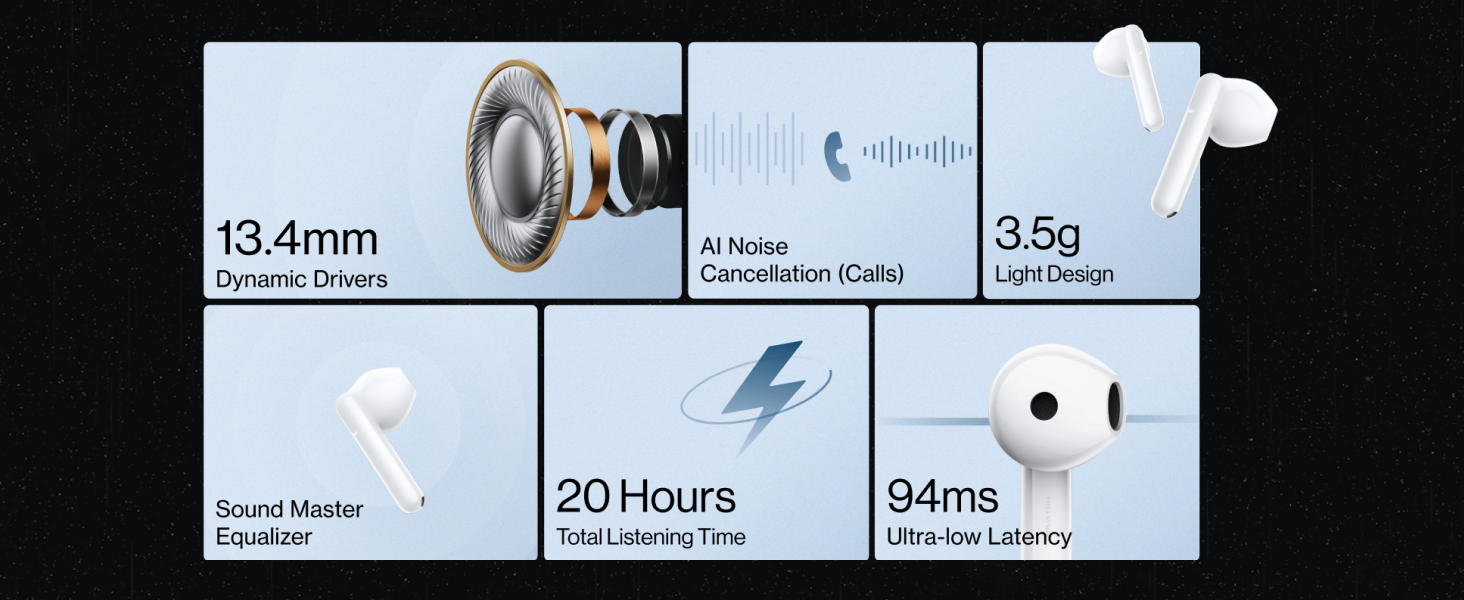
Image: An overview of key features including 13.4mm Dynamic Drivers, AI Noise Cancellation, 3.5g Light Design, Sound Master Equalizer, 20 Hours Total Listening Time, and 94ms Ultra-low Latency.
Warranty and Support
Warranty Information
The OnePlus Nord Buds CE comes with a 1-year manufacturer warranty from the date of purchase. This warranty covers manufacturing defects. Please retain your proof of purchase for warranty claims.
The warranty does not cover damage caused by:
- Accidental damage, misuse, or abuse.
- Unauthorized repairs or modifications.
- Normal wear and tear.
- Damage from liquids beyond IPX4 rating.
Customer Support
For further assistance, technical support, or warranty claims, please visit the official OnePlus support website or contact their customer service. You can find contact details on the OnePlus official website or through the HeyMelody app.


