
Ducati Pro-III R
DUCATI Corse Pro-III R Electric Scooter
User Manual
Model: Pro-III R (DU-MO-220003)
Introduction
This user manual provides essential information for the safe and efficient operation, maintenance, and troubleshooting of your DUCATI Corse Pro-III R Electric Scooter. Please read this manual thoroughly before using the scooter to ensure proper handling and to maximize its lifespan.

Figure 1: DUCATI Corse Pro-III R Electric Scooter, showcasing its sleek design and robust build.
Safety Information
Your safety is paramount. Always adhere to local regulations and traffic laws when operating the scooter. Wear appropriate safety gear, including a helmet, knee pads, and elbow pads. Ensure the scooter is in good working condition before each ride.
- Do not ride in heavy rain or through puddles deeper than 2 cm.
- Avoid riding on slippery surfaces, steep slopes, or uneven terrain.
- Maintain a safe distance from other vehicles and pedestrians.
- Do not perform stunts or sudden maneuvers.
- Ensure all screws and components are securely fastened before riding.
- The maximum weight capacity for this scooter is 100 kg.
- In Italy, the maximum authorized speed is 20 km/h. Always check local regulations.
Setup
1. Unboxing and Initial Inspection
Carefully remove all components from the packaging. Check for any signs of damage during transit. The package should include the scooter, a multilingual manual, and a charger.
2. Assembly
The DUCATI Corse Pro-III R Electric Scooter comes largely pre-assembled. You will primarily need to secure the handlebar. Follow these steps:
- Lift the steering column until it locks into place.
- Attach the handlebar to the steering column, ensuring the cables are not pinched. Secure it with the provided screws.
- Verify that the brake levers and display are correctly positioned and functional.
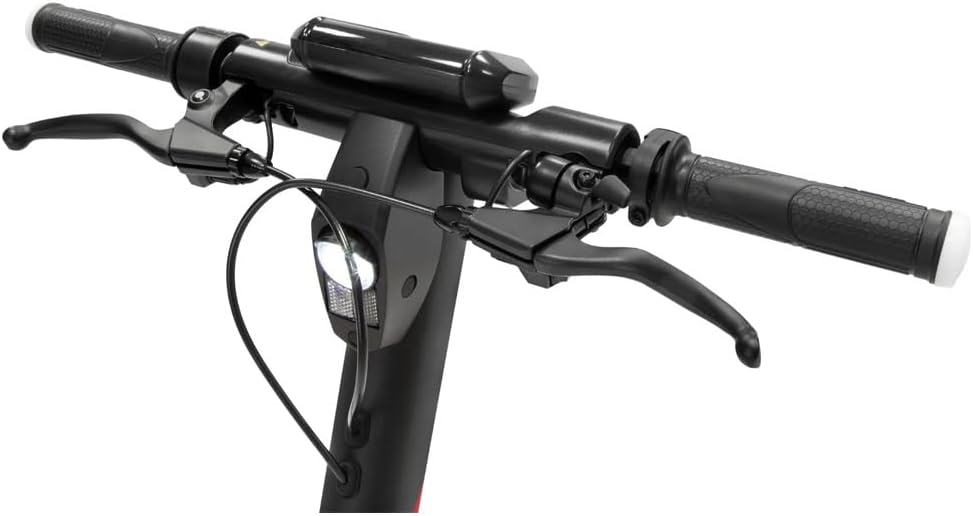
Figure 2: Detail of the handlebar assembly, showing brake levers and integrated controls.
3. Initial Charging
Before first use, fully charge the scooter's battery. The battery capacity is 468Wh. Locate the charging port, typically near the base of the steering column or on the deck. Connect the charger and plug it into a power outlet. The charging indicator on the display or charger will show the charging status. Disconnect the charger once fully charged.

Figure 3: View of the battery compartment, indicating the location for charging.
4. App Installation and Pairing
For enhanced features and control, download the official Ducati Urban e-Mobility app from your smartphone's app store. Follow the in-app instructions to pair your scooter via Bluetooth. The app allows for motor activation, mode selection, and monitoring of ride statistics.

Figure 4: Download the official app from your device's app store for full functionality.
Operating Instructions
1. Power On/Off
Press and hold the power button on the display to turn the scooter on or off. The digital display will illuminate, showing battery level, speed, and odometer readings.

Figure 5: The scooter's digital display provides real-time information and includes a USB charging port.
2. Riding Modes
The DUCATI Corse Pro-III R features multiple riding modes to suit different conditions and preferences. Switch between modes using the dedicated button on the display or via the mobile app. Modes typically include:
- Eco Mode: For maximum range and energy efficiency, with a lower top speed.
- Sport Mode: For higher performance and acceleration, utilizing the 500W motor's full potential.
3. Riding the Scooter
To start riding, place one foot on the deck and push off with the other foot. Once you gain a little momentum, gently press the accelerator lever. The scooter will engage its motor. Use the handlebars for steering and balance.
4. Braking
The scooter is equipped with a dual disc brake system (front and rear) for effective stopping power. Gently squeeze the brake levers on the handlebar to slow down or stop. Apply both brakes simultaneously for optimal braking performance and stability.

Figure 6: The robust front disc brake system ensures reliable stopping power.
5. Turn Signals
The scooter features integrated turn signals. Activate them using the controls on the handlebar to indicate your turning intentions to others. Ensure they are visible, especially during daylight hours.
6. Folding Mechanism
For easy storage and transport, the DUCATI Corse Pro-III R can be folded. Locate the folding latch mechanism on the steering column. Release the latch and carefully fold the steering column down until it clicks into place, securing it to the rear fender.

Figure 7: The scooter easily folds for convenient storage and portability.
Maintenance
Regular maintenance ensures the longevity and optimal performance of your scooter.
1. Tire Care
The scooter is equipped with 10-inch Pirelli Street tires. Regularly check tire pressure and inflate to the recommended PSI (refer to the tire sidewall or scooter specifications). Inspect tires for wear, punctures, or damage. Proper tire pressure improves ride quality and extends tire life.
2. Brake System Maintenance
Periodically inspect the disc brakes for wear on the pads and rotors. Ensure the brake cables are taut and the levers provide firm resistance. If you notice reduced braking performance or unusual noises, have the brakes inspected by a qualified technician.
3. Battery Care
- Charge the battery fully before long periods of storage.
- Avoid completely draining the battery before recharging.
- Store the scooter in a cool, dry place away from direct sunlight and extreme temperatures.
- Use only the original charger provided with the scooter.
4. Cleaning
Clean the scooter with a damp cloth. Do not use high-pressure water jets or corrosive cleaning agents. Ensure the charging port cover is securely closed to prevent water ingress.
5. General Inspection
Regularly check all bolts and screws for tightness, especially on the steering column and folding mechanism. Lubricate moving parts as recommended by the manufacturer.
Troubleshooting
| Problem | Possible Cause | Solution |
|---|---|---|
| Scooter does not power on. | Low battery; loose connections; power button malfunction. | Charge the battery; check all cable connections; contact support if issue persists. |
| Reduced range/autonomy. | Under-inflated tires; riding in Sport mode; heavy load; cold weather; aging battery. | Check tire pressure; use Eco mode; reduce load; battery performance may decrease in cold. |
| Brakes feel weak or noisy. | Worn brake pads; misaligned calipers; air in hydraulic system (if applicable); loose cables. | Inspect brake pads and rotors; adjust calipers; have a technician bleed brakes or tighten cables. |
| Steering column feels loose. | Loose screws in the folding mechanism or handlebar assembly. | Tighten all visible screws on the steering column and handlebar. If persistent, seek professional inspection. |
| App connectivity issues. | Bluetooth off; app outdated; scooter not in pairing mode. | Ensure Bluetooth is enabled; update the app; restart scooter and phone; try re-pairing. |
Specifications
| Feature | Detail |
|---|---|
| Model Name | DUCATI Corse Pro-III R |
| Model Number | DU-MO-220003 |
| Motor Power | 500W |
| Battery Capacity | 468Wh (Lithium-ion) |
| Max Range | Up to 50 km (31 miles) |
| Tire Size | 10 inches (Pirelli Street tires) |
| Brake System | Dual Mechanical Disc Brakes (Front & Rear) |
| Frame Material | Magnesium / Aluminum |
| Weight | 17.6 Kilograms (38.8 lbs) |
| Max Load Capacity | 100 Kilograms (220 lbs) |
| Special Features | Foldable design, Integrated Turn Signals, KERS technology |
| Included Components | Scooter, Multilingual Manual, Charger |
Warranty and Support
For warranty information and technical support, please refer to the warranty card included with your product or visit the official Ducati Urban e-Mobility website. Keep your proof of purchase for any warranty claims.
If you encounter issues not covered in the troubleshooting section, or require professional assistance, please contact Ducati customer service or an authorized service center.
Related documentsPro-III R


Ask a question about this manual
Ask about setup, troubleshooting, compatibility, parts, safety, or missing instructions. Manuals+ will review the question and use this page’s manual context to help answer it.