
1. Introduction
This manual provides detailed instructions for the setup, operation, and maintenance of your Inandon HCYW1566TW 15.6-inch Touch Screen Karaoke Machine. Please read this manual thoroughly before using the product to ensure proper functionality and a satisfying user experience.

This image shows the Inandon HCYW1566TW karaoke machine, featuring a 15.6-inch touch screen display, accompanied by two wireless microphones. A smartphone is also depicted, illustrating the mobile application control functionality.

This graphic compares a traditional karaoke setup, requiring separate microphone, pre-effector, karaoke machine, and touch display screen units, with the Inandon HCYW1566TW. The new model consolidates these into a single 'Four-in-One' unit, emphasizing space-saving, portability, ease of operation, and simple installation.
2. What's in the Box
Carefully unpack all items and ensure the following components are included:
- Inandon HCYW1566TW Karaoke Machine (15.6-inch Touch Screen)
- Wireless Microphones (2 units)
- HDMI HD Cable
- RCA Audio Cable
- RCA to AUX Cable
- Power Adapter
- Built-in WiFi Adapter
- Microphone Covers
- 2TB Hard Disk Drive (HDD)

This image displays the Inandon HCYW1566TW karaoke machine along with its comprehensive set of included accessories. These include an HDMI HD Cable, RCA Audio Cable, RCA to AUX Cable, Power Adapter, a Built-in WiFi adapter, and Microphone Covers, providing everything needed for immediate setup and use.
3. Setup Guide
- Power Connection: Connect the power adapter to the karaoke machine's power input and then to a suitable power outlet.
- Display Connection: Use the provided HDMI HD Cable to connect the karaoke machine's HDMI output to your television or external display.
- Audio Connection (Optional): For enhanced audio, connect the RCA Audio Cable or RCA to AUX Cable from the machine's audio output to your external sound system or amplifier.
- Microphone Setup: Ensure the wireless microphones are charged and powered on. They should automatically pair with the karaoke machine.
- Network Connection: Connect to the internet via the network cable port or configure the built-in WiFi adapter through the on-screen settings.
- Power On: Press the power switch on the back of the unit to turn on the machine.

A diagram illustrates the internal components of the Inandon HCYW1566TW, including an 8-core chip, 8GB memory, and a built-in DSP chip, indicating smooth performance. Below, the rear panel of the machine displays various connectivity options: Digital Optical output, USB interface, MIC input, HDMI output, Coaxial output, RCA Audio Output, Recording output, Network port, and a Power switch, alongside Wi-Fi and Cable Network icons.
4. Operating Instructions
4.1 Song Ordering Methods
The Inandon HCYW1566TW offers four convenient ways to select and manage songs:
- Touch Screen: Directly interact with the 15.6-inch touch screen to browse, select, and queue songs.
- Mobile App: Download the dedicated Inandon mobile application to your smartphone for remote control and song selection.
- WeChat Scan Code: Utilize WeChat's scan code feature to access song selection and control functions.
- Voice Assistant: Use voice commands to search for and play songs.
These methods allow for easy control of functions such as pause, play, next song, original singing, and backing vocals.

This image highlights the four distinct methods for ordering songs on the Inandon HCYW1566TW karaoke machine: via WeChat scan code, a dedicated mobile application, an intelligent voice assistant, and directly through the integrated touch screen. The machine is shown connected to a large display, playing a music video.
4.2 Sound Effect Settings
Adjust the audio output to your preference using the built-in DSP Digital Reverb Microphone settings. You can modify:
- Music Tone: Fine-tune the overall music sound.
- Microphone Volume: Adjust the volume of the connected microphones.
- Music Mixing: Balance the music and vocal levels.
- Sound Effects: Select from various preset effects or customize your own.
- Equalizer: Access a detailed equalizer for precise frequency adjustments.

The screen of the Inandon HCYW1566TW karaoke machine is shown, illustrating the DSP Digital Reverb Microphone settings. Users can adjust music tone, microphone volume, music mixing, and select various sound effects like 'Goddess', 'Child', and 'Uncle'. An equalizer interface is also visible for fine-tuning audio frequencies.
4.3 Language Selection
The system supports 16 national languages, allowing you to operate the interface in your preferred language. Navigate to the settings menu to select your desired language.

The touch screen of the Inandon HCYW1566TW karaoke machine displays a language selection interface, offering 16 different languages including Chinese (Simplified and Traditional), English, Japanese, Korean, French, Vietnamese, Russian, Malay, Indonesian, and Filipino, among others. This feature allows users to operate the system in their preferred language.
4.4 Home Entertainment Modes
Beyond karaoke, the Inandon HCYW1566TW functions as a comprehensive entertainment hub. It supports:
- YouTube: Access YouTube for online video streaming.
- Online TV: Watch live online television.
- Music Apps: Stream music from various applications.
- Game Apps: Download and play games.
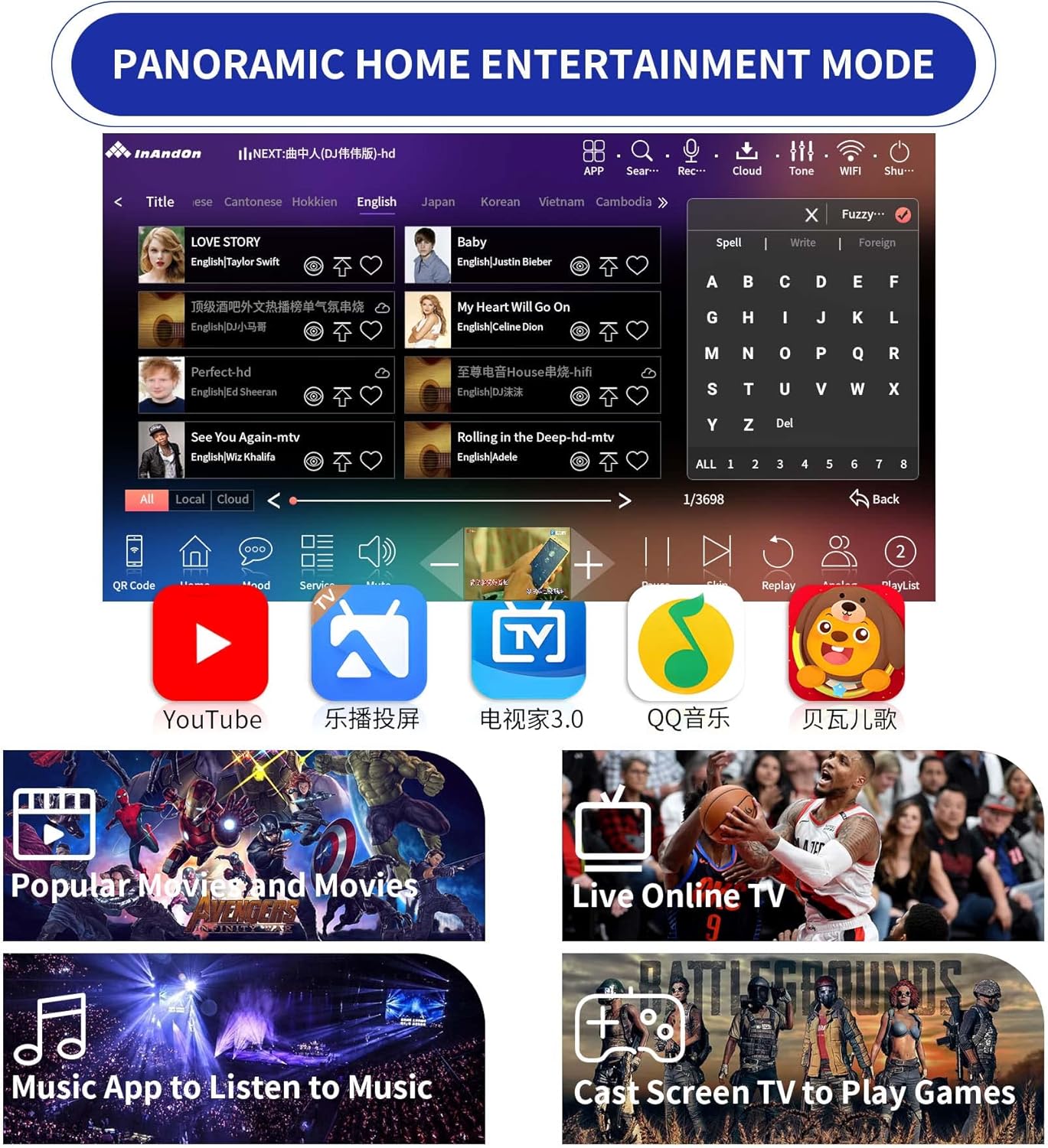
The screen of the Inandon HCYW1566TW karaoke machine demonstrates its 'Panoramic Home Entertainment Mode'. Icons for YouTube, online TV, music applications, and game casting are visible, indicating the device's capability to support a wide range of multimedia and gaming functions beyond just karaoke.
4.5 Live Demonstration
A live demonstration of the Inandon karaoke machine in use, showing two individuals singing along to a song displayed on a large screen. One person is seated, and the other is standing, both holding microphones. The touch screen control panel is visible on a stand to the left.
A live recording of the Inandon karaoke machine operating in a room with ambient lighting. The video shows a song playing on a large screen, with lyrics and a music video. The room's ceiling is decorated with star-like lights, enhancing the entertainment experience.
5. Connectivity
The Inandon HCYW1566TW offers flexible connectivity options:
- Wired Network: Connect an Ethernet cable to the network port for a stable internet connection.
- Wi-Fi: Utilize the built-in Wi-Fi for wireless internet access. This allows for cloud song downloads and online streaming.
- USB: Multiple USB ports are available for connecting external storage devices or other peripherals.
- HDMI: Connect to external displays for video output.
- RCA Audio: Connect to external audio systems for enhanced sound.
- Digital Optical Output: For high-quality digital audio connection.
- Coaxial Output: Another option for digital audio output.
- MIC Input: Dedicated inputs for microphones.
- Recording Output: Allows for recording your performances.
6. Key Features
- Extensive Song Library: Access to a cloud-based library of over 450,000 songs, with weekly real-time updates. The included 2TB hard drive can store approximately 46,000 songs, covering Chinese, English, Cantonese, Japanese, Korean, Vietnamese, Thai, and Malaysian languages.
- Dual Android System: The machine operates on a dual Android system, allowing for versatile functionality beyond karaoke, such as installing office and game applications.
- Real-time Scoring: Features a real-time scoring function to provide immediate feedback on your singing performance.
- Advanced Audio Processing: Equipped with a built-in DSP chip for high-quality digital reverb and sound effect management.
- User-Friendly Interface: The 15.6-inch touch screen provides an intuitive interface for easy navigation and control.

This image showcases the extensive song library available through the Inandon Karaoke System, highlighting '500,000 Songs Downloaded for Free On The Cloud'. It lists song counts for different languages: Chinese (256,000), Cantonese (25,600), Hokkien (15,200), English (29,600), Japanese (20,320), Korean (22,000), Vietnamese (20,200), Thai (40,000), and Malaysian (36,480).
7. Specifications
| Feature | Detail |
|---|---|
| Model Number | HCYW1566TW |
| Item Weight | 11 pounds |
| Product Dimensions | 6.5 x 10 x 14 inches |
| Screen Size | 15.6 inches |
| Storage | 2TB HDD |
| Compatible Devices | Smartphone |
| Connector Type | USB, RCA, HDMI, Digital Optical, Coaxial, Network |
| Speaker Count | 1 (internal, for system sounds; external speakers recommended for karaoke) |
| Power Source | Corded Electric |
| Voltage | 127 Volts (AC) |
| Special Feature | Touch Screen, Dual Android System, DSP Chip |
8. Troubleshooting
If you encounter issues with your Inandon HCYW1566TW, please refer to the following common solutions:
- No Power: Ensure the power adapter is securely connected to both the machine and a working power outlet. Check the power switch on the back of the unit.
- No Video Output: Verify that the HDMI cable is correctly connected to both the karaoke machine and your display. Ensure your display is set to the correct HDMI input source.
- No Audio Output: Check all audio cable connections (RCA, Optical, Coaxial) to your sound system. Ensure the volume on both the karaoke machine and your sound system is turned up and not muted.
- Microphones Not Working: Confirm that the wireless microphones are charged and powered on. If issues persist, try re-pairing them according to the on-screen instructions or consult the microphone-specific manual.
- Cannot Connect to Network: For Wi-Fi, ensure the correct password is entered and the machine is within range of your router. For wired connection, check the Ethernet cable and router status.
- Slow Performance: If the system is running slowly, try restarting the machine. Ensure there are no excessive background applications running if applicable.
For persistent issues, please contact Inandon customer support.
9. Warranty and Support
For information regarding product warranty, returns, or technical support, please refer to the warranty card included with your product or visit the official Inandon website. Keep your purchase receipt as proof of purchase for any warranty claims.


