
CHICIRIS CHICIRISzwb6y9hfn0
CHICIRIS A8 Display Metal Detector User Manual
Model: CHICIRISzwb6y9hfn0
Introduction
This manual provides comprehensive instructions for the safe and effective operation of your CHICIRIS A8 Display Metal Detector. Designed for high accuracy and long-range detection, this professional underground metal detector is ideal for treasure hunting, capable of locating gold, silver, and copper.
Please read this manual thoroughly before using the device to ensure proper functionality and to maximize your detection success.

The CHICIRIS A8 Display Metal Detector is a powerful tool for locating various metals underground.
Safety Information
- Always operate the metal detector in a safe environment, away from active electrical lines or hazardous materials.
- Do not attempt to disassemble or modify the device. Repairs should only be performed by qualified personnel.
- Keep the device dry. Avoid exposure to rain or excessive moisture.
- Store the detector in its provided storage box when not in use to prevent damage.
- Ensure the charging voltage is within the specified range (100-240V) to prevent damage to the battery and device.
Package Contents
Verify that all items listed below are present in your package:
- 1 x CHICIRIS A8 Display Metal Detector Unit
- 1 x Power Plug/Charger
- 1 x Storage Box
- 1 x Antenna
- 1 x English User Manual (this document)
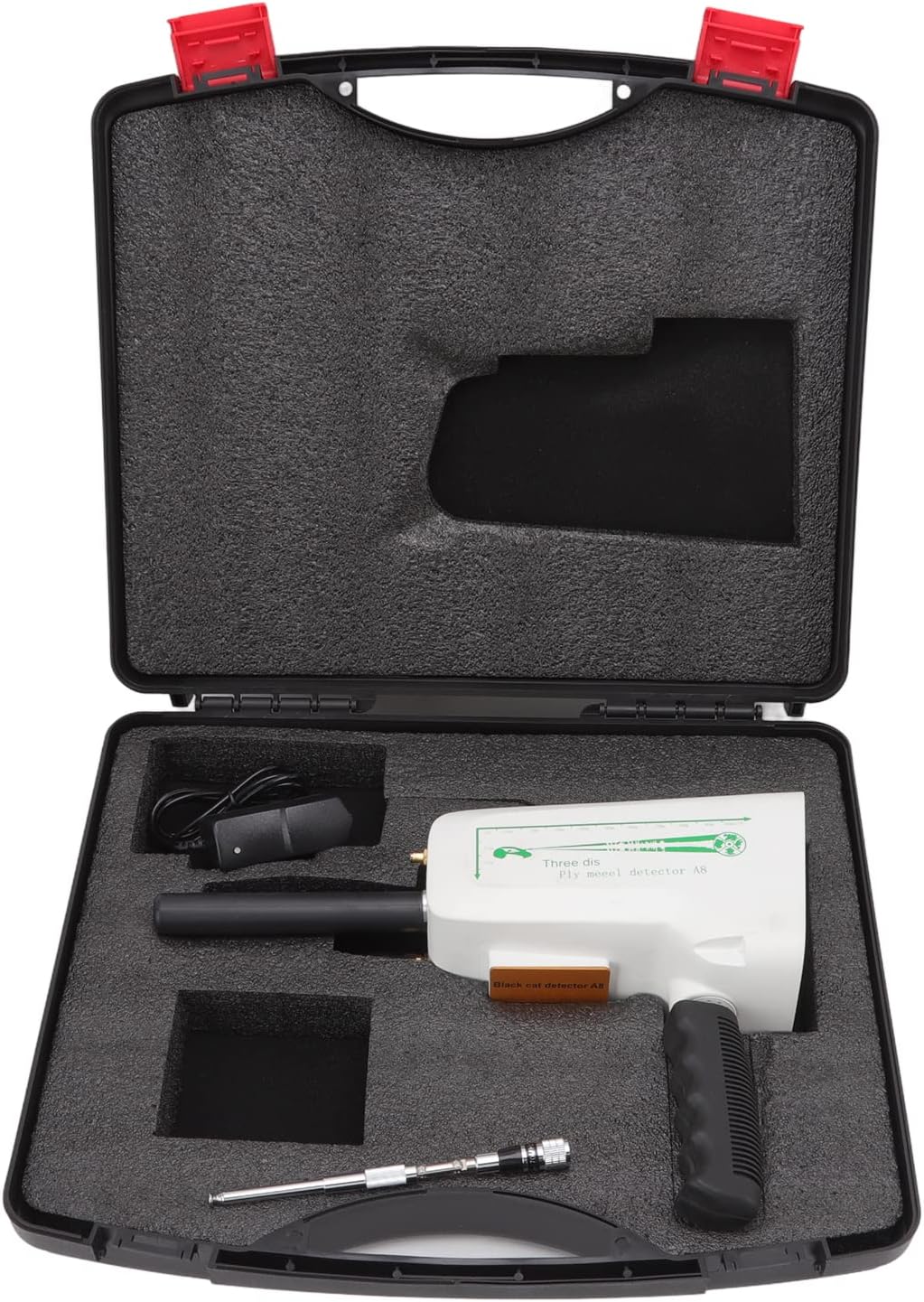
The metal detector and its accessories are securely stored in the included carrying case.
Product Overview
The CHICIRIS A8 Display Metal Detector features a microcomputer CPU control system for precise detection. Its design includes an intuitive display and control panel for easy operation.

Main components of the CHICIRIS A8 Display Metal Detector system.

The control panel allows selection of target metals and adjustment of search parameters.
Setup
Charging the Battery
The instrument comes with pre-installed rechargeable NiMH batteries (AAA, 1000MAH). To charge:
- Connect the provided power plug/charger to the charging port on the detector.
- Plug the charger into a standard electrical outlet (100-240V).
- Allow 10 to 12 hours for a full charge.
Initial Boot Test
Before first use, perform a boot test to ensure proper functionality:
- Turn on the switch for both the host detector and the searcher (antenna). The work indicator on the searcher should flash.
- Select "Gold" on the host detector. The corresponding gold indicator on the searcher should illuminate.
- Cycle through "Silver", "Copper", and "Diam" (Diamond) gears on the host. The corresponding indicator on the searcher should light up for each selection.
- If any indicator light on the searcher does not illuminate when the corresponding gear is selected on the host, the batteries of either the host or searcher may be low and require charging.
- If all conditions are normal, the instrument is ready for use.
Operating Instructions
The CHICIRIS A8 Display Metal Detector uses a microcomputer CPU control system and reflected conductivity for detection. Follow these steps for operation:
- Power On: Ensure the device is fully charged. Turn on the host detector and extend the antenna.
- Select Target Metal: Press the button corresponding to the metal you wish to detect (Gold, Silver, Copper, Diam) on the control panel.
- Adjust Search Parameters: Use the controls on the host detector to adjust the desired depth and range for your search.
- Begin Detection: Hold the detector steadily. As you move, the device will sway from side to side when detecting the designated object. The amplitude of the swing will increase as you get closer to a larger detected object.

The detector emits signals to locate buried objects, with the display indicating the presence of metal.

The device is capable of detecting various precious metals, including gold.
Maintenance
- Cleaning: Wipe the detector with a soft, dry cloth after each use to remove dirt and debris. Do not use abrasive cleaners or solvents.
- Storage: When not in use, store the detector and its accessories in the provided storage box in a cool, dry place, away from direct sunlight and extreme temperatures.
- Battery Care: Recharge the battery regularly, even if the device is not used frequently, to maintain battery health. Avoid fully discharging the battery for extended periods.
- Antenna: Handle the antenna with care to prevent bending or damage.
Troubleshooting
| Problem | Possible Cause | Solution |
|---|---|---|
| Work indicator on searcher does not flash. | Switch not turned on, or insufficient battery power. | Ensure both host and searcher switches are ON. Charge the device for 10-12 hours. |
| Corresponding metal indicator light on searcher does not illuminate. | Insufficient battery power in host or searcher. | Charge the device fully. Refer to "Charging the Battery" section. |
| Device does not detect metal or provides inaccurate readings. | Incorrect metal selection, improper holding technique, or environmental interference. | Ensure the correct metal type is selected. Hold the device steadily and avoid other interference. Re-test in a known metal-rich area. |
Specifications
| Feature | Detail |
|---|---|
| Brand | CHICIRIS |
| Model Number | CHICIRISzwb6y9hfn0 |
| Search System | Microcomputer CPU control and reflected conductivity |
| Voltage | 100-240V |
| Product Dimensions (L x W x H) | 12.2" x 8.7" x 3.5" (31 x 22 x 9 CM) |
| Item Weight | 4.5 Pounds (2063g) |
| Search Range | Up to 1000m |
| Detection Depth | Up to 30m |
| Host Battery | NiMH rechargeable battery, AAA, 1000MAH (built-in) |
| Battery Life | Approximately 12 hours |
| Transmission Frequency | 5.6-6KHZ |
| Signal Frequency | 400-470mhz |
| Detection Type | Gold, Silver, Copper, Diamond (implied by "Diam") |
| Display Type | A8 Display |

Detailed dimensions of the metal detector unit.
Warranty and Support
For warranty information and technical support, please refer to the contact details provided by your retailer or the manufacturer, CHICIRIS. Keep your purchase receipt as proof of purchase.
For further assistance, you may visit the CHICIRIS Store on Amazon.
Ask a question about this manual
Ask about setup, troubleshooting, compatibility, parts, safety, or missing instructions. Manuals+ will review the question and use this page’s manual context to help answer it.