
1. Introduction
The LiebeWH Wall Hanging Sound Level Meter is a versatile device designed for accurate measurement of sound levels, temperature, and humidity. Its large 11-inch LED display provides clear, real-time readings, making it suitable for various environments such as classrooms, offices, studios, and homes. This manual provides essential information for the proper setup, operation, and maintenance of your device.
2. Safety Information
- Do not expose the device to extreme temperatures, direct sunlight, or high humidity.
- Avoid dropping or subjecting the device to strong impacts.
- Use only the provided USB cable for charging.
- Do not attempt to open or repair the device yourself. Refer all servicing to qualified personnel.
- Keep out of reach of children.
3. Package Contents
Please check the package for the following items:
- 1 x LiebeWH Wall Hanging Sound Level Meter
- 1 x USB Charging Cable (9.8 ft / 300 cm)
- Mounting Screws and Wall Plugs

Image: Contents of the product package, including the USB charging cable and mounting hardware.
4. Product Features
- Large LED Display: An 11-inch bright LED screen clearly shows real-time decibel levels, temperature, and humidity.
- Automatic Noise Alarm: The display color changes automatically based on decibel levels for quick visual alerts:
- Green: Less than 60dB
- Yellow: 60 to 75dB
- Orange: 75 to 85dB
- Red: 85dB or more
- Multifunctional Measurement: Measures sound levels from 30 to 130 decibels, as well as ambient humidity and temperature.
- Long USB Cable: Powered by a 2000mAh Li-ion battery and includes a 9.8 ft (300 cm) USB cable for convenient charging and continuous power.
- Versatile Placement: Can be easily hung on a wall or placed on a table, making it suitable for various indoor environments.
5. Setup
5.1 Charging the Device
Before first use, fully charge the device. Connect the provided USB cable to the charging port on the side of the meter and plug the other end into a standard USB power adapter (not included) or a computer USB port. The battery indicator on the display will show charging status.
5.2 Mounting Options
The sound level meter offers two primary placement options:
- Tabletop Placement: Simply place the device on a flat, stable surface.
- Wall Mounting:
- Choose a suitable location on a wall, away from direct heat sources or excessive vibrations.
- Use the included mounting screws and wall plugs to securely fasten the device to the wall. The back of the unit features keyhole slots for easy hanging.

Image: Top view of the meter showing control buttons and a rear view illustrating the wall mounting points.
6. Operating Instructions
6.1 Power On/Off
Press and hold the power button (U) located on the top of the device to turn it on or off.
6.2 Display Overview
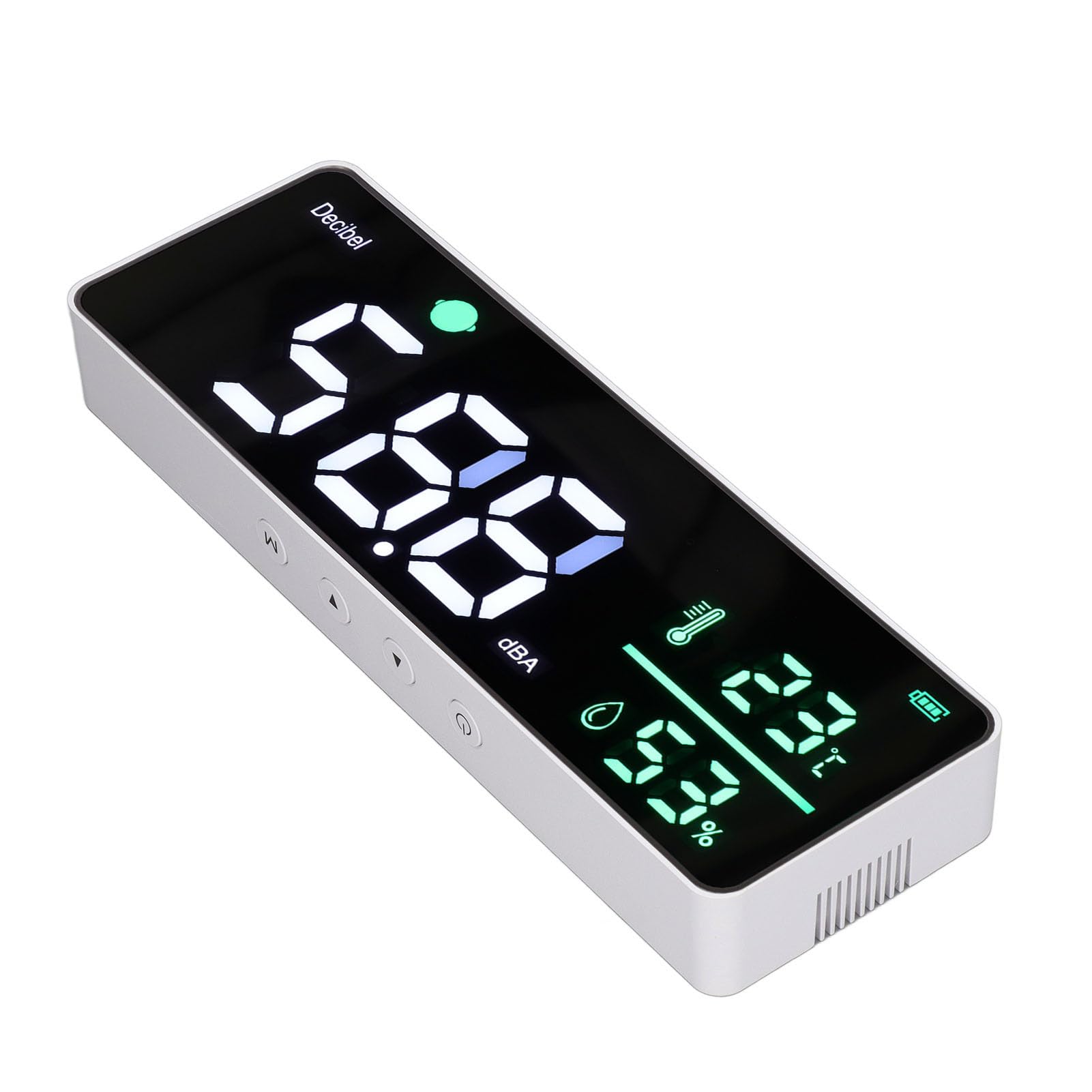
Image: Front view of the sound level meter display, showing current decibel reading, temperature, humidity, and battery status.
The large LED display shows the following information:
- Decibel Level (dB): The prominent large numbers indicate the current sound level.
- Temperature (°C): Displays the ambient temperature.
- Humidity (%): Shows the relative humidity.
- Battery Indicator: Located in the top right corner, showing the current battery charge level.
- Color-Coded Alarm: The small circular indicator next to "Decibel" changes color based on the sound level, as described in Section 4.
6.3 Mode Selection
Press the 'M' button on the top of the device to cycle through different display modes or settings, if available. Consult the on-screen prompts for specific options.
6.4 Adjusting Settings
Use the '▲' (Up) and '▼' (Down) buttons to adjust settings when in a configuration mode. These buttons are located on the top panel of the device.

Image: Examples of the sound level meter being used in different settings, including a classroom, meditation room, studio, and study room.
7. Maintenance
- Cleaning: Wipe the device with a soft, dry cloth. Do not use abrasive cleaners or solvents.
- Storage: When not in use for extended periods, store the device in a cool, dry place.
- Battery Care: To prolong battery life, avoid fully discharging the battery frequently. Recharge when the battery indicator is low.
8. Troubleshooting
| Problem | Possible Cause | Solution |
|---|---|---|
| Device does not power on. | Low or depleted battery. | Connect the device to a power source using the USB cable and allow it to charge. |
| Display is dim or unreadable. | Insufficient power or display settings. | Ensure the device is charged or connected to power. Check if there are brightness settings (refer to operating instructions). |
| Inaccurate readings. | Device placement or environmental factors. | Ensure the device is placed in an open area, away from direct airflow, heat sources, or obstructions. Avoid placing near loud machinery for accurate sound readings. |
| Buttons are unresponsive. | Temporary software glitch. | Try restarting the device by holding the power button. If the issue persists, contact customer support. |
9. Specifications
- Brand: LiebeWH
- Model: LiebeWHun3h5zbxsg
- Sound Measurement Range: 30 - 130 dB
- Display: 11-inch Large LED
- Power Source: 2000mAh Lithium Ion Battery, 5V USB
- Temperature Range: Up to 50 °C
- Temperature Accuracy: 1 °C
- Mounting Type: Wall Mount
10. Warranty and Support
For warranty information or technical support, please refer to the documentation included with your purchase or contact LiebeWH customer service directly. You can often find contact details on the manufacturer's official website or through the retailer where the product was purchased.