
1. Introduction
The Cubii Move is a compact, low-impact elliptical designed for seated use, allowing you to stay active while working, relaxing, or engaging in other sedentary activities. Its quiet operation and adjustable resistance levels make it suitable for various fitness levels and environments.

The Cubii Move Under Desk Elliptical, a compact and portable exercise machine.
2. Safety Information
WARNING
- INGESTION HAZARD: This product contains a button cell or coin battery.
- DEATH or serious injury can occur if ingested.
- A swallowed button cell or coin battery can cause Internal Chemical Burns in as little as 2 hours.
- KEEP new and used batteries OUT OF REACH OF CHILDREN.
- Seek immediate medical attention if a battery is suspected to be swallowed or inserted inside any part of the body.

Important safety warnings regarding battery ingestion.
3. Setup
The Cubii Move is designed for easy assembly. Typically, this involves attaching the foot pedals or stabilizers to the main unit. Follow these general steps:
- Unpack all components from the box.
- Identify the main elliptical unit and any separate foot pedals or base stabilizers.
- Align the pedals/stabilizers with the corresponding attachment points on the main unit.
- Secure them using the provided screws or fasteners. Ensure all connections are tight and stable before use.
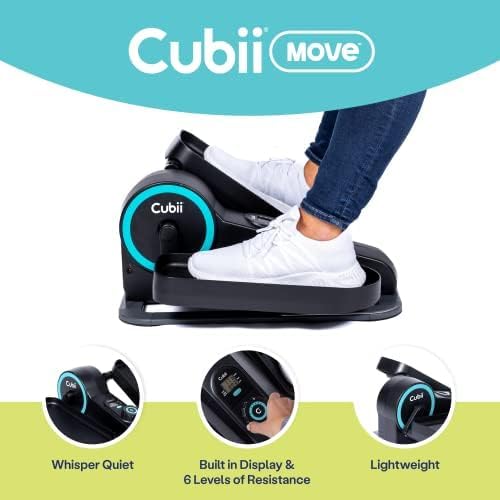
The Cubii Move is designed to be lightweight and easy to set up.
4. Operating Instructions
The Cubii Move offers a smooth, low-impact workout experience. Follow these guidelines for optimal use:
4.1. Getting Started
- Place the Cubii Move on a flat, stable surface in front of your chair or couch.
- Sit comfortably with your feet placed on the pedals.
- Begin pedaling in a smooth, circular motion.
4.2. Adjusting Resistance
The Cubii Move features 6 levels of magnetic resistance, allowing you to customize your workout intensity. Locate the resistance knob on the unit and turn it clockwise to increase resistance or counter-clockwise to decrease it.
Video demonstrating how to adjust the resistance levels on the Cubii Move.
4.3. Using the LCD Display
The built-in LCD monitor tracks your workout progress. It typically displays:
- Stride Count: Total number of pedal rotations.
- Mileage: Estimated distance covered.
- Duration: Time spent exercising.
- Calories Burned: Estimated calories expended.
You can manually enter these statistics into the Cubii App for a more interactive fitness experience and to track your progress over time.

The Cubii Move can be used with the Cubii App for tracking and workout classes.
Official video introducing the Cubii Move Under Desk Elliptical.
5. Maintenance
Regular maintenance ensures the longevity and smooth operation of your Cubii Move.
- Cleaning: Wipe down the unit regularly with a soft, damp cloth. Avoid abrasive cleaners or solvents.
- Lubrication: If you notice any squeaking or stiffness in the pedals, apply a small amount of silicone-based lubricant to the moving parts, particularly around the pedal axles and joints. Refer to the specific instructions on your product packaging for recommended lubrication points.
- Tighten Fasteners: Periodically check and tighten any screws or bolts to ensure the unit remains stable and secure.
6. Troubleshooting
If you encounter any issues with your Cubii Move, try the following troubleshooting steps:
| Problem | Possible Cause | Solution |
|---|---|---|
| Squeaking noise during use | Lack of lubrication, loose parts | Apply silicone lubricant to moving parts. Check and tighten all screws and bolts. |
| No resistance or too little resistance | Resistance knob setting, internal mechanism issue | Ensure the resistance knob is turned to a higher setting. If the issue persists, contact customer support. |
| LCD display not working | Battery issue, loose connection | Check and replace the battery in the LCD unit. Ensure all connections to the display are secure. |
| Unit slides on floor during use | Smooth floor surface, lack of grip | Place the unit on a non-slip mat or carpet. Ensure the rubber feet are clean and intact. |
7. Specifications
| Feature | Detail |
|---|---|
| Model Name | MOVE |
| Brand | Cubii |
| Color | Aqua |
| Product Dimensions (D x W x H) | 21.7" x 19.7" x 9.7" |
| Material | Metal |
| Resistance Mechanism | Magnetic |
| Maximum Weight Recommendation | 300 Pounds |
| Number of Resistance Levels | 6 |
| Item Weight | 17.6 Pounds |
| Screen Size | 7 Centimeters |
| UPC | 852811008962 |
8. Warranty and Support
The Cubii Move comes with a warranty. Please refer to the product packaging or the official Cubii website for detailed warranty information, terms, and conditions.
For customer support, technical assistance, or to inquire about replacement parts, please visit the official Cubii website or contact their customer service department using the contact information provided with your product.

