
1. Product Overview
The Motorola RM730 IMPRES Windporting Remote Speaker Microphone (RSM) is designed for clear and reliable communication in various environments. This compact and durable accessory enhances the functionality of your Motorola radio.
Key Features:
- IMPRES Audio Technology: Delivers loud and clear audio, capable of up to 99 phon loudness.
- Windporting Technology: Reduces background noise from wind and other outdoor elements for improved voice clarity.
- Orange Emergency Button: Provides quick access to emergency functions on compatible radios.
- Low Profile Swivel Clip: Allows for flexible and secure attachment to clothing or gear, keeping the RSM closer to your body.
- 3.5mm Audio Jack: Supports a receive-only earpiece (e.g., PMLN8120) for private listening.
- IP68 Certified: Offers protection against dust and water immersion up to 2 meters for 4 hours.
- UL Compliant: Meets safety standards for hazardous environments.
What's in the Box:
- Motorola RM730 IMPRES Windporting Remote Speaker Microphone
- Integrated 3.5mm Audio Jack
- Orange Emergency Button
2. Setup and Installation
Follow these steps to properly connect your Remote Speaker Microphone to your Motorola radio.
- Connect to Radio: Align the multi-pin connector of the RSM with the accessory port on your Motorola radio. Gently push the connector in and then screw the retaining screw clockwise until it is finger-tight. Do not overtighten.
- Secure the Clip: The RSM features a low-profile swivel clip on its back. Attach this clip to your collar, lapel, or other convenient location on your clothing or gear. The clip can rotate 360 degrees to allow for optimal positioning.
- Optional Earpiece: If using a receive-only earpiece (e.g., PMLN8120), plug its 3.5mm jack into the audio port located on the side of the RSM.

Figure 1: Front view of the Motorola RM730 RSM, showing the speaker grille and Motorola branding.

Figure 2: Back view of the Motorola RM730 RSM, highlighting the swivel clip for attachment.
3. Operating Instructions
The RM730 RSM simplifies communication by bringing the microphone and speaker closer to you.
- Push-to-Talk (PTT): To transmit, press and hold the large PTT button located on the side of the microphone. Speak clearly into the microphone grille. Release the PTT button to listen.
- Receiving Audio: Audio will be routed through the RSM's speaker. If an earpiece is connected to the 3.5mm audio jack, audio will be directed to the earpiece for private listening.
- Emergency Button: In an emergency, press the orange emergency button (if configured on your radio) to activate the emergency alert feature. Refer to your radio's user manual for specific emergency function programming.
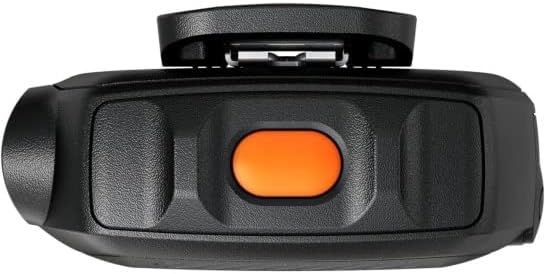
Figure 3: Side view of the Motorola RM730 RSM, showing the orange emergency button and the 3.5mm audio jack.
4. Maintenance and Care
To ensure the longevity and optimal performance of your RM730 RSM, follow these maintenance guidelines:
- Cleaning: Wipe the microphone with a soft, damp cloth. Do not use harsh chemicals or abrasive cleaners.
- Water Resistance: The RSM is IP68 rated, meaning it is protected against dust and can withstand immersion in water up to 2 meters for 4 hours. Ensure the accessory port cover on your radio is securely closed when the RSM is not connected, and ensure the RSM's connector is properly sealed when attached to maintain water resistance.
- Storage: Store the RSM in a cool, dry place away from direct sunlight and extreme temperatures.
- Cable Care: Avoid excessive pulling or bending of the coiled cable to prevent damage.
5. Troubleshooting
If you experience issues with your RM730 RSM, consider the following common solutions:
- No Audio / Poor Audio Quality:
- Ensure the RSM connector is securely attached to the radio and the retaining screw is tightened.
- Check the radio's volume settings.
- If using an earpiece, ensure it is fully plugged into the 3.5mm jack.
- Verify the radio is powered on and functioning correctly.
- PTT Button Not Responding:
- Confirm the RSM is correctly connected to the radio.
- Check if the radio's PTT function is enabled and not locked.
If problems persist, consult your radio's user manual or contact Motorola customer support.
6. Specifications
| Feature | Detail |
|---|---|
| Model Name | RM730 |
| Microphone Form Factor | Lavalier |
| Power Source | Corded Electric |
| Signal-to-Noise Ratio | 76 dB |
| Number of Channels | 1 |
| Manufacturer | Motorola Solutions |
| UPC | 748091022180 |
| Item Weight | 7.8 ounces |
| Package Dimensions | 8.07 x 3.7 x 2.44 inches |
| ASIN | B0BLDVFZ8F |
| Date First Available | February 8, 2023 |
| Color Name | Orange |
| Recommended Uses | Speech, Video Conference |
| Connectivity Technology | Auxiliary |
| Connector Type | 3.5 mm Jack |
| Special Feature | Clip |
| Compatible Devices | Speaker |
| Color | Orange |
| Included Components | 3.5mm Audio Jack, Orange Emergency Button |
| Polar Pattern | Unidirectional |
7. Warranty and Support
For warranty information and customer support, please refer to the documentation included with your Motorola radio or visit the official Motorola Solutions website.
Optional Protection Plans:
- 3-Year Protection Plan: Available for purchase.
- 4-Year Protection Plan: Available for purchase.
- Complete Protect: Monthly plan covering eligible past and future purchases.
These plans are offered separately and provide extended coverage beyond the standard manufacturer's warranty.


