
VIHELM ZT-QB4
VIHELM ZT-QB4 Digital Clamp Multimeter User Manual
Model: ZT-QB4
Introduction
The VIHELM ZT-QB4 is a versatile digital clamp multimeter designed for accurate measurement of various electrical parameters. This manual provides essential information for the safe and effective operation, maintenance, and troubleshooting of your device.
What's in the Box
- ZT-QB4 Digital Clamp Multimeter (x1)
- User Manual (this document)
- Test Leads
- Carrying Pouch
Product Overview
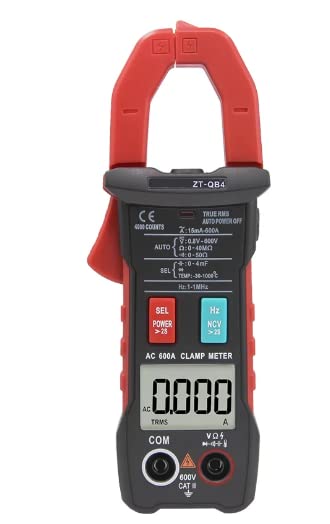
This image shows the front view of the ZT-QB4 Digital Clamp Multimeter. It features a large LCD display, function buttons (SEL, POWER, Hz, NCV), and input jacks for test leads. The clamp jaw is visible at the top, designed for non-contact current measurement.
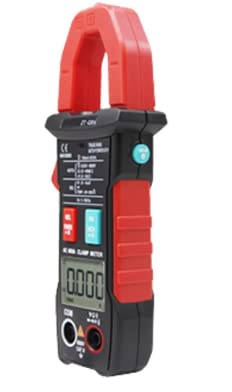
This image displays the ZT-QB4 Digital Clamp Multimeter from a side angle, highlighting its ergonomic design and the red clamp mechanism. The main body is black with red accents, indicating the robust construction of the device.
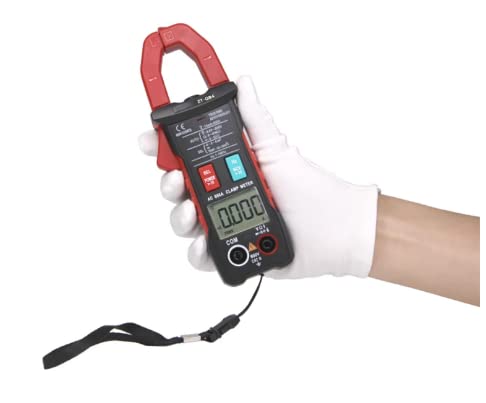
This image shows the ZT-QB4 Digital Clamp Multimeter being held in a gloved hand, providing a sense of its size and portability. A wrist strap is attached to the bottom, offering security during use.
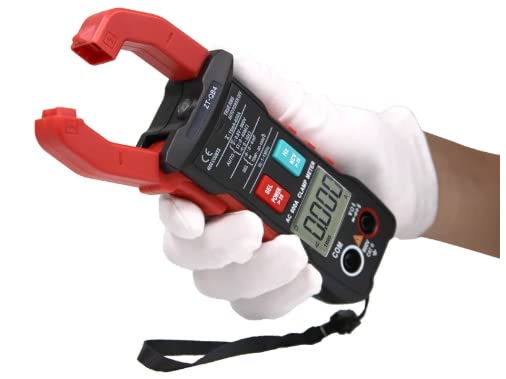
This image illustrates the ZT-QB4 Digital Clamp Multimeter with its clamp jaw open, ready for current measurement around a conductor. The robust red clamp mechanism is clearly visible.
Setup
1. Battery Installation
The ZT-QB4 requires batteries for operation. Locate the battery compartment on the rear of the device. Use a screwdriver to open the compartment cover. Insert the batteries, ensuring correct polarity (+/-). Replace the cover and secure it with the screw.
2. Connecting Test Leads
For voltage, resistance, capacitance, frequency, diode, and continuity measurements, insert the black test lead into the "COM" (common) jack and the red test lead into the "VΩHz" jack. Ensure the leads are fully inserted for a secure connection.
Operating Instructions
Before operating, ensure the device is clean and the test leads are in good condition. Always select the appropriate measurement function before connecting to a circuit.
1. Power On/Off
Press the POWER button to turn the multimeter on. The LCD display will illuminate. To turn off the device, press and hold the POWER button until the display turns off. The device also features an auto-power-off function to conserve battery life.
2. Function Selection
The ZT-QB4 is an auto-ranging multimeter, simplifying operation. The device automatically selects the correct range for most measurements. Use the SEL button to cycle through different measurement modes within a category (e.g., AC Voltage vs. DC Voltage, Resistance vs. Diode/Continuity).
3. AC Current Measurement (Clamp Function)
- Ensure the device is powered on.
- Press the trigger to open the clamp jaw.
- Place the clamp around a single conductor (not a bundle of wires) through which the AC current is flowing.
- Release the trigger to close the clamp jaw securely around the conductor.
- Read the AC current value displayed on the LCD.
4. Voltage Measurement (AC/DC)
- Connect the black test lead to the "COM" jack and the red test lead to the "VΩHz" jack.
- Press the SEL button until the desired voltage mode (AC or DC) is indicated on the display.
- Connect the test leads in parallel to the circuit or component you wish to measure.
- Read the voltage value on the display.
5. Resistance Measurement
- Ensure the circuit or component is de-energized before measuring resistance.
- Connect the black test lead to the "COM" jack and the red test lead to the "VΩHz" jack.
- Press the SEL button until the resistance symbol (Ω) is shown.
- Connect the test leads across the component.
- Read the resistance value on the display.
6. Continuity Test
- Connect the black test lead to the "COM" jack and the red test lead to the "VΩHz" jack.
- Press the SEL button until the continuity symbol (speaker icon) is shown.
- Touch the test leads to the two points you want to check for continuity.
- A continuous beep indicates a low-resistance path (continuity).
7. Non-Contact Voltage (NCV) Detection
The NCV function allows for detection of AC voltage without direct contact. Press the NCV button. Move the top part of the multimeter near a live AC voltage source. The device will emit an audible beep and/or visual indication (LED) when AC voltage is detected.
Maintenance
1. Cleaning
Wipe the device with a damp cloth and mild detergent. Do not use abrasive cleaners or solvents. Ensure the device is completely dry before storage or next use.
2. Battery Replacement
When the low battery indicator appears on the display, replace the batteries promptly to ensure accurate readings. Follow the battery installation steps outlined in the "Setup" section.
3. Storage
Store the multimeter in a cool, dry place, away from direct sunlight and extreme temperatures. If storing for an extended period, remove the batteries to prevent leakage.
Troubleshooting
- No Display/Device Not Turning On:
Check battery installation and ensure batteries are not depleted. Replace batteries if necessary.
- Inaccurate Readings:
Ensure test leads are properly connected. Verify the correct function is selected for the measurement. Check for damaged test leads. Ensure the circuit is de-energized for resistance measurements.
- "OL" or "OVERLOAD" on Display:
This indicates the measured value exceeds the device's maximum range for the selected function. Select a higher range if available, or ensure the measurement is within the device's capabilities.
Specifications
The following table details the measurement ranges and accuracy for the VIHELM ZT-QB4 Digital Clamp Multimeter.
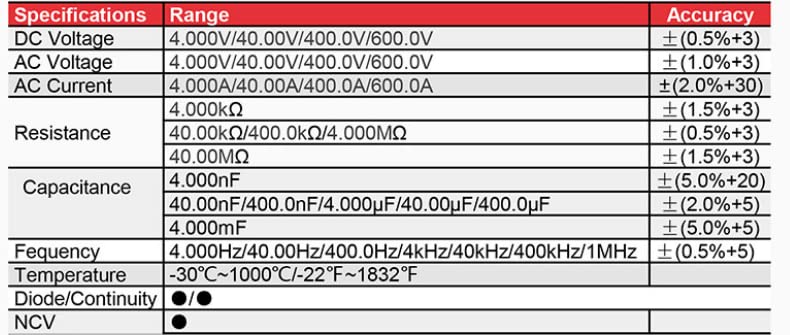
This image displays a detailed table of the technical specifications for the ZT-QB4 Digital Clamp Multimeter, including ranges and accuracy for DC Voltage, AC Voltage, AC Current, Resistance, Capacitance, Frequency, Temperature, Diode/Continuity, and NCV.
| Product Dimensions | 6 x 2 x 3 inches |
| Weight | 2.2 Pounds |
| Manufacturer | VIHELM |
| Model Number | ZT-QB4 |
| UPC | 797447718574 |
Warranty Information
Specific warranty details for the VIHELM ZT-QB4 Digital Clamp Multimeter are not provided in this manual. Please refer to the product packaging or contact the manufacturer directly for warranty terms and conditions.
Customer Support
For technical assistance, troubleshooting beyond this guide, or inquiries regarding your VIHELM ZT-QB4 Digital Clamp Multimeter, please contact VIHELM customer support through their official website or the contact information provided with your purchase.