Introduction
Thank you for purchasing the HXSJ V700 Wired Gaming Keyboard. This manual provides detailed instructions on how to set up, operate, and maintain your keyboard to ensure optimal performance and longevity. Please read this manual thoroughly before using the product.

Image: The HXSJ V700 Wired Gaming Keyboard, showcasing its compact 61-key layout and vibrant RGB backlighting. The keyboard is connected via a USB cable.
Setup
The HXSJ V700 keyboard is designed for simple plug-and-play operation. Follow these steps to connect your keyboard:
- Locate an available USB port on your computer (PC or Laptop).
- Insert the USB connector of the keyboard cable into the USB port.
- The system will automatically detect the keyboard and install the necessary drivers. No manual driver installation is typically required.
- Once the drivers are installed, the keyboard will be ready for use.

Image: A diagram illustrating the dimensions of the HXSJ V700 keyboard and its USB cable, highlighting its compact size and wired connectivity.
Operating Instructions
The HXSJ V700 keyboard features several multimedia and backlight functions accessible via combination keys. These functions enhance your gaming and office experience.
Multimedia Functions:
- Volume Adjustment:
- Press FN + R to decrease volume.
- Press FN + T to increase volume.
- Press FN + Y to mute/unmute audio.
- Compound Function Keys:
The FN key combined with the first row of keyboard keys (1-0, -, =) provides access to F1-F12 function keys, ESC, and Delete. This allows for a full range of functions despite the compact 61-key layout.
- Game Arrow Keys:
Press FN + W/A/S/D to toggle these keys as game arrow keys, providing enhanced control for gaming.
- Windows Key Lock:
Press FN + WIN to lock or unlock the Windows key, preventing accidental presses during gameplay.

Image: A detailed diagram illustrating the compound function key switches on the HXSJ V700 keyboard, showing combinations like FN+R/T/Y for volume control and FN+W/A/S/D for game arrow keys.
Backlight Adjustment:
- The keyboard features RGB cool horse racing lighting.
- It supports 6 different backlight effects.
- It offers 8 different backlight color switching options.
- Specific key combinations for changing effects and colors are typically detailed in the included quick start guide or can be discovered through experimentation.

Image: The HXSJ V700 keyboard illuminated with its vibrant RGB backlighting, showcasing the dynamic color effects.
Features
The HXSJ V700 keyboard is designed with several features to enhance user experience:
- 61-Key Compact Layout: This design saves desk space while retaining essential keys for gaming and general use.
- RGB Streamer Lighting: Dynamic and customizable RGB lighting effects provide an immersive visual experience.
- Floating Keycaps: The keycaps are designed to appear "floating" above the base, contributing to both aesthetics and ease of cleaning.
- Comfortable Operation Feel: While not a true mechanical keyboard, it offers a similar tactile feedback and a scientific key layout for comfortable and efficient input.
- Durable Construction: Keycap material is ABS two-color injection, ensuring durability and preventing legends from fading.
- Long Button Life: Rated for 10 million clicks or more, ensuring long-term reliability.

Image: A close-up view highlighting the 61-key layout of the HXSJ V700 gaming keyboard, emphasizing its compact design and RGB lighting.
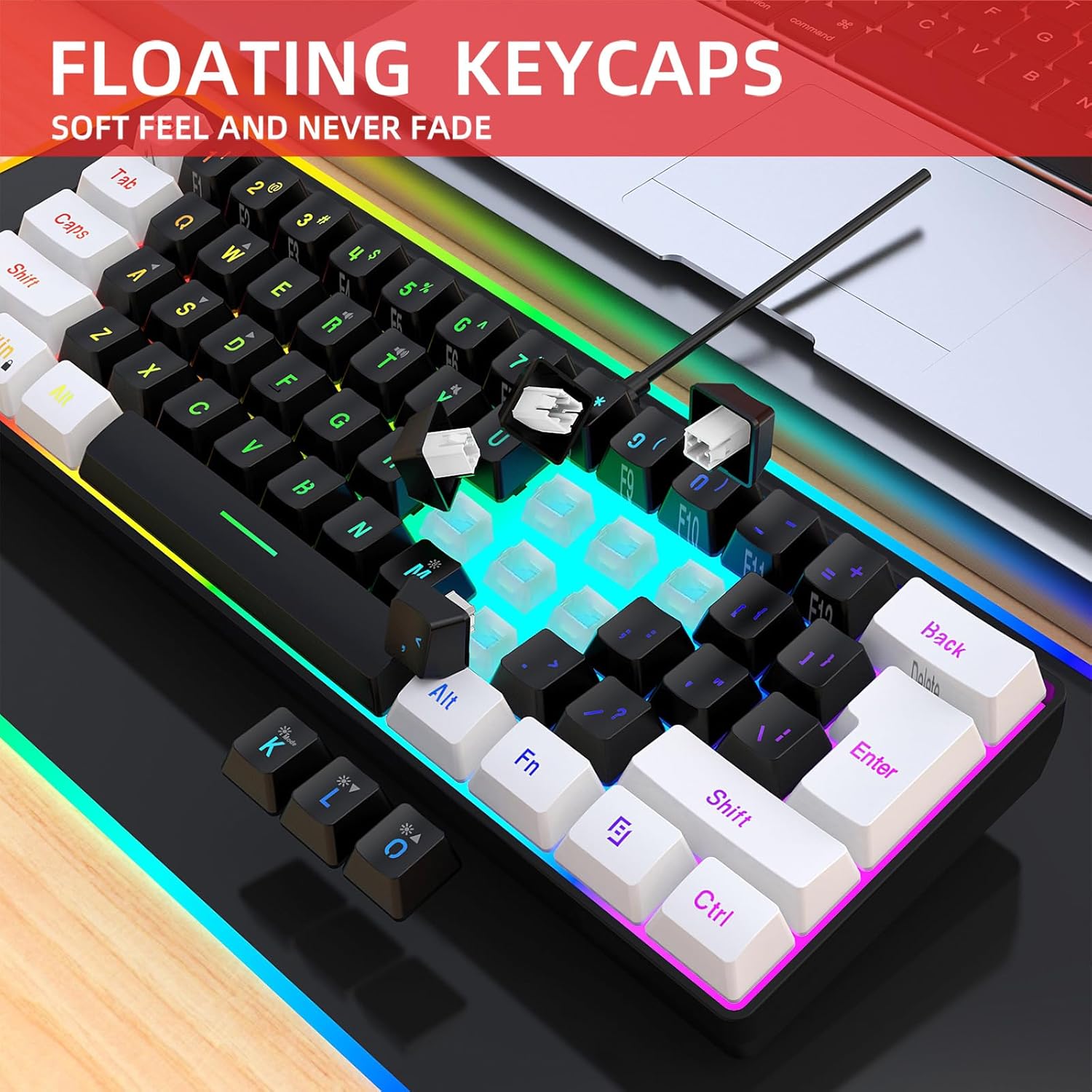
Image: A detailed shot of the HXSJ V700 keyboard's floating keycaps, illustrating their design and how they can be easily removed for cleaning.

Image: The HXSJ V700 keyboard positioned on a desk next to a laptop, demonstrating its ergonomic streamlined design for comfortable input during work or gaming sessions.
Maintenance
Proper maintenance can extend the life of your HXSJ V700 keyboard. Follow these guidelines:
- Cleaning: Use a soft, dry cloth to wipe down the keyboard surface regularly. For deeper cleaning, you can use a can of compressed air to remove dust and debris from between the keys. A slightly damp cloth (not wet) can be used for stubborn spots, ensuring no liquid enters the keyboard.
- Avoid Liquids: Do not spill liquids on the keyboard. If a spill occurs, immediately unplug the keyboard and allow it to dry completely before reconnecting.
- Storage: When not in use for extended periods, store the keyboard in a clean, dry environment away from direct sunlight and extreme temperatures.
- Cable Care: Avoid bending or crimping the USB cable excessively to prevent internal wire damage.
Troubleshooting
If you encounter issues with your HXSJ V700 keyboard, try the following troubleshooting steps:
- Keyboard Not Responding:
- Ensure the USB cable is securely plugged into both the keyboard and the computer's USB port.
- Try plugging the keyboard into a different USB port on your computer.
- Restart your computer.
- Test the keyboard on another computer to determine if the issue is with the keyboard or your system.
- Keys Not Working:
- Check for any physical obstructions under the keycap.
- Gently remove the keycap (if designed to be removable) and clean any debris.
- Backlight Issues:
- Ensure the keyboard is properly connected and receiving power.
- Refer to the operating instructions for backlight adjustment key combinations.
- Lag or Input Delay:
- Ensure your computer's operating system is up to date.
- Close any unnecessary background applications that might be consuming system resources.
If these steps do not resolve the issue, please refer to the Warranty and Support section for further assistance.
Specifications
Below are the technical specifications for the HXSJ V700 Wired Gaming Keyboard:
| Brand | HXSJ |
| Model | V700 |
| Interface Type | USB |
| Number of Keys | 61-key |
| Keycap Material | ABS two-color injection |
| Button Life | 10 million times or more |
| Operating Voltage | 5.0V+5% DC |
| Working Current | 150mA (MAX) |
| Product Line Length | 1.7M |
| Product Dimensions (L*W*H) | 29.2 x 10.2 x 4 cm (11.5 x 4.02 x 1.57 in) |
| Item Weight | Approx. 400g (14.11oz) |
| System Compatibility | Compatible with IBM PC Win98SE/Me/2000/XP/MISTAWIN 7/WIN10 |
Image: A technical drawing showing the precise length, width, and height measurements of the HXSJ V700 keyboard, along with its weight.
Warranty and Support
The HXSJ V700 Wired Gaming Keyboard comes with a standard manufacturer's warranty. Please refer to the warranty card included in your product packaging for specific terms and conditions, including warranty duration and coverage details.
For technical support, warranty claims, or any product-related inquiries, please contact HXSJ customer service through the contact information provided on the product packaging or the official HXSJ website. Please have your product model number (V700) and purchase details ready when contacting support.


