
1. Important Safety Information
Always read and understand all safety warnings, instructions, illustrations, and specifications provided with this power tool. Failure to follow all instructions listed below may result in electric shock, fire, and/or serious injury.
- Work Area Safety: Keep your work area clean and well-lit. Cluttered or dark areas invite accidents. Do not operate power tools in explosive atmospheres, such as in the presence of flammable liquids, gases, or dust. Power tools create sparks which may ignite the dust or fumes.
- Electrical Safety: Power tool plugs must match the outlet. Never modify the plug in any way. Do not abuse the cord. Never use the cord for carrying, pulling, or unplugging the power tool. Keep cord away from heat, oil, sharp edges, or moving parts.
- Personal Safety: Stay alert, watch what you are doing, and use common sense when operating a power tool. Do not use a power tool while you are tired or under the influence of drugs, alcohol, or medication. Always wear eye protection. Use safety glasses, goggles, or a face shield.
- Tool Use and Care: Do not force the power tool. Use the correct power tool for your application. The correct power tool will do the job better and safer at the rate for which it was designed. Disconnect the plug from the power source and/or remove the battery pack, if detachable, from the power tool before making any adjustments, changing accessories, or storing power tools.
- Battery Pack Use and Care: Recharge only with the charger specified by the manufacturer. A charger that is suitable for one type of battery pack may create a risk of fire when used with another battery pack. Use power tools only with specifically designated battery packs.
2. Package Contents
Carefully unpack all items and ensure you have received the following:
- BATAVIA Cordless Drill (BT-CTD001)
- 20V MAX 2.0Ah Lithium-Ion Battery
- 2.4A Battery Charger
- Instruction Manual

Image: The BATAVIA Cordless Drill, including the main unit, a 20V MAX 2.0Ah Lithium-Ion battery, and a 2.4A battery charger.
3. Product Overview
Familiarize yourself with the components of your BATAVIA Cordless Drill:
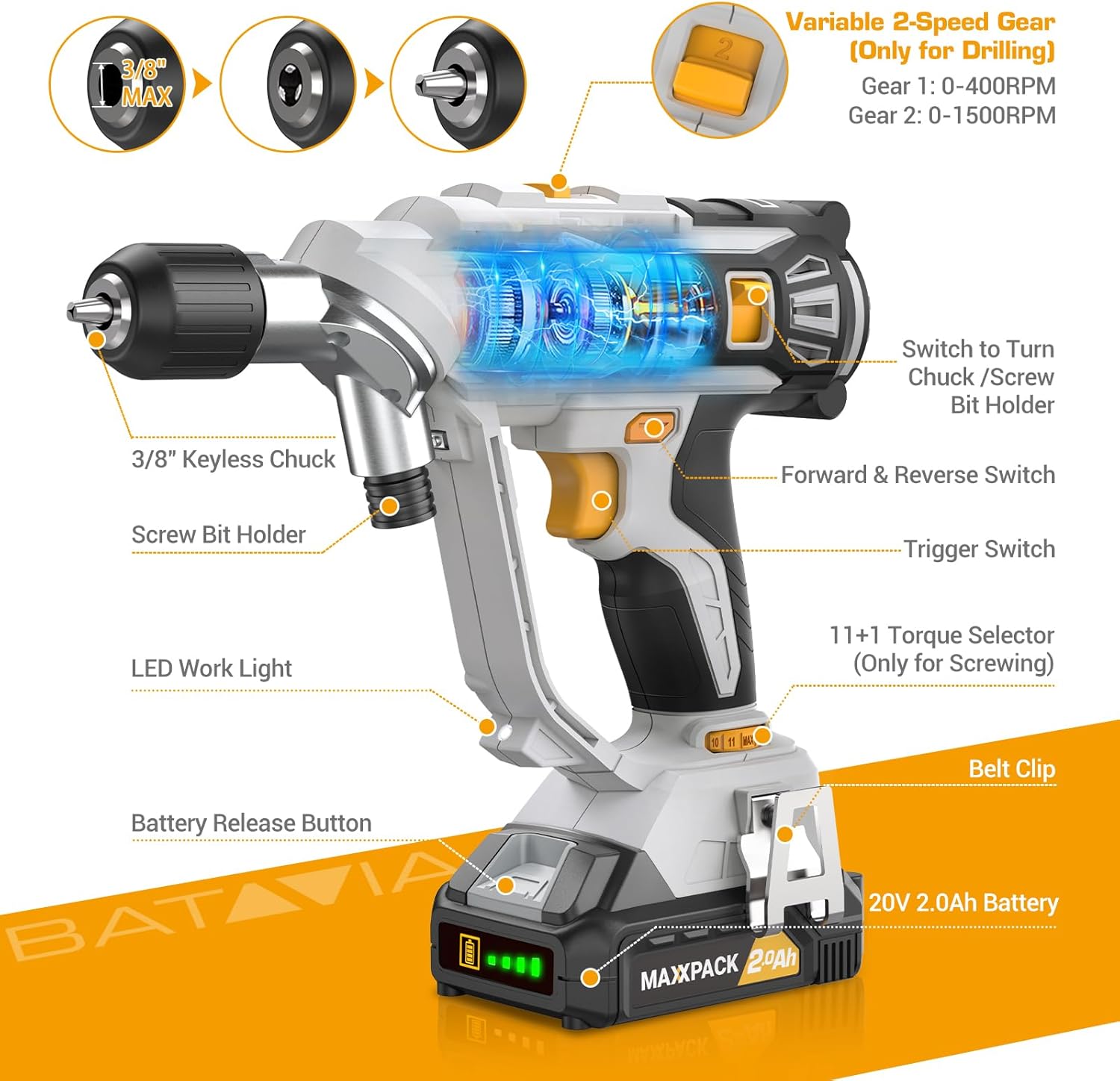
Image: A detailed diagram highlighting key components of the BATAVIA Cordless Drill, including the 3/8" Keyless Chuck, Screw Bit Holder, LED Work Light, Battery Release Button, 20V 2.0Ah Battery, Belt Clip, 11+1 Torque Selector, Trigger Switch, Forward & Reverse Switch, and Variable 2-Speed Gear switch.
- Dual Rotating Chucks: Features both a 3/8" keyless chuck for drilling and a 1/4" hex chuck for driving, allowing quick transitions between tasks.
- 11+1 Torque Settings: Provides precise control for various applications and materials.
- 2 Variable Speeds: Offers two speed ranges (0-400 RPM and 0-1500 RPM) for optimal performance in different drilling and driving scenarios.
- Automatic LED Work Light: Illuminates the work area for improved visibility in low-light conditions.
- Belt Clip: Conveniently attaches the drill to your belt for easy access.
4. Setup
4.1 Charging the Battery
- Ensure the battery is securely inserted into the 2.4A battery charger.
- Plug the charger into a standard 120V AC electrical outlet.
- The indicator lights on the charger will show the charging status. A full charge typically takes less time due to the 2.4A charger.
- Once fully charged, disconnect the charger from the outlet and remove the battery.
4.2 Installing/Removing the Battery
- To install: Align the battery with the base of the drill handle and slide it in until it clicks securely into place.
- To remove: Press the battery release button located on the front of the battery pack and slide the battery out.
4.3 Using the Dual Rotating Chucks
This drill features a unique dual rotating chuck system for quick changes between drilling and driving tasks.

Image: The BATAVIA Cordless Drill demonstrating its dual rotating chuck feature, allowing users to switch between a drill bit and a screwdriver bit by rotating the chuck assembly.
- For Drilling (3/8" Keyless Chuck): Rotate the front section of the drill head to expose the 3/8" keyless chuck. Insert the drill bit and tighten the chuck by hand until the bit is secure.
- For Driving (1/4" Hex Chuck): Rotate the front section of the drill head to expose the 1/4" hex chuck. Insert the screwdriver bit directly into the hex opening until it locks into place.
5. Operating Instructions
5.1 Setting Torque (11+1 Settings)
The torque selector ring allows you to adjust the amount of rotational force the drill applies. This is crucial for preventing overtightening screws or damaging materials.

Image: The BATAVIA Cordless Drill highlighting its 11+1 torque settings, with recommendations for low settings for small screws/soft materials and high settings for large screws/hard materials.
- Rotate the torque selector ring to choose a setting from 1 to 11. Lower numbers are for smaller screws or softer materials, while higher numbers are for larger screws or harder materials.
- The 'Drill' symbol (often indicated as 'MAX' or a drill icon) bypasses the clutch for maximum torque, suitable for drilling applications.
5.2 Selecting Speed (2 Variable Speeds)
The drill features a 2-speed gearbox to match the speed to the application.

Image: The BATAVIA Cordless Drill showing its adjustable variable 2-speed gear selector. Gear 1 (0-400 RPM) is recommended for large diameter drilling, and Gear 2 (0-1500 RPM) for small diameter drilling.
- Gear 1 (0-400 RPM): Use for high-torque applications, such as driving large screws or drilling large holes in tough materials.
- Gear 2 (0-1500 RPM): Use for high-speed applications, such as drilling small holes or driving small screws quickly.
- The trigger switch provides variable speed control within the selected gear range. Pressing the trigger further increases the speed.
5.3 Forward/Reverse Switch
The forward/reverse switch is located above the trigger. It controls the direction of rotation.
- Push the switch to the left for forward rotation (for drilling and driving screws).
- Push the switch to the right for reverse rotation (for removing screws or backing out drill bits).
- When the switch is in the center position, the trigger is locked, preventing accidental starting.
5.4 Automatic LED Work Light
The built-in LED light automatically illuminates when the trigger is pressed, providing visibility in dimly lit work areas.
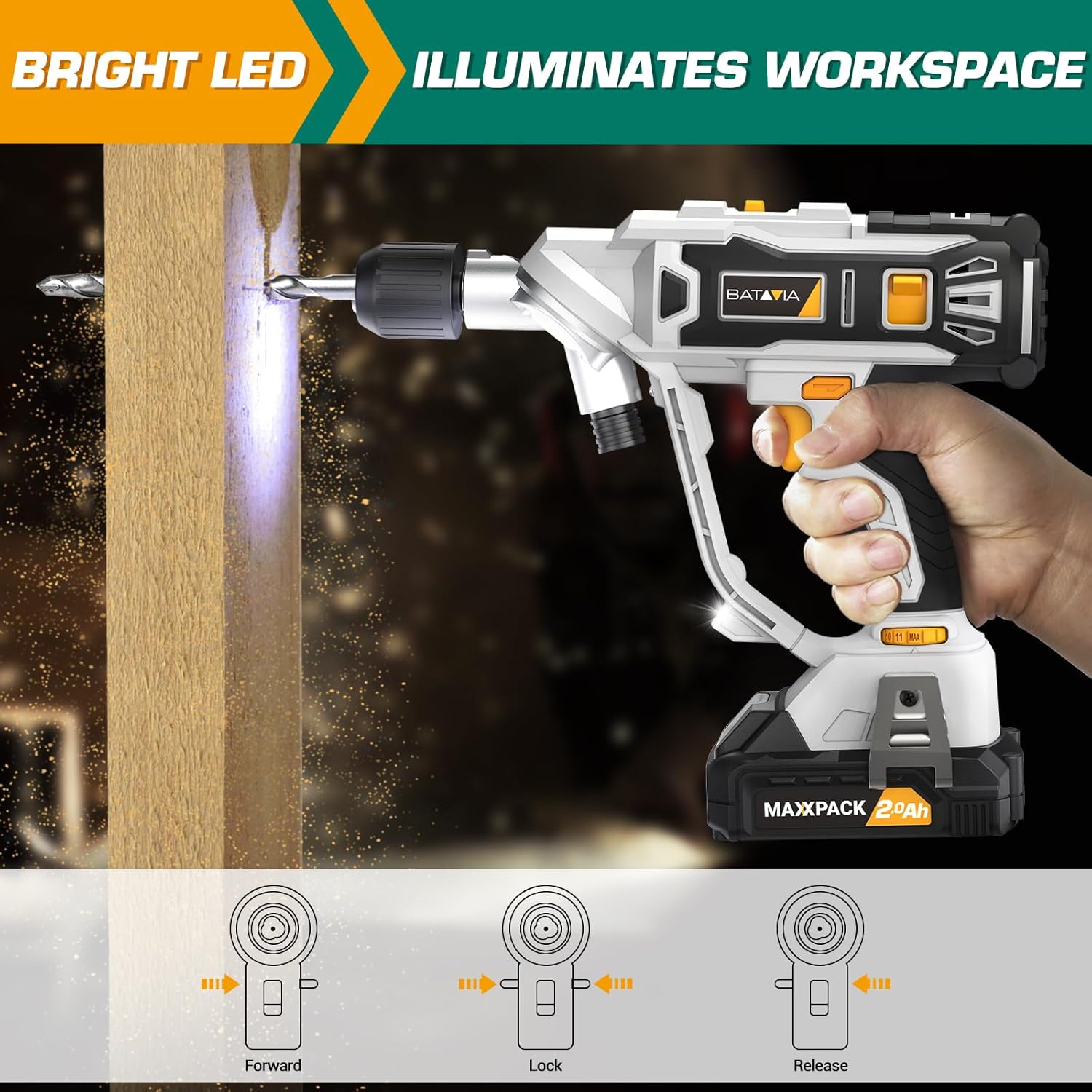
Image: The BATAVIA Cordless Drill in use, with its bright LED light illuminating the work surface, demonstrating its utility in dark or confined spaces.
6. Maintenance
Regular maintenance ensures the longevity and optimal performance of your drill.
- Cleaning: After each use, wipe down the drill with a clean, damp cloth. Do not use harsh chemicals or abrasive cleaners. Keep the ventilation openings clear of dust and debris.
- Storage: Store the drill, battery, and charger in a cool, dry place, away from direct sunlight and extreme temperatures. Ensure the battery is removed from the drill before storage.
- Battery Care: Do not store batteries in a discharged state. Recharge them periodically if not in use for extended periods.
7. Troubleshooting
If you encounter issues with your BATAVIA Cordless Drill, refer to the following common problems and solutions:
| Problem | Possible Cause | Solution |
|---|---|---|
| Drill does not start. | Battery not charged or not properly inserted. Forward/Reverse switch in locked (center) position. | Ensure battery is fully charged and securely inserted. Move Forward/Reverse switch to forward or reverse position. |
| Battery not charging. | Charger not plugged in. Faulty battery or charger. | Check power outlet and charger connection. If problem persists, contact customer support. |
| Drill lacks power or stops during use. | Battery low on charge. Overload protection activated. | Recharge battery. Reduce pressure on the drill or use a lower speed setting for tough materials. |
| Chuck not holding bit securely. | Bit not inserted deep enough. Chuck not tightened properly. | Ensure bit shank is fully inserted into the chuck. Tighten the keyless chuck firmly by hand. |
8. Specifications
| Feature | Specification |
|---|---|
| Model Number | BT-CTD001 |
| Brand | Batavia |
| Power Source | Battery Powered |
| Battery Type | 20V MAX 2.0Ah Lithium-Ion |
| Charger Amperage | 2.4 Amps |
| Maximum Rotational Speed | 1500 RPM |
| No. of Speeds | 2 (0-400 RPM & 0-1500 RPM) |
| Torque Settings | 11+1 |
| Maximum Chuck Size | 3/8 Inches (Keyless Chuck) |
| Material | PA6-GF30 |
| Product Dimensions (L x W x H) | 8.07" x 3.34" x 14.5" |
| Item Weight | 5.28 pounds |
| Special Features | Adjustable Torque, Built-In LED Working Light, Compact, Cordless, Variable Speed |
| Certifications | ETL Certified |
9. Warranty and Support
BATAVIA products are designed and manufactured to the highest quality standards. This product is ETL certified, ensuring product quality and safety.
For any questions, technical assistance, or warranty claims, please contact BATAVIA customer service:
- Phone: (+1) 866-272-5789
- Operating Hours (EDT): 10am - 7pm
- Operating Hours (PDT): 7am - 4pm
Please have your model number (BT-CTD001) and purchase information ready when contacting support.