
1. Introduction
Thank you for purchasing the Taiyo Remote Control Jeep Wrangler Rubicon. This 1:8 scale RC vehicle is designed for both indoor and outdoor use, offering full-function control including forward, backward, left, and right turns, as well as the ability to perform various stunts. It features a durable ABS plastic body, a flexible suspension system for shock absorption, and operates on a 2.4 GHz frequency for reliable long-distance control up to 50 feet. This manual provides essential information for safe operation, setup, maintenance, and troubleshooting.
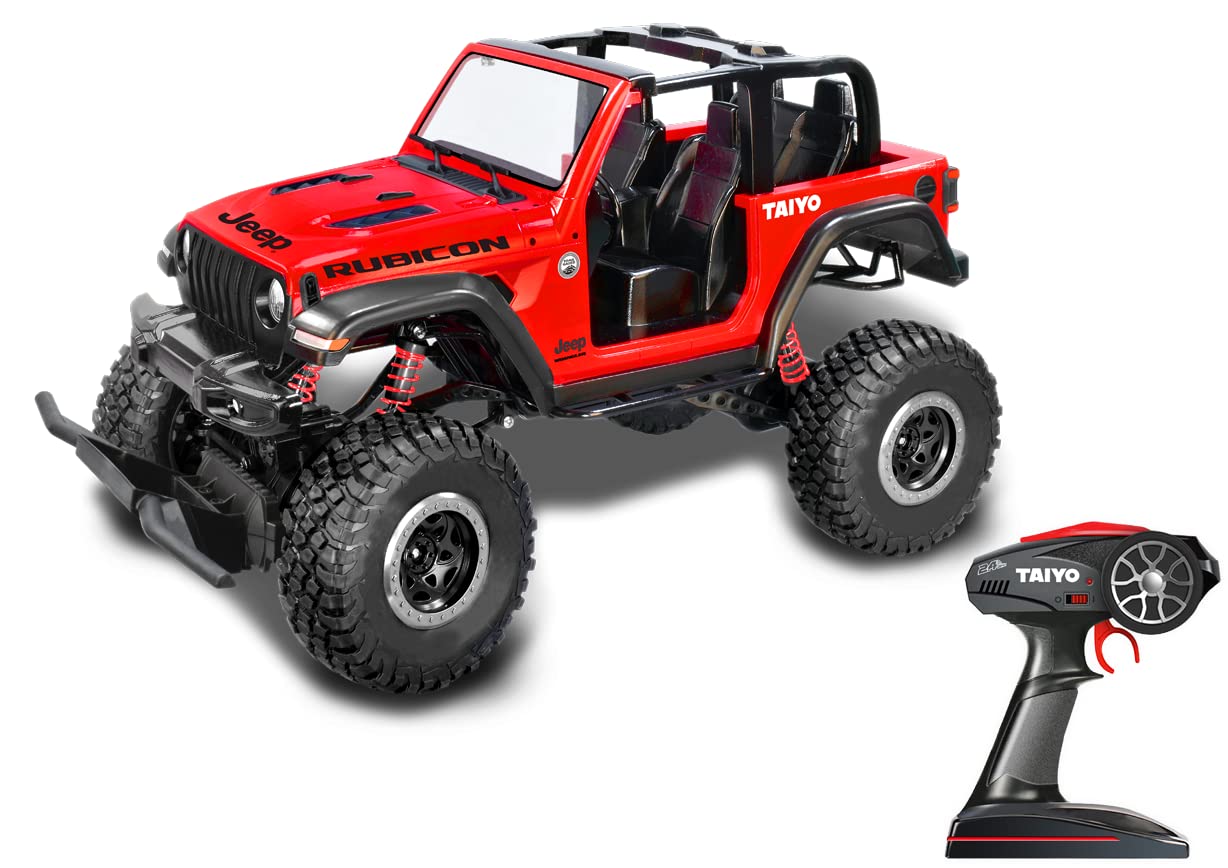
Figure 1.1: The Taiyo Remote Control Jeep Wrangler Rubicon (Model 080011A) in its packaging, highlighting the red vehicle and its 2.4 GHz remote controller.
2. Safety Information
Please read all safety warnings and instructions before operating this product to prevent injury or damage.
- Age Recommendation: This product is recommended for users aged 8 years and older.
- Battery Safety:
- Use only the specified 7.4V Lithium-Ion rechargeable battery and USB charging system.
- Do not attempt to charge non-rechargeable batteries.
- Do not short-circuit, disassemble, or expose batteries to extreme temperatures or fire.
- Adult supervision is recommended during battery charging and replacement.
- Remove batteries from the vehicle and remote control when not in use for extended periods.
- Operating Environment:
- Operate the vehicle in open areas, away from people, pets, and obstacles.
- Avoid operating near water, electrical wires, or busy streets.
- Do not operate in adverse weather conditions (rain, strong winds).
- General Precautions:
- Keep fingers, hair, and loose clothing away from moving parts (wheels, suspension).
- Do not modify the vehicle or remote control.
- Store the product in a cool, dry place when not in use.
3. Package Contents
Verify that all items listed below are included in your package:
- Taiyo Remote Control Jeep Wrangler Rubicon Vehicle (Red)
- 2.4 GHz Remote Control Transmitter
- 7.4V Lithium-Ion Rechargeable Battery (for vehicle)
- USB Charging Cable
- Instruction Manual (this document)
- Note: Remote control batteries (e.g., AA or AAA) may not be included and should be purchased separately.
4. Setup
4.1 Charging the Vehicle Battery
- Locate the 7.4V Lithium-Ion rechargeable battery and the USB charging cable.
- Connect the battery to the USB charging cable.
- Plug the USB charging cable into a standard USB power source (e.g., computer USB port, USB wall adapter).
- The charging indicator light on the USB cable will illuminate (color may vary, refer to charger for specifics).
- Allow approximately 2-3 hours for a full charge. The indicator light will change or turn off when charging is complete.
- Disconnect the battery from the charger once fully charged. Do not overcharge.
4.2 Installing Batteries in the Remote Control
- Open the battery compartment on the back of the remote control.
- Insert the required batteries (typically 2x AA or AAA, not included) according to the polarity markings (+/-).
- Close the battery compartment securely.
4.3 Installing the Vehicle Battery
- Locate the battery compartment on the underside or rear of the RC vehicle.
- Open the battery compartment cover.
- Connect the fully charged 7.4V Lithium-Ion battery to the vehicle's power connector, ensuring correct polarity.
- Carefully place the battery inside the compartment and close the cover securely.
4.4 Pairing the Remote Control with the Vehicle
- Ensure both the vehicle and the remote control have fresh or fully charged batteries installed.
- Turn on the vehicle's power switch (usually located on the chassis).
- Turn on the remote control's power switch.
- The remote control and vehicle should automatically pair within a few seconds. The indicator light on the remote may stop flashing or turn solid once paired.
- If pairing fails, turn off both devices, wait a few seconds, and repeat the process.
5. Operating Instructions
Once the vehicle and remote control are paired, you are ready to operate your RC Jeep Wrangler Rubicon.
- Forward/Backward: Use the throttle trigger/stick on the remote control to move the vehicle forward or backward.
- Left/Right Steering: Use the steering wheel/stick on the remote control to turn the vehicle left or right.
- 2.4 GHz Control: The 2.4 GHz frequency provides a stable connection and allows for multiple RC vehicles to operate simultaneously without interference.
- Range: The vehicle can be controlled reliably up to a distance of approximately 50 feet (15 meters).
- Terrain: The independent articulated suspension and 4-wheel drive system allow for operation on various indoor and outdoor surfaces. Avoid excessively rough terrain, deep water, or sand to prevent damage.
- Stunts: Experiment with different control inputs to perform various maneuvers and stunts.
6. Maintenance
Proper maintenance will extend the life and performance of your RC vehicle.
- Cleaning:
- After each use, especially outdoors, gently wipe the vehicle with a soft, dry cloth to remove dirt and dust.
- Do not use water or chemical cleaners, as they can damage electronic components.
- Remove any debris from the wheels and suspension system.
- Battery Care:
- Always fully charge the vehicle battery before use.
- Do not leave batteries charging unattended.
- If storing the vehicle for an extended period, remove all batteries from both the vehicle and the remote control.
- Store batteries in a cool, dry place.
- Storage: Store the vehicle and remote control in a dry, cool environment, away from direct sunlight and extreme temperatures.
7. Troubleshooting
If you encounter issues with your RC vehicle, refer to the following common problems and solutions:
| Problem | Possible Cause | Solution |
|---|---|---|
| Vehicle does not respond to remote. |
|
|
| Vehicle moves slowly or inconsistently. |
|
|
| Short control range. |
|
|
8. Specifications
| Feature | Detail |
|---|---|
| Model Number | 080011A |
| Brand | Taiyo |
| Scale | 1:8 |
| Frequency | 2.4 GHz |
| Control Range | Up to 50 feet (approx. 15 meters) |
| Vehicle Battery | 7.4V Lithium-Ion (Rechargeable, Included) |
| Charging System | USB Charging Cable |
| Remote Control Batteries | Not specified (typically AA/AAA, not included) |
| Material | ABS Plastic |
| Color | Red |
| Dimensions (L x W x H) | 28 x 48 x 39 cm (approx.) |
| Item Weight | 3.15 kg (approx.) |
| Recommended Age | 8+ Years |
| Special Features | Full Function Control, Independent Articulated Suspension, 4-Wheel Drive, Crash-Resistant |
9. Warranty and Support
For warranty information or technical support, please refer to the retailer where the product was purchased or visit the official Taiyo website. Keep your proof of purchase for any warranty claims.


