1. Product Overview
The Realspace RGX High-Back Gaming Office Chair is designed to provide comfort and flexibility for various scenarios, including gaming and office work. It features contoured seat padding for enhanced support and padded arms that can be flipped up to accommodate different tasks. The chair includes seat height and tilt adjustments for optimal positioning and a waterfall seat design to help reduce leg stress. Lumbar support is integrated for improved posture. This chair is BIFMA compliant, ensuring it meets rigorous performance and safety standards.

Image: Full view of the Realspace RGX Gaming Chair in black and red.
2. Safety Information
- Casters may not be suitable for all floor types. Always ensure the chair is on a stable surface.
- Do not exceed the maximum weight capacity of 275 lb (125 kg).
- Ensure all bolts and screws are securely tightened before use and periodically check for looseness.
- Keep small parts away from children during assembly.
3. Package Contents
Verify that all components are present before beginning assembly:
- Chair Back
- Chair Seat
- Armrests (2)
- Chair Base
- Casters (5)
- Gas Lift Cylinder
- Mechanism Plate
- Hardware Pack (screws, washers, Allen wrench)
4. Assembly Instructions
Follow these general steps for assembling your Realspace RGX Gaming Office Chair. Refer to the included assembly diagram for specific part identification.
- Attach Casters to Base: Insert each of the five casters into the holes at the end of each leg of the chair base until they click securely into place.
- Insert Gas Lift: Place the gas lift cylinder into the center hole of the assembled chair base.
- Attach Mechanism Plate: Secure the mechanism plate to the underside of the chair seat using the provided screws. Ensure the front of the mechanism faces the front of the seat.
- Attach Armrests: Fasten the armrests to the sides of the chair seat using the designated screws. Ensure they are oriented correctly.
- Connect Backrest to Seat: Align the backrest with the seat and secure it using the remaining screws. It may be helpful to partially tighten all screws before fully tightening any one to ensure proper alignment.
- Place Assembled Top onto Gas Lift: Carefully place the assembled seat and backrest onto the gas lift cylinder, ensuring it is centered and stable.
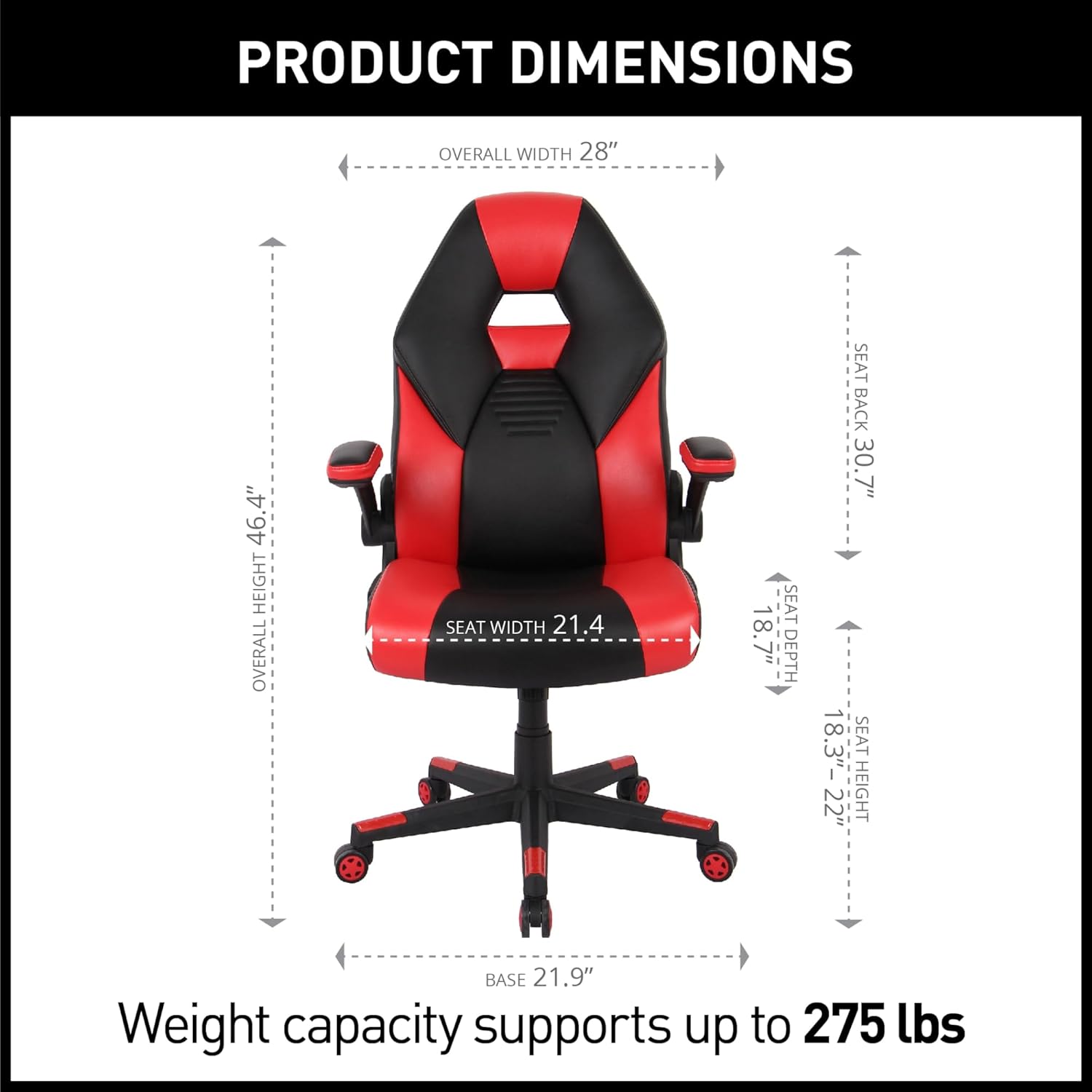
Image: Diagram illustrating the overall dimensions and key measurements of the gaming chair.
5. Operating Instructions
5.1. Seat Height Adjustment
To adjust the seat height, locate the lever on the right side beneath the seat. While seated, pull the lever up to lower the seat. To raise the seat, stand up and pull the lever up. Release the lever at the desired height to lock it in place.
5.2. Tilt Adjustment
The chair features a tilt mechanism. To recline, pull the lever on the left side beneath the seat outwards. Lean back to the desired angle and push the lever inwards to lock the tilt. To return to an upright position, lean forward slightly and pull the lever outwards, then release it when upright.
5.3. Armrest Adjustment
The armrests are designed to flip up and out of the way. To raise the armrests, simply lift them upwards until they lock into the vertical position. To lower them, gently pull them down.
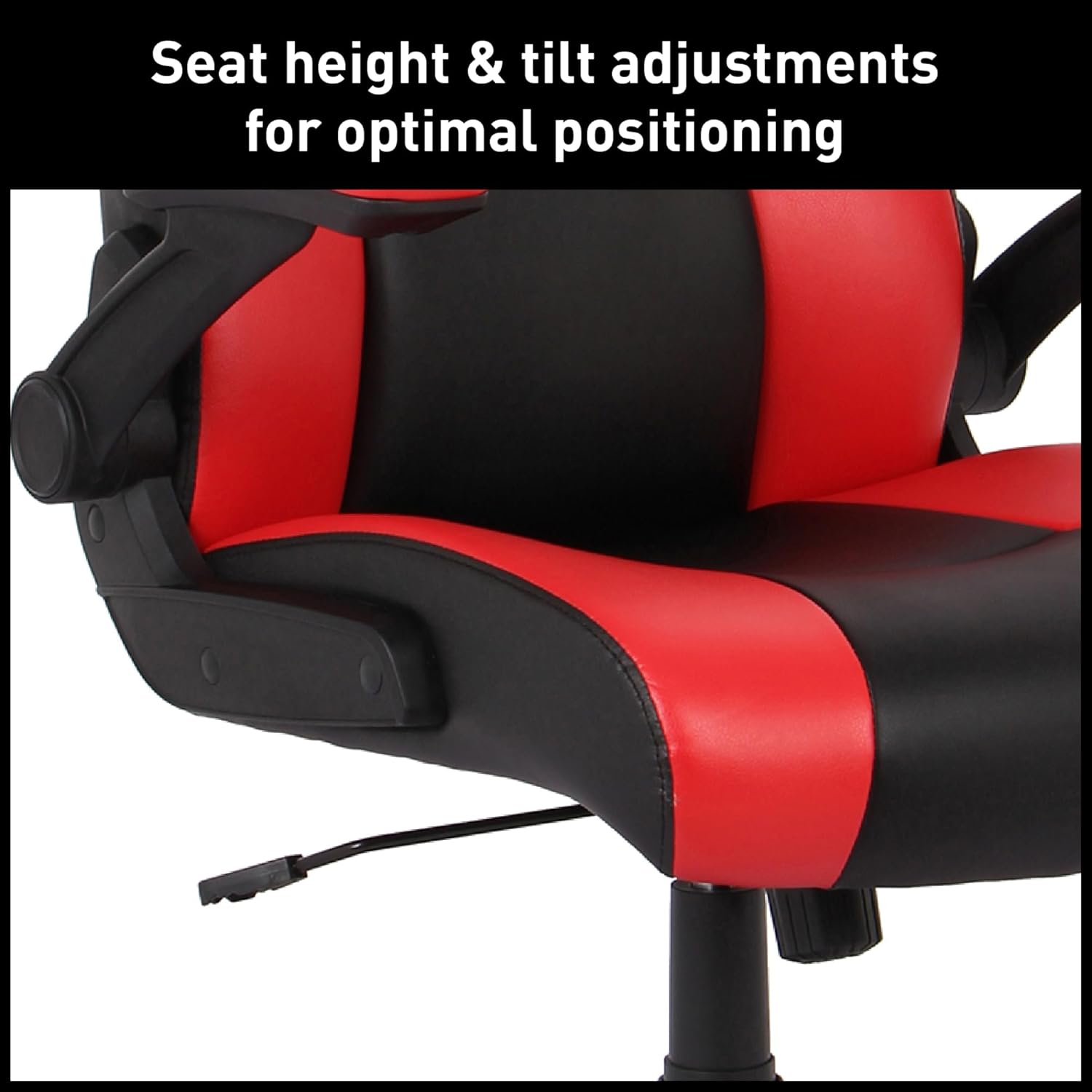
Image: Close-up view of the levers for seat height and tilt adjustments located under the chair seat.

Image: Detail of the padded flip-up armrest in its raised position, accommodating various tasks.
6. Maintenance and Care
To maintain the appearance and longevity of your Realspace RGX Gaming Office Chair:
- Cleaning: Wipe clean with a damp cloth. Avoid harsh chemicals or abrasive cleaners, which can damage the faux leather and PVC materials.
- Inspection: Periodically check all screws and bolts to ensure they remain tight. Re-tighten if necessary to prevent wobbling or instability.
- Caster Care: Keep casters free of debris (hair, dust) to ensure smooth rolling.
- Material Care: The chair is made of faux leather (polyurethane and PVC). Avoid prolonged exposure to direct sunlight or extreme temperatures to prevent material degradation.
7. Troubleshooting
| Problem | Possible Cause | Solution |
|---|---|---|
| Chair is wobbly or unstable. | Loose screws or bolts. | Check and tighten all assembly screws, especially those connecting the seat, back, and armrests. |
| Seat height adjustment not working. | Gas lift cylinder malfunction or lever mechanism issue. | Ensure the lever is fully engaged. If the issue persists, the gas lift may need replacement. Contact customer support. |
| Casters do not roll smoothly. | Debris caught in casters or casters not fully inserted. | Remove any hair or debris from the caster wheels. Ensure each caster is fully inserted into the chair base. |
| Armrests do not stay in position. | Mechanism wear or damage. | Inspect the armrest hinge mechanism for any visible damage. If damaged, contact customer support for replacement parts. |
8. Product Specifications
- Brand: Realspace
- Model Name: RGX
- Item Model Number: HLC-3751B(BK+RED)
- Color: Red / Black
- Product Dimensions: 26.2"D x 28.25"W x 49.55"H
- Overall Chair Dimensions: 31.5" x 12.6" x 2.125'
- Material Type: Faux Leather, Polyvinyl Chloride
- Fill Material: Foam
- Maximum Weight Recommendation: 275 Pounds
- Back Style: Solid Back
- Arm Style: Rounded, Flip-up
- Included Components: Caster
- Form Factor: Tilt
- Item Weight: 48.3 pounds
- Compliance: ANSI/BIFMA Compliant
9. Warranty and Support
For warranty information or technical support regarding your Realspace RGX Gaming Office Chair, please refer to the documentation included with your purchase or contact Realspace customer service directly. Contact details can typically be found on the manufacturer's official website or on your purchase receipt.
For additional assistance, you may visit the Realspace Store on Amazon.


