
1. Introduction
This manual provides essential information for the proper use and maintenance of your VENTION Cat6 RJ45 Ethernet Extension Cable. This cable is designed to extend the reach of your existing Ethernet network, ensuring stable and high-speed data transmission.

Image: The VENTION Cat6 RJ45 Ethernet Extension Cable connected to a laptop, illustrating its function in extending network reach with 1000Mbps speed.
2. Product Features
- Cable Extension: Extends existing Cat 6 Ethernet cables, preventing the need to purchase longer cables and protecting device ports from wear.
- High-Speed Transmission: Supports data transfer speeds up to 1000 Mbps and a bandwidth of 250MHz, ensuring consistent network performance.
- Advanced Shielding: Constructed with 4 pairs of copper conductors, each shielded with aluminum foil, and an overall aluminum foil braided mesh for double shielding against signal interference.
- Durable Design: Designed for durability, capable of withstanding over 10,000 bends and operating in temperatures from -15 to 65 degrees Celsius, suitable for indoor and outdoor applications.
- Universal Compatibility: Universally compatible with all Cat 6 Ethernet cables, and backward compatible with Cat 5 and 5e cables. Connects various LAN components including PCs, laptops, servers, switches, routers, modems, smart TVs, and gaming consoles (PS5, PS4).
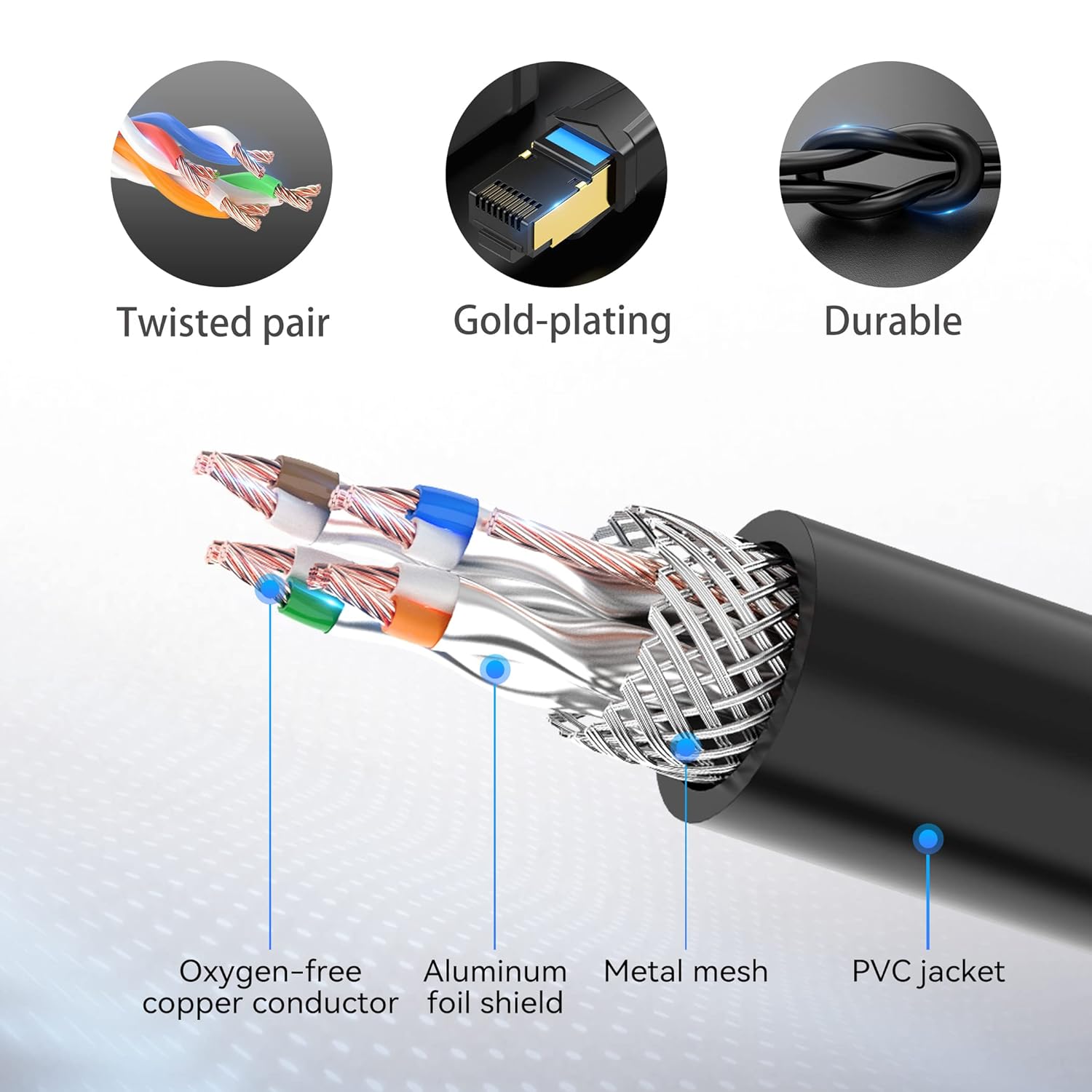
Image: Detailed diagram illustrating the internal construction of the VENTION Ethernet cable, highlighting its oxygen-free copper conductors, aluminum foil shielding, and metal mesh for enhanced performance and durability.

Image: A close-up view of the VENTION RJ45 connector, showcasing its gold-plated contacts for optimal signal integrity.
3. Setup
The VENTION Cat6 RJ45 Ethernet Extension Cable is designed for simple plug-and-play installation.
- Identify Connection Points: Locate the existing Ethernet cable you wish to extend and the device (e.g., computer, router) you want to connect.
- Connect Existing Cable: Plug the male end of your existing Ethernet cable into the female port of the VENTION extension cable. Ensure a secure connection.
- Connect to Device: Plug the male end of the VENTION extension cable into the Ethernet port of your desired device.
- Verify Connection: Check the network status indicators on your device or router to confirm a successful connection.

Image: The VENTION Ethernet Extension Cable in use, extending the reach of a standard Ethernet cable to a laptop, demonstrating a typical setup.
4. Operating Instructions
Once connected, the VENTION Cat6 RJ45 Ethernet Extension Cable operates automatically to extend your network signal. No additional software or configuration is required.
- The cable maintains the data transfer speed and bandwidth of your Cat6 network.
- It is compatible with various network devices and applications, including internet browsing, streaming, online gaming, and data transfer.

Image: An illustration demonstrating the broad compatibility of the VENTION Ethernet Extension Cable with common network devices such as PCs, laptops, routers, and smart TVs.
5. Maintenance
To ensure the longevity and optimal performance of your VENTION Ethernet Extension Cable, follow these maintenance guidelines:
- Avoid Sharp Bends: While durable, avoid excessively sharp bends or kinks in the cable to prevent internal damage.
- Keep Connectors Clean: Periodically inspect the RJ45 connectors for dust or debris. Use a soft, dry cloth or compressed air to clean them if necessary.
- Secure Connections: Ensure both ends of the extension cable are securely plugged in to prevent intermittent connections.
- Temperature Range: Operate the cable within its specified temperature range of -15 to 65 degrees Celsius.
- Storage: When not in use, store the cable in a clean, dry place, ideally coiled loosely to prevent tangling or damage.
6. Troubleshooting
If you encounter issues with your Ethernet extension cable, consider the following troubleshooting steps:
| Problem | Possible Cause | Solution |
|---|---|---|
| No network connection | Loose connection, faulty cable, incorrect port. | Ensure all RJ45 connectors are fully seated. Test with a different Ethernet cable or port. Check device network settings. |
| Slow network speed | Cable damage, interference, network congestion. | Inspect the cable for visible damage. Ensure the cable is not near strong electromagnetic sources. Restart your router and device. |
| Intermittent connection | Loose connection, cable stress. | Firmly re-seat all connections. Avoid pulling or stressing the cable. |
7. Specifications
Detailed technical specifications for the VENTION Cat6 RJ45 Ethernet Extension Cable:
- Brand: VENTION
- Model Number: IBL
- Connector Type: RJ45
- Cable Type: Ethernet
- Ethernet Cable Category: Cat 6 (backward compatible with Cat 5, 5e)
- Connector Gender: Male-to-Female
- Data Transfer Rate: 1000 Megabytes Per Second (1 Gbps)
- Frequency: 250 MHz
- Number of Pins: 8
- Special Features: Braided, Data Transfer, High Speed, Double Shielded (Aluminum Foil Shield, Metal Mesh)
- Conductor Material: Oxygen-free copper
- Jacket Material: PVC
- Shape: Round
- Item Weight: 45 Grams (1.59 ounces)
- Usage Environment: Indoor, Outdoor
- Durability: Withstands 10,000+ bends
- Operating Temperature: -15 to 65 degrees Celsius
- Compatible Devices: PC, Router, Laptops, Servers, Switches, Modems, Network Media Players, Smart TVs, Network Printers, PS5, PS4

Image: A Fluke Networks test report confirming the VENTION Ethernet cable meets Cat6 network standards, indicating reliable performance.

Image: A diagram providing the precise dimensions of the VENTION RJ45 male and female connectors in millimeters, useful for installation planning.
8. Official Product Video
Video: An official product video from Vention Official Store demonstrating the features and use of the Ethernet extension cable. Duration: 0:30.
9. Warranty and Support
VENTION products are manufactured to high-quality standards. For specific warranty information and customer support, please refer to the product packaging or visit the official VENTION website. If you have any questions or require assistance, please contact VENTION customer service.