
1. Safety Information
Please read all safety information before assembly and use of the COLAMY Executive Office Chair. Retain this manual for future reference.
- Assembly: This product requires assembly. Always follow the assembly instructions carefully to ensure safe and proper installation.
- Weight Capacity: Do not exceed the maximum weight capacity of 275 lbs (125 kg) to maintain stability and safety.
- Adjustments: Be cautious when adjusting the tilt and tension control to prevent injury. Ensure all adjustments are securely locked before use.
- Stability: Do not stand on the chair. Do not use the chair as a step stool.
- Children: Keep children away from the assembly area. Small parts may pose a choking hazard.
2. Product Overview and Features
The COLAMY Executive Office Chair Model 2822 is designed for comfort and ergonomic support, suitable for home and office environments. It features durable construction and multiple adjustment options.

Image 2.1: The COLAMY Executive Office Chair Model 2822 in a modern office environment.
Key Features:
- Bonded Leather Upholstery: Resistant to scratches, stains, peeling, and cracking.
- Flip-up Arm Design: Allows arms to rotate 90 degrees, enabling the chair to fit under desks for space-saving.
- Inflatable Lumbar Support: An adjustable airbag provides effective support to the lumbar area, enhancing sitting comfort.
- Synchro Tilt & Tension Control: Pneumatic controls for seat height adjustment and a rocking function with adjustable tension.
- Solid Construction: Features a 360-degree swivel, heavy-duty nylon base, and smooth-rolling casters. BIFIMA certified for reliability.

Image 2.2: Overview of the chair's multifunctional features including padded headrest, lumbar support, double padded seat, flip-up armrests, height adjustor, tilt tension knob, and rocking function.

Image 2.3: Illustration of bonded leather construction, highlighting wear-resistant quality, breathability, high rebound, spring for rebound & comfort, high density, and natural wood components.
3. Assembly Instructions
Detailed assembly instructions with diagrams are typically included in the product packaging. Please refer to those specific instructions for step-by-step guidance. Ensure all components are present and undamaged before beginning assembly.
General Assembly Tips:
- Lay out all parts and hardware on a clean, soft surface to prevent scratches.
- Do not fully tighten screws until all components are loosely assembled.
- Seek assistance if needed, especially for attaching the backrest to the seat.
4. Operating Instructions
Familiarize yourself with the chair's adjustment mechanisms to optimize your comfort and posture.
4.1. Seat Height Adjustment
To adjust the seat height, locate the lever on the right side of the chair, beneath the seat. Pull the lever upwards while seated to lower the seat, or pull the lever upwards while standing to raise the seat. Release the lever at the desired height to lock it in place.
Video 4.1: Demonstration of seat height adjustment and flip-up armrest functionality. This video shows how to raise and lower the chair seat and how to use the padded flip-up armrests.
4.2. Flip-up Armrests
The armrests can be rotated upwards by 90 degrees. This feature allows the chair to be pushed closer to a desk, saving space when not in use, or to provide an armless option.
4.3. Inflatable Lumbar Support
To activate the lumbar support, locate the airbag pump (a small bulb) typically found on the side or underneath the seat. Press the bulb repeatedly to inflate the lumbar area to your desired firmness. To deflate, press the small button on the bulb.

Image 4.1: Illustration of the inflatable lumbar support system, showing the decompression valve and how to press the bulb to boost support.
Video 4.2: Demonstration of the inflatable lumbar support. This video illustrates how to inflate and deflate the lumbar support for personalized comfort.
4.4. Tilt and Tension Control
The chair features a synchro tilt mechanism allowing you to rock back. Pull out the lever (usually the same one for height adjustment) to enable the rocking function. Push the lever in to lock the chair in an upright position.
To adjust the tension of the rocking motion, turn the round knob located underneath the seat, at the front. Turn clockwise to increase tension (making it harder to recline) or counter-clockwise to decrease tension (making it easier to recline).
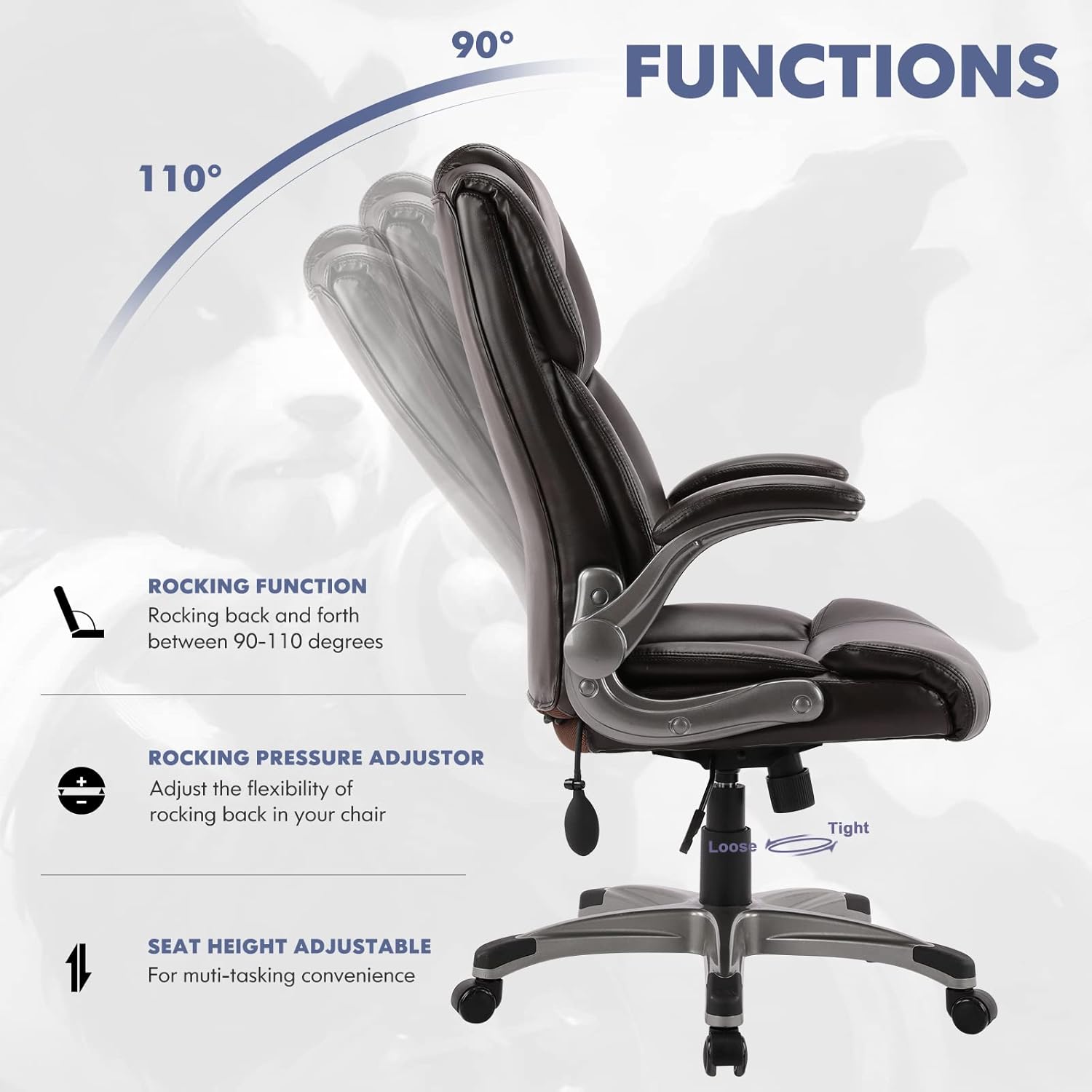
Image 4.2: Illustration of the rocking function (90-110 degrees) and the rocking pressure adjustor (tilt tension knob).
Video 4.3: Demonstration of the tilt and tension control. This video shows how to engage the rocking function and adjust the tilt tension.
5. Maintenance
Proper care will extend the life and appearance of your COLAMY Executive Office Chair.
- Cleaning: Spot clean the bonded leather upholstery as needed. Use a soft, damp cloth to wipe clean. Avoid harsh chemicals or abrasive cleaners that may damage the material.
- Inspection: Periodically check all screws and bolts to ensure they are tight. Re-tighten if necessary.
- Casters: Keep casters free of debris (hair, dust, etc.) to ensure smooth rolling.
- Avoid Direct Sunlight: Prolonged exposure to direct sunlight can cause the upholstery to fade or crack.
6. Troubleshooting
If you encounter any issues with your COLAMY Executive Office Chair, refer to the following common problems and solutions:
- Chair does not adjust height: Ensure the height adjustment lever is fully engaged. Check if the gas lift cylinder is functioning correctly.
- Chair wobbles: Verify that all assembly screws are securely tightened. Ensure the base is properly attached to the gas lift.
- Casters do not roll smoothly: Check for hair or debris wrapped around the caster wheels. Clean them thoroughly.
- Lumbar support does not inflate/deflate: Check the pump bulb and its connection for any leaks or damage. Ensure the button for deflation is pressed correctly.
If the problem persists, please contact COLAMY customer support for further assistance.
7. Specifications
| Feature | Specification |
|---|---|
| Brand | COLAMY |
| Model Name | 2822 |
| Color | Brown |
| Material | Bonded Leather, Foam (Fill Material) |
| Product Dimensions (D x W x H) | 29.9"D x 26"W x 48"H |
| Maximum Weight Recommendation | 275 Pounds (125 kg) |
| Back Style | Solid Back |
| Arm Style | Flip-up |
| Special Features | Adjustable Height, Adjustable Lumbar, Arm Rest, Ergonomic, Head Support, Swivel, Upholstered Leather |
| Recommended Uses | Drafting, Gaming, Office, Reading, Relaxing |
| Certifications | BIFIMA Certified |

Image 7.1: Detailed dimensions of the COLAMY Executive Office Chair, including height, width, depth, seat height, seat width, seat depth, arm length, and backrest height.
8. Warranty and Support
For warranty information, please refer to the documentation included with your purchase or contact COLAMY customer service directly. COLAMY is committed to providing quality products and support.
If you require assistance, have questions, or need to report a missing part, please contact COLAMY customer support through their official website or the retailer where the product was purchased.