
Introduction
This manual provides detailed instructions for the safe and efficient use of your SENLAN 40W RGBW COB Par Can Wash Light. This lighting fixture features a 40W RGBW 4-in-1 COB LED light source, designed for various stage and event applications. Its unique design incorporates a highly polished aluminum reflector and a small dome lens, with the light source directly fixed to the reflector base for efficient cooling without a large, noisy fan.
The fixture offers a 45° beam angle and supports multiple operating modes including DMX512, automatic operation, sound activation, and master/slave configurations. It also allows for manual color mixing.
Setup
1. Unpacking and Inspection
Carefully remove the light fixture from its packaging. Inspect the unit for any signs of damage during transit. Ensure all components, including the mounting bracket and power cable, are present.

Figure 1: SENLAN Par Light as received in packaging.
2. Mounting the Fixture
Attach the provided mounting bracket to the fixture using the screws on the sides. Ensure the bracket is securely fastened. The fixture can be mounted to a truss, ceiling, or placed on a flat surface. Always use appropriate clamps and safety cables when suspending the fixture.

Figure 2: SENLAN Par Light with its mounting bracket.
3. Power Connection
Connect the power cable to the AC input on the back of the fixture. This unit operates on AC90V-240V/50-60Hz. Ensure the power source matches these specifications.
4. DMX Connection (Optional)
For DMX control, connect a DMX cable from your DMX controller to the DMX IN port on the fixture. If linking multiple fixtures, connect from the DMX OUT of the first fixture to the DMX IN of the next, and so on.
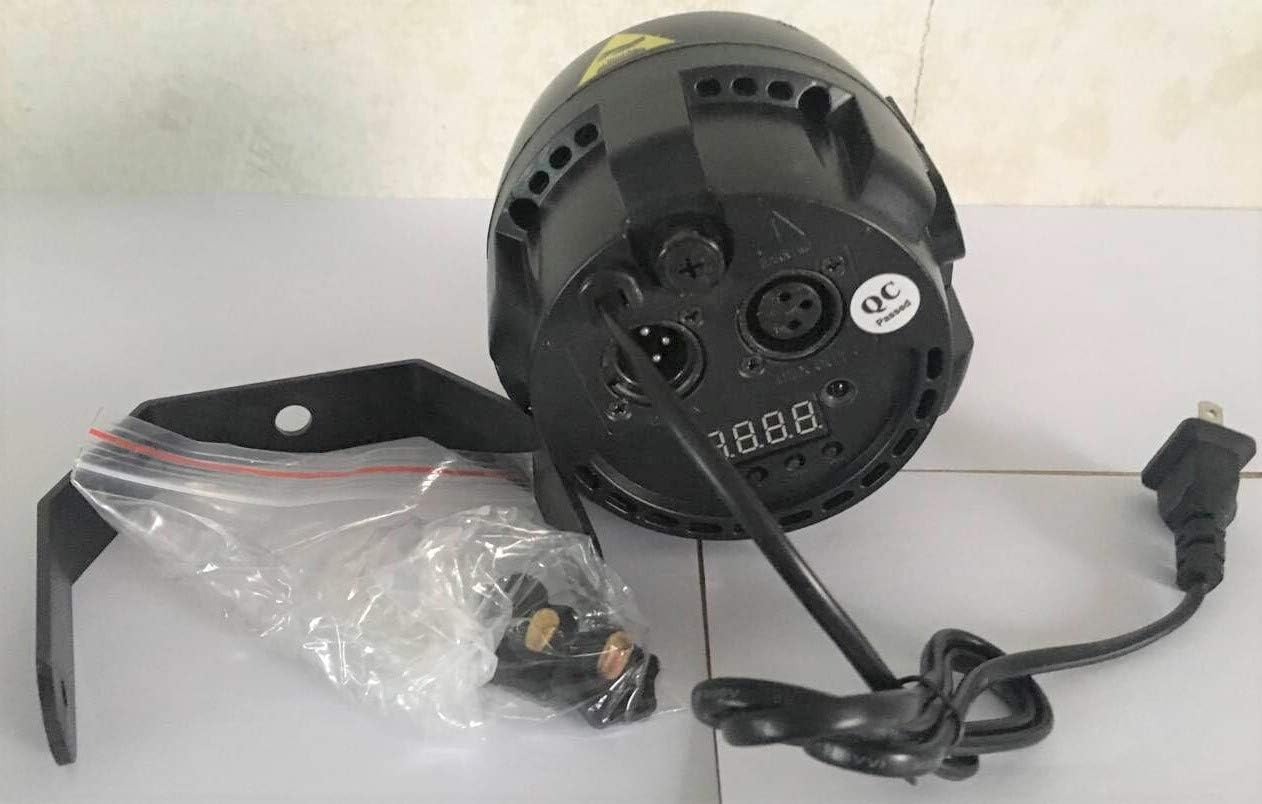
Figure 3: Rear view of the SENLAN Par Light, showing power input, DMX ports, and control display.
Operating Instructions
The SENLAN Par Light offers several operating modes, selectable via the control panel on the rear of the unit.
1. Control Panel Overview
The control panel typically includes a digital display and several buttons (e.g., Menu, Up, Down, Enter) to navigate through settings and modes.
2. DMX512 Mode
In DMX mode, the fixture is controlled by an external DMX controller. Set the DMX address for each fixture using the control panel. This model uses 7 DMX channels. Refer to your DMX controller's manual for specific programming instructions.

Figure 4: DMX testing of multiple SENLAN Par Lights, demonstrating color capabilities.
3. Automatic Operation
Select "Auto" mode from the control panel. The fixture will cycle through pre-programmed light shows and color changes automatically.
4. Sound Action Mode
Select "Sound" mode. The built-in microphone will detect ambient sound, and the light effects will synchronize with the music or audio.
5. Master/Slave Mode
To synchronize multiple fixtures without a DMX controller, connect them via DMX cables. Set one fixture as "Master" and the others as "Slave." The slave units will mimic the master's operation.
6. Manual Color Mixing (Mixology Feature)
This feature allows you to manually adjust the intensity of Red, Green, Blue, and White LEDs to create custom colors directly from the fixture's control panel, similar to what can be achieved with a DMX controller.
Maintenance
1. Cleaning
Regularly clean the lens and exterior housing with a soft, lint-free cloth. Do not use abrasive cleaners or solvents. Ensure the fixture is unplugged before cleaning.
2. Fuse Replacement
The fixture is equipped with a 3A fuse located in a fuse holder at the back for safety. If the unit fails to power on, check and replace the fuse if necessary. Always replace with a fuse of the same type and rating (3A).
3. Cooling System
The fixture utilizes a special thin aluminum reflector and a sunflower aluminum part for cooling. Ensure that the cooling fins are not obstructed to maintain optimal performance and longevity of the LED.
Troubleshooting
| Problem | Possible Cause | Solution |
|---|---|---|
| Fixture does not power on. | No power supply; Blown fuse; Faulty power cable. | Check power connection; Replace 3A fuse; Test with a different power cable. |
| No light output in DMX mode. | Incorrect DMX address; DMX cable issue; DMX controller not sending signal. | Verify DMX address setting; Check DMX cable connections; Ensure DMX controller is active and sending data. |
| Colors are incorrect or inconsistent. | DMX channel mapping error; Internal wiring issue; Lens not properly seated. | Review DMX channel assignments; Contact support if persistent; Ensure the dome lens is correctly positioned. |
| Fixture makes unusual noise. | Loose internal component; Cooling system issue. | Ensure fixture is securely mounted; Check for obstructions around cooling fins. If noise persists, contact support. |
| Fixture not responding in Master/Slave mode. | Incorrect Master/Slave setting; DMX cable issue between units. | Verify one unit is set to Master and others to Slave; Check DMX cable connections between fixtures. |
Specifications
- Model Number: PAR38 RGBW
- Light Source: 1x 40W RGBW 4-in-1 COB LED
- Beam Angle: 45 degrees
- Operating Modes: DMX512, Automatic, Sound Action, Master/Slave
- DMX Channels: 7
- Voltage: AC90V-240V / 50-60Hz
- Wattage: 40 watts
- Amperage: 3 A (fuse rating)
- Light Output Maximum: 1000 lumens
- Color Rendering Index (CRI): 80
- Material: Acrylonitrile Butadiene Styrene (ABS), Aluminum
- Finish Type: Polished
- Product Dimensions: 11L x 12W x 11H centimetres
- Item Weight: 550 g
- Manufacturer: Casisy
- Country of Origin: China
Warranty Information
This product comes with a 1-year manufacturer's warranty. Please retain your proof of purchase for warranty claims. The warranty covers defects in materials and workmanship under normal use. It does not cover damage caused by misuse, accidents, unauthorized modifications, or improper installation.
Support and Contact Information
For technical support, service, or warranty inquiries, please contact the manufacturer:
- Manufacturer: Guangzhoushi Senbaodengguangshebei Youxiangongsi
- Phone: +8602086023645
- Brand: SENLAN
Please have your product model number (PAR38 RGBW) and proof of purchase ready when contacting support.