1. Introduction
The OLIGHT Perun 2 Mini is a versatile, rechargeable headlamp designed for various activities requiring hands-free illumination. It features dual white and red LED light sources, multiple lighting modes, and a compact, durable design. This manual provides essential information for safe and effective use of your Perun 2 Mini.
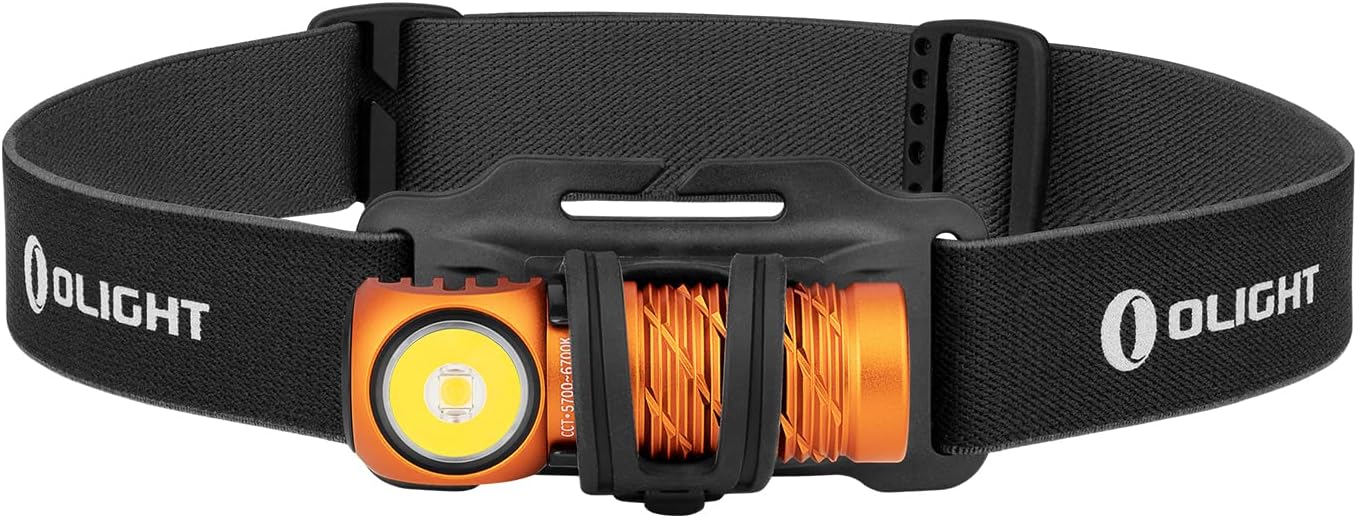
Image 1: The OLIGHT Perun 2 Mini Headlamp mounted on its adjustable headband.
2. Safety Information
- Eye Safety: Do not shine the light directly into eyes. The powerful beam can cause temporary vision impairment or permanent eye damage.
- Children: Keep out of reach of children. This product is not a toy.
- Heat: The headlamp may become warm during prolonged use, especially on higher modes. Avoid direct contact with hot surfaces.
- Battery: Use only the specified rechargeable battery. Do not attempt to disassemble or modify the battery.
- Water Resistance: While IPX8 rated, ensure the charging port is clean and dry before charging to prevent damage.
3. Package Contents
Verify that all items are present in your package:
- OLIGHT Perun 2 Mini Headlamp
- Rechargeable Battery (pre-installed)
- Headband with Silicone Mount
- MCC1A Magnetic Charging Cable
- Pocket Clip
- User Manual

Image 2: Contents of the Perun 2 Mini package.
4. Product Overview
The Perun 2 Mini features a compact body with a powerful LED, a magnetic tail cap for charging and attachment, and a side switch for operation. It can be used as a headlamp with the included headband or as a handheld flashlight.
Image 3: Front view of the Perun 2 Mini, highlighting the LED and body design.
5. Setup
5.1 Initial Charging
Before first use, fully charge the headlamp. Connect the magnetic charging cable (MCC1A) to the magnetic tail cap of the headlamp and a USB power source. The indicator on the charging cable will show red during charging and turn green when fully charged.

Image 4: The Perun 2 Mini connected to its magnetic charging cable.
5.2 Attaching to Headband
Insert the headlamp into the silicone mount on the headband. Ensure it is securely seated. The headband is adjustable for a comfortable fit.
6. Operating Instructions
6.1 Power On/Off and Mode Switching
- Turn On/Off: Single click the side switch to turn the light on or off.
- Change Brightness: When the light is on, press and hold the side switch to cycle through Low, Medium, and High modes. Release the switch at your desired brightness.
- Moonlight Mode: When the light is off, press and hold the side switch for approximately one second to activate Moonlight mode.
- Turbo Mode: Double click the side switch to activate Turbo mode. Double click again to return to the previous mode.
- Red Light Mode: Triple click the side switch to activate Red light mode.
- SOS Mode: From Red light mode, double click the side switch to activate SOS mode.
6.2 Angle Adjustment
The headlamp can be rotated up to 180 degrees within its silicone mount, allowing you to direct the beam precisely where needed. This wide range of adjustment enhances visibility and helps avoid hazards.

Image 5: The Perun 2 Mini demonstrating its 180-degree adjustable angle.
6.3 Usage Scenarios
The Perun 2 Mini is suitable for a wide range of activities, including camping, running, hiking, night fishing, auto repair, and as an emergency light during power outages.

Image 6: Examples of the Perun 2 Mini in use for different activities.
7. Battery Management
7.1 Charging
The Perun 2 Mini utilizes a magnetic charging system for convenience. A full charge takes approximately 70 minutes, providing extended runtime.
7.2 Battery Level Indicator
The headlamp features a three-color battery indicator to show the remaining power at a glance:
- Green: Battery level > 60%
- Orange: Battery level 60% ~ 10%
- Red: Battery level 10% ~ 5%
- Red Flashing: Battery level < 5%

Image 7: The Perun 2 Mini's battery level indicator.
8. Maintenance
- Cleaning: Clean the lens with a soft, clean cloth. For stubborn dirt, use a small amount of rubbing alcohol.
- Charging Port: Keep the magnetic charging port clean and free of debris to ensure proper charging.
- Storage: Store the headlamp in a cool, dry place. If storing for an extended period, charge the battery every few months to maintain its health.
9. Troubleshooting
- Light not turning on: Ensure the battery is charged. Check for any physical damage.
- Light is dim: The battery may be low. Recharge the headlamp.
- Charging issues: Ensure the magnetic charging cable is properly connected and the charging port is clean. Try a different USB power source.
- Inconsistent mode switching: Ensure the side switch is clean and free of obstructions.
10. Specifications
| Feature | Detail |
|---|---|
| Brand | OLIGHT |
| Model | Perun 2 Mini |
| Color | Orange (Cool white) |
| Material | Aluminum |
| Light Source Type | LED |
| Power Source | Rechargeable Battery |
| Max Brightness | 1100 Lumens |
| Max Beam Distance | 150 Meters |
| Product Size | 2.06 x 2.2 x 6.43 cm |
| Product Weight | 140 g (including battery) |
| Waterproof Rating | IPX8 |
| Impact Resistance | 1.5 Meters |
| Special Features | SOS Mode, Angle Adjustable Strap |
11. Warranty and Support
OLIGHT products are covered by a manufacturer's warranty. For detailed warranty information, product support, or service inquiries, please refer to the official OLIGHT website or contact your local dealer. Keep your purchase receipt for warranty claims.


