
1. Introduction
Thank you for choosing the JATRHG EV Charging Cable. This manual provides important information regarding the safe and efficient use of your 22KW, 32A, 3-phase, 5-meter Type 2 to Type 2 charging cable. Please read this manual thoroughly before using the product and retain it for future reference.
This cable is designed for charging electric vehicles and plug-in hybrids equipped with a Type 2 charging port, compatible with public charging stations and home wall-mounted chargers.
2. Important Safety Warnings
Failure to follow these safety instructions may result in electric shock, fire, serious injury, or death.
- Installation: This device must be installed by a qualified electrician in accordance with local standards. Incorrect installation can cause risks of electric shock or fire.
- Usage: Use this equipment only for its intended purpose. Any modification or inappropriate use may lead to damage or safety risks.
- Supervision: Do not leave the device operating unattended. In case of any problem, turn it off immediately and consult a professional.
- Environment: Use the equipment under recommended conditions. Avoid exposure to excessive humidity or extreme temperatures.
- Maintenance: Do not attempt to repair the device yourself. Entrust all repairs to a qualified technician.
- Safety: Keep the equipment out of reach of children and animals.
- Disconnection: Disconnect the device in case of emergency to avoid any danger.
3. Product Features
- High Power: 22KW maximum output power, 32A three-phase current for fast charging.
- Durable Construction: Outer shell material made of TPU for enhanced durability and flexibility.
- Weather Resistant: IP54 protection class, suitable for various environmental conditions.
- Long Lifespan: Mechanical life of plugging and unplugging (no load) > 10,000 times.
- Ergonomic Design: Lightweight and easy to transport, with an ergonomic and anti-skid design for comfortable handling.
- Certified Safety: CE and TÜV certified for safety and quality assurance.
4. Package Contents
Upon unpacking, please ensure all items are present and undamaged:
- EV Charging Cable (Type 2 to Type 2)
- User Manual (this document)
- Storage Bag
- Handle (if applicable, for wall mounting)
5. Setup and Connection
The JATRHG EV Charging Cable is designed for straightforward use. Ensure your vehicle and charging station are compatible with Type 2 connectors.
5.1 Initial Inspection
Before each use, visually inspect the cable and connectors for any signs of damage, wear, or foreign objects. Do not use the cable if it appears damaged.
5.2 Connecting the Cable
- Ensure both your electric vehicle and the charging station are turned off or in a safe state for connection.
- Open the charging port cover on your vehicle.
- Insert one end of the Type 2 charging cable firmly into the vehicle's charging port. Ensure it clicks into place.
- Insert the other end of the Type 2 charging cable firmly into the charging station's output port. Ensure it clicks into place.
- Once both ends are securely connected, you can initiate the charging process according to your vehicle's and charging station's instructions.

Image: The JATRHG EV charging cable connected to a vehicle's charging port, showing the secure connection and illuminated charging indicator.

Image: A close-up view illustrating the compatibility of the Type 2 connector with various vehicle charging ports.
6. Operating Instructions
6.1 Initiating Charging
After securely connecting the cable to both the vehicle and the charging station:
- Follow the instructions on your charging station to start the charging session. This may involve swiping a card, using an app, or pressing a button.
- Monitor the charging status indicators on your vehicle dashboard or the charging station.
6.2 Ending Charging
To safely end the charging session:
- Stop the charging session via your vehicle's controls or the charging station's interface.
- Wait for the charging station and vehicle to indicate that the session has ended and the cable is unlocked.
- Disconnect the cable from the vehicle first, then from the charging station.
- Replace the protective caps on the connectors to prevent dust and moisture ingress.
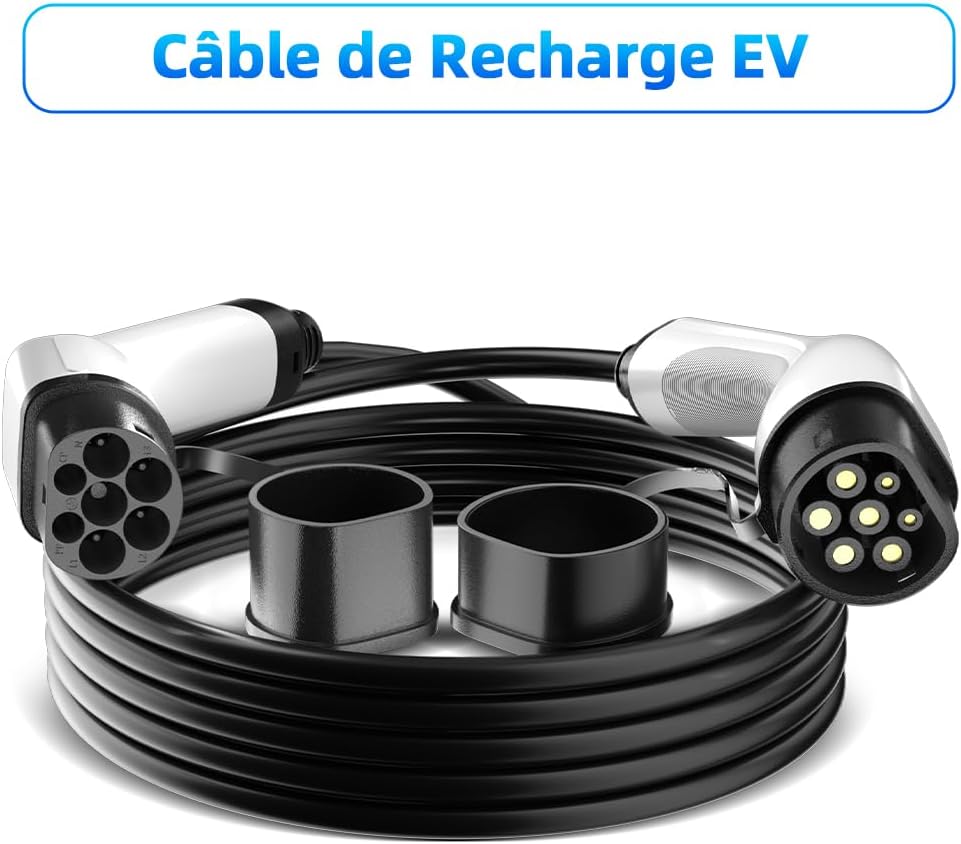
Image: The JATRHG EV charging cable, showing both Type 2 connectors with protective caps, ready for storage or use.
7. Maintenance and Storage
7.1 Cleaning
Keep the charging cable clean and free from dirt, dust, and moisture. Use a soft, dry cloth to wipe down the cable and connectors. Do not use harsh chemicals or abrasive cleaners.
7.2 Storage
When not in use, store the cable in a dry, cool place, away from direct sunlight and extreme temperatures. Use the provided storage bag to protect the cable from damage and keep the connectors clean. Avoid kinking or bending the cable sharply.

Image: A detailed view of the ergonomic and anti-skid design of the Type 2 connector, highlighting its comfortable grip.
8. Troubleshooting
If you encounter issues during charging, refer to the following common problems and solutions:
| Problem | Possible Cause | Solution |
|---|---|---|
| Charging does not start. |
|
|
| Slow charging speed. |
|
|
| Cable feels hot during charging. |
|
|
If the problem persists after attempting these solutions, please contact customer support or a qualified electrician.
9. Technical Specifications
| Feature | Specification |
|---|---|
| Model Number | EV-IEC-AC-32-PV |
| Brand | JATRHG |
| Connector Type | Type 2 to Type 2 (IEC 62196-2) |
| Maximum Output Power | 22 KW |
| Current Rating | 32 A (Three-Phase) |
| Voltage Rating | 400 Volts (AC) |
| Cable Length | 5 Meters |
| Outer Shell Material | TPU |
| Operating Temperature | -40℃ to +85℃ |
| Protection Class | IP54 |
| Mechanical Life | > 10,000 plugging/unplugging cycles (no load) |
| Certifications | CE, TÜV, Rhos |
| Compatible Devices | Type 2 Electric and Plug-in Hybrid Vehicles |
| Item Weight | 4 Kilograms |
10. Warranty Information
The JATRHG EV Charging Cable comes with a 2-year warranty on spare parts, as per EU availability. This warranty covers defects in materials and workmanship under normal use. It does not cover damage resulting from misuse, accidents, unauthorized modifications, or improper installation.
Please retain your proof of purchase for warranty claims.
11. Customer Support
For technical assistance, warranty claims, or any questions regarding your JATRHG EV Charging Cable, please contact your retailer or visit the official JATRHG website for support information.
Manufacturer: Eway New Energy