
1. Introduction
Thank you for choosing the FUDONI Projector. This manual provides detailed instructions for setting up, operating, and maintaining your projector to ensure optimal performance and longevity. Please read this manual thoroughly before using the product and keep it for future reference.

Image: FUDONI Projector showcasing its key features like 4K support, 5G WiFi, 1080P FHD, and Bluetooth 5.1.
2. What's in the Box
Verify that all components are present in the package:
- Projector
- Remote Control
- HDMI Cable
- Power Cord
- AV Cable
- User Manual (this document)
3. Product Features
- Fast & Stable 5G WiFi & Bluetooth 5.1: Supports 2.4G/5G dual-band WiFi for smooth video streaming and Bluetooth 5.1 for connecting external audio devices like speakers and headphones.
- Native 1080P & 4K Support: Features native 1920x1080 resolution with 4K input support, NTSC color technology, and a 10000:1 contrast ratio for superior image quality and realistic color reproduction.
- Large Screen & Zoom Function: Offers a projection size from 32 to 300 inches with a projection distance of 3.6ft to 32.8ft. Includes a 50% zoom function to adjust image size without moving the projector.
- Multi-Device Compatibility: Equipped with HDMI, USB, AV, and 3.5mm audio ports for connecting TV sticks, smartphones, laptops, Chromecast, DVD players, external speakers, PS4, USB flash drives, and more.
- Built-in HiFi Stereo Speakers: Provides original audio fidelity for an immersive auditory experience.
- Detachable Dust Filter: Designed to prevent dust from entering the machine and extending the product's lifespan.

Image: Overview of FUDONI Projector's key features.
4. Setup
4.1 Placement
Position the projector on a stable, flat surface or mount it using compatible accessories. Ensure there is adequate ventilation around the projector to prevent overheating. The projector supports front, rear, and ceiling installation.
4.2 Power Connection
Connect the power cord to the projector's power input and then plug it into a power outlet.
4.3 Focus and Keystone Correction
Adjust the focus ring on the projector lens until the image is clear. Use the keystone correction feature to correct distorted images if the projector is not perfectly perpendicular to the screen.

Image: Demonstrates the zoom function and flexible installation options.

Image: Visual guide for various projector setup and installation methods.
5. Operating Instructions
5.1 Power On/Off
Press the power button on the projector or the remote control to turn the unit on or off.
5.2 Navigation
Use the arrow keys and OK button on the remote control or the projector's control panel to navigate through the on-screen menu.
5.3 Input Source Selection
Press the 'Source' button on the remote or projector to select the desired input source (HDMI, USB, AV, etc.).

Image: Examples of the projector's versatile use in different environments.
6. Connectivity
6.1 WiFi Connection (2.4G/5G)
To connect your smartphone or other devices wirelessly:
- Go to the projector's settings menu and select 'WiFi'.
- Choose your desired 2.4G or 5G network from the list.
- Enter the password and connect.
- For screen mirroring, select the appropriate mirroring function on your smartphone (e.g., Screen Cast for iOS, Smart View for Android) and connect to the projector's network.
Note: Due to copyright restrictions, direct screen mirroring of streaming services like Netflix, Prime Video, Hulu, Disney+ is not supported. For these services, use an HDMI connection with a TV Stick or Roku Express.

Image: Illustrates the 5G wireless connection capability with various operating systems.

Image: Depicts the projector's fast wireless connection for an immersive gaming experience.
6.2 Bluetooth Connection (5.1)
The Bluetooth 5.1 feature allows connection to external Bluetooth speakers, headphones, and other audio equipment for an enhanced sound experience. It is not designed for connecting to smartphones.

Image: Bluetooth 5.1 connectivity for external audio devices.

Image: Highlights the Bluetooth 5.1 and HiFi speaker features for delicate sound.
6.3 Wired Connections (HDMI, USB, AV)
Connect devices such as TV sticks, laptops, gaming consoles (PS4), DVD players, or USB flash drives to the corresponding ports on the projector. Select the correct input source using the 'Source' button.
Note for USB drives: The projector primarily recognizes USB drives formatted in FAT32. If you encounter issues playing files directly from a USB, ensure it is formatted correctly.
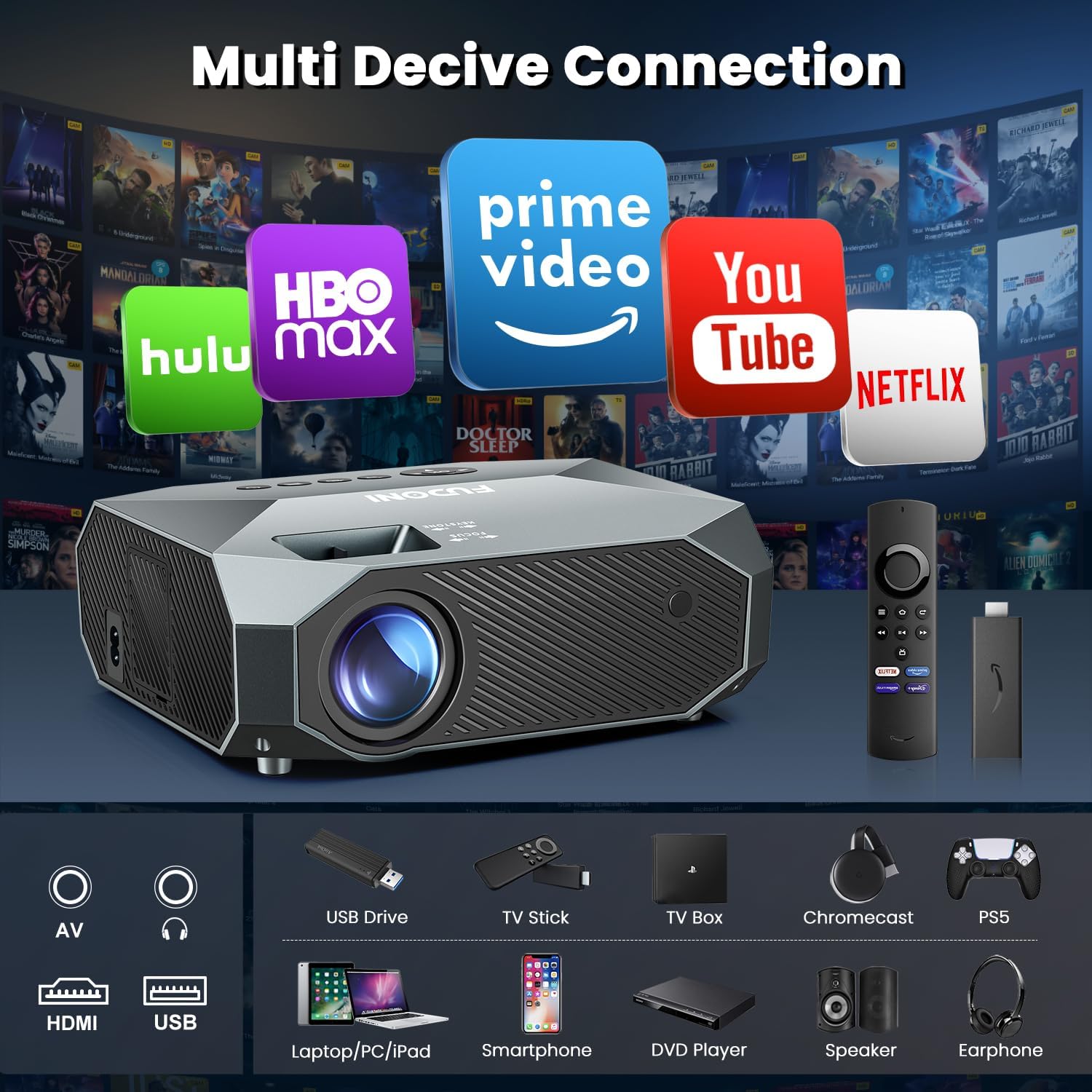
Image: Comprehensive overview of the projector's multi-device connectivity.

Image: Showcases the projector's compatibility with popular streaming platforms via connected devices.
7. Display & Audio
7.1 Image Quality
The projector delivers native 1080P resolution with support for 4K input, providing clear and vibrant images. Adjust focus and keystone correction for the best visual experience.

Image: Demonstrates the superior image quality of the FUDONI Projector.

Image: Emphasizes the projector's capabilities for a cinematic experience.

Image: Illustrates the impressive maximum screen size of 300 inches.
7.2 Audio Output
The projector includes built-in HiFi stereo speakers for a complete audio experience. For louder or more immersive sound, connect external speakers via Bluetooth or the 3.5mm audio port.

Image: Highlights the cinematic sound experience provided by the built-in HiFi speakers.
8. Maintenance
8.1 Lens Cleaning
Gently wipe the projector lens with a soft, lint-free cloth designed for optical surfaces. Avoid using abrasive cleaners or excessive force.
8.2 Dust Filter
The projector features a detachable dust filter. Regularly clean the filter to prevent dust accumulation, which can affect performance and lifespan. Refer to the diagram in the manual for filter removal and cleaning instructions.
8.3 Storage
When not in use for extended periods, store the projector in a cool, dry place, away from direct sunlight and extreme temperatures. Use the original packaging or a protective case to prevent damage.
9. Troubleshooting
9.1 No Image/Poor Image Quality
- Ensure the power cord is securely connected and the projector is powered on.
- Check the input source selection matches the connected device.
- Adjust the focus ring and keystone correction.
- Verify the connected device is outputting a signal.
- Clean the projector lens.
9.2 No Sound
- Check the volume level on both the projector and the connected device.
- Ensure external speakers are properly connected via Bluetooth or 3.5mm audio cable.
- If using HDMI, ensure the audio output settings on the source device are correct.
9.3 Wireless Connection Issues
- Ensure the projector and your device are within range of the WiFi network.
- Verify the WiFi password is entered correctly.
- Restart both the projector and your router.
- For screen mirroring, ensure you are using the correct mirroring function on your device (not direct app casting).
9.4 USB Playback Issues
- Ensure your USB drive is formatted to FAT32.
- Check that the media files are in supported formats.
10. Specifications
| Feature | Specification |
|---|---|
| Model Number | R7B |
| Product Dimensions | 8.46 x 6.89 x 3.3 inches |
| Item Weight | 3.08 pounds |
| Display Resolution | 1920 x 1080 (Native 1080P, 4K Supported) |
| Connectivity Technology | USB, HDMI, AV, 3.5mm Audio |
| Wireless Connectivity | 2.4G/5G WiFi, Bluetooth 5.1 |
| Projection Size | 32" - 300" |
| Zoom Function | 50% - 100% |
| Manufacturer | FUDONI |
11. Warranty & Support
FUDONI offers lifetime support for this product. For any technical assistance, troubleshooting, or warranty inquiries, please refer to the contact information provided on the product packaging or the official FUDONI website.
Please retain your proof of purchase for warranty claims.


