
Introduction
The Auxbeam XP-Ultra Series 3-Inch Amber/White LED Light Pods are versatile off-road lighting solutions featuring 6 distinct lighting modes, dual-color amber and white output, and a durable, waterproof design. This manual provides detailed instructions for installation, operation, and maintenance to ensure optimal performance and longevity of your light pods.
Safety Information
- Always disconnect the vehicle's battery before performing any electrical work.
- Ensure all wiring connections are secure and properly insulated to prevent short circuits.
- Do not look directly into the light when it is operating, as it can cause eye damage.
- Mount the lights securely to prevent vibration and potential detachment during vehicle operation.
- Consult a professional if you are unsure about any installation steps.
Package Contents
Verify that all items are present in your package:
- 2 x Auxbeam 3-Inch LED Light Pods
- 1 x 10ft DT Wiring Harness (2-leads)
- 2 x Installation Accessories Kits (Mounting Brackets, Wrenches & Screws)
- 1 x User Manual

Figure 1: Contents of the Auxbeam XP-Ultra Series 3-Inch LED Light Pods package, including two light pods, wiring harness, mounting hardware, and user manual.
Product Features
- 6 Lighting Modes: Easily switch between White, Amber, White & Amber, White Strobe, Amber Strobe, and White & Amber Strobe modes. Features a memory function to recall the last used mode.
- Dual Color Output: Provides 3000K amber floodlight and 6500K white spotlight for versatile use in various driving conditions.
- Advanced Optics: Features a 30° spot beam pattern and a 120° broad flood reflector for optimal light distribution.
- Durable Construction: Built with 6063 aluminum profile and 304 stainless steel brackets for high durability and efficient heat dissipation.
- IP68 Waterproof: Seamless protective housing ensures excellent performance in waterproof, dustproof, and quakeproof conditions.
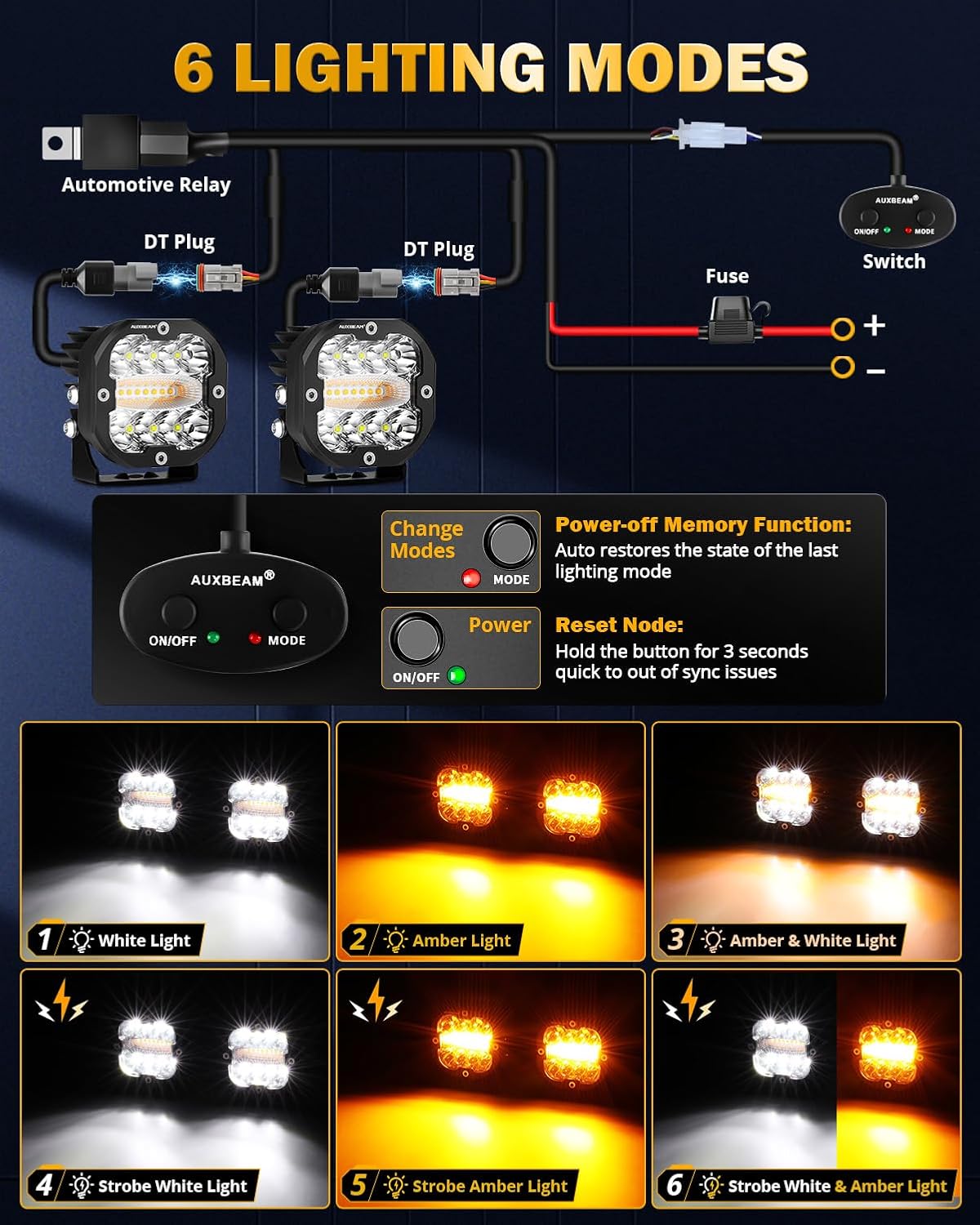
Figure 2: Visual representation of the six distinct lighting modes available on the Auxbeam XP-Ultra Series LED Light Pods.

Figure 3: Illustration of the memory function, which retains the last selected lighting mode after the lights are turned off and on again.

Figure 4: Diagram showing the 30° white spot beam and 120° amber flood beam for enhanced driving visibility.

Figure 5: The IP68 waterproof rating ensures the light pods are protected against dust and water ingress, suitable for harsh environments.
Installation
The Auxbeam XP-Ultra Series LED Light Pods are designed for straightforward installation. Follow these general steps:
- Mounting: Securely attach the light pods to your desired location using the provided mounting brackets and hardware. Ensure the lights are aimed correctly for optimal beam pattern.
- Wiring: Connect the light pods to the included DT wiring harness. The harness is designed for plug-and-play functionality.
- Power Connection: Connect the wiring harness to your vehicle's power source (battery) and a suitable switch for operation. Ensure proper grounding.
Video 1: An unboxing and installation overview of the Auxbeam X-PRO Series 3 Inch LED Pods Kit, demonstrating the components and mounting process.
Operating Modes
The light pods feature 6 distinct lighting modes, switchable via the remote control on the wiring harness. The memory function ensures the last selected mode is retained upon restart.
- White Light: Standard white illumination.
- Amber Light: Standard amber illumination.
- Amber & White Light: Both amber and white LEDs illuminated simultaneously.
- White Strobe: Flashing white light.
- Amber Strobe: Flashing amber light.
- White & Amber Strobe: Alternating flashing white and amber light.
To reset the mode or synchronize lights, hold the mode button for 3 seconds.
Video 2: Demonstration of the 6 lighting modes for the Auxbeam 3" 48W LED Pods, showing the different white, amber, and strobe options.
Video 3: A detailed look at the 6 Modes Amber White LED Cube Lights (Model ZD000713), showcasing the various lighting combinations and strobe effects.
Maintenance
- Regularly clean the lens of the light pods with a soft cloth and mild soap to maintain optimal light output.
- Inspect wiring and connections periodically for any signs of wear, corrosion, or damage.
- Ensure mounting hardware remains tight to prevent vibration and potential damage.
Troubleshooting
- Lights not turning on: Check all wiring connections, ensure the battery is charged, and verify the fuse in the wiring harness is intact.
- Flickering lights: Inspect for loose connections or insufficient power supply. Ensure the wiring is correctly sized for the current draw.
- Mode switching issues: Ensure the remote control is functioning correctly. Try resetting the mode by holding the mode button for 3 seconds.
Specifications
| Feature | Detail |
|---|---|
| Model Number | ZDAB000713 |
| Color | XP-Ultra 3 Inch Amber/White Combo 6 Modes |
| Shape | Square |
| Material | Aluminum |
| Finish Type | Powder Coated |
| Light Source Type | LED |
| Voltage | 12 Volts (DC) |
| Brightness | 9600 lumen |
| Wattage (per light) | 48 Watts |
| Maximum Compatible Light Source Wattage | 96 Watts |
| Mounting Type | Bracket Mount |
| Bulb Features | Color-changing, Mode-switching, Strobe lighting effects |
| Number of Light Sources | 2 |
| Product Dimensions | 8.6"L x 8.2"W x 4.1"H |
| Light Output Maximum | 9600 Lumens |
| Beam Angle | 30 Degrees (Spot) / 120 Degrees (Flood) |
| IP Rating | IP68 |
| Average Life | 50000 Hours |
Warranty & Support
Auxbeam provides a 2-year warranty for this product. For any assistance or inquiries, please contact Auxbeam customer service. They offer 24-hour after-sales service to ensure you receive the best solution.
