
Advance Paris A12 Classic (Model 6802367)
Advance Paris A12 Classic Stereo Hi-Fi Amplifier
User Manual - Model 6802367
1. Introduction
Thank you for choosing the Advance Paris A12 Classic Stereo Hi-Fi Amplifier. This high-fidelity amplifier is designed to deliver exceptional audio performance with its powerful amplification, sophisticated tube pre-amplification stage, and extensive connectivity options. To ensure optimal performance and longevity of your device, please read this manual thoroughly before operation.
Important Safety Instructions
- Read Instructions: All safety and operating instructions should be read before the product is operated.
- Retain Instructions: The safety and operating instructions should be retained for future reference.
- Heed Warnings: All warnings on the product and in the operating instructions should be adhered to.
- Follow Instructions: All operating and use instructions should be followed.
- Cleaning: Unplug this product from the wall outlet before cleaning. Do not use liquid cleaners or aerosol cleaners. Use a damp cloth for cleaning.
- Water and Moisture: Do not use this product near water – for example, near a bathtub, wash bowl, kitchen sink, laundry tub, in a wet basement, or near a swimming pool.
- Ventilation: Slots and openings in the cabinet are provided for ventilation and to ensure reliable operation of the product and to protect it from overheating. These openings must not be blocked or covered.
- Power Sources: This product should be operated only from the type of power source indicated on the marking label. If you are not sure of the type of power supply to your home, consult your product dealer or local power company.
- Power-Cord Protection: Power-supply cords should be routed so that they are not likely to be walked on or pinched by items placed upon or against them, paying particular attention to cords at plugs, convenience receptacles, and the point where they exit from the product.
- Lightning: For added protection for this product during a lightning storm, or when it is left unattended and unused for long periods of time, unplug it from the wall outlet and disconnect the antenna or cable system. This will prevent damage to the product due to lightning and power-line surges.
- Overloading: Do not overload wall outlets, extension cords, or integral convenience receptacles as this can result in a risk of fire or electric shock.
- Object and Liquid Entry: Never push objects of any kind into this product through openings as they may touch dangerous voltage points or short-out parts that could result in a fire or electric shock. Never spill liquid of any kind on the product.
- Servicing: Do not attempt to service this product yourself as opening or removing covers may expose you to dangerous voltage or other hazards. Refer all servicing to qualified service personnel.
2. Product Overview
Front Panel
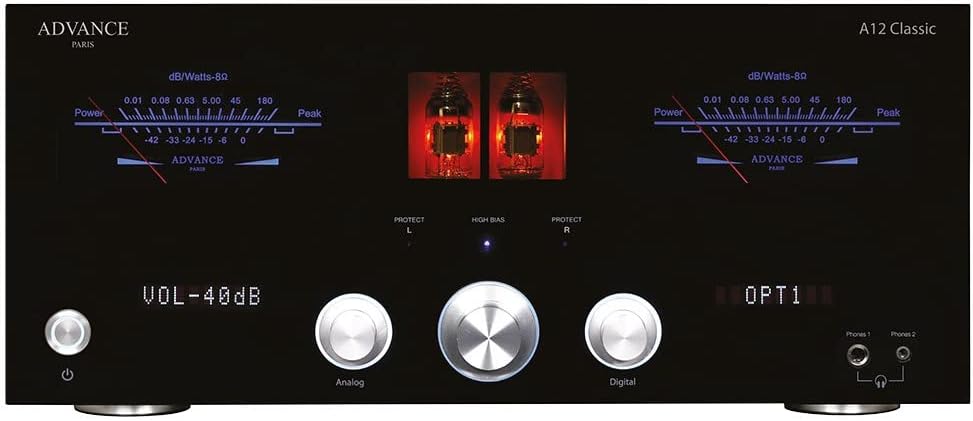
Figure 2.1: Front view of the Advance Paris A12 Classic amplifier. The front panel features a sleek black finish with a central display indicating volume and selected input. Two prominent VU meters provide visual feedback on output levels, while illuminated windows showcase the pre-amplification tubes. Controls include a large central volume knob, input selection buttons, and a power button.
Rear Panel

Figure 2.2: Rear view of the Advance Paris A12 Classic amplifier. The rear panel is equipped with a comprehensive selection of input and output terminals. These include balanced XLR inputs, multiple RCA analog inputs, digital inputs (optical, coaxial, USB-B), HDMI ARC, and a phono input with MM/MC selection. Speaker binding posts are robust and clearly labeled for left and right channels. A voltage selector switch is also visible.
Internal Design
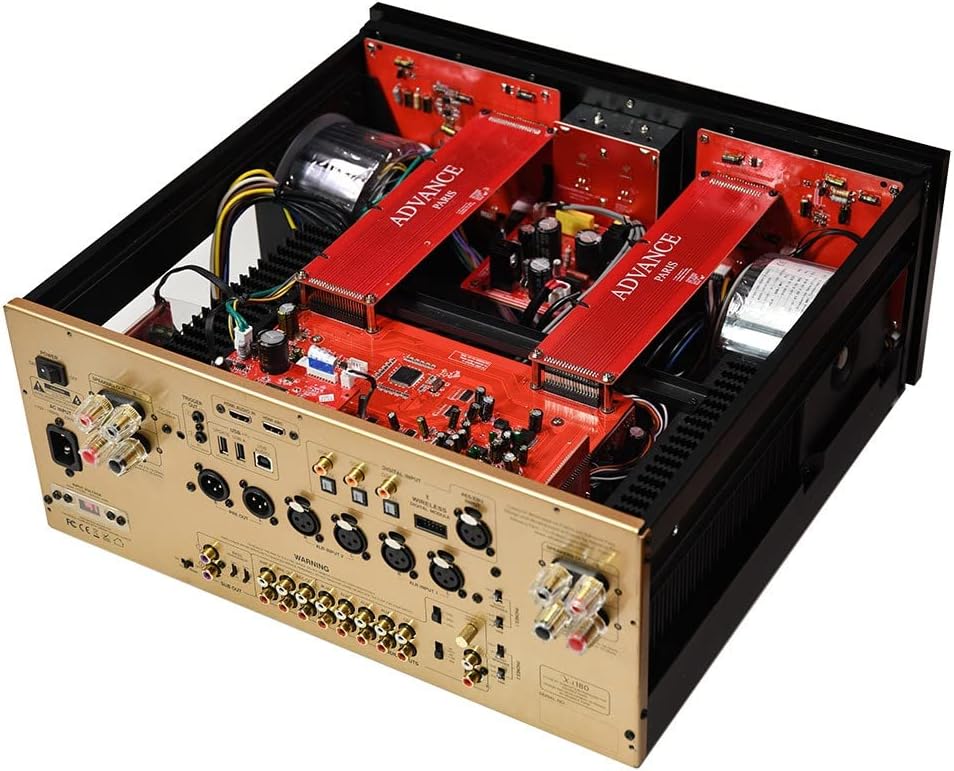
Figure 2.3: Angled internal view of the Advance Paris A12 Classic amplifier. This image highlights the amplifier's robust internal construction, featuring a dual-mono design. Two large toroidal transformers are visible, positioned on either side of the chassis, indicating dedicated power supplies for each channel. The red circuit boards are neatly arranged, showcasing the high-quality components and meticulous engineering.
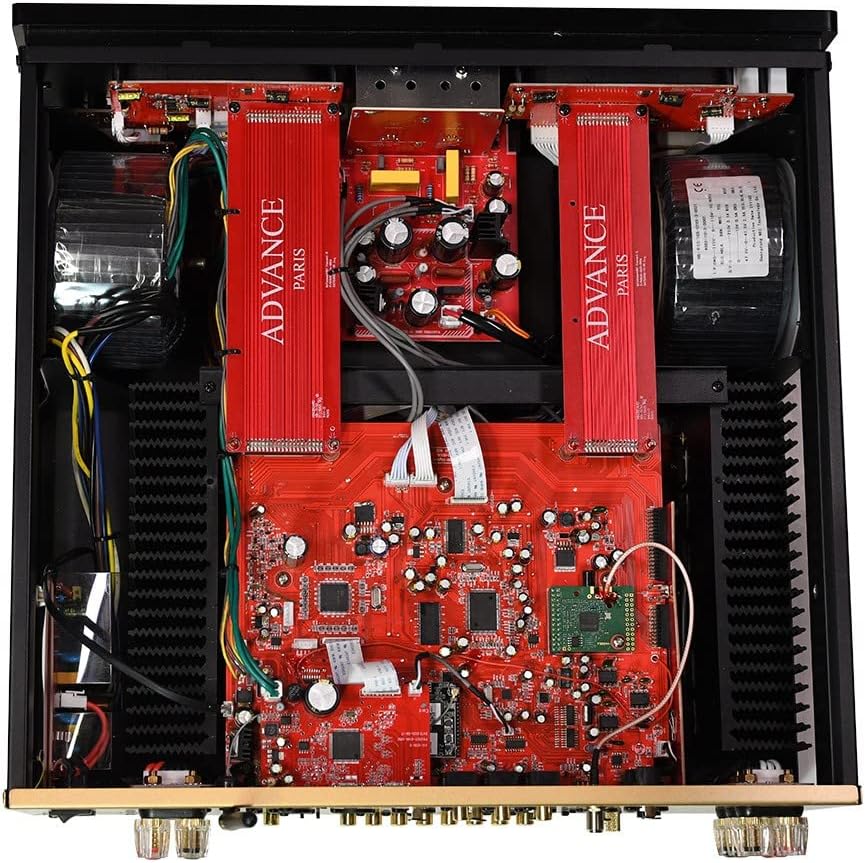
Figure 2.4: Top-down internal view of the Advance Paris A12 Classic amplifier. This perspective clearly shows the symmetrical layout of the internal components, reinforcing the dual-mono architecture. Large heat sinks are visible along the sides, ensuring efficient thermal management. The intricate network of circuit boards and wiring demonstrates the complex yet organized design aimed at delivering high-fidelity audio.
3. Setup
3.1 Unpacking
- Carefully remove the amplifier from its packaging.
- Retain all packaging materials for future transport or servicing.
- Inspect the amplifier for any signs of damage. If damage is present, do not connect the unit and contact your dealer.
3.2 Placement
- Place the amplifier on a stable, level surface away from direct sunlight, heat sources, or excessive moisture.
- Ensure adequate ventilation around the unit. Do not block the ventilation openings on the top or sides. Allow at least 10 cm (4 inches) of clear space above and around the amplifier.
- Avoid placing the amplifier near strong electromagnetic fields, such as those generated by large transformers or motors, which could introduce hum or interference.
3.3 Connecting Speakers
- Ensure the amplifier is turned off and unplugged from the mains power.
- Connect your speakers to the corresponding speaker terminals on the rear panel. Ensure correct polarity: connect the positive (+) terminal of the amplifier to the positive (+) terminal of the speaker, and the negative (-) terminal of the amplifier to the negative (-) terminal of the speaker.
- The A12 Classic supports speakers with an impedance of 4 to 8 Ohms. Ensure your speakers' impedance is within this range.
- Use high-quality speaker cables for optimal sound transmission.
3.4 Connecting Audio Sources
The A12 Classic offers a wide range of input options:
- Analog Inputs (RCA/XLR): Connect your CD player, tuner, or other analog sources to the RCA (CD, AUX1, AUX2, AUX3) or balanced XLR (XLR1, XLR2) inputs.
- Phono Input (MM/MC): Connect your turntable to the PHONO input. Use the switch next to the input to select between Moving Magnet (MM) or Moving Coil (MC) cartridge types, matching your turntable's cartridge.
- Digital Inputs (Optical/Coaxial/USB-B): Connect digital sources like a network streamer, TV, or computer to the OPTICAL (OPT1, OPT2, OPT3), COAXIAL (COAX1, COAX2), or USB-B inputs. The integrated DAC supports PCM streams up to 32 Bits / 384 kHz.
- HDMI ARC: Connect your TV's HDMI ARC output to the amplifier's HDMI ARC input for audio return channel functionality.
- USB-A (Update/Audio): The USB-A ports are primarily for firmware updates and potentially for connecting USB storage devices for audio playback (refer to future firmware updates for full functionality).
3.5 Power Connection
- Before connecting the power cord, ensure the voltage selector switch on the rear panel is set to your local mains voltage (115V or 230V).
- Connect the supplied power cord to the AC INLET on the rear panel of the amplifier and then to a suitable wall outlet.
- Do not power on the unit until all other connections are made.
4. Operation
4.1 Basic Controls
- Power On/Off: Press the power button on the front panel or the remote control to turn the amplifier on or off.
- Volume Control: Rotate the large central knob on the front panel or use the volume buttons on the remote control to adjust the listening volume.
- Input Selection: Use the input selection buttons on the front panel or the remote control to cycle through the available audio sources (Analog, Digital, Phono, HDMI). The selected input will be displayed on the front panel.
4.2 Advanced Features
- High Bias Mode: The A12 Classic features a 'High Bias' switch on the rear panel. When activated, this mode allows the amplifier to operate in Class A for the first few watts of output, providing a purer and more refined sound quality, especially at lower listening levels.
- Integrated DAC: The built-in Digital-to-Analog Converter (DAC) allows you to connect digital audio sources directly to the amplifier, bypassing the need for an external DAC. It supports high-resolution audio files, ensuring excellent sound reproduction from your digital library.
- Pre-Out/Sub Out: The amplifier includes pre-out connections for connecting an external power amplifier or active subwoofer, offering flexibility for system expansion.
5. Maintenance
- Cleaning: Always unplug the amplifier from the power outlet before cleaning. Use a soft, dry, lint-free cloth to wipe the surfaces. For stubborn marks, a slightly damp cloth can be used, but ensure no moisture enters the unit. Avoid using abrasive cleaners, solvents, or chemical sprays.
- Ventilation: Periodically check that the ventilation openings are clear of dust and debris. Use a soft brush or a vacuum cleaner with a brush attachment to gently remove any accumulation.
- Tube Care: The pre-amplification tubes have a finite lifespan. If you notice a degradation in sound quality or unusual noise, the tubes may need replacement. This should be performed by qualified service personnel.
- Connections: Occasionally check all cable connections to ensure they are secure and free from corrosion.
6. Troubleshooting
If you experience any issues with your Advance Paris A12 Classic amplifier, please consult the table below for common problems and their solutions. If the problem persists, contact your dealer or qualified service personnel.
| Problem | Possible Cause | Solution |
|---|---|---|
| No power | Power cord not connected; Power outlet faulty; Amplifier in standby mode. | Ensure power cord is securely connected. Try a different power outlet. Press the power button on the front panel or remote. |
| No sound | Incorrect input selected; Speaker cables disconnected or incorrectly connected; Volume too low; Mute function activated; Source device not playing. | Select the correct input. Check all speaker cable connections for correct polarity. Increase volume. Deactivate mute. Ensure source device is playing audio. |
| Distorted sound | Input signal too strong; Speaker impedance mismatch; Faulty cables; Damaged speakers. | Reduce volume on source device. Verify speaker impedance (4-8 Ohms). Check and replace faulty cables. Test with different speakers if possible. |
| Hum or noise | Ground loop; Interference from other electronics; Faulty cables. | Ensure all components are properly grounded. Move amplifier away from other electronic devices. Replace suspect cables. |
| Remote control not working | Batteries depleted; Obstruction between remote and amplifier; Remote sensor blocked. | Replace batteries. Remove any obstructions. Ensure remote sensor on amplifier is clear. |
7. Specifications
| Feature | Specification |
|---|---|
| Brand | Advance Paris |
| Model Number | 6802367 |
| Power Output | 2 x 190 Watts (into 8 Ohms) |
| Pre-amplification Stage | Tube-based |
| DAC Compatibility | PCM up to 32 Bits / 384 kHz |
| Analog Inputs | RCA, XLR, Phono (MM/MC) |
| Digital Inputs | Optical, Coaxial, USB-B, HDMI ARC |
| Speaker Impedance | 4 - 8 Ohms |
| Power Supply | Dual Toroidal Transformers |
| Class Operation | Class AB with High Bias (Class A on first watts) |
| ASIN | B0BKS5119B |
| Release Date on Amazon.com.be | January 19, 2023 |
8. Warranty and Support
Advance Paris products are designed and manufactured to the highest quality standards. For information regarding your product's warranty, please refer to the warranty card included with your purchase or contact your authorized Advance Paris dealer. For technical support or service inquiries, please reach out to your point of purchase or visit the official Advance Paris website for contact information.
Related documentsA12 Classic (Model 6802367)


Ask a question about this manual
Ask about setup, troubleshooting, compatibility, parts, safety, or missing instructions. Manuals+ will review the question and use this page’s manual context to help answer it.