
1. Product Overview
The CP PLUS 4MP Outdoor Smart Wi-Fi PT Camera (Model CP-Z41A) is designed for enhanced outdoor security and surveillance. This camera offers a 4MP Quad HD resolution for clear video quality, 360° pan and tilt capabilities for comprehensive area coverage, and advanced features such as two-way audio, superior night vision, human body detection, and smart motion tracking. It is built for easy installation and seamless integration with smart home systems like Alexa and Google Assistant.
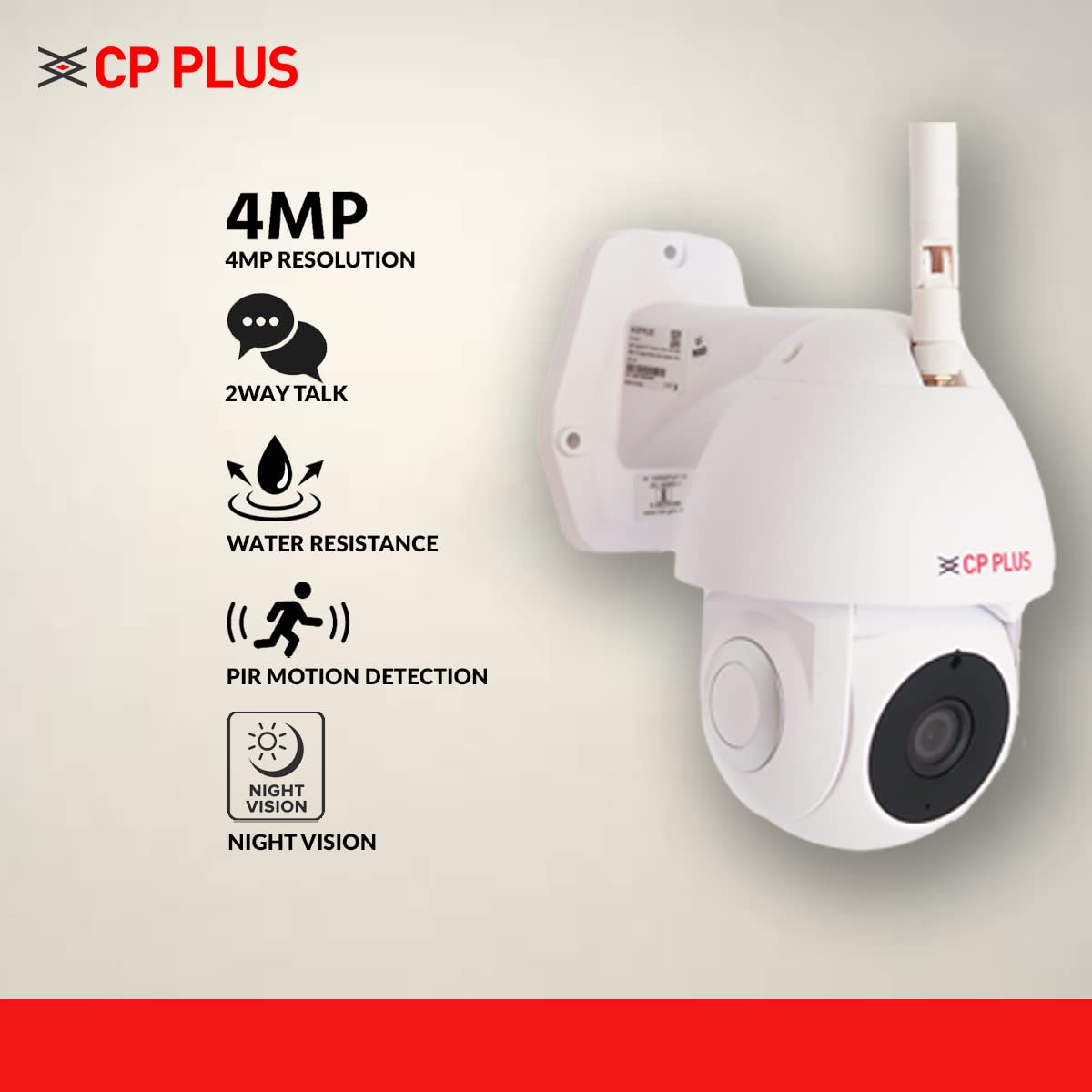
Figure 1: Front view of the CP PLUS 4MP Outdoor Smart Wi-Fi PT Camera.
2. What's in the Box
Upon opening the product packaging, you will find the following components:
- CP PLUS 4MP Outdoor Smart Wi-Fi PT Camera (Model CP-Z41A)
- USB Cable
- Power Adapter
- User Manual (this document)
- Mounting Screws and Wall Plugs
Video 1: Unboxing and overview of the CP PLUS 4MP Outdoor Smart Wi-Fi PT Camera, showing included accessories and initial setup steps.
3. Key Features
The CP-Z41A camera is equipped with several features to enhance your security experience:
- 4MP Quad HD Resolution: Provides clear and detailed video footage for effective monitoring.
- 360° Pan & Tilt: Offers a wide viewing angle, allowing you to remotely adjust the camera's perspective to cover all areas.
- Two-Way Talk: Features an inbuilt microphone and speaker for real-time communication with visitors or to deter intruders.
- Superior Night Vision: Equipped with IR lights for clear visibility up to 20 meters in low-light or complete darkness, utilizing a larger CMOS image sensor for improved image quality.
- Human Body Detection & Smart Motion Tracking: Intelligently detects human movement and tracks the subject, reducing false alarms from pets or inanimate objects.
- IP65 Water Resistance: Designed for outdoor use, offering protection against dust and water splashes.
- SD Card Support: Supports local storage up to 128GB for continuous recording.
- H.265 Compression: Efficient video compression technology that allows for longer recording times on the same storage capacity while maintaining video quality.
- Alexa & Google Assistant Support: Integrates with smart home ecosystems for voice-controlled viewing of camera feeds.

Figure 2: The camera's motion alert feature in action, detecting movement.

Figure 3: Illustration of the camera's night vision, providing clear images in darkness.

Figure 4: Demonstrating the two-way talk feature, allowing communication through the camera.

Figure 5: Connecting the CP-Z41A camera with the EzyKam+ mobile application.
Video 2: Detailed demonstration of the CP PLUS 4MP Outdoor Smart Wi-Fi PT Camera's key features, including pan/tilt, night vision, and smart detection.
4. Setup Instructions
- Unpack the Camera: Carefully remove all components from the box.
- Attach the Antenna: Screw the detachable antenna onto the designated port on the camera. Ensure it is securely fastened for optimal Wi-Fi connectivity.
- Power On: Connect the USB cable to the camera and the power adapter, then plug the adapter into a power outlet. The camera will power on and initiate its startup sequence.
- Install EzyKam+ App: Download and install the "EzyKam+" application on your iOS or Android smartphone. You can find the app on the App Store or Google Play Store, or by scanning the QR code provided on the product packaging.
- Add Device: Open the EzyKam+ app, create an account or log in, and follow the in-app instructions to add a new device. Select your camera model (CP-Z41A).
- Connect to Wi-Fi: The app will guide you through connecting the camera to your 2.4GHz Wi-Fi network. Ensure your smartphone is connected to the same 2.4GHz Wi-Fi network during setup. You may be prompted to scan a QR code displayed on your phone with the camera lens.
- Mount the Camera: Use the provided mounting screws and wall plugs to securely install the camera in your desired outdoor location. Ensure the mounting surface is stable and provides a clear view of the area you wish to monitor.
- Optional LAN Connection: If Wi-Fi signal is weak or unstable, you can connect the camera directly to your router using an Ethernet cable via the LAN port on the camera.
5. Operating Instructions
- Live View: Open the EzyKam+ app and select your camera to view the live feed. You can pan and tilt the camera remotely using the controls within the app.
- Two-Way Audio: To use the two-way talk feature, tap the microphone icon in the live view interface. Speak into your phone, and your voice will be transmitted through the camera's speaker. Listen for responses through the camera's microphone.
- Recording & Playback: The camera continuously records to the inserted SD card (up to 128GB). To view recorded footage, access the "Playback" option in the app. You can select specific dates and times to review events.
- Motion Alerts: Enable motion detection and human body detection in the app settings to receive real-time alerts on your smartphone when activity is detected.
- Night Vision: The camera automatically switches to night vision mode in low light conditions. You can manually toggle night mode settings within the app if needed.
- Privacy Mode: Utilize the privacy mode feature in the app to temporarily disable video recording and live view for specific areas or times, ensuring your privacy.
- Smart Home Integration: Connect your camera to Alexa or Google Assistant through their respective apps. Once linked, you can use voice commands to view the camera feed on compatible smart displays or TVs.
6. Maintenance
- Clean the Lens: Regularly clean the camera lens with a soft, dry cloth to ensure clear image quality. Avoid abrasive cleaners.
- Check Connections: Periodically inspect all cable connections (power, LAN) for secure fit and signs of wear.
- Firmware Updates: Keep the camera's firmware updated through the EzyKam+ app to ensure optimal performance and access to new features.
- SD Card Management: If using an SD card, ensure it is functioning correctly. Consider formatting it periodically through the app to maintain performance.
7. Troubleshooting
| Problem | Possible Solution |
|---|---|
| Camera not connecting to Wi-Fi |
|
| Poor video quality |
|
| Motion alerts not working |
|
| Two-way talk issues |
|
8. Specifications
| Feature | Detail |
|---|---|
| Model | CP-Z41A |
| Effective Video Resolution | 4 MP (2560x1440) |
| Mounting Type | Wall Mount |
| Colour | White |
| Wireless Communication Technology | Wi-Fi (2.4GHz) |
| Form Factor | PT (Pan & Tilt) |
| Viewing Angle | 360 Degrees (Pan), 110 Degrees (Tilt) |
| Night Vision Range | 20 Metres |
| Material | Plastic |
| Voltage | 5 Volts (AC) |
| Wattage | 6 Watts |
| International Protection Rating | IP65 |
| Flash Memory Type | SD (up to 128 GB) |
| Item Weight | 650 Grams |
| Operating System Compatibility | Android, iOS |
| Special Features | 2 Way Audio, Motion Sensor, Night Vision, PTZ Technology |
| Control Method | Voice (Alexa, Google Assistant) |
9. Warranty and Support
This CP PLUS camera comes with a 1 Year Warranty from the date of purchase. For any technical assistance, warranty claims, or product-related inquiries, please contact CP PLUS customer support. Manufacturer details: CP PLUS (Aditya Infotech Ltd.) F-28 Okhla Industrial Area, Phase 1, New Delhi 110020, INDIA. Contact: 8800952952.
For additional information, please refer to the official CP PLUS website or the product detail page on Amazon.


