
Introduction
This manual provides essential instructions for the safe and effective use of your SYLVANIA 6 AMP Smart Charger and Battery Maintainer. This device is designed to charge and maintain 6V and 12V lead-acid, gel, calcium, EFB, AGM, and lithium-ion batteries found in various vehicles, including cars and motorcycles. Please read this manual thoroughly before operation to ensure proper usage and to prevent damage to the charger or your battery.

Image: SYLVANIA Smart Charger banner.
Safety Information
Always observe the following safety precautions when operating the charger:
- Eye Protection: Always wear appropriate eye protection (safety glasses) when working with batteries.
- Ventilation: Ensure the charging area is well-ventilated to prevent the accumulation of explosive gases.
- No Smoking/Sparks: Do not smoke or allow open flames or sparks near the battery or charger during operation.
- Disconnect Power: Always disconnect the AC power cord from the outlet before connecting or disconnecting the battery clamps.
- Correct Voltage: Ensure the charger's output voltage matches the battery's voltage (6V or 12V).
- Reverse Polarity: Avoid reverse polarity connections. The charger has protection, but always double-check connections.
- Damaged Batteries: Do not attempt to charge frozen, damaged, or non-rechargeable batteries.
- Children and Pets: Keep the charger and battery out of reach of children and pets.
Product Overview and Features
The SYLVANIA Smart Charger 6A is a versatile battery charger and maintainer with several key features:
- 9-Stage Full Auto Charging: Automatically charges and monitors your battery through a comprehensive 9-stage process to reach 100% charge.
- Digital Display: A large, backlit LCD display shows the voltage and charging progress, visible even in low light conditions.
- Single-Button Operation: Simplifies mode selection for vehicle or motorcycle batteries.
- Float Mode: Automatically switches to long-term maintenance mode once the battery is fully charged, preventing overcharging.
- Cold Weather Charging Mode: Designed with safety features to protect batteries and optimize charging in cold temperatures.
- Compatibility: Supports 6V/12V sealed lead, acid, gel, calcium, EFB, AGM, and lithium batteries. Compatible with vehicles featuring Start/Stop functionality.
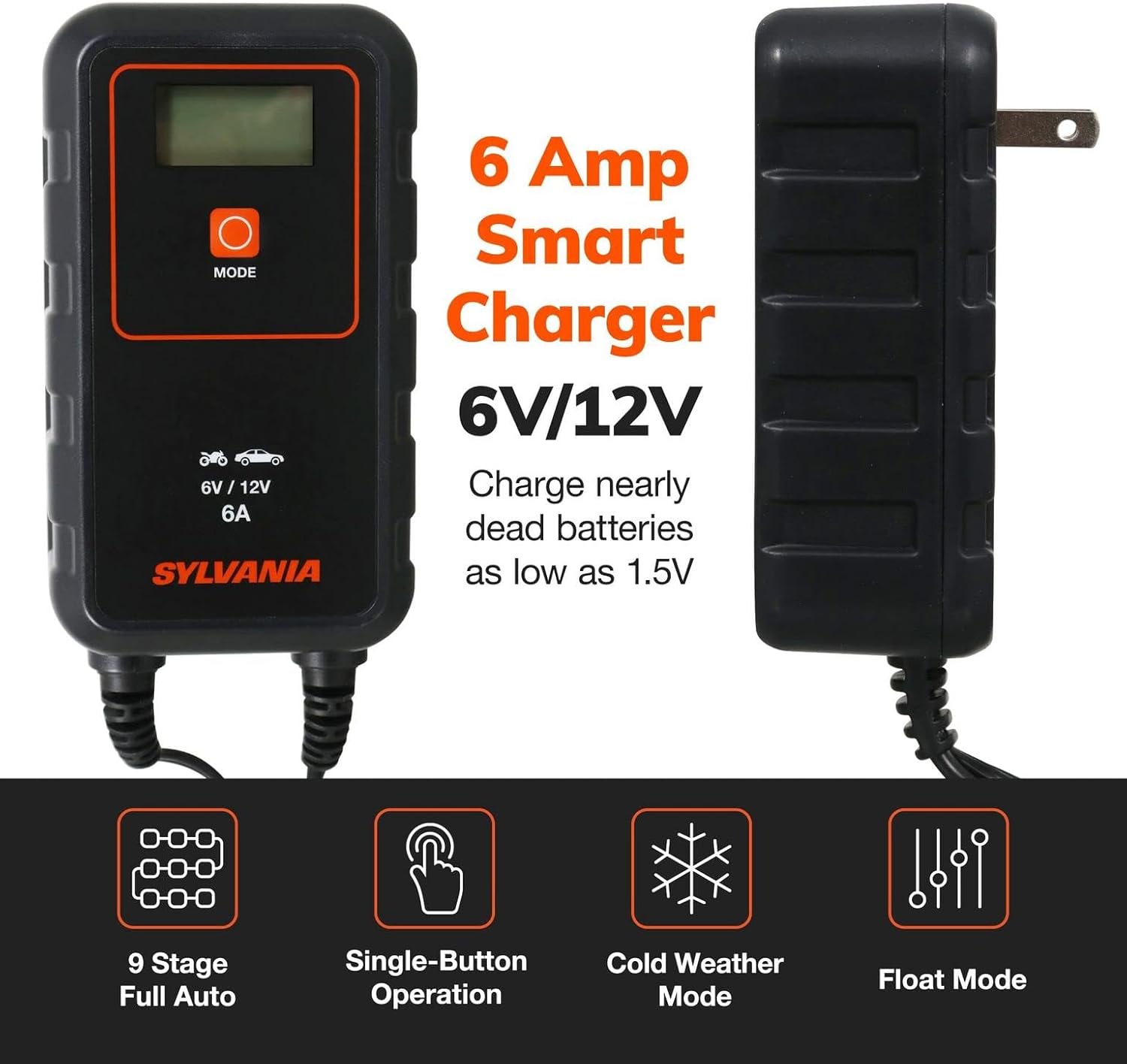
Image: SYLVANIA 6 Amp Smart Charger highlighting key features.

Image: Compatible battery types and Start/Stop vehicle compatibility.
Included in the Box:
- SYLVANIA Smart Charger 6A Unit
- Alligator Clips
- O-Ring Terminals
- User Manual

Image: Contents included with the SYLVANIA Smart Charger.
Setup
- Prepare the Battery: Ensure the battery terminals are clean and free of corrosion. If necessary, clean them with a wire brush.
- Choose Connections: Select either the alligator clips for temporary connection or the O-ring terminals for a more permanent connection.
- Connect to Battery:
- Connect the RED positive (+) clamp/O-ring to the positive (+) battery terminal.
- Connect the BLACK negative (-) clamp/O-ring to the negative (-) battery terminal.
- For vehicle batteries, if connecting to the chassis, connect the BLACK clamp to a non-painted metal part of the vehicle chassis away from the battery and fuel line.
- Connect to Power: Plug the charger's AC power cord into a standard electrical outlet (120V AC). The charger will power on.

Image: Hands connecting the charger to a car battery.
Operation
Once connected, the charger will display the current battery voltage. Follow these steps to begin charging:
- Select Charging Mode: Press the MODE button repeatedly to cycle through the available charging modes. The LCD display will show icons representing the selected mode (e.g., car, motorcycle, cold weather).
- Vehicle Mode: For standard 12V car batteries.
- Motorcycle Mode: For 6V or 12V motorcycle batteries.
- Cold Weather Mode: Use this mode when charging in temperatures below 5°C (41°F). This mode provides a slightly higher voltage to compensate for cold conditions.
- Automatic Charging: Once a mode is selected, the charger will automatically begin its 9-stage charging process. The display will show charging progress and current voltage.
- Float Mode: When the battery reaches full charge, the charger will automatically switch to Float Mode (maintenance mode) to keep the battery optimally charged without overcharging.
- Disconnecting the Charger:
- First, unplug the AC power cord from the electrical outlet.
- Next, disconnect the BLACK negative (-) clamp/O-ring from the battery terminal or chassis.
- Finally, disconnect the RED positive (+) clamp/O-ring from the battery terminal.

Image: Single-button operation for ease of use.

Image: Cold Weather Charging Mode in use.
Estimated Charging Times
The following table provides estimated charging times for various battery types and charger amperages. These are based on a typical lead-acid battery with a 50% charge level.

Image: Estimated charging times for various vehicles.
Maintenance
To ensure the longevity and proper functioning of your SYLVANIA Smart Charger:
- Cleaning: Disconnect the charger from power before cleaning. Wipe the exterior with a soft, damp cloth. Do not use harsh chemicals or abrasives.
- Storage: Store the charger in a cool, dry place when not in use. Ensure cables are neatly coiled and not kinked.
- Inspection: Periodically inspect the charger, cables, and connectors for any signs of damage. Do not use if damaged.
Troubleshooting
If you encounter issues with your charger, refer to the following common problems and solutions:
| Problem | Possible Cause | Solution |
|---|---|---|
| Charger does not turn on. | No power from outlet; loose connection. | Check the power outlet with another device. Ensure the AC power cord is securely plugged into both the charger and the outlet. |
| Charger displays an error symbol or does not begin charging. |
|
|
| Charger gets warm during operation. | Normal operation. | It is normal for the charger to become warm during the charging process. Ensure adequate ventilation around the unit. If it becomes excessively hot, disconnect immediately and contact support. |
Specifications
| Specification | Value |
|---|---|
| Model Number | SMTCHRGR_6A.BX |
| Product Dimensions | 5.71 x 5.04 x 10.16 inches |
| Item Weight | 2.42 pounds |
| Output Voltage | 6 Volts (DC) or 12 Volts (DC) |
| Input Voltage | 120 Volts (AC) (Standard US Outlet) |
| Current Rating | 6 Amps |
| Max Battery Capacity (Charging) | 110 Ah |
| Max Battery Capacity (Maintenance) | 160 Ah |
| Cable Length | 7 ft |
| Compatible Battery Types | Lead Acid, Gel, Calcium, EFB, AGM, Li-ion |

Image: Product features and specifications table.
Warranty Information
Specific warranty details for the SYLVANIA Smart Charger 6A are typically provided with the product packaging or can be found on the official SYLVANIA website. Please refer to these sources for the most accurate and up-to-date warranty terms and conditions.
Customer Support
For technical assistance, troubleshooting beyond this manual, or inquiries regarding your SYLVANIA Smart Charger 6A, please visit the official SYLVANIA website or contact their customer service department. Contact information is usually available on the product packaging or the brand's official online presence.
