
Unity Tactical HLM-MABF
Unity Tactical MARK™ Ops-Core® AMP® Communication Headset Kit User Manual
Model: HLM-MABF
Brand: Unity Tactical
1. Introduction
The Unity Tactical MARK™ (Modular Attached Rail Kit) provides a streamlined solution for integrating electronic hearing protection and communication headsets with headborne systems, specifically designed for Ops-Core® AMP® Communication Headsets. This innovative system significantly reduces the overall profile of mounted communication headsets and enhances the ear protection's seal.
Unlike traditional pop-in/pop-out mechanisms, the MARK™ system allows ear cups to be pulled away from the ears and rotated backwards for convenient stowage. This design ensures a tighter seal for the ear cups, which contributes to a higher Noise Reduction Rating (NRR) due to varying head shapes and sizes.
2. Safety Information
- Always ensure the MARK™ system and attached headset are securely mounted to your helmet before use. A loose connection can compromise hearing protection and headset function.
- Verify that the ear cups form a proper seal around your ears to achieve the stated Noise Reduction Rating (NRR). Adjust the headset position as needed.
- Do not attempt to modify the MARK™ system. Unauthorized modifications can lead to product failure and void the warranty.
- Keep the product clean and free from debris that could interfere with its moving parts or connections.
- Store the product in a dry, temperate environment when not in use.
3. Package Contents
Please verify that all components are present in your package:
- (1 Pair) Unity MARK 2.0 Adapter Assembly
- (1 Pair) ARC Style Backer Plates + Hardware
- (1 Pair) EXFIL Hardware
- (1 Pair) AMP Cradle Clamp Assembly (full kit only)

Image: The complete Unity Tactical MARK 2.0 Adapter Assembly kit, including the two main adapter units.
4. Setup and Installation
The MARK™ system is designed for straightforward installation onto helmets equipped with ARC rails.
- Prepare Your Helmet: Ensure your helmet's ARC rails are clean and free of obstructions.
- Attach MARK™ Adapter to ARC Rail:
- Align the MARK™ 2.0 Adapter Assembly with the ARC rail on your helmet.
- Use the provided ARC Style Backer Plates and hardware to securely fasten the adapter to the rail. Ensure a snug fit without overtightening.
- If using an EXFIL helmet, utilize the specific EXFIL Hardware provided for proper attachment.

Image: Detailed view of the MARK adapter securely attached to a helmet's ARC rail.
- Integrate Ops-Core® AMP® Headset:
- Take your Ops-Core® AMP® Communication Headset.
- Attach the AMP Cradle Clamp Assembly to the ear cups of your Ops-Core® AMP® headset.
- Connect the headset, with the attached cradle clamps, to the MARK™ 2.0 Adapter Assembly. The design allows for a secure, low-profile connection.

Image: An Ops-Core AMP headset fully integrated with a helmet via the MARK system.
- Verify Fit and Function: Once installed, ensure the headset is firmly attached and can rotate freely as intended. Check that the ear cups form a tight seal around your ears when in the deployed position.
5. Operating Instructions
The Unity Tactical MARK™ system offers enhanced flexibility for headset management.
- Deploying Headset: To use your headset, simply pull the ear cups forward and down until they are positioned over your ears and form a comfortable, secure seal.
- Stowing Headset: When not in use, or when you need to quickly remove the ear cups from your ears without fully detaching the headset, gently pull the ear cups away from your ears and rotate them backwards. The MARK™ system allows the ear cups to pivot and rest against the rear of the helmet, maintaining a low profile.
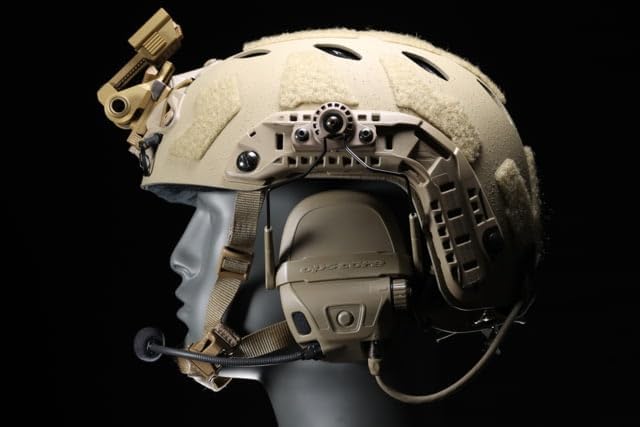
Image: The MARK system allows for a very low-profile headset integration with the helmet.
- Achieving Optimal Seal: For maximum Noise Reduction Rating (NRR), ensure the ear cups fully encompass your ears and create a tight seal against your head. Adjust the headset's position on the MARK™ system and the helmet as needed to achieve this.
6. Maintenance
Proper maintenance will ensure the longevity and reliable performance of your Unity Tactical MARK™ system.
- Cleaning: Wipe down the adapter assemblies with a damp cloth to remove dirt, dust, or sweat. Avoid using harsh chemicals or abrasive cleaners that could damage the finish or material.
- Inspection: Regularly inspect all components for signs of wear, damage, or loose connections. Pay close attention to the pivot points and attachment hardware.
- Lubrication: The pivot points are designed for smooth operation. If you notice any stiffness, a small amount of dry lubricant (e.g., silicone spray) can be applied, but avoid over-lubricating.
- Storage: When not in use, store the MARK™ system and headset in a clean, dry place away from extreme temperatures and direct sunlight.
7. Troubleshooting
If you encounter issues with your Unity Tactical MARK™ system, refer to the following common problems and solutions:
- Headset feels loose on helmet:
- Ensure all attachment hardware (screws, backer plates) is securely tightened to the helmet's ARC rails.
- Verify that the AMP Cradle Clamp Assembly is correctly seated and locked onto the Ops-Core® AMP® headset ear cups.
- Poor ear cup seal / Reduced NRR:
- Adjust the position of the MARK™ adapter along the ARC rail to find the optimal placement for your head shape.
- Ensure no hair, clothing, or other obstructions are interfering with the ear cup's seal against your head.
- Check the condition of your headset's ear seals; worn seals may need replacement.
- Difficulty rotating ear cups:
- Inspect the pivot points for any dirt or debris. Clean as per maintenance instructions.
- Apply a small amount of dry lubricant if necessary.
- Ensure the headset cables are not snagging or obstructing the rotation mechanism.
8. Specifications
| Feature | Detail |
|---|---|
| Model Name | MARK™ Ops-Core® AMP® Communication Headset Kit | With Ops-Core Craddle Clamps | FDE |
| Part Number | HLM-MABF |
| Brand | Unity Tactical |
| Material | Aluminum |
| Color | Multi (FDE) |
| Item Package Dimensions (L x W x H) | 6.1 x 4.57 x 1.73 inches |
| Package Weight | 0.08 Kilograms |
| Included Components | Unity Tactical Gen 2 MARK AMP Kit W/Ops Core Hardware, (1 Pair) Unity MARK 2.0 Adapter Assembly, (1 Pair) ARC Style Backer Plates + Hardware, (1 Pair) EXFIL Hardware, (1 Pair) AMP Cradle Clamp Assembly (full kit only) |
| Suggested Users | unisex-adult |
| Date First Available | October 25, 2022 |
Ask a question about this manual
Ask about setup, troubleshooting, compatibility, parts, safety, or missing instructions. Manuals+ will review the question and use this page’s manual context to help answer it.