
Introduction
This manual provides detailed instructions for the safe installation, operation, and maintenance of your WINGBO 60-inch DC Ceiling Fan with Lights and Remote Control. Please read all instructions carefully before beginning installation and retain this manual for future reference.
The WINGBO 60-inch DC Ceiling Fan features a modern design with 8 plywood blades, a 6-speed reversible DC motor, and an integrated LED light kit. It is designed for indoor use in spaces such as living rooms, bedrooms, or larger rooms, and is suitable for damp locations.
Safety Information
- Always disconnect power at the main circuit breaker before installation or servicing.
- Ensure all electrical connections comply with local codes and ordinances. If you are unsure, consult a qualified electrician.
- The fan must be mounted with a minimum of 7 feet (2.1 meters) clearance from the floor to the blade trailing edge.
- Ensure the mounting structure can support the weight of the fan (approximately 21.2 pounds or 9.62 kg).
- Do not bend the blade holders during installation or cleaning.
- This fan is designed for safe and energy-efficient usage.
Packing List
Verify that all components are present before beginning installation:
- Ceiling Fan Motor Assembly
- 8 Plywood Blades
- Mounting Bracket
- Downrods (4.5-inch and 12-inch)
- Canopy
- Remote Control with Wall Holder
- Receiver Module
- Integrated LED Light Kit
- Hardware Pack (screws, wire nuts, etc.)
- Instruction Manual

Figure 1: Fan dimensions and included downrods for various ceiling heights and angles.
Setup and Installation
Professional installation is recommended. Follow these steps carefully:
Step 1: Install Fan Mounting Bracket
Secure the fan mounting bracket to the ceiling junction box. Ensure the bracket is firmly attached and can support the fan's weight.
Step 2: Install the Arms
Attach the fan arms to the motor assembly using the provided screws. Ensure they are securely fastened.
Step 3: Install the Lighting
Connect the wires for the integrated LED light kit and secure the light assembly to the fan motor. Ensure all connections are tight.
Step 4: Attach Blades
Attach each of the 8 plywood blades to the fan arms using the provided hardware. Ensure all screws are tightened to prevent wobbling.

Figure 2: Detail of blade attachment to the fan motor assembly.
Step 5: Install Downrod
Select the appropriate downrod (4.5-inch or 12-inch) for your ceiling height. Feed the fan wires through the downrod and secure the downrod to the fan motor assembly.
Step 6: Connect the Wires
Connect the fan wires to the receiver module, and then connect the receiver module wires to the ceiling electrical supply wires (Live, Neutral, Ground) according to the wiring diagram. Use appropriate wire nuts for secure connections.
Step 7: Hang the Motor
Carefully lift the fan assembly and hang it onto the mounting bracket. Ensure the downrod ball is properly seated in the bracket's opening.
Step 8: Install Receiver Module
Carefully tuck the receiver module and excess wiring into the canopy or junction box, ensuring no wires are pinched.
Step 9: Attach the Canopy
Slide the canopy up to the ceiling and secure it to the mounting bracket with the provided screws. Ensure the canopy covers all wiring and the mounting bracket.
Step 10: Install the Light Globe
Secure the frosted light globe to the light kit assembly. Restore power and test the fan and light functions.
Video 1: Step-by-step installation guide for the WINGBO 8-blade ceiling fan with light.
Operating Instructions
Your WINGBO ceiling fan is operated by the included handheld remote control.

Figure 3: Handheld remote control functions.
- Fan Speed: The fan features 6 forward and reverse speeds. Use the speed buttons (1-6) on the remote to adjust the airflow.
- Light Control: The integrated LED light offers 3 color temperatures (3000K Warm White, 4500K Natural White, 6000K Day White). Use the light control button on the remote to cycle through these settings.
- Reversible Motor: The quiet, reversible DC motor allows for dual-direction operation. Use the 'Follow/Reverse' button on the remote to switch between summer mode (forward direction, forces air down) and winter mode (reverse direction, gently draws air up).
- Timer Function: Set the fan to turn off automatically using the timing buttons on the remote.
- Fan Stop: Use the 'Fan Stop' button to turn off the fan.
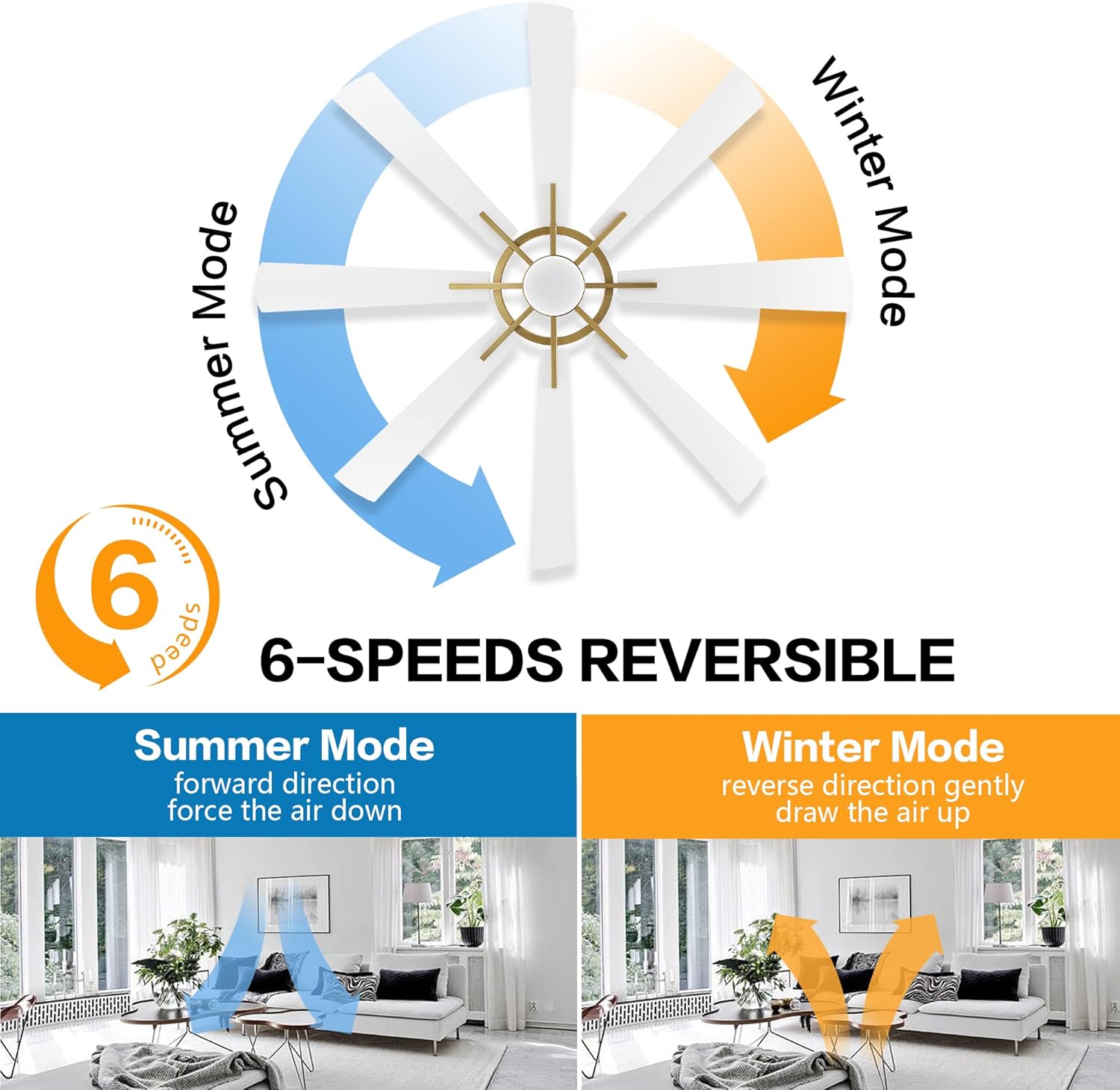
Figure 4: Summer and Winter mode operation.

Figure 5: Available 3 color temperatures for the LED light.
Maintenance
Regular maintenance ensures optimal performance and longevity of your ceiling fan.
- Cleaning: To clean the fan, wipe the blades and motor housing with a soft, damp cloth. Do not use abrasive cleaners or solvents, as these may damage the finish.
- Blade Inspection: Periodically check the blade attachments for tightness. Loose blades can cause wobbling and noise.
- Light Source: The integrated LED light source is designed for long life and typically does not require replacement. If issues arise, consult customer support.
- Motor: The DC motor is designed for quiet operation and energy efficiency. No lubrication is required.
Troubleshooting
If you experience issues with your fan, refer to the following common problems and solutions:
| Problem | Possible Cause | Solution |
|---|---|---|
| Fan does not start | No power to the fan; loose wiring; remote control battery low. | Check circuit breaker; ensure all wiring connections are secure; replace remote control battery. |
| Fan wobbles | Loose blade screws; unbalanced blades; loose mounting bracket. | Tighten all blade screws; ensure blades are balanced (balancing kit may be needed); tighten mounting bracket screws. |
| Light does not work | Loose light wiring; faulty LED module; remote control battery low. | Check light wiring connections; contact customer support for LED module replacement; replace remote control battery. |
| Remote control not working | Battery low or incorrectly installed; receiver not paired. | Replace battery, ensure correct polarity; refer to remote pairing instructions in the full manual (if applicable). |
| Fan is noisy | Loose screws; motor issue; blades hitting an obstruction. | Check and tighten all screws; ensure no obstructions are in the fan's path. If motor noise persists, contact customer support. |
Specifications
| Feature | Detail |
|---|---|
| Brand | WINGBO |
| Model Name | SYCF6003 |
| Color | Gold and White |
| Electric Fan Design | Ceiling Fan |
| Power Source | DC |
| Style | Modern |
| Product Dimensions | 60"D x 60"W x 33"H |
| Room Type | Bedroom, Living Room, Large Rooms |
| Special Feature | LED Light, Reversible Motor |
| Recommended Uses | Indoor (suitable for damp places) |
| Wattage | 24 watts (LED Light) |
| Finish Type | Brushed |
| Number of Blades | 8 |
| Blade Length | 60 Inches |
| Switch Type | Remote |
| Item Weight | 21.2 pounds (9.62 Kilograms) |
| Included Components | Remote |
| Control Method | Remote |
| Efficiency | Highly Efficient |
| Number of Power Levels | 6 |
| Installation Type | Downrod Mount |
| Batteries Required? | No (for fan operation, remote requires batteries) |
Warranty and Support
For warranty information or technical support, please refer to the contact details provided with your purchase documentation or visit the official WINGBO website. Keep your purchase receipt as proof of purchase for any warranty claims.