
1. Introduction
Thank you for purchasing the WINGBO 72-inch DC Ceiling Fan. This manual provides detailed instructions for the safe installation, operation, and maintenance of your new ceiling fan. Please read all instructions carefully before beginning installation and retain this manual for future reference.

The WINGBO 72-inch DC Ceiling Fan features a modern design with a brushed gold motor housing and eight black plywood blades. An integrated LED light is centered below the motor.
2. Important Safety Instructions
WARNING: To reduce the risk of fire, electric shock, or personal injury, always follow these basic precautions:
- Read all instructions and safety information before installing your new fan.
- All wiring must be in accordance with national and local electrical codes. If you are unfamiliar with wiring, consult a qualified electrician.
- Before installation, disconnect power by turning off the circuit breakers at the main fuse box.
- Ensure the installation site allows the fan blades to rotate without obstruction and has a minimum clearance of 7 feet (2.1 meters) from the floor to the blade trailing edge.
- The mounting structure must be capable of supporting the weight of the fan (approximately 12.07 kg / 26.6 lbs).
- Do not operate the fan with damaged blades or any visible defects.
- Do not insert objects into the path of the fan blades while the fan is operating.
3. Package Contents
Verify that all components listed below are included in your package:
- Fan Motor Assembly (Gold Finish)
- 8 x Plywood Blades (Black)
- LED Light Kit
- Remote Control
- Receiver Module
- Mounting Bracket
- 3 x Downrods (4.5", 12", 24")
- Canopy
- Hardware Pack (screws, wire nuts, washers, etc.)
- Instruction Manual

This image illustrates the overall dimensions of the 72-inch WINGBO ceiling fan, including the fan diameter and height with different downrod options. It also shows the three available downrod lengths: 4.5 inches, 12 inches, and 24 inches, allowing for flexible installation based on ceiling height.
4. Specifications
| Feature | Detail |
|---|---|
| Brand | WINGBO |
| Model Number | SYCF7203 |
| Color | Gold and Black |
| Electric Fan Design | Ceiling Fan |
| Power Source | DC |
| Style | Modern |
| Product Dimensions | 72"D x 72"W x 33"H |
| Room Type | Bedroom, Kitchen, Living Room |
| Special Feature | LED Light, Reversible Motor |
| Recommended Uses | Indoor |
| Mounting Type | Downrod Mount |
| Controller Type | Remote Control |
| Number of Speeds | 6 |
| Wattage (Light) | 24 watts |
| Number of Blades | 8 |
| Voltage | 24 Volts |
| Light Type | LED (3000K/4500K/6000K) |
| Material | Engineered Wood (Blades) |
| Item Weight | 12.07 Kilograms |
| Certification | ETL |
5. Installation Guide
Follow these steps to install your WINGBO 72-inch DC Ceiling Fan. For a visual guide, please refer to the official installation video below.
Official WINGBO Installation Video: This video provides a comprehensive, step-by-step guide on how to install the 8-blade ceiling fan with integrated light. It covers mounting the bracket, attaching the arms and blades, installing the lighting, connecting the downrod, wiring the receiver, and securing the canopy and light globe.
5.1. Mounting Bracket Installation
- Turn off power at the circuit breaker.
- Secure the mounting bracket to the ceiling junction box using appropriate screws and washers. Ensure it is firmly attached and can support the fan's weight.

This image provides a detailed look at the brushed gold motor housing and the structural elements connecting the eight blades, showcasing the fan's robust construction and design.
5.2. Attaching Blades and Arms
- Attach the fan arms to the motor assembly using the provided screws.
- Secure each plywood blade to the fan arms using the designated screws and washers. Ensure all blades are tightly fastened.

The fan is equipped with eight premium quality plywood blades, designed for durability and efficient air movement. The close-up view shows the smooth finish and secure attachment of the blades to the motor housing.
5.3. Installing the LED Light Kit
- Connect the LED light kit wires to the corresponding wires from the motor assembly.
- Secure the LED light kit to the bottom of the motor assembly.

A detailed view of the fan's integrated LED light, featuring a frosted glass lamp cover that contributes to its modern and sleek aesthetic, providing diffused and elegant illumination.
5.4. Downrod Assembly
- Select the appropriate downrod length (4.5", 12", or 24") for your ceiling height.
- Feed the electrical wires from the motor through the chosen downrod.
- Attach the downrod to the motor assembly, ensuring the pin and screws are securely in place.
5.5. Wiring Connections
- Carefully lift the fan assembly and hang it on the mounting bracket.
- Connect the fan's electrical wires to the receiver module, matching colors (e.g., Red to Red, Yellow to Yellow, Grey to Grey, Blue to Blue, White to White).
- Connect the receiver module to the ceiling electrical box wires (e.g., Ground to Ground, White (ceiling) to White (receiver), Black (ceiling) to Black (receiver)). Use wire nuts to secure connections.
- Carefully tuck all wires and the receiver module into the ceiling junction box.
5.6. Attaching the Canopy and Light Globe
- Slide the canopy up to the ceiling and secure it to the mounting bracket with screws.
- Install the light globe by twisting it onto the light kit until secure.
6. Operating Instructions
Your WINGBO ceiling fan is operated via the included remote control.
6.1. Remote Control Functions
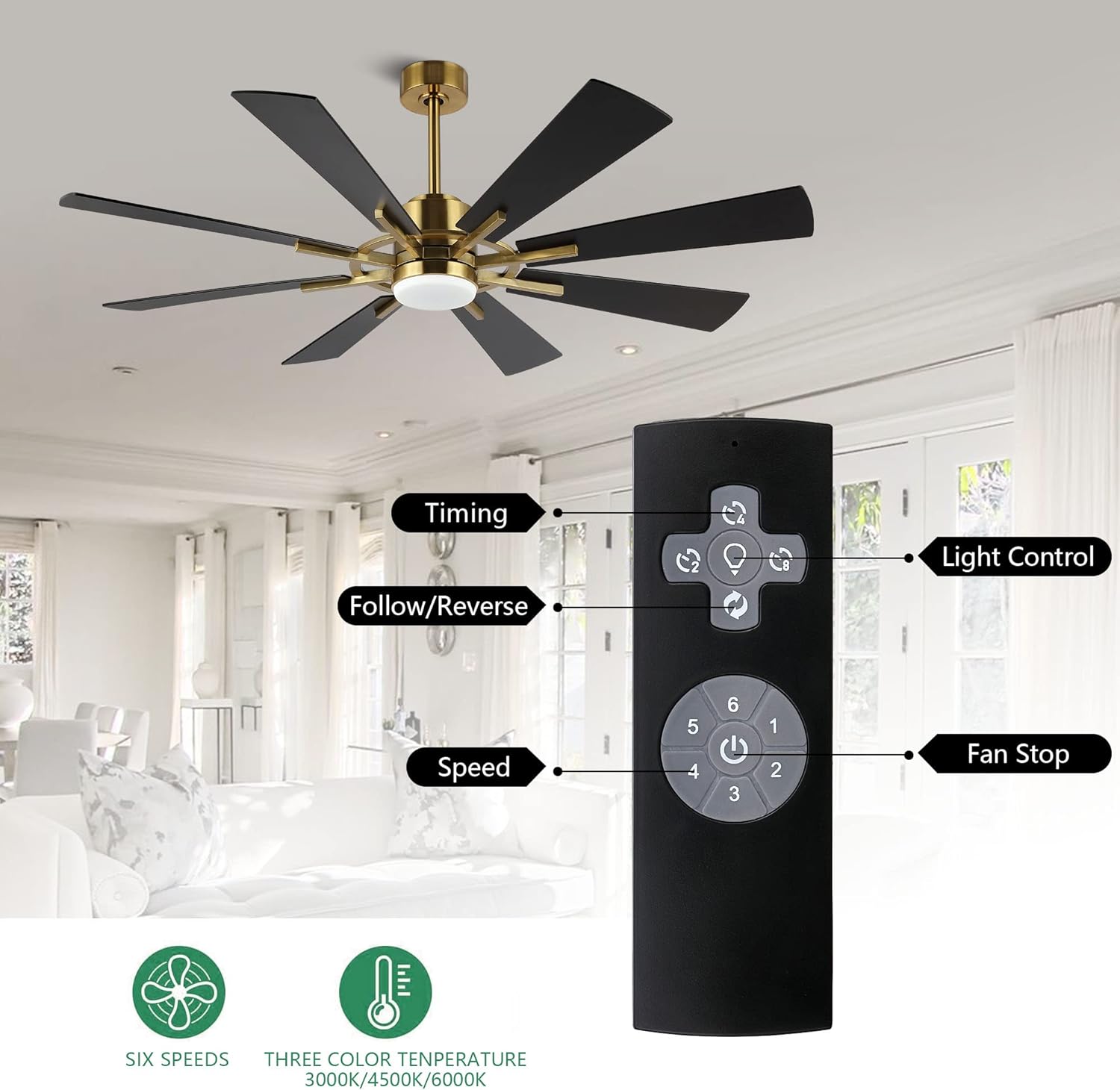
The included remote control provides easy access to all fan functions. Buttons are clearly labeled for timing, fan direction (follow/reverse), six-speed adjustment, and light control.
- Power Button: Turns the fan on/off.
- Fan Speed (1-6): Adjusts the fan speed from 1 (lowest) to 6 (highest).
- Light Control: Toggles the LED light on/off and cycles through color temperatures (3000K, 4500K, 6000K).
- Follow/Reverse: Changes the direction of the fan blades for summer or winter mode.
- Timing: Sets a timer for the fan to turn off automatically.
6.2. Reversible DC Motor (Summer/Winter Modes)
The fan features a reversible DC motor for optimal comfort throughout the year:
- Summer Mode: Blades rotate counter-clockwise, pushing air downwards to create a cooling effect.
- Winter Mode: Blades rotate clockwise, drawing air upwards to circulate warm air more evenly.

The fan features a reversible DC motor, allowing for year-round comfort. In summer mode, the blades rotate to force air downwards, creating a cooling breeze. In winter mode, the blades reverse direction to gently draw warm air upwards, helping to circulate heat.
6.3. LED Light Color Temperatures
The integrated LED light offers three distinct color temperatures:
- 3000K (Warm White): Provides a cozy and inviting ambiance.
- 4500K (Natural White): Offers balanced and neutral illumination.
- 6000K (Day White): Delivers bright and clear lighting.

The integrated LED light offers three adjustable color temperatures: Warm White (3000K) for a cozy ambiance, Natural White (4500K) for balanced illumination, and Day White (6000K) for bright, clear lighting.
7. Maintenance
Regular maintenance ensures optimal performance and longevity of your ceiling fan.
- Cleaning: To avoid damage to the finish, clean the fan with a soft, damp cloth. Do not use abrasive cleaners or solvents.
- Blade Cleaning: Dust the blades regularly to prevent dust buildup, which can cause wobbling.
- Tightening Screws: Periodically check all screws on the fan and mounting hardware. Tighten any loose screws to prevent wobbling or noise.
- Lubrication: The DC motor is permanently lubricated and does not require additional oiling.
8. Troubleshooting
If you experience issues with your fan, refer to the following common problems and solutions:
| Problem | Possible Cause | Solution |
|---|---|---|
| Fan does not start | No power to the fan; Loose wire connections; Remote control not paired or batteries dead. | Check circuit breaker and wall switch; Verify all wire connections are secure; Replace remote batteries or re-pair remote. |
| Fan wobbles | Loose blade screws; Improperly balanced blades; Loose mounting bracket. | Tighten all blade screws; Use a balancing kit (not included) to balance blades; Ensure mounting bracket is securely fastened to the ceiling. |
| Light does not work | Loose wire connection to light kit; Faulty LED light kit; Remote control issue. | Check light kit wiring connections; Contact customer support for replacement LED kit; Check remote batteries and functionality. |
| Noisy operation | Loose screws; Fan not properly mounted; Internal motor issue. | Check and tighten all screws; Re-check mounting for secure installation; If noise persists, contact customer support. |
9. Warranty and Support
For warranty information or technical support, please contact WINGBO customer service. Keep your purchase receipt as proof of purchase.
For further assistance, please visit the WINGBO Store on Amazon.