
Alpine HDS-990
Alpine HDS-990 Status Series High-Resolution Digital Media Audio Source
Model: HDS-990
Introduction
The Alpine HDS-990 Status Series is a high-resolution digital media audio source designed for superior in-car audio experiences. This unit features a compact system control panel and a hide-away black box, offering significant installation flexibility. It is engineered to process and play back Hi-Res Audio files at 192kHz/24bit, meeting the current industry standard for high-fidelity music. The HDS-990 provides versatile connectivity options, including multiple USB ports, RCA outputs, and an optical TOSLINK port, alongside 4x 50Watts hi-resolution amplified speaker outputs, allowing for broad system building flexibility. Its hi-res color display provides clear playback data, including album cover artwork.
Setup
Setting up your Alpine HDS-990 involves connecting the main black box unit to your vehicle's power and audio system, and then integrating the dash-mountable commander unit. The system includes all necessary wiring harnesses for connection to both the black box and your factory radio or aftermarket components.
- Black Box Placement: Identify a suitable, discreet location for the hide-away black box, ensuring proper ventilation and accessibility for connections.
- Commander Unit Installation: Mount the compact control panel (commander unit) in an easily accessible location on your dashboard.
- Wiring Connections: Connect the provided wiring harnesses between the commander unit and the black box, and from the black box to your vehicle's power, ground, and speaker outputs.
- Audio Source Connections: Utilize the 3x USB ports for connecting various audio sources. For high-performance audio output, connect to external amplifiers via the RCA outputs or use the optical TOSLINK port for digital audio transmission.
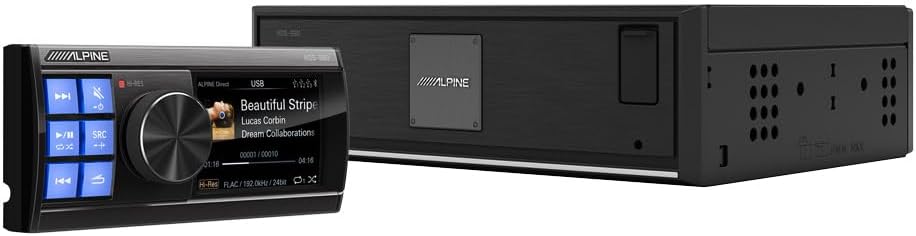
Image: The Alpine HDS-990 commander unit (left) and the main black box unit (right), illustrating their relative sizes and components for installation.
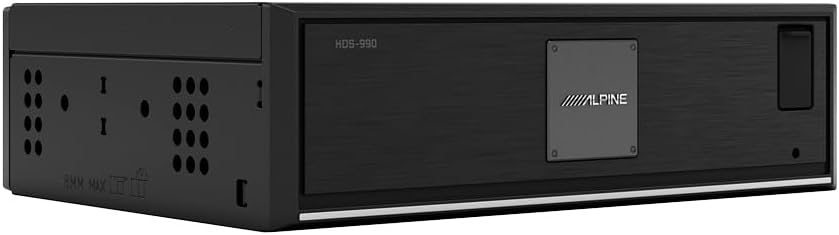
Image: A detailed view of the Alpine HDS-990 black box unit, which houses the primary processing and connectivity components.

Image: The rear panel of the Alpine HDS-990 black box, showing various input and output ports including USB, power, and audio connections.
Operating
The HDS-990 is designed for intuitive operation through its dash-mountable commander unit. The high-resolution color display provides comprehensive information about your audio playback.
- Power On/Off: Use the designated button on the commander unit to power the system on or off.
- Source Selection: Navigate through various audio sources (USB, Bluetooth, etc.) using the source selection controls.
- Audio Playback: Control playback functions such as play, pause, skip track, and volume directly from the commander unit.
- Hi-Res Audio: The system automatically processes and plays Hi-Res Audio files up to 192kHz/24bit, ensuring the highest quality sound reproduction.
- Display Information: The color display shows current track information, artist, album, and album cover artwork for a rich user experience.
- Wireless Streaming: Stream music wirelessly to your HDS-990 Head Unit from compatible devices.

Image: The Alpine HDS-990 commander unit, showcasing its high-resolution color display with playback information and control buttons.
Maintenance
To ensure the longevity and optimal performance of your Alpine HDS-990, follow these general maintenance guidelines:
- Cleaning: Gently wipe the commander unit's display and buttons with a soft, dry cloth. Avoid using abrasive cleaners or solvents.
- Ventilation: Ensure the black box unit has adequate ventilation to prevent overheating. Do not block any vents.
- Environmental Conditions: Avoid exposing the unit to extreme temperatures, direct sunlight for prolonged periods, or excessive moisture.
- Cable Management: Periodically check all cable connections to ensure they are secure and free from damage.
Troubleshooting
If you encounter issues with your Alpine HDS-990, consider the following common troubleshooting steps:
- No Power: Check all power connections, including the vehicle's fuse box. Ensure the unit is properly grounded.
- No Sound: Verify that all speaker connections are secure. Check the volume level and ensure the correct audio source is selected. Confirm that external amplifiers (if used) are powered on and functioning.
- Distorted Sound: Check speaker wiring for shorts or loose connections. Ensure the audio source is not overdriven.
- Display Issues: If the display is blank or flickering, check the connection between the commander unit and the black box.
- USB Playback Issues: Ensure the USB device is formatted correctly and contains compatible audio files. Try a different USB device.
For persistent issues, please refer to the comprehensive troubleshooting guide in the full product manual or contact Alpine customer support.
Specifications
| Feature | Specification |
|---|---|
| Product Dimensions | 14.5 x 9 x 4 inches |
| Item Weight | 4.73 pounds |
| Item Model Number | HDS-990 |
| Brand | Alpine |
| Connectivity Technology | RCA, USB |
| Controller Type | Push Button |
| Special Feature | Hi-Res Audio Playback (192kHz/24bit) |
| Compatible Devices | Speaker |
| Total HDMI Ports | 1 |
| Connector Type | RCA, USB |
| Audio Output Mode | Surround |
| Surround Sound Channel Configuration | 4 Channel |
| Color | Black |
Warranty and Support
For detailed warranty information regarding your Alpine HDS-990, please refer to the warranty card included with your product or visit the official Alpine website. Alpine provides customer support for product inquiries, technical assistance, and service. Please visit the Alpine support page or contact their customer service line for further assistance.
Alpine Official Website: https://www.alpine-usa.com/
Related documentsHDS-990


Ask a question about this manual
Ask about setup, troubleshooting, compatibility, parts, safety, or missing instructions. Manuals+ will review the question and use this page’s manual context to help answer it.