
TESLA IR200R
TESLA IR200R Iron User Manual
Model: IR200R
Introduction
Thank you for choosing the TESLA IR200R Iron. This manual provides essential information for the safe and efficient operation, maintenance, and troubleshooting of your new appliance. Please read it thoroughly before first use and keep it for future reference.

Figure 1: Front view of the TESLA IR200R Iron, showcasing its red and white design with the power cord extending from the rear.
Safety Instructions
- Always unplug the iron from the power outlet when filling with water, emptying, or when not in use.
- Do not immerse the iron, cord, or plug in water or other liquids.
- Keep the iron and its cord out of reach of children when it is switched on or cooling down.
- Do not operate the iron with a damaged cord or plug, or if the iron has been dropped or damaged.
- Use the iron only for its intended household use.
Product Overview
The TESLA IR200R is a powerful 2200W steam iron designed for efficient wrinkle removal. It features a non-stick ceramic soleplate for smooth gliding and includes anti-calc and drip-stop functions for enhanced performance and longevity.
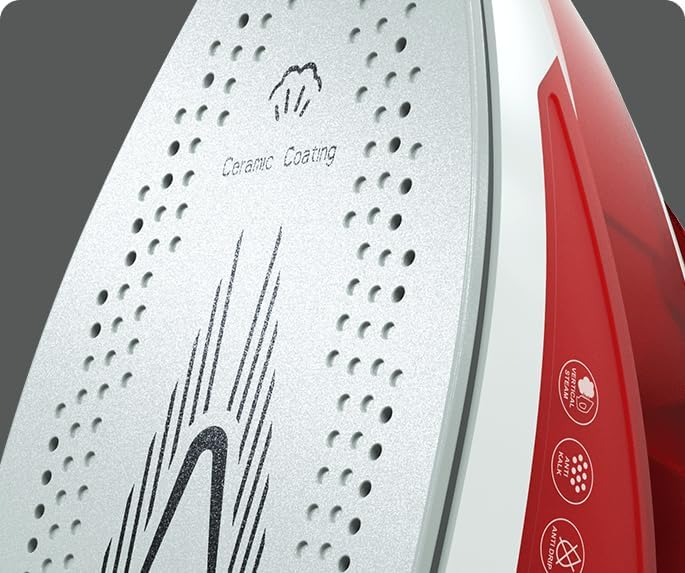
Figure 2: Detailed view of the non-stick ceramic soleplate, highlighting its smooth surface and steam vents.
Key Features:
- Power: 2200 W for quick heating and efficient ironing.
- Water Tank Capacity: 300 ml for extended use without frequent refills.
- Soleplate: Non-stick ceramic for effortless gliding over fabrics.
- Steam Functions: Vertical steam shot and 90 g/min steam boost for stubborn wrinkles.
- Anti-Calc System: Integrated system to prevent limescale buildup.
- Anti-Drip System: Prevents water leakage at low temperatures.
Setup
- Unpacking: Carefully remove the iron and all accessories from the packaging. Retain the packaging for future storage or transport.
- First Use Preparation: Before first use, wipe the soleplate with a soft, damp cloth to remove any manufacturing residues.
- Filling the Water Tank:
Ensure the iron is unplugged. Open the water inlet cover. Use a measuring cup to fill the 300 ml water tank with tap water. Do not overfill. Close the water inlet cover securely.

Figure 3: The iron with its water inlet open, ready for filling. Ensure the iron is unplugged before adding water.
- Connecting to Power: Plug the iron into a suitable 240V AC power outlet.
Operating Instructions
Temperature Control:
Rotate the temperature dial to select the appropriate heat setting for your fabric type. The indicator light will illuminate while the iron is heating and turn off when the desired temperature is reached.
Steam Ironing:
For steam ironing, ensure the water tank is filled and the temperature is set to a steam-compatible level (usually indicated on the dial). The iron will produce continuous steam as you iron.

Figure 4: Steam actively being released from the iron's soleplate during operation, demonstrating its steam function.
Steam Boost and Vertical Steam:
- Steam Boost: Press the steam boost button for an extra burst of steam to remove stubborn creases.
- Vertical Steam: Hold the iron vertically and press the steam boost button to steam hanging garments, curtains, or drapes.
Dry Ironing:
For dry ironing, ensure the water tank is empty or the steam setting is turned off. Select the desired temperature and iron without steam.
Maintenance
Cleaning the Soleplate:
Allow the iron to cool completely. Wipe the soleplate with a damp cloth and a non-abrasive cleaner if necessary. Do not use harsh scouring pads or metal objects.
Descaling (Anti-Calc System):
The iron features an automatic descaling system. For optimal performance, periodically perform a self-clean cycle as per the instructions below:
- Fill the water tank to the MAX level.
- Set the temperature to maximum.
- Once the iron reaches temperature, unplug it.
- Hold the iron horizontally over a sink.
- Press and hold the self-clean button (if available, otherwise use steam boost repeatedly) to flush out scale and impurities.
- Continue until the water tank is empty.
Storage:
After use, empty the water tank and allow the iron to cool down completely. Store the iron upright in a safe, dry place.
Troubleshooting
| Problem | Possible Cause | Solution |
|---|---|---|
| Iron not heating up. | Not plugged in; power outlet faulty; temperature dial set to minimum. | Check power connection; try another outlet; adjust temperature dial. |
| No steam or insufficient steam. | Water tank empty; temperature too low for steam; steam vents clogged. | Fill water tank; increase temperature; perform self-clean cycle. |
| Water leaking from soleplate. | Temperature too low for steam (anti-drip not active); water tank overfilled. | Increase temperature; do not overfill water tank. |
| White flakes coming from soleplate. | Limescale buildup. | Perform a self-clean cycle. |
Specifications
| Feature | Detail |
|---|---|
| Brand | TESLA |
| Model Number | IR200R |
| Power | 2200 W |
| Water Tank Capacity | 300 ml |
| Soleplate Material | Ceramic |
| Color | Red / White |
| Product Dimensions (L x W x H) | 13.5 x 10.8 x 13.5 cm |
| Item Weight | 1.03 Kilograms |
| Voltage | 240 Volt |
| Automatic Shut-off | No |
| Special Features | Automatic Descaling System, Anti-Drip |
Warranty and Support
Specific warranty information is not provided in the product details. Please refer to the warranty card included with your purchase or contact TESLA customer support for details regarding warranty coverage and service.
For technical support or inquiries, please visit the official TESLA website or contact their customer service department. Contact details can typically be found on the product packaging or the manufacturer's website.
Related documentsIR200R


Ask a question about this manual
Ask about setup, troubleshooting, compatibility, parts, safety, or missing instructions. Manuals+ will review the question and use this page’s manual context to help answer it.