
Introduction
The iZEEKER iG200 Trail Camera is designed for superb and vibrant image and video capture, day and night. Featuring 2K HD video and 36MP ultra-high resolution photos, it utilizes 36 no-glow LEDs for silent night vision, ensuring animals remain undisturbed. Its robust IP66 waterproof design makes it suitable for various outdoor conditions, from wildlife monitoring to outdoor security.
This camera boasts a 0.2s fast trigger speed and a motion-activated sensor to capture exciting moments. The front-facing LCD screen and lens allow for easy angle adjustment during mounting. With an illuminated keyboard and intuitive UI, setup and operation are straightforward. Multiple features like time interval, timer, time lapse, and password protection enhance its versatility.

The iZEEKER iG200 Trail Camera, designed for discreet outdoor monitoring.
What's in the Box
- 1 x iG200 Trail Camera
- 1 x USB Cable
- 1 x User Manual
- 1 x Strap

All components included in the iZEEKER iG200 Trail Camera package.
Setup
Follow these steps for initial setup of your iZEEKER iG200 Trail Camera:
- Insert SD Card: Locate the SD card slot on the right side of the camera body. Insert a standard-sized SD card (not included) into the slot until it clicks.
- Install Batteries: Open the bottom-opening battery case. Insert 4 or 8 AA batteries (not included) in the correct direction, observing polarity markings.
- Power On: Switch the camera to the 'ON' mode using the toggle switch.
- Initial Configuration: The LCD screen will power on. Select your preferred language and set the current time and date using the menu buttons.
- Format SD Card: It is highly recommended to format the SD card through the camera's menu system before first use to ensure compatibility and optimal performance.
- Adjust Settings: Press the 'MENU' button to access system settings and filming options. You can adjust photo pixel resolution (up to 36MP), video resolution (2K, 1080P, 720P), recording length, audio recording, and more.
- Mounting: Use the provided strap to securely mount the camera to a tree or other fixed object. The front-facing screen and lens allow for easy aiming and positioning.
Official Quick Setup Guide for the iZEEKER No Glow Trail Camera iG200.
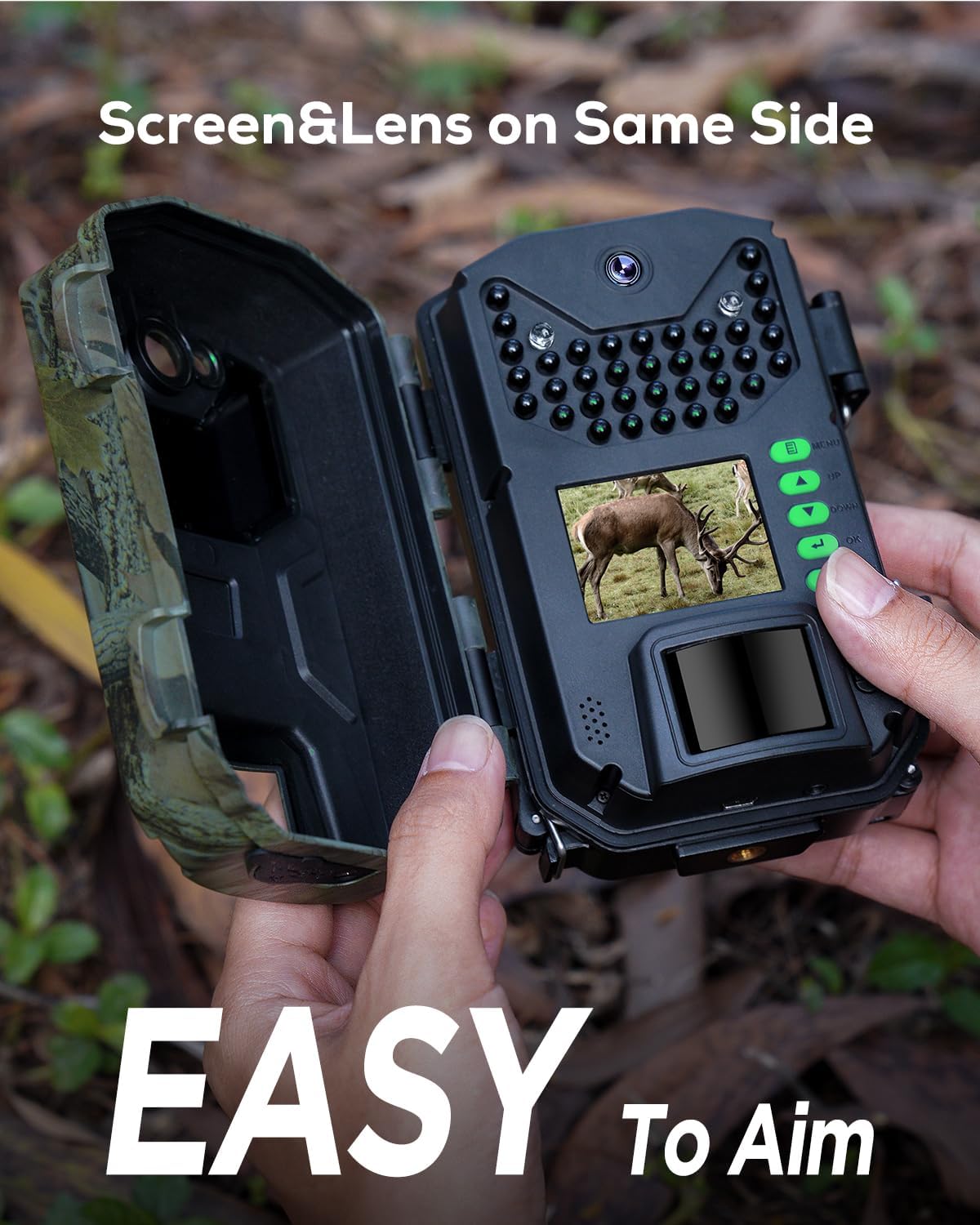
The front-facing screen and lens simplify setup and aiming.
Operating
The iG200 offers various operating modes and settings to suit your monitoring needs:
- Photo Mode: Captures still images at resolutions up to 36MP.
- Video Mode: Records video clips in 2K, 1080P, or 720P resolution with clear audio.
- Photo & Video Mode: Takes a still photo followed by a video clip when triggered.
- Trigger Speed: The camera features an ultra-fast 0.2-second trigger speed to ensure no movement is missed.
- Motion Detection: The adjustable motion-activated sensor can be configured for sensitivity to optimize detection.
- Night Vision: 36 no-glow 940nm infrared LEDs provide high-quality black and white night vision without disturbing wildlife.
- Time Lapse: Utilize the time lapse feature to capture events over extended periods.
- Loop Recording: For security purposes, the camera supports loop recording, overwriting older files when the SD card is full.

940nm No Glow IR LEDs ensure the camera remains discreet during night operation.
Example wildlife footage captured by the iZEEKER Trail Camera iG200.
Maintenance
- Waterproofing: The iG200 features an IP66 waterproof rating with an innovative clamshell design and unique bottom-opening battery case. Ensure all latches are securely closed to maintain water resistance, especially in rainy conditions.
- Battery Care: Use high-quality AA batteries. While the camera can operate on 4 batteries, 8 batteries will provide extended runtime. Always insert batteries with correct polarity.
- SD Card Handling: The camera uses a normal-sized SD card. Ensure it is properly inserted and removed from the side slot to prevent damage. Regularly format the SD card via the camera's menu for optimal performance.
- Cleaning: Keep the lens and sensors clean from dirt, dust, or moisture for clear image and video quality. Use a soft, dry cloth for cleaning.

The iG200 is built with IP66 all-weather protection for reliable outdoor use.
Troubleshooting
- SD Card Not Recognized: Ensure the SD card is a standard size (not micro SD with adapter) and is properly inserted. Some users have reported issues with larger capacity cards; try a 32GB Class 10 card. Formatting the card in the camera is crucial.
- Poor Night Vision: Verify that the camera is positioned correctly and that there are no obstructions in front of the lens or IR LEDs. Ensure batteries have sufficient charge.
- Short Battery Life: Check battery quality and type. Using 8 high-quality AA batteries is recommended for extended life. Extreme temperatures can also affect battery performance.
- Difficulty Accessing Battery/SD Card: The bottom-opening battery case and side SD card slot are designed for convenience. If mounted tightly against a tree, it might be difficult to access; consider mounting position carefully.
- Camera Not Triggering: Adjust the PIR sensor sensitivity in the menu. Ensure the camera is positioned to capture motion within its detection range.
Specifications
| Feature | Detail |
|---|---|
| Model Name | iG200 |
| Effective Still Resolution | 36 MP |
| Video Capture Resolution | 2K, 1080P, 720P |
| Night Vision | 940nm No Glow Infrared LEDs (36 LEDs) |
| Trigger Speed | 0.2 seconds |
| Waterproof Rating | IP66 |
| Power Source | 8 x AA Batteries (not included) or 6V DC input |
| Storage | SD Card (up to 32GB recommended) |
| Dimensions | 5.71 x 4.13 x 2.68 inches |
| Weight | 9.9 ounces |
Warranty & Support
iZEEKER is committed to providing consumers with premium products of consistent and reliable quality. For any questions or support regarding your iG200 Trail Camera, please refer to the included User Manual (PDF) or visit the official iZEEKER store for further assistance.
The product was first available on October 25, 2022.
For detailed instructions, you can also refer to the User Manual (PDF).


