1. Introduction
Thank you for choosing the HUTT W8 Robotic Window and Surface Cleaner. This manual provides essential information for the safe and efficient operation, maintenance, and troubleshooting of your device. Please read this manual thoroughly before first use and retain it for future reference.
1.1 Important Safety Information
- Always connect the safety rope before operating the robot, especially on high windows or surfaces.
- Ensure the power cord is securely connected and not tangled during operation.
- Do not use the robot on cracked, damaged, or uneven surfaces.
- Keep children and pets away from the operating robot.
- Use only recommended cleaning solutions or water in the tank.
- Do not immerse the robot in water or other liquids.
- In case of power failure, the internal safety battery provides temporary suction. Retrieve the robot promptly.
2. Product Overview
The HUTT W8 is an advanced robotic cleaner designed for various smooth surfaces, including windows, mirrors, and tiles. It features a powerful suction motor, a dual-spray system, and intelligent navigation for efficient cleaning.
2.1 Package Contents
- HUTT W8 Robotic Cleaner
- Remote Control
- Microfiber Cleaning Pads (multiple)
- Power Adapter and Cable
- Safety Rope
- Water Filling Bottle
2.2 Key Features
- Dual Spray System: Two-way spray nozzles for effective cleaning without pre-treatment.
- Integrated Water Tank: 80ml capacity for water or cleaning solution.
- High Suction Power: Up to 3800Pa for secure adhesion to surfaces.
- Laser Sensors: Detects edges, corners, and obstacles for precise navigation.
- Intelligent Path Planning: Optimizes cleaning routes for thorough coverage.
- Remote Control: Convenient operation and mode selection.
- Safety Features: 6-meter safety cable and 650mAh backup battery.

Figure 2.1: Front view of the HUTT W8 Robotic Cleaner, showing the dual spray nozzles and water tank.

Figure 2.2: The HUTT W8 robot alongside its included accessories, such as the remote control and cleaning pads.
3. Setup
Before operating your HUTT W8, follow these steps to ensure proper setup.
3.1 Charging the Robot
The robot has an internal safety battery. For optimal performance and safety, ensure the robot is fully charged before its first use. Connect the power adapter to the robot and a power outlet. The indicator light will show charging status.
3.2 Attaching Cleaning Pads
Attach the microfiber cleaning pads to the bottom of the robot. Ensure they are securely fastened and cover the cleaning area completely.

Figure 3.1: The underside of the HUTT W8, showing the attachment points for the microfiber cleaning pads.
3.3 Filling the Water Tank
Open the water tank cap and use the provided filling bottle to add clean water or a suitable window cleaning solution. Do not overfill the 80ml tank. Close the cap securely.
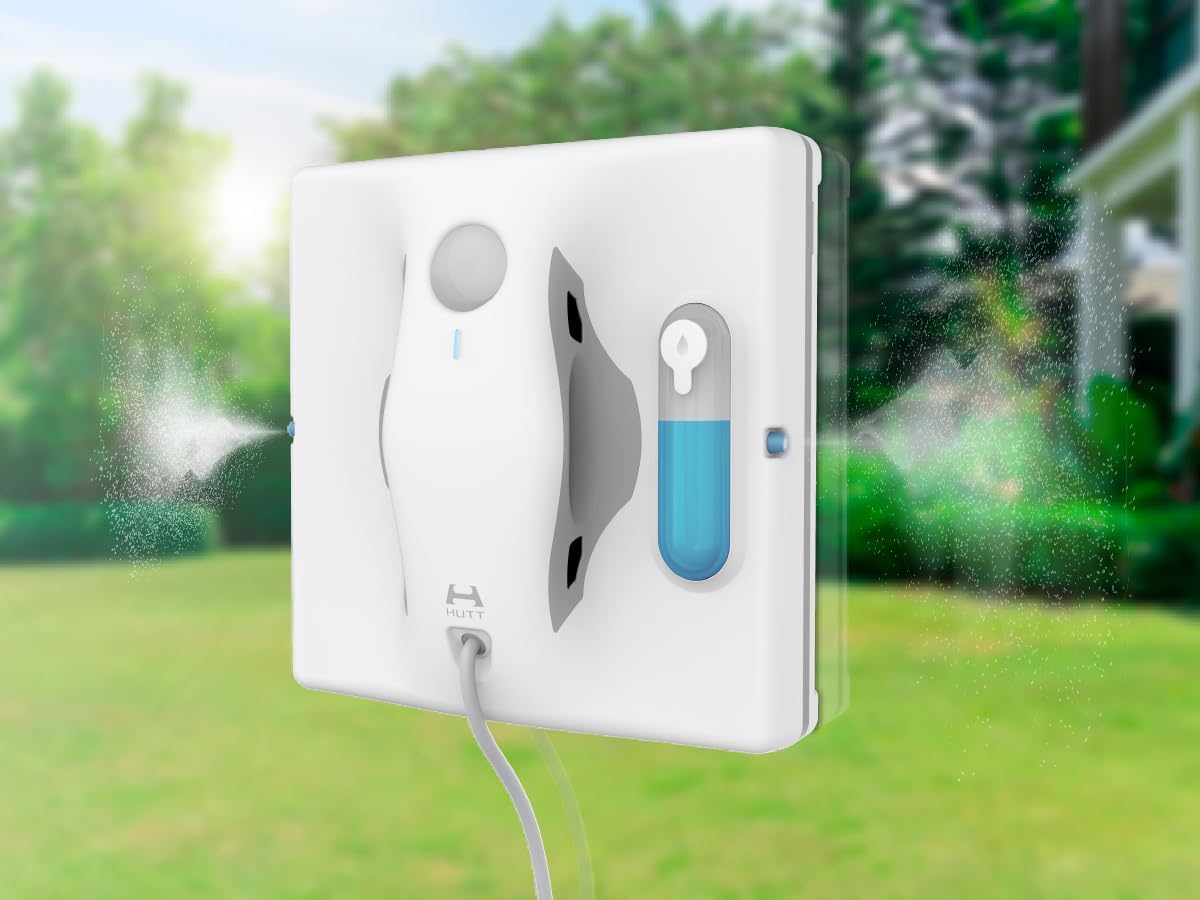
Figure 3.2: The HUTT W8 with its integrated 80ml water tank visible, ready for filling with cleaning solution.
3.4 Power Connection and Safety Rope
Connect the power cable to the robot and then to a power outlet. Securely attach the safety rope to a sturdy anchor point before placing the robot on the surface to be cleaned. This is crucial for preventing falls.
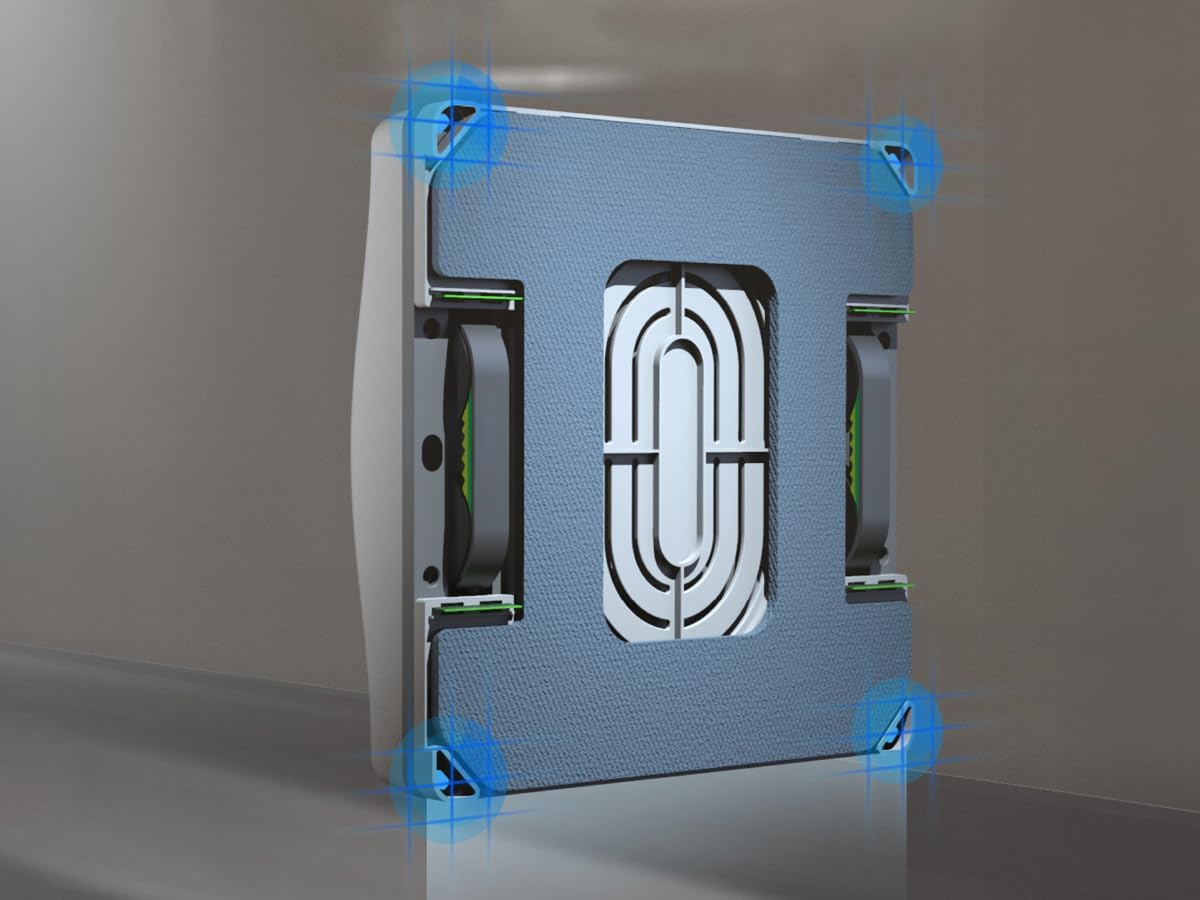
Figure 3.3: The HUTT W8 robot positioned on a window, demonstrating the connected power cord and safety rope attachment.
4. Operating Instructions
Follow these steps to operate your HUTT W8 for effective cleaning.
4.1 Placing the Robot
Place the robot on the surface to be cleaned, ensuring it is flat and free of large debris. Press the power button on the robot or the remote control to activate suction. The robot will adhere to the surface.
4.2 Starting the Cleaning Cycle
Once the robot is securely attached, press the start button on the robot or the remote control. The robot will begin its intelligent path planning and cleaning cycle, spraying solution and wiping the surface.

Figure 4.1: Illustration of the HUTT W8's intelligent path planning, demonstrating its systematic cleaning pattern for thorough coverage.

Figure 4.2: The HUTT W8 actively cleaning a window, showcasing its movement and spray function.
4.3 Using the Remote Control
The remote control allows you to start, pause, and manually direct the robot. Refer to the remote control diagram for specific button functions.

Figure 4.3: A hand holding the remote control for the HUTT W8, illustrating its compact design and button layout.
4.4 Voice Prompts
The robot provides voice prompts to indicate its status and actions. Pay attention to these prompts for operational guidance.
5. Maintenance
Regular maintenance ensures the longevity and optimal performance of your HUTT W8.
5.1 Cleaning Microfiber Pads
After each use, remove the microfiber cleaning pads. They can be hand-washed or machine-washed with mild detergent. Allow them to air dry completely before reattaching.
5.2 Emptying and Cleaning the Water Tank
Empty any remaining solution from the water tank after each use. Rinse the tank with clean water to prevent residue buildup. Ensure the tank is dry before storage.
5.3 Cleaning the Robot Body
Wipe the exterior of the robot with a soft, damp cloth. Do not use abrasive cleaners or immerse the robot in water. Ensure sensors are clean and free of debris.
6. Troubleshooting
If you encounter issues with your HUTT W8, refer to the following common problems and solutions.
| Problem | Possible Cause | Solution |
|---|---|---|
| Robot not adhering to surface | Insufficient suction; surface too dirty/wet; power issue. | Ensure power cable is connected. Clean the surface of large debris. Check for blockages in suction vents. |
| Leaves streaks on surface | Dirty cleaning pads; incorrect cleaning solution; surface too dirty. | Replace or clean microfiber pads. Use appropriate cleaning solution or clean water. Pre-clean heavily soiled surfaces manually. |
| Robot not moving or stuck | Obstacle detected; sensor dirty; power issue. | Clear any obstacles. Clean laser sensors. Ensure continuous power supply. |
| No spray from nozzles | Water tank empty; nozzles blocked. | Refill the water tank. Check nozzles for blockages and clean if necessary. |
7. Specifications
Technical specifications for the HUTT W8 Robotic Window and Surface Cleaner.
| Feature | Specification |
|---|---|
| Model | W8 (H000001) |
| Dimensions | 50 x 50 x 28 cm |
| Weight | 1.4 kg |
| Wattage | 90 watts |
| Noise Level | 65 Decibels |
| Water Tank Capacity | 80 ml |
| Max Suction Power | 3800Pa |
| Safety Battery | 650 mAh |
| Safety Cable Length | 6 meters |
| Special Features | Wireless operation (with power cord connected), Dual Spray System, Laser Sensors |
8. Warranty and Support
For warranty information and customer support, please refer to the warranty card included with your product or visit the official HUTT website. If you experience any issues not covered in this manual, please contact HUTT customer service for assistance.


