
Yoidesu Yoidesu0ic7qgk1os5663
Yoidesu BT22 Helmet Bluetooth Headset User Manual
Model: BT22
1. Introduction
Thank you for choosing the Yoidesu BT22 Helmet Bluetooth Headset. This manual provides essential information for the proper setup, operation, and maintenance of your device. Please read this manual thoroughly before use to ensure optimal performance and safety. This headset is designed to provide clear audio communication and music playback while riding, featuring Bluetooth 5.0 technology, automatic call answering, and noise reduction.
2. Safety Information
- Always prioritize road safety. Do not operate the device in a manner that distracts you from riding.
- Ensure the headset is securely installed in your helmet to prevent detachment during operation.
- Do not expose the device to extreme temperatures, moisture, or corrosive substances.
- Keep the device away from children and pets.
- Use only the provided charging cable and a compatible power source for charging.
- Avoid listening at excessively high volumes for prolonged periods to prevent hearing damage.
3. Package Contents
Please verify that all items listed below are included in your package:
- 1 x Helmet Bluetooth Headset (Control Unit)
- 1 x Headset Controller (Integrated Speakers and Microphone)
- 1 x Charging Cable
- 1 x User Manual

Image: All components included in the Yoidesu BT22 Helmet Bluetooth Headset package.
4. Product Overview
The Yoidesu BT22 Helmet Bluetooth Headset consists of a main control unit, integrated speakers, and a microphone, designed for easy installation within most motorcycle helmets.
Control Unit
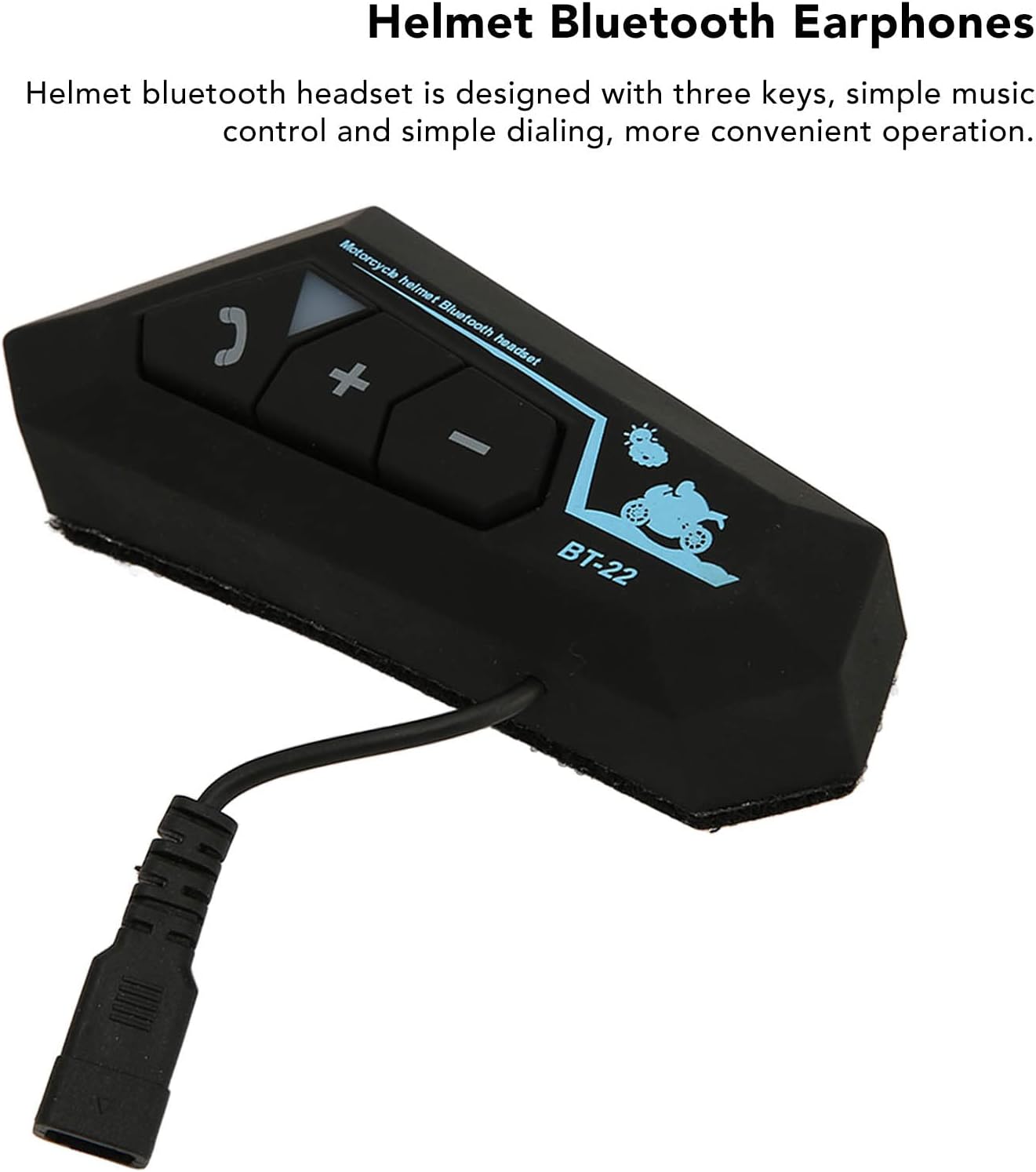
Image: The main control unit with its three-button interface.
The control unit features a three-key design for simple operation:
- Call Button: For answering/ending calls and power on/off.
- '+' Button: For increasing volume or next track.
- '-' Button: For decreasing volume or previous track.
Speakers and Microphone

Image: The two flat speakers designed to fit inside a helmet.
The headset includes two slim speakers for clear stereo sound and a flexible boom microphone with noise reduction technology for clear voice transmission.
5. Setup
5.1 Charging the Battery
The BT22 headset is equipped with a built-in 820mAh rechargeable lithium-ion battery. Before first use, fully charge the device.
- Connect the provided charging cable to the charging port on the control unit.
- Connect the other end of the charging cable to a USB power adapter (not included) or a computer's USB port.
- The indicator light will show charging status (e.g., red for charging, blue for fully charged).
- Once fully charged, disconnect the charging cable.
5.2 Installation in Helmet
The headset is designed for easy installation within most motorcycle helmets.
- Identify suitable locations within your helmet for the speakers, typically in the ear pockets.
- Secure the speakers using the adhesive pads or hook-and-loop fasteners provided (if applicable) to ensure they are flat and comfortable against your ears.
- Position the microphone near your mouth, ensuring it does not obstruct your vision or helmet closure.
- Mount the control unit on the exterior of the helmet, typically on the side, using the provided clip or adhesive mount. Ensure it is easily accessible for operation.
- Route all cables neatly within the helmet lining to prevent tangling or discomfort.
5.3 Bluetooth Pairing
To connect your headset to a mobile device:
- Ensure the headset is turned off.
- Press and hold the Call button on the control unit until the indicator light flashes rapidly (e.g., alternating red and blue), indicating pairing mode.
- On your mobile device, enable Bluetooth and search for available devices.
- Select "BT22" from the list of found devices.
- Once connected, the indicator light on the headset will change (e.g., slow blue flashes) and a voice prompt may confirm the connection.
6. Operating Instructions
6.1 Power On/Off
- Power On: Press and hold the Call button for approximately 3 seconds until you hear a voice prompt or see the indicator light turn on.
- Power Off: Press and hold the Call button for approximately 5 seconds until you hear a voice prompt or see the indicator light turn off.
6.2 Call Handling
- Automatic Answering: The headset is designed to automatically answer incoming calls after a few rings, providing a safer and more convenient experience while riding.
- Answer Call: If automatic answering is not desired or enabled, short press the Call button to answer an incoming call.
- End Call: Short press the Call button during a call to end it.
- Reject Call: Press and hold the Call button for 2 seconds to reject an incoming call.
- Redial Last Number: Double-press the Call button to redial the last dialed number.
6.3 Music Playback
- Play/Pause: Short press the Call button to play or pause music.
- Next Track: Short press the '+' button.
- Previous Track: Short press the '-' button.
6.4 Volume Control
- Volume Up: Press and hold the '+' button.
- Volume Down: Press and hold the '-' button.
6.5 Intercom Connection
The BT22 headset supports intercom connection. For detailed instructions on how to establish and manage intercom communication with other compatible devices, please refer to the specific section in the full manual provided with your product or contact customer support.
7. Maintenance
- Cleaning: Use a soft, dry cloth to clean the control unit and speakers. Do not use abrasive cleaners or solvents.
- Storage: When not in use for extended periods, store the headset in a cool, dry place away from direct sunlight.
- Battery Care: To prolong battery life, avoid fully discharging the battery frequently. Charge the device regularly, even if not in use.
- Water Resistance: While designed for outdoor use, avoid submerging the device in water.
8. Troubleshooting
| Problem | Possible Cause | Solution |
|---|---|---|
| Device does not power on. | Low battery. | Charge the device fully. |
| Cannot pair with mobile device. | Headset not in pairing mode; Bluetooth off on mobile device; too many paired devices. | Ensure headset is in pairing mode (flashing red/blue). Turn on Bluetooth on your phone. Delete old Bluetooth connections on your phone and try again. |
| No sound from speakers. | Volume too low; speakers disconnected; device not connected. | Increase volume. Check speaker connections to the control unit. Ensure the headset is successfully paired and connected to your device. |
| Microphone not working. | Microphone disconnected; microphone blocked. | Check microphone connection. Ensure nothing is obstructing the microphone. |
9. Specifications
| Feature | Specification |
|---|---|
| Model | BT22 |
| Bluetooth Version | 5.0 |
| Battery Type | Built-in 820mAh Lithium Battery |
| Frequency | 2.402-2.480GHz |
| Bluetooth Range | 20-30m (65.6-98.4ft) |
| Material | ABS Plastic |
| Item Weight | 8 ounces |
| Package Dimensions | 9.06 x 3.94 x 1.18 inches |
10. Warranty and Support
For warranty information, technical support, or any inquiries regarding your Yoidesu BT22 Helmet Bluetooth Headset, please refer to the contact information provided on the product packaging or contact the seller directly. Keep your purchase receipt as proof of purchase.
Ask a question about this manual
Ask about setup, troubleshooting, compatibility, parts, safety, or missing instructions. Manuals+ will review the question and use this page’s manual context to help answer it.