
1. Introduction
This manual provides detailed instructions for the safe and effective use of your Yoidesu 2G Unlocked Senior Flip Cell Phone. Please read this manual thoroughly before operating the device to ensure proper functionality and longevity.

Image: The Yoidesu 2G Unlocked Senior Flip Cell Phone shown in both its closed, compact form and its open, ready-to-use state, highlighting its flip design and large keypad.
2. Safety Information
Observe the following safety precautions to prevent injury or damage to your device:
- Do not expose the phone to extreme temperatures, direct sunlight, or moisture.
- Use only manufacturer-approved chargers and accessories.
- Avoid dropping or subjecting the phone to severe impact.
- Do not attempt to disassemble or repair the phone yourself.
- Keep the phone away from medical devices, such as pacemakers, to avoid interference.
3. Package Contents
Verify that all items are present in the package:
- Yoidesu 2G Unlocked Senior Flip Cell Phone
- USB Cable
- Phone Case

Image: The Yoidesu flip phone, a USB charging cable, and a protective phone case, illustrating the items included in the product package.
4. Product Features
The Yoidesu 2G Unlocked Senior Flip Cell Phone is designed with user-friendliness in mind, offering several key features:
- Large 2.8-inch Display: A clear, high-resolution screen for easy viewing of text and images.
- Prominent Buttons & Large Font: Oversized, clearly visible buttons and large font display for effortless dialing and navigation.
- Flip Design: Answer calls by simply flipping open the phone.
- One-Touch Dialing: Program up to six family numbers for quick access.
- SOS Function: Dedicated button for emergency calls.
- Voice Broadcast: Announces menu options, key presses, and incoming call numbers.
- Built-in Flashlight: Provides illumination in low-light conditions.
- Automatic Time Synchronization: Sets time automatically via satellite, no manual adjustment needed.
- High Volume Speaker: Ensures clear sound quality for calls and alerts.
- Dual SIM Support: Allows for two SIM cards to be used simultaneously.
- Long Standby Time: Equipped with a 5900mAh battery for extended usage.
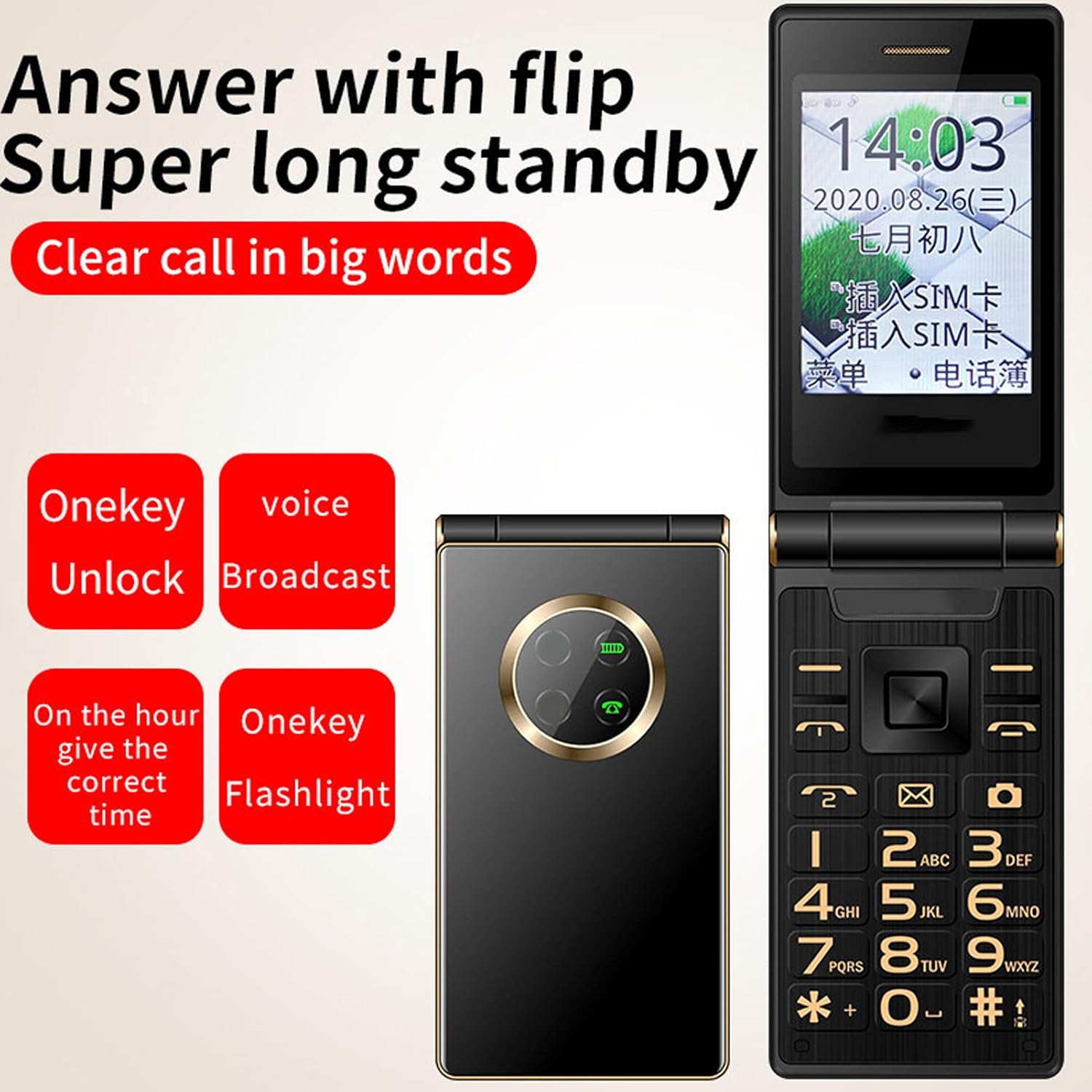
Image: Visual representation of the phone's key features, including answering calls by flipping, long standby, clear call quality, one-key unlock, voice broadcast, time announcement, and flashlight function.

Image: A close-up of the phone's 2.8-inch HD display, showing clear text and graphics, emphasizing its high definition and resolution for better readability.

Image: The phone's keypad and screen, illustrating the large font display and the prominent, easy-to-press buttons, designed for user convenience.
5. Setup
5.1. Battery Installation and Charging
- Open the back cover of the phone.
- Insert the battery into the compartment, ensuring the gold contacts align.
- Replace the back cover.
- Connect the USB cable to the phone's charging port and the other end to a compatible USB power adapter (not included) or computer.
- Allow the phone to charge fully before first use. The battery indicator on the screen will show charging status.
5.2. SIM Card Installation
This phone supports dual SIM cards.
- Power off the phone and remove the back cover and battery.
- Locate the SIM card slots.
- Carefully insert your 2G compatible SIM card(s) into the designated slot(s) with the gold contacts facing down.
- Reinsert the battery and replace the back cover.
5.3. Initial Power On
- Press and hold the Power/End Call button until the screen lights up.
- Follow any on-screen prompts for initial setup, such as language selection.
6. Operating Instructions
6.1. Making and Receiving Calls
- Making a Call: Dial the number using the keypad and press the Green Call button.
- Receiving a Call: Flip open the phone or press the Green Call button to answer. Press the Red End Call button or close the phone to end a call.
- Volume Adjustment: Use the dedicated volume buttons on the side of the phone during a call to adjust the earpiece volume.
6.2. One-Touch Dialing (Family Numbers)
This feature allows you to quickly dial pre-set family numbers.
- Navigate to the "Settings" or "Phonebook" menu.
- Locate the "Family Numbers" or "Speed Dial" option.
- Assign up to six contact numbers to specific keys (e.g., 1-6).
- To dial, simply long-press the assigned number key.

Image: An illustration demonstrating the one-touch dialing feature, showing how to set up and use quick dial numbers for family contacts.
6.3. SOS Function
The SOS button is located on the back of the phone. In an emergency, long-press this button to activate the SOS function. The phone will automatically dial pre-set emergency contacts and send an emergency message.
- Setting SOS Contacts: Access the "SOS Settings" in the phone's menu to add or modify emergency contact numbers.
6.4. Voice Broadcast
The phone features voice broadcast for enhanced accessibility.
- Key Voice Broadcast: Announces the number or function of the key pressed.
- Incoming Call Voice Broadcast: Announces the incoming caller's number (if not in contacts) or name (if in contacts).
- Menu Voice Broadcast: Announces menu options as you navigate.

Image: A visual representation of the phone's voice broadcast feature, showing sound waves emanating from the phone, indicating its ability to audibly announce functions and numbers.
6.5. Flashlight
To activate the built-in LED flashlight, locate the dedicated flashlight button on the side of the phone and slide it up or press it, depending on the model variant. Slide it down or press again to turn it off.

Image: The phone's built-in LED flashlight illuminated, demonstrating its function as a convenient light source.
6.6. Camera Function
The phone includes a basic camera for capturing photos and videos.
- Navigate to the "Camera" application from the main menu.
- Use the navigation keys to frame your shot.
- Press the center key to capture a photo or start/stop video recording.

Image: The phone's screen displaying a family photo, illustrating its capability to capture photos and videos.
6.7. Automatic Time Synchronization
The phone automatically synchronizes its time via satellite, eliminating the need for manual time adjustments.

Image: The phone displaying a clock face, with a graphic suggesting automatic time synchronization via satellite, indicating no manual adjustment is required.
7. Maintenance
- Cleaning: Use a soft, dry cloth to clean the phone's exterior. Avoid using liquid cleaners or aerosols.
- Battery Care: To prolong battery life, avoid fully discharging the battery frequently. Charge the phone regularly, but do not leave it connected to the charger for extended periods after it is fully charged.
- Storage: Store the phone in a cool, dry place away from direct sunlight and extreme temperatures when not in use for long periods.
8. Troubleshooting
| Problem | Possible Cause | Solution |
|---|---|---|
| Phone does not power on. | Battery is discharged or not properly installed. | Charge the battery. Ensure the battery is correctly inserted. |
| Cannot make or receive calls. | No SIM card, SIM card not properly inserted, or no network signal. | Ensure SIM card is inserted correctly. Check network coverage in your area. Verify the phone is unlocked for your carrier (this model is unlocked). |
| Poor sound quality during calls. | Low volume setting, poor network signal, or speaker obstruction. | Adjust call volume. Move to an area with better signal. Ensure speaker is not blocked. |
| Battery drains quickly. | Frequent usage, old battery, or background processes. | Reduce screen brightness. Close unused applications. Consider replacing the battery if it's old. |
| Keys are unresponsive. | Software glitch or physical damage. | Restart the phone. If the problem persists, contact customer support. |
9. Specifications
| Feature | Detail |
|---|---|
| Brand | Yoidesu |
| Model | 2G Unlocked Senior Flip Cell Phone |
| Screen Size | 2.8 Inches |
| Resolution | 240 x 320 |
| Battery Capacity | 5900 Milliamp Hours |
| RAM Memory Installed Size | 4 MB |
| Memory Storage Capacity | 32 MB |
| Wireless Carrier | Unlocked for All Carriers |
| Cellular Technology | GSM |
| Connectivity Technology | Bluetooth, USB |
| Human Interface Input | Buttons |
| Form Factor | Flip |
| Color | Black 1 |
| Item Weight | 10.2 ounces |
| Package Dimensions | 5.55 x 3.39 x 2.52 inches |
10. Warranty and Support
For warranty information, please refer to the documentation provided with your purchase or contact the seller directly. This product typically includes a standard return policy of 30 days for refund or replacement.
For technical support or further assistance, please visit the official Yoidesu store on Amazon: Yoidesu Store.