
1. Introduction
This manual provides detailed instructions for the installation, operation, and maintenance of your CANMEIJIA CMJ-XDD-001 Dimmable RGB LED Ceiling Light. Please read this manual thoroughly before installation and use to ensure proper function and safety. This ceiling light features dimmable white light (3000K-6500K), RGB color options, remote control, and smart app control capabilities.
2. Safety Information
- Electrical Safety: Installation must be performed by a qualified electrician or in accordance with local electrical codes. Always disconnect power at the circuit breaker before installation or maintenance.
- Voltage: Ensure the supply voltage matches the light fixture's requirements (220 Volts AC).
- Mounting: Mount the fixture securely to a stable ceiling surface.
- Water Resistance: This product is IP44 rated, making it suitable for damp locations like bathrooms, but it is not designed for direct water immersion.
- Cleaning: Do not use abrasive cleaners or solvents. Clean with a soft, damp cloth.
- Disassembly: Do not attempt to disassemble or modify the light fixture. This will void the warranty and may cause electrical hazards.
3. Package Contents
Verify that all components are present before beginning installation:
- CANMEIJIA CMJ-XDD-001 LED Ceiling Light Fixture
- Remote Control
- Mounting Hardware (screws, anchors)
- User Manual (this document)

Image: Contents of the package, including the ceiling light, remote control, and a visual representation of the smartphone app interface.
4. Installation
Follow these steps for safe and proper installation:
- Disconnect Power: Turn off the main power supply at the circuit breaker before starting installation.
- Separate Base: Gently twist or unclip the lamp body from its base.
- Fasten Base: Position the mounting base on the ceiling and mark the drill holes. Drill holes, insert anchors (if necessary), and securely fasten the base to the ceiling using the provided screws.
- Connect Wires: Connect the household electrical wires to the corresponding wires on the light fixture's base. Ensure all connections are secure and insulated.
- Secure Lamp Body: Align the lamp body with the fastened base and secure it by twisting or clipping it into place.
- Restore Power: Turn the main power supply back on at the circuit breaker.
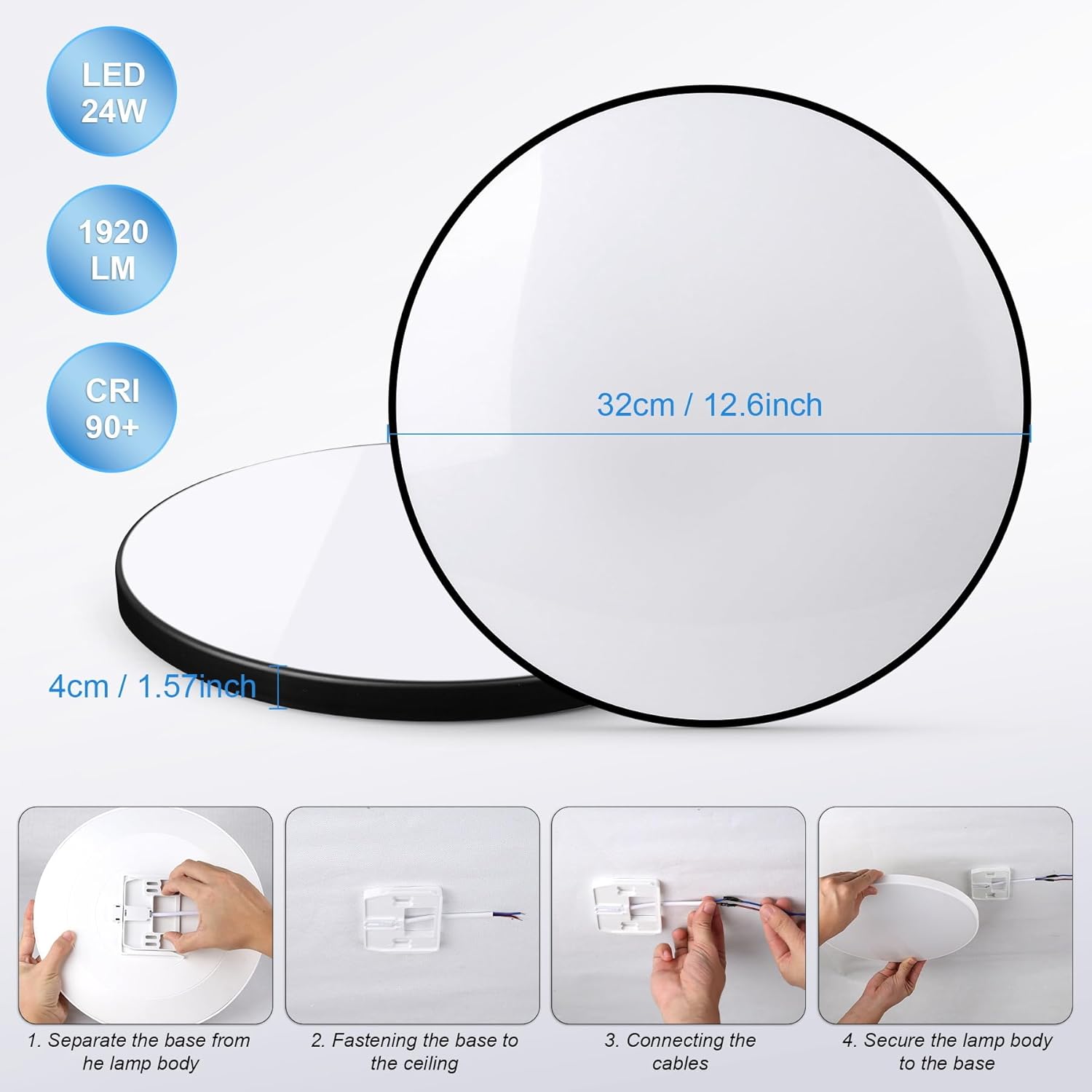
Image: Visual guide demonstrating the four-step installation process: separating the base, fastening the base to the ceiling, connecting electrical cables, and securing the lamp body.
5. Operating Instructions
Your CANMEIJIA ceiling light can be controlled via the included remote control, a smartphone app, or voice commands.
5.1 Remote Control Operation
The remote control allows for basic functions:
- Power On/Off: Press the ON/OFF button.
- Brightness Adjustment: Use the Brightness Up/Down buttons to adjust intensity from 10% to 100%.
- Color Temperature: Cycle through Warm Light (3000K), Neutral White Light, and Cold White Light (6500K) using dedicated buttons.
- RGB Colors: Select various RGB colors directly from the remote's color palette buttons.
- Scene Modes: Some remotes may include preset scene modes for different atmospheres.
5.2 Smartphone App Control
For advanced features and customization, download the compatible smart home app (e.g., Tuya Smart or Smart Life) from your device's app store.
- Download App: Search for "Tuya Smart" or "Smart Life" in your app store and install it.
- Register/Login: Create an account or log in.
- Add Device: Follow the in-app instructions to add your ceiling light. This typically involves ensuring the light is in pairing mode (often by cycling power 3-5 times) and connecting via Bluetooth or Wi-Fi.
- Control Features: The app provides comprehensive control over:
- Precise color temperature adjustment (3000K-6500K).
- Smooth brightness dimming (10%-100%).
- Selection from 16 million RGB colors.
- Customizable scene modes and dynamic lighting effects.
- Scheduling and timer functions.
- Group control for multiple lights.

Image: A smartphone displaying the app interface for controlling the ceiling light, highlighting the extensive RGB color selection and various color outputs.
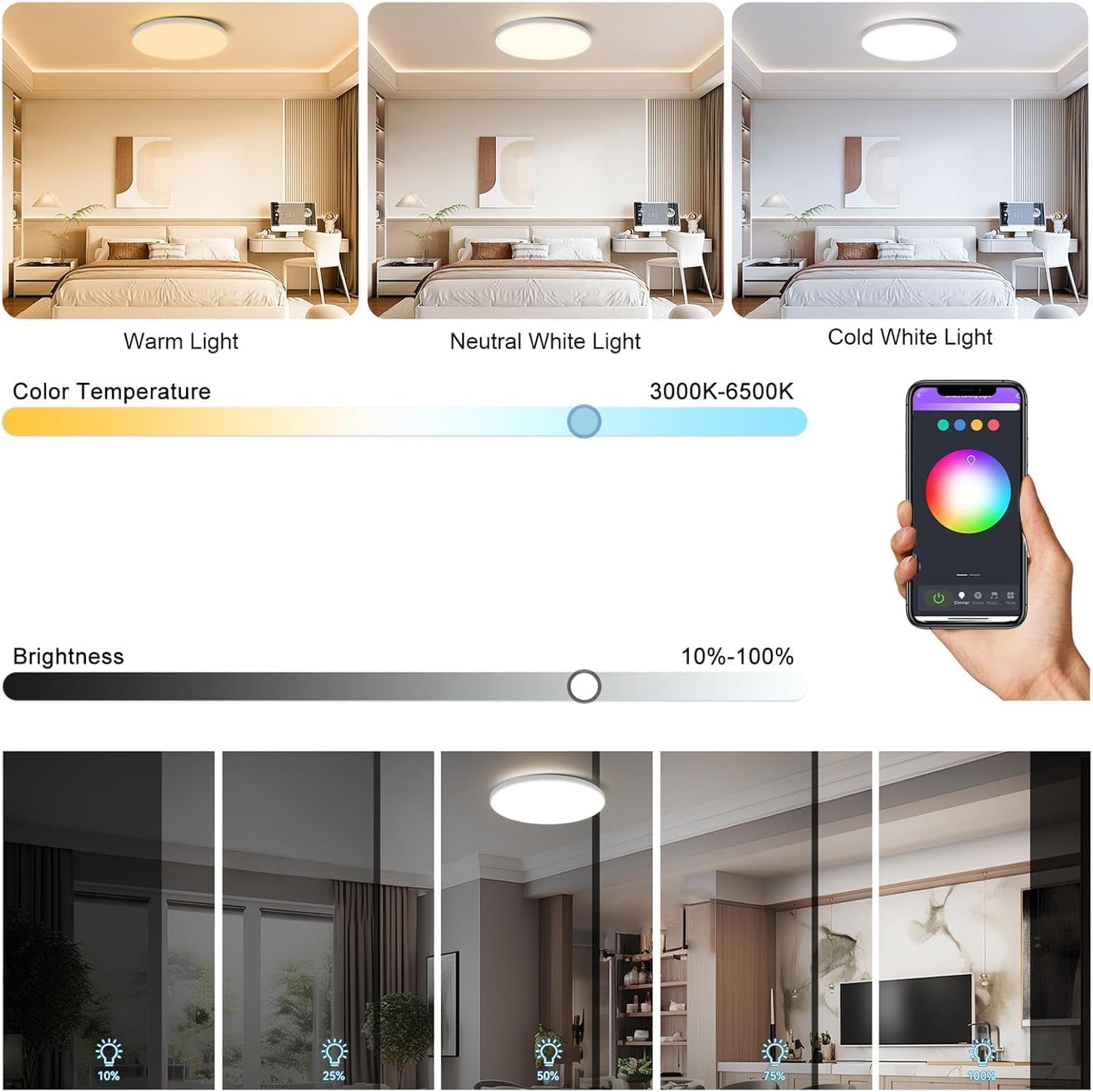
Image: Demonstrates the adjustable color temperature from warm to cold white light (3000K-6500K) and brightness dimming (10%-100%) through the app interface, with examples of light output at different settings.
5.3 Voice Control
The light supports voice control through compatible smart assistants (e.g., Amazon Alexa, Google Assistant) once integrated with the smart app.
- Link Account: In your smart assistant app, link your Tuya Smart/Smart Life account.
- Discover Devices: Ask your smart assistant to discover new devices.
- Voice Commands: Use commands such as: "Alexa, turn on the bedroom light," "Hey Google, set the living room light to blue," or "Alexa, dim the ceiling light to 50%."
6. Maintenance
Regular maintenance ensures optimal performance and longevity of your ceiling light.
- Cleaning: Ensure the power is off before cleaning. Wipe the surface of the light with a soft, dry, or slightly damp cloth. Do not use harsh chemicals, abrasive cleaners, or sprays directly on the fixture.
- Inspection: Periodically check for any loose connections or damage to the fixture. If any damage is found, disconnect power and contact customer support.
- Bulb Replacement: This LED fixture does not require bulb replacement. The LEDs are integrated and designed for long-term use.
7. Troubleshooting
If you encounter issues with your ceiling light, refer to the following common problems and solutions:
| Problem | Possible Cause | Solution |
|---|---|---|
| Light does not turn on. | No power, loose wiring, remote battery dead. | Check circuit breaker. Verify wiring connections. Replace remote control batteries. |
| Remote control not working. | Batteries dead, remote out of range, not paired. | Replace batteries. Ensure remote is within operating range. Re-pair remote if necessary (refer to specific pairing instructions if provided with remote). |
| App control not working. | Light not connected to Wi-Fi/Bluetooth, incorrect app settings, network issues. | Ensure light is in pairing mode. Check Wi-Fi connection. Restart router. Re-add device in the app. |
| Light flickers. | Unstable power supply, loose connection, incompatible dimmer (if applicable). | Check power supply stability. Verify wiring. This light is designed to be flicker-free (CRI > 90). If flickering persists, contact support. |
| Colors are incorrect or unresponsive. | App/remote synchronization issue. | Restart the light by cycling power. Re-sync with the app or remote. |
8. Specifications
Key technical specifications for the CANMEIJIA CMJ-XDD-001 LED Ceiling Light:
- Model Number: CMJ-XDD-001
- Brand: CANMEIJIA
- Power: 24 Watts
- Luminous Flux: 1920 Lumens
- Color Temperature: 3000K - 6500K (Dimmable White)
- Color Options: RGB (16 Million Colors via App)
- Voltage: 220 Volts (AC)
- Dimensions (L x W x H): 32 x 32 x 4 cm (12.6 x 12.6 x 1.57 inches)
- Weight: 520 grams
- IP Rating: IP44 (Waterproof for damp locations)
- CRI (Color Rendering Index): >90
- Control Methods: Remote Control, Smartphone App (Tuya Smart/Smart Life), Voice Control (via smart assistants)
Image: The ceiling light with its dimensions indicated: 32cm (12.6 inches) diameter and 4cm (1.57 inches) thickness.

Image: EU Energy Label for the CANMEIJIA CMJ-XDD-001-24W, indicating an energy efficiency class of F and 24 kWh/1000h consumption. For more details, visit the official EPREL database: EPREL Product Page.

Image: A detailed Product Information Sheet providing comprehensive technical data and parameters for the CANMEIJIA CMJ-XDD-001-24W LED light source.

Image: A graph illustrating the spectral power distribution of the LED light source, showing the intensity of light across different wavelengths.
9. Warranty and Support
CANMEIJIA products are designed for quality and reliability. For warranty information, technical support, or assistance with your product, please refer to the contact information provided with your purchase or visit the official CANMEIJIA website. Please retain your proof of purchase for warranty claims.


