Product Overview
The Amico Smart LED Motion Sensor Outdoor Light is a 40W, 4000 LM security floodlight designed for outdoor use in areas such as garages, yards, and porches. It features adjustable color temperature (2700K-6500K) and brightness, app control via Wi-Fi, motion sensing capabilities, and an IP65 waterproof rating. This smart light offers various operational modes including sensor mode, micro-bright mode, and manual mode, providing flexible lighting solutions and enhanced security.

Figure 1: Amico Smart LED Motion Sensor Outdoor Light with its mobile application interface.
Key Features
- App Control: Manage settings conveniently via the "joinin home" app over 2.4Ghz WiFi, eliminating the need for physical adjustments.
- Adjustable Brightness & Color Temperature: Customize light output from 1% to 100% brightness and color temperature from 2700K (warm white) to 6500K (cool white).
- Motion Sensor Mode: Automatically activates when motion is detected (people, animals, cars) with adjustable sensing distance (up to 70FT) and lighting duration (5 seconds to 60 minutes).
- Micro-Bright Mode: Provides low-brightness standby (1%-30%) to save energy, transitioning to full illumination upon motion detection. Standby time adjustable from 1 minute to 8 hours.
- Manual Mode: Functions as a standard outdoor floodlight, allowing manual control, delayed shut-off, or scheduled on/off times.
- Group Control & Linked Devices: Control multiple lights from one phone and link devices for synchronized operation (e.g., garage light on, porch light activates). Device sharing with family members is supported.
- IP65 Waterproof: Durable, weatherproof design ensures reliable outdoor performance in various conditions.
- Easy Installation: Designed for simple wall mounting with straightforward wiring.
- Durable Metal Design: Constructed with corrosion and rust-resistant aluminum for long-lasting performance and efficient heat dissipation.
Installation Guide
Safety Precautions
- Ensure power is turned off at the circuit breaker before installation.
- Consult a qualified electrician if you are unsure about wiring procedures.
- Wear appropriate safety gear, including gloves and eye protection.
Mounting Options
The Amico Smart LED Motion Sensor Outdoor Light can be mounted on a wall or soffit, providing flexibility for various outdoor lighting needs.

Figure 2: Soffit Mounted vs. Wall Mounted Installation.
Wiring Steps
- Attach the mounting bracket to the desired surface using appropriate screws.
- Connect the light's wires to your household wiring:
- Connect the black wire (Live) from the light to the black wire from the junction box.
- Connect the white wire (Neutral) from the light to the white wire from the junction box.
- Connect the green wire (Ground) from the light to the green or bare copper wire from the junction box.
- Secure connections with wire nuts.
- Mount the light fixture onto the bracket and secure it.

Figure 3: Wiring connections for the Amico Smart LED Motion Sensor Outdoor Light.
Operating Instructions
App Control (Joinin Home App)
To utilize the smart features, download the "joinin home" app and pair the device via 2.4Ghz WiFi. The app allows for comprehensive control and customization.
- Brightness and Color Temperature Adjustment: Use the app to set brightness from 1% to 100% and color temperature from 2700K (warm) to 6500K (cool).
- Mode Selection: Switch between Manual, Sensor, and Micro-Bright modes.
- Scheduling: Set custom on/off schedules or delayed shut-off timers.
- Group Control: Link multiple Amico smart lights to control them simultaneously or create automated sequences.

Figure 4: App control offers convenience over manual adjustments.

Figure 5: Customizable light settings for brightness and color temperature.


Figure 6: App interfaces for color/brightness adjustment and scheduling.
Sensor Mode
In Sensor Mode, the light automatically turns on when motion is detected. You can adjust the sensitivity and duration of the light.
- Sensing Distance: Adjustable up to 70 feet.
- Lighting Time: Adjustable from 5 seconds to 60 minutes after motion detection.
- Event Records: The app provides a log of motion detection events.
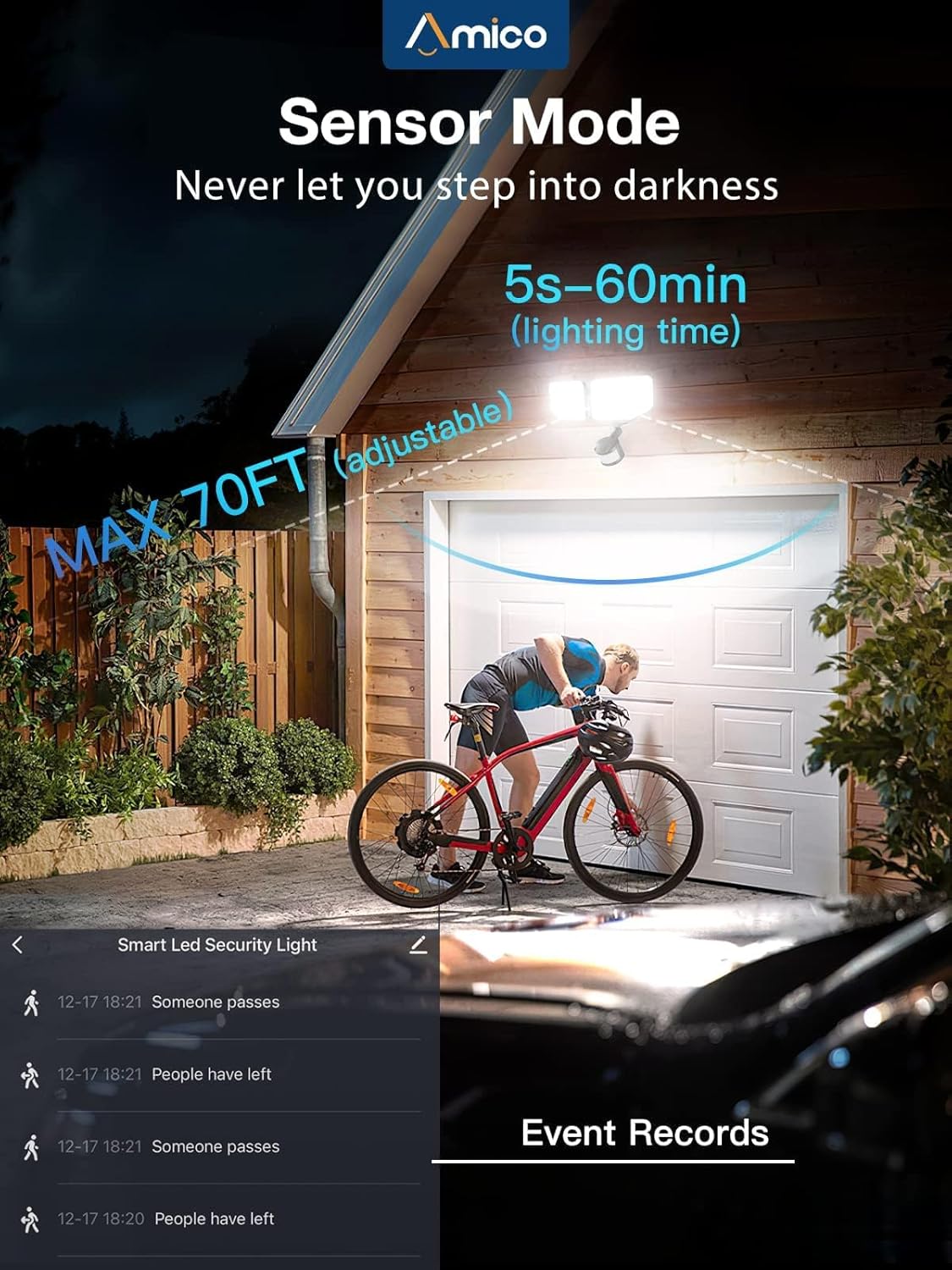
Figure 7: Motion sensor in action, detecting movement up to 70 feet.


Figure 8: App interfaces for sensor settings and event logs.
Micro-Bright Mode
This mode allows the light to maintain a low brightness (1%-30%) when no motion is detected, saving energy. It will switch to full brightness upon motion detection.
- Standby Brightness: Adjustable from 1% to 30%.
- Standby Time: Adjustable from 1 minute to 8 hours.

Figure 9: Illustration of Micro-Bright Mode operation.
Voice Control
The Amico Smart LED Motion Sensor Outdoor Light is compatible with voice assistants like Alexa, allowing for hands-free control of basic functions such as turning the light on/off.

Figure 10: Voice control integration for smart home convenience.
Maintenance
- Cleaning: Periodically wipe the light fixture with a soft, damp cloth to remove dust and debris. Do not use abrasive cleaners or solvents.
- Inspection: Regularly check the wiring and mounting for any signs of wear, damage, or loosening. Ensure the motion sensor lens is clear of obstructions.
- Software Updates: Keep the "joinin home" app updated to the latest version to ensure optimal performance and access to new features.


Figure 11: The light's IP65 waterproof design and efficient heat dissipation contribute to its durability and low maintenance.
Troubleshooting
| Problem | Possible Cause | Solution |
|---|---|---|
| Light does not turn on. | No power; loose wiring; faulty light. | Check circuit breaker. Ensure all wiring connections are secure. Contact customer support if light remains unresponsive. |
| Motion sensor not detecting. | Sensor obstructed; incorrect sensitivity setting; outside detection range. | Clear any obstructions from the sensor lens. Adjust sensor sensitivity in the app. Ensure motion occurs within the 70FT detection range. |
| Light stays on constantly. | Continuous motion; incorrect mode setting; faulty sensor. | Check for continuous motion in the detection area. Verify the light is in Sensor Mode and not Manual Mode in the app. |
| Cannot connect to Wi-Fi/App. | Incorrect Wi-Fi band (not 2.4Ghz); weak signal; incorrect pairing steps. | Ensure your router is broadcasting a 2.4Ghz Wi-Fi signal. Move closer to the router. Follow the app's pairing instructions carefully. |
| Brightness/Color temperature not adjusting. | App glitch; connectivity issue. | Restart the app and the light (power cycle). Check Wi-Fi connection. Ensure the app is updated. |
Specifications
| Attribute | Detail |
|---|---|
| Brand | Amico |
| Model Number | 2HLSSFLB |
| Power Source | Corded Electric |
| Wattage | 40 watts |
| Brightness | 4000 lumens |
| Color Temperature | 2700K - 6500K (Adjustable) |
| Control Method | App, Voice |
| Connectivity Protocol | Wi-Fi (2.4Ghz) |
| Motion Sensor Range | Up to 70 feet |
| Water Resistance Level | IP65 Waterproof |
| Material | Aluminum |
| Product Dimensions | 11.22 x 7.16 x 5.67 inches |
| Item Weight | 2.2 pounds |
Warranty and Support
For warranty information and technical support, please contact Amico customer service. Refer to the product packaging or the official Amico website for the most current contact details.
Manufacturer: Amico
Website: Amico Official Store on Amazon


