
Bosch WNA13441
Bosch WNA13441 Serie 4 Washer Dryer Instruction Manual
Model: WNA13441
Introduction
This instruction manual provides essential information for the safe and efficient operation, installation, and maintenance of your Bosch WNA13441 Serie 4 Washer Dryer. Please read this manual thoroughly before using the appliance and keep it for future reference.

Image: Front view of the Bosch WNA13441 Serie 4 Washer Dryer, showing the control panel and drum door.
Safety Instructions
Always follow basic safety precautions when using electrical appliances to reduce the risk of fire, electric shock, and injury to persons.
- Read all instructions before using the appliance.
- Do not allow children to play on or in the appliance.
- Unplug the appliance from the power supply before cleaning or performing any maintenance.
- Do not install or store the appliance where it will be exposed to the weather.
- Do not tamper with controls.
- Do not repair or replace any part of the appliance or attempt any servicing unless specifically recommended in this manual.
Setup and Installation
Proper installation is crucial for the performance and longevity of your washer dryer.
Unpacking
Carefully remove all packaging materials. Inspect the appliance for any damage during transit. Report any damage immediately to your retailer.
Location
Place the appliance on a firm, level floor. Ensure adequate ventilation around the unit. Avoid direct sunlight or heat sources.

Image: The Bosch WNA13441 Washer Dryer with its door open, positioned in a modern laundry room next to shelving.
Connecting to Water and Power
- Connect the water inlet hose to a cold water tap.
- Ensure the drain hose is properly installed into a standpipe or sink.
- Plug the power cord into a grounded 230V electrical outlet.
First Use
Before the first wash, run a short cycle without laundry to clean the drum and remove any manufacturing residues.
Operating Instructions
Your Bosch WNA13441 Serie 4 Washer Dryer offers various programs and settings for optimal laundry care.
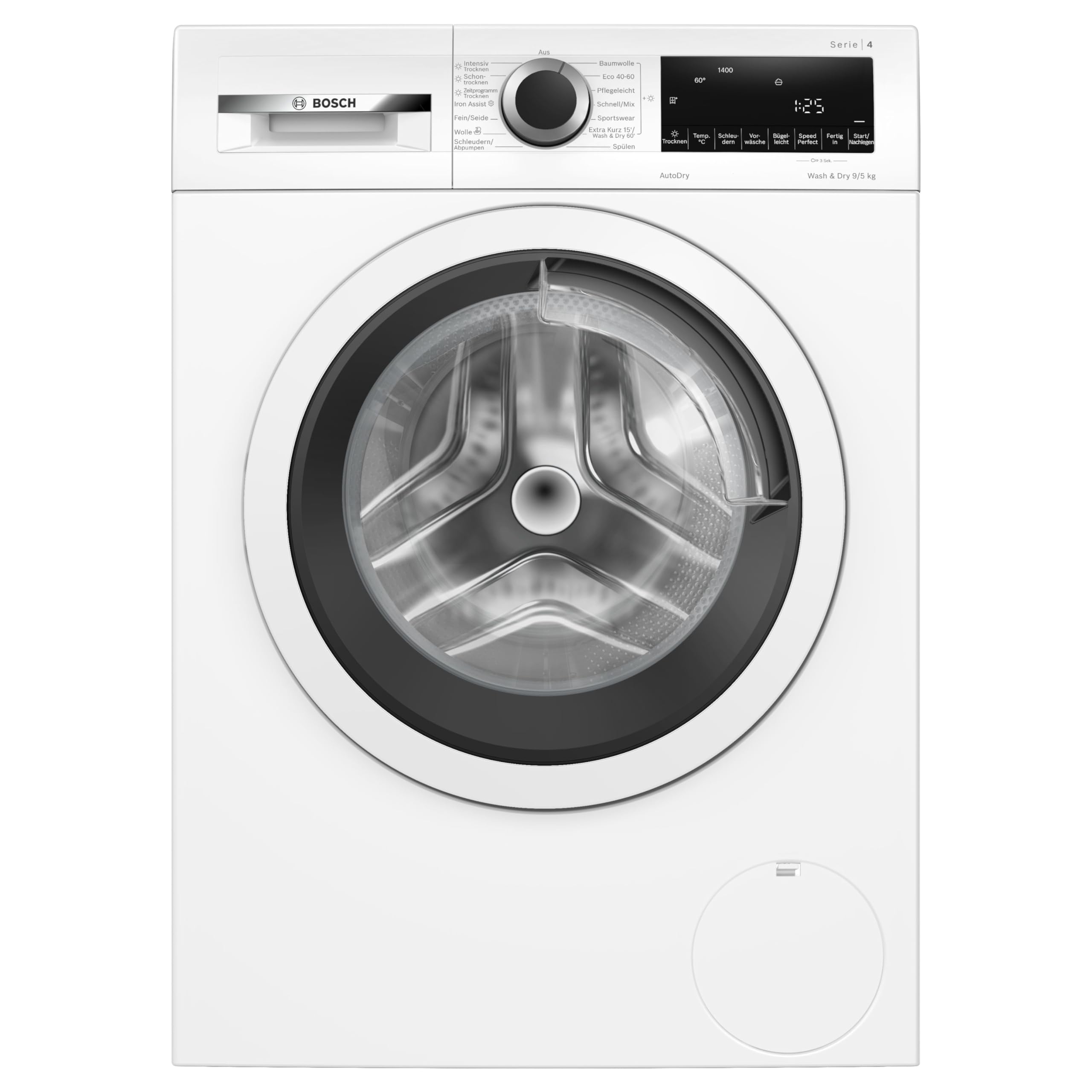
Image: Close-up of the control panel, showing the program selector dial and LED display with various function buttons.
Loading Laundry
Open the front-loading door and load laundry, ensuring not to exceed the maximum capacity of 9 kg for washing. For drying, refer to specific program limits.
Program Selection
Turn the program selector dial to choose your desired wash or dry program. The LED display will show relevant information.
- Intensiv Trocknen (Intensive Dry): For heavily soiled items requiring thorough drying.
- Schon Trocknen (Gentle Dry): For delicate fabrics that need careful drying.
- Iron Assist: Reduces wrinkles for easier ironing.
- Fein/Seide (Delicates/Silk): Gentle wash for delicate garments.
- Wolle (Wool): Special program for woolens.
- Schleudern/Abpumpen (Spin/Drain): For spinning or draining water only.
- Spülen (Rinse): Additional rinse cycle.
- Baumwolle (Cotton): Standard program for cotton items.
- Eco 40-60: Energy-efficient program for cottons and mixed loads at 40-60°C.
- Pflegeleicht (Easy Care): For synthetic and mixed fabrics.
- Extra Kurz 15'/Wash & Dry (Extra Short 15'/Wash & Dry): Quick wash and dry cycle for small loads.
- Sportswear: For sports clothing.
Additional Functions
Use the buttons on the LED display to select additional functions such as temperature, spin speed, or delay start.
Starting a Program
Press the Start/Pause button to begin the selected program.
Maintenance and Care
Regular maintenance ensures optimal performance and extends the lifespan of your appliance.
Cleaning the Exterior
Wipe the exterior with a soft, damp cloth. Do not use abrasive cleaners or solvents.
Cleaning the Detergent Dispenser
Remove and clean the detergent dispenser regularly to prevent residue buildup.
Cleaning the Drum
Run a maintenance wash cycle (e.g., a hot wash with no laundry and a descaling agent) periodically to clean the drum.
Cleaning the Lint Filter
For optimal drying performance, clean the lint filter after every drying cycle. The lint filter is typically located near the bottom front of the appliance.
Troubleshooting
Before contacting customer service, please refer to the following common issues and their solutions.
| Problem | Possible Cause | Solution |
|---|---|---|
| Appliance does not start. | Power cord not plugged in; door not closed properly; program not selected. | Check power connection; ensure door is securely closed; select a program and press Start. |
| Water not draining. | Drain hose kinked or blocked; pump filter clogged. | Check and straighten drain hose; clean the pump filter. |
| Excessive vibration during spin cycle. | Appliance not level; transport bolts not removed; uneven load. | Adjust leveling feet; ensure transport bolts are removed; redistribute laundry. |
| Clothes not drying completely. | Lint filter clogged; incorrect drying program selected; overloaded. | Clean lint filter; select appropriate drying program; reduce load size. |
Technical Specifications
Detailed technical information for the Bosch WNA13441 Serie 4 Washer Dryer.
- Brand: Bosch
- Model Number: WNA13441
- Product Dimensions (L x W x H): 59 x 59.8 x 84.8 cm
- Item Weight: 71.4 Kilograms
- Washing Capacity: 9 Kilograms
- Noise Level: 70 Decibels
- Display Type: LED
- Voltage: 230.0 V
- Access Location: Front-loading
- Color: Black
- Batteries Included/Required: No
- Spare Parts Availability: Information unavailable
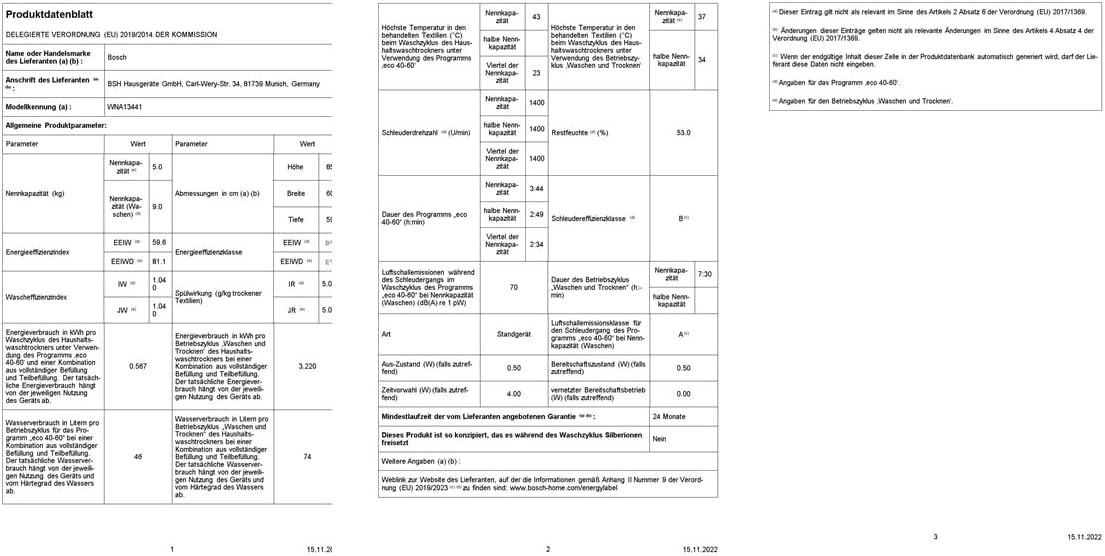
Image: Official product data sheet detailing technical specifications and energy consumption.
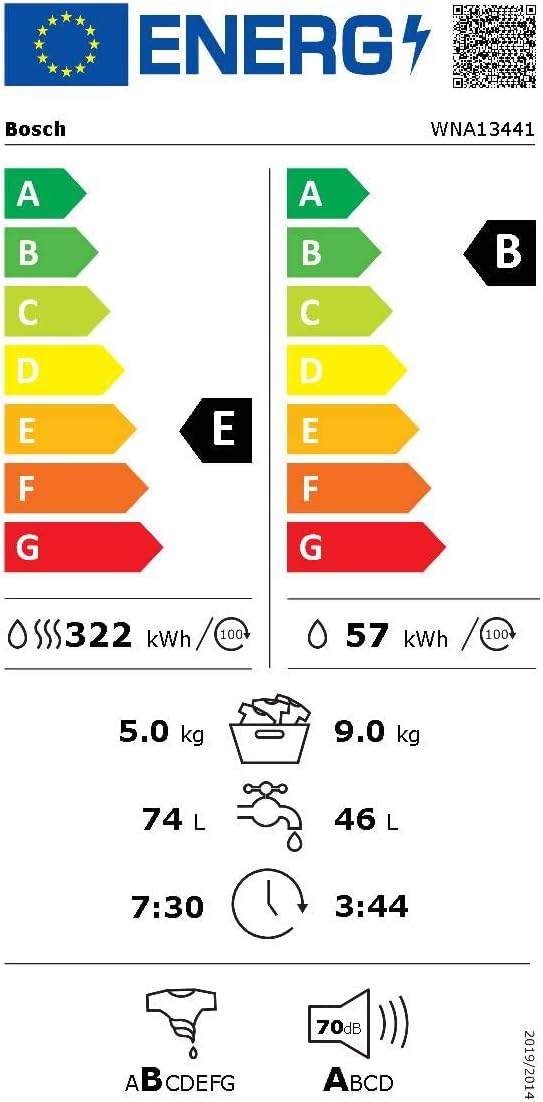
Image: Energy efficiency label for the Bosch WNA13441, showing energy consumption and performance ratings.
Warranty and Support
For warranty information, please refer to the documentation provided with your appliance at the time of purchase or contact Bosch customer service. Keep your proof of purchase for warranty claims.
For technical support, spare parts, or service requests, please visit the official Bosch website or contact their customer support line. Ensure you have your model number (WNA13441) and serial number ready.
Related documentsWNA13441


Ask a question about this manual
Ask about setup, troubleshooting, compatibility, parts, safety, or missing instructions. Manuals+ will review the question and use this page’s manual context to help answer it.