
1. Introduction
This manual provides detailed instructions for the installation, operation, and maintenance of your Alphacool ES Geforce RTX 4090 Reference Design GPU Water Block with Backplate. This product is designed to provide efficient liquid cooling for compatible NVIDIA Geforce RTX 4090 graphics cards, enhancing thermal performance and stability. Please read this manual thoroughly before proceeding with installation.
2. Safety Information
- Always disconnect power from your computer before installing or removing any components.
- Handle all components with care to avoid damage.
- Ensure proper grounding to prevent electrostatic discharge.
- Use only approved coolants for liquid cooling systems. Mixing incompatible coolants can lead to system damage.
- Perform a leak test before powering on your system after installation.
- Keep liquids away from electrical components during installation and operation.
3. Package Contents
Verify that all components are present before beginning installation:
- Alphacool ES Geforce RTX 4090 Reference Design GPU Water Block
- Backplate (pre-installed or separate)
- Mounting screws and washers
- Thermal pads and thermal paste
- G1/4" stop plugs (if included)
- Installation guide (this document)
4. Setup and Installation
Follow these steps carefully to install the water block onto your graphics card.
4.1 Compatibility Check
This water block is designed for the Geforce RTX 4090 Reference Design. It is not compatible with Nvidia's Geforce RTX 4090 Founders Edition.
Important Note for Inno3D Users: Inno3D utilizes two different PCB layouts for their RTX 4090 cards. Please check your graphics card's serial number. If it matches the following patterns, it is not compatible with this water block:
- 32-879-xxxx8xxxx
- Inno3D GeForce RTX 4090 iCHILL Black, 24GB GDDR6X (C4090-246XX-18330005)
- Inno3D GeForce RTX 4090 iCHILL Frostbite, 24GB GDDR6X (C4090-246XX-1833FB)
- Inno3D GeForce RTX 4090 iCHILL X3, 24GB GDDR6X (C40903-246XX-1833VA47)
- Inno3D GeForce RTX 4090 X3 OC, 24GB GDDR6X (N40903-246XX-18332989)
- KFA2 GeForce RTX 4090 SG (1-Click OC), 24GB GDDR6X (49NXM5MD6DSK)
4.2 Preparation
- Carefully remove the existing cooler from your graphics card, following the manufacturer's instructions.
- Clean the GPU die and memory chips thoroughly, removing all traces of old thermal paste and pads. Use isopropyl alcohol and a lint-free cloth.
- Apply the provided thermal pads to the designated areas on the water block and/or graphics card PCB, as indicated in the specific product diagram (not included in this general manual, refer to Alphacool's product page for detailed diagrams).
- Apply a small amount of thermal paste to the center of the GPU die.
4.3 Mounting the Water Block
- Carefully align the water block with the graphics card, ensuring all mounting holes and components are correctly positioned.
- Gently lower the water block onto the graphics card.
- Secure the water block using the provided screws, following a diagonal pattern to ensure even pressure. Do not overtighten.
- Attach the backplate to the rear of the graphics card, aligning it with the mounting holes and securing it with the appropriate screws.

Image: Alphacool ES Geforce RTX 4090 Water Block mounted on a graphics card, showing the carbon top and the backplate covering the PCB.

Image: Rear view of the Alphacool ES Geforce RTX 4090 Water Block, highlighting the carbon backplate with multiple screw points.
4.4 Connecting to the Liquid Cooling Loop
- Install your chosen G1/4" fittings into the inlet and outlet ports of the water block. Ensure they are tightened securely but do not overtighten.
- Connect your tubing to the fittings, ensuring a secure and leak-free connection.
- The connection ports are positioned to simplify hosing in server rack environments.
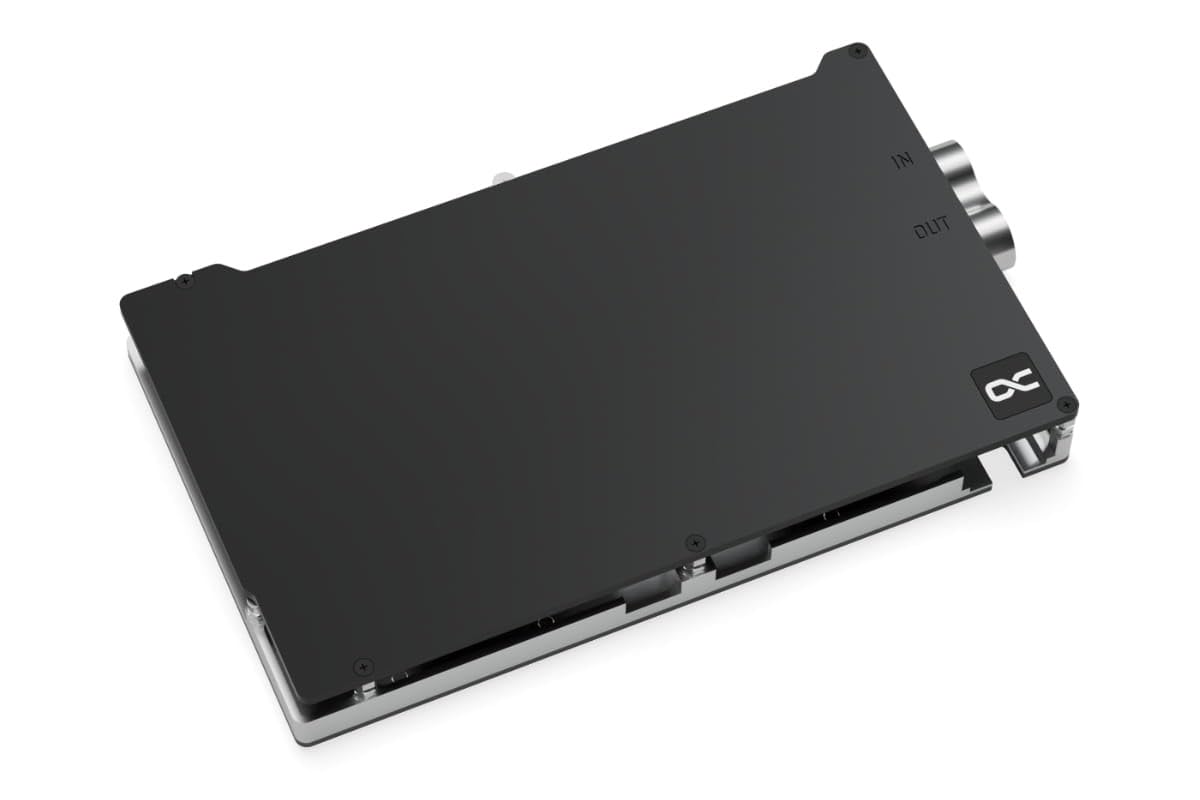
Image: Top view of the Alphacool ES Geforce RTX 4090 Water Block, showing the 'IN' and 'OUT' labels next to the G1/4" threaded ports for liquid cooling connections.
5. Operating Instructions
Once the water block is installed and connected to your liquid cooling loop:
- Leak Testing: Before powering on your computer, fill the loop with coolant and run the pump for at least 24 hours without powering on other components. Carefully inspect all connections for any signs of leaks. Use paper towels or a leak detector for thorough inspection.
- Initial Startup: After confirming no leaks, power on your system. Monitor GPU temperatures and coolant flow.
- Temperature Monitoring: Regularly monitor your GPU temperatures using appropriate software to ensure optimal cooling performance.
6. Maintenance
Regular maintenance ensures the longevity and performance of your liquid cooling system:
- Coolant Replacement: Replace the coolant every 6-12 months, or as recommended by your coolant manufacturer, to prevent buildup and corrosion.
- System Cleaning: Periodically inspect the water block and other loop components for any signs of particulate buildup or algae. If necessary, disassemble and clean with distilled water or a specialized cleaning solution.
- Connection Check: Ensure all fittings and connections remain secure over time.
7. Troubleshooting
If you encounter issues, consider the following:
- High GPU Temperatures:
- Check pump operation and flow rate.
- Ensure sufficient thermal paste and proper contact between the water block and GPU die.
- Verify radiator fan speed and airflow.
- Inspect for air bubbles trapped in the loop.
- Leaks:
- Immediately power off the system.
- Tighten fittings (do not overtighten).
- Replace damaged O-rings or components.
- No Flow:
- Check pump power connection and functionality.
- Inspect for blockages in the loop.
8. Specifications
| Feature | Detail |
|---|---|
| Model Number | 1023161 |
| Dimensions (L x W x H) | 209 x 120 x 24mm (8.23"L x 4.72"W x 0.94"H) |
| Material (Cooler) | Chrome-plated Copper |
| Material (Cooler Top) | Carbon |
| Threads | 2 x G1/4" |
| Maximum Working Temperature | 60°C |
| Compatible Devices | Desktop (Geforce RTX 4090 Reference Design) |
| Cooling Method | Water |
| Power Connector Type | 3-Pin (for pump, if integrated) |
| Voltage | 12 Volts |
9. Warranty and Support
Alphacool products are manufactured to high standards and come with a manufacturer's warranty. For specific warranty terms and conditions, please refer to the official Alphacool website or contact their customer support directly. For technical assistance, troubleshooting, or spare parts, please visit the Alphacool support portal or contact their authorized service centers.
Alphacool Official Website: www.alphacool.com


