
Introduction
This manual provides detailed instructions for the installation, operation, and maintenance of your STUDIOFINIX 800W 6.5 Inch Outdoor Bluetooth Speakers. Designed for both indoor and outdoor use, these waterproof speakers deliver high-fidelity sound with versatile connectivity options. Please read this manual thoroughly before using the product to ensure proper setup and optimal performance.
What's in the Box
Verify that all components are present in your package:
- 4 x Passive Speakers
- 1 x AMP68 Multifunctional Amplifier Box
- Speaker Wires
- Power Cord
- 12V DC Cable
- Power Adapter
- Instruction Manuals (2)

Product Overview
The STUDIOFINIX 800W 6.5 Inch Outdoor Bluetooth Speakers system is designed for robust audio performance in various environments. Key features include:
- High Power Output: 200 Watts per speaker (800 Watts total for 2 pairs) with 6.5" polypropylene cone woofers and 1" PET dome tweeters.
- Versatile Application: Suitable for backyard, patio, poolside, garden, or RV use.
- Durable Construction: IP66 waterproof rating for dust and water resistance, featuring a rugged ABS cabinet and anti-rust meshed grills.
- Multifunctional Amplifier (AMP68): Supports Bluetooth 5.0, AUX, USB, and Microphone inputs, allowing connection of up to 4 speakers.
- Flexible Mounting: Includes adjustable wall mount brackets for versatile placement.



Specifications
| Feature | Detail |
|---|---|
| Brand | STUDIOFINIX |
| Model Name | 800W 6.5 Inch Outdoor Bluetooth Speakers |
| Speaker Type | Woofer |
| Special Feature | Waterproof |
| Connectivity Technology | Auxiliary, USB, Bluetooth |
| Recommended Uses | For Outdoor and Indoor Audio Listening (backyard/patio, near the pool, RV) |
| Compatible Devices | Smartphone, Tablet, Laptop |
| Speaker Maximum Output Power | 800 Watts |
| Woofer Diameter | 6.5 Inches |
| Tweeter Diameter | 1 Inch (2.54 Centimeters) |
| Material | Aluminum (Cabinet: Heavy Duty Plastic) |
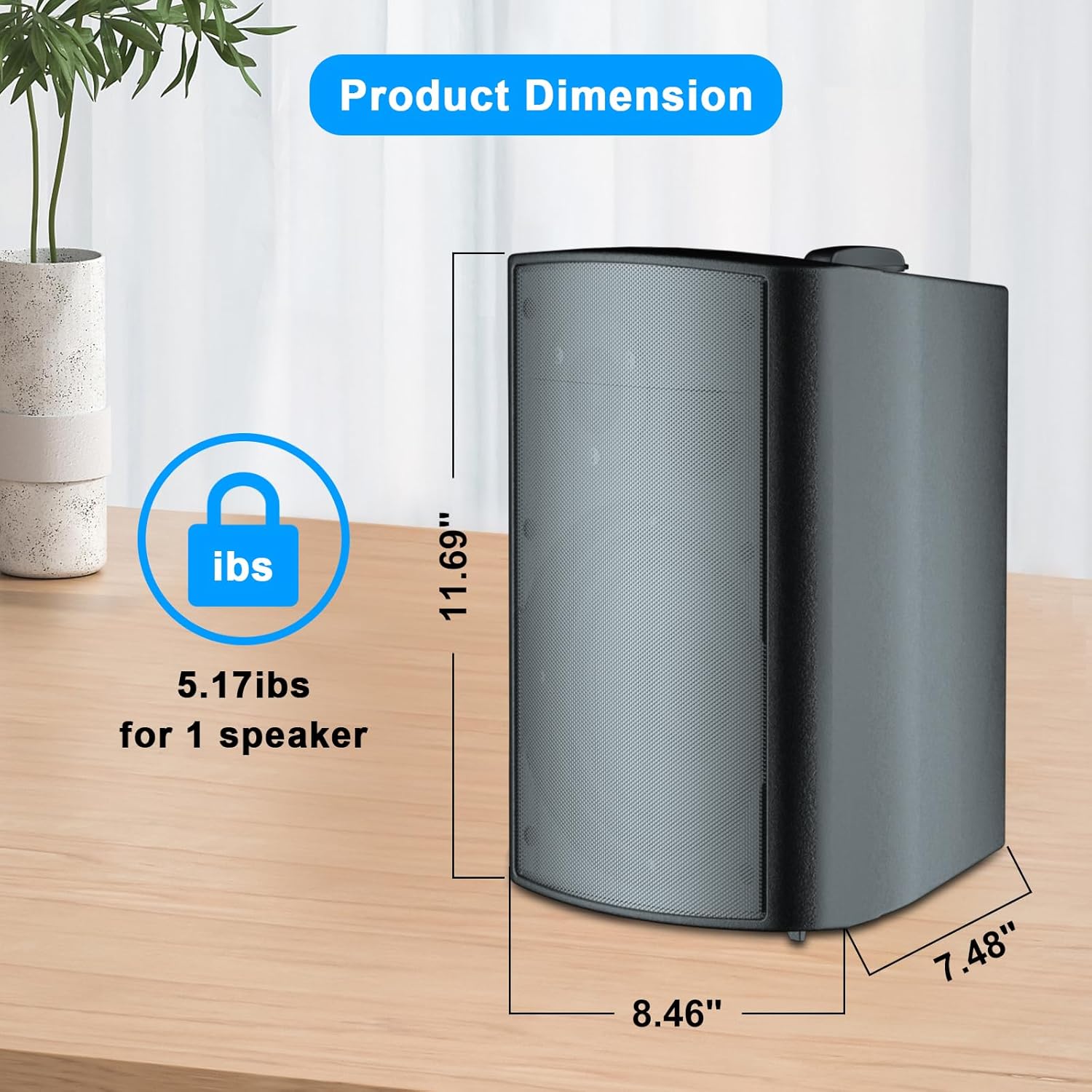
| Product Dimensions | 4.57"D x 3.33"W x 3.02"H (Individual Speaker: 11.69"H x 8.46"W x 7.48"D) |
| Item Weight | 25.8 pounds (11.75 Kilograms) |
| Water Resistance Level | IP66 (Waterproof) |
| Mounting Type | Outside Mount, Wall Mount |
| Control Method | Voice (via connected device) |
| Bluetooth Range | 20 Meters (65 feet) |
Setup Guide
1. Mounting the Speakers
The speakers come with adjustable wall mount brackets for flexible installation. Ensure the mounting surface is sturdy enough to support the speaker's weight.
- Identify the desired mounting location. Consider optimal sound dispersion for your space.
- Detach the mounting bracket from the speaker by loosening the side knobs.
- Use the bracket as a template to mark the drill holes on the wall or mounting surface.
- Drill pilot holes if necessary, then secure the bracket using appropriate screws (not included, choose based on wall material).
- Reattach the speaker to the mounted bracket and tighten the side knobs to secure it at the desired angle.
2. Connecting the Speakers to the Amplifier
The system includes an AMP68 multifunctional amplifier box to power the passive speakers. Ensure the amplifier is placed in a dry, protected area, especially if speakers are outdoors.
- Connect the speaker wires to the binding posts on the back of each speaker. Match the positive (+) red terminal on the speaker to the positive (+) terminal on the amplifier, and the negative (-) black terminal on the speaker to the negative (-) terminal on the amplifier.
- Connect the other end of the speaker wires from each speaker to the corresponding L+ / L- (Left) and R+ / R- (Right) terminals on the AMP68 amplifier. Ensure correct polarity for all connections.
- Connect the 12V DC cable to the AMP68 amplifier.
- Plug the power adapter into the 12V DC cable, then plug the power cord into a standard electrical outlet.

Operating Instructions
AMP68 Control Functions

- Power On/Off: Press and hold the Play/Pause button (1) for 3 seconds.
- Play/Pause: Short press the Play/Pause button (1).
- Mode Switch: Short press the Mode button (2) to cycle between Bluetooth, USB, AUX, and MIC inputs.
- Volume Control: Short press VOL-TWS (3) to decrease volume, short press VOL+MONO (4) to increase volume.
- TWS Mode (True Wireless Stereo): Press and hold VOL-TWS (3) for 3 seconds to turn on/off TWS mode for stereo pairing with another compatible unit.
- Mono Mode: Press and hold VOL+MONO (4) for 3 seconds to turn on/off Mono mode.
- Track Control: Short press Previous Track (5) for the previous song, short press Next Track (6) for the next song.
- Fast Rewind/Forward: Press and hold Previous Track (5) for fast rewind, press and hold Next Track (6) for fast forward.
- Restore Factory Settings: Press and hold the Mode button (2) for 3 seconds.
Bluetooth Pairing
- Ensure the AMP68 amplifier is powered on and in Bluetooth mode (indicated by a blue LED).
- On your mobile device (smartphone, tablet, laptop), enable Bluetooth and search for available devices.
- Select "STUDIOFINIX" or the model number (e.g., HNGM-4-601BTB) from the list of devices.
- Once connected, the amplifier will indicate successful pairing, and you can begin playing audio through the speakers.
Maintenance
To ensure the longevity and optimal performance of your STUDIOFINIX outdoor speakers, follow these maintenance guidelines:
- Cleaning: Regularly wipe down the speaker cabinets and grills with a soft, damp cloth. Avoid using harsh chemicals or abrasive cleaners.
- Weather Protection: While the speakers are waterproof (IP66 rated), prolonged exposure to extreme weather conditions (e.g., direct heavy rain, snow, extreme heat) should be minimized. Consider placing them under eaves or in covered areas.
- Cable Inspection: Periodically check speaker wires and power cables for any signs of wear, fraying, or damage. Replace damaged cables immediately to prevent electrical hazards and ensure consistent performance.
- Amplifier Care: The AMP68 amplifier box is not waterproof. Always ensure it is installed in a dry, protected location, away from moisture and direct sunlight.
Troubleshooting
If you encounter issues with your STUDIOFINIX speaker system, refer to the following common troubleshooting steps:
- No Power:
- Ensure the power adapter is securely plugged into a working electrical outlet and the amplifier.
- Check if the power indicator light on the amplifier is on.
- No Sound:
- Verify all speaker wire connections are secure and correctly matched (positive to positive, negative to negative) on both the speakers and the amplifier.
- Check the volume levels on both the amplifier and your connected audio source device.
- Ensure the correct input mode (Bluetooth, AUX, USB, MIC) is selected on the amplifier.
- Test with a different audio source or cable to rule out issues with the source device or cable.
- Bluetooth Connection Issues:
- Make sure the amplifier is in Bluetooth pairing mode.
- Ensure your device is within the 20-meter Bluetooth range.
- Forget the device from your phone's Bluetooth settings and try pairing again.
- Restart both the amplifier and your Bluetooth device.
- Distorted Sound:
- Reduce the volume on both the amplifier and the audio source.
- Check for loose speaker wire connections.
- Ensure the audio source is not overdriving the amplifier.
Warranty and Support
STUDIOFINIX provides a 1-Year Warranty Service for this product. We are committed to ensuring customer satisfaction. If you have any technical questions or require assistance with your product, please do not hesitate to contact our Professional Customer Support Team. Our team is available to help you 24 hours a day.
For support, please refer to the contact information provided on the product packaging or the official STUDIOFINIX website.