3.1 Unpacking
Carefully remove the mixer from its packaging. Inspect the unit for any signs of damage. Retain the packaging for future storage or transport.

Model: CTX8-8Channels
The BOMGE CTX 8 Channel Audio Mixer is a versatile sound mixing console designed for both professional and beginner users. It integrates Bluetooth, USB, and PC recording capabilities, along with essential inputs like XLR microphone jacks and RCA connections. This manual provides detailed instructions for setting up, operating, maintaining, and troubleshooting your audio mixer to ensure optimal performance.

Figure 1.1: Front view of the BOMGE CTX 8 Channel Audio Mixer.
Carefully remove the mixer from its packaging. Inspect the unit for any signs of damage. Retain the packaging for future storage or transport.
Connect the provided power adapter to the mixer's power input and then to a suitable electrical outlet. Ensure the mixer's power switch is in the OFF position before connecting to power.
Connect your microphones, instruments, or other audio sources to the appropriate input jacks. The mixer features XLR microphone inputs with +48V phantom power for condenser microphones, and 1/4-inch LINE inputs for other audio sources. RCA inputs are also available for stereo line-level devices.
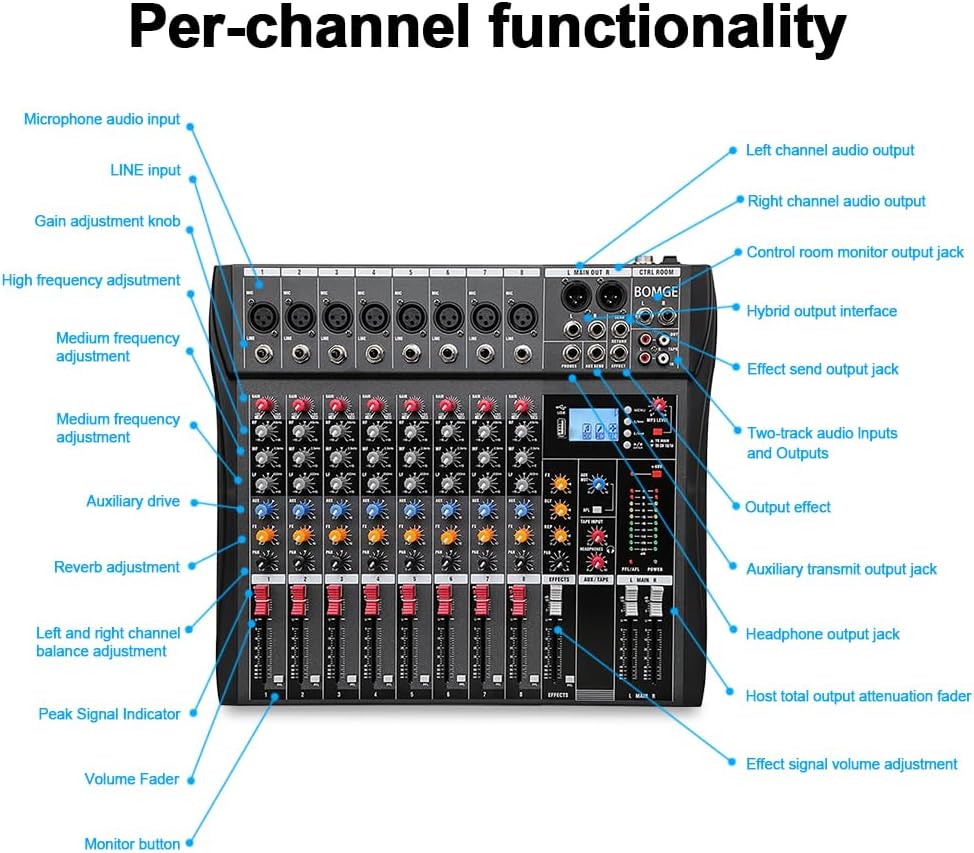
Figure 3.1: Detailed view of mixer inputs and controls.
Connect your main speakers to the L MAIN OUT R XLR outputs. For monitoring, connect headphones to the PHONES jack. Additional outputs like AUX SEND and EFFECT SEND/RETURN are available for external processing or monitoring.

Figure 3.2: Output section with lotus recording and headphone jacks.
Each channel features a GAIN knob to adjust input sensitivity, HIGH, MID, and LOW EQ knobs for tone shaping, an FX knob to send signal to the internal effects processor, and a PAN knob for stereo positioning. The channel volume is controlled by the individual channel faders.
To connect a Bluetooth device, activate Bluetooth on your device and select the mixer from the available devices. The mixer's display will indicate a successful connection. Use the dedicated fader to control the Bluetooth audio volume.

Figure 4.1: Bluetooth connection with a smart device.
Insert a USB flash drive into the USB port for direct recording or playback. To record to a computer, connect the mixer via USB and use your preferred digital audio workstation (DAW) software. The mixer acts as an audio interface for your computer.

Figure 4.2: USB and computer connection for recording.
Adjust the EFFECTS knob to apply built-in reverb and delay. The main output level is controlled by the L MAIN R faders. Monitor your mix in real-time using headphones connected to the PHONES output. The multi-color LED display provides visual feedback on audio levels.

Figure 4.3: Real-time headphone monitoring.

Figure 4.4: Multi-color LED level display.
| Problem | Possible Cause | Solution |
|---|---|---|
| No sound output | Incorrect connections, low volume levels, power issue. | Check all cable connections. Ensure main faders and channel faders are up. Verify power supply. |
| Distorted audio | Input gain too high, faulty cable, impedance mismatch. | Reduce input GAIN. Check cables for damage. Ensure input source impedance matches mixer. |
| Bluetooth not connecting | Device too far, Bluetooth not enabled, interference. | Ensure device is within range. Enable Bluetooth on both devices. Reduce interference from other wireless devices. |
| Phantom power not working | Phantom power switch off, faulty microphone. | Ensure +48V phantom power switch is engaged for the respective channel. Test with another condenser microphone. |
| Feature | Specification |
|---|---|
| Model Number | CTX8-8Channels |
| Item Weight | 8.38 pounds (3800 Grams) |
| Product Dimensions | 15.75 x 13.39 x 1.46 inches (13.39"D x 15.75"W x 1.46"H) |
| Body Material | Metal |
| Connector Types | 1/4-Inch Stereo, 1/4-Inch Right Angle to Straight, 1/4-Inch Straight, XLR to XLR |
| Hardware Interface | USB 2.0 |
| Power Source | Electric |
| Voltage | 48 Volts (for phantom power) |
| Number of Channels | 8 (supports 8/12/16 channel configurations) |

Figure 7.1: Product dimensions.
BOMGE products are manufactured to high-quality standards. For specific warranty details, please refer to the warranty card included with your product or visit the official BOMGE website. Keep your purchase receipt as proof of purchase for any warranty claims.
For technical support, troubleshooting assistance, or service inquiries, please contact BOMGE customer support through the contact information provided on the official BOMGE website or your retailer's support channels. When contacting support, please have your model number (CTX8-8Channels) and purchase date ready.
 |
Manual do Usuário: Mixer de Estúdio e Gravação BOMGE 4/6 Canais Guia completo do mixer BOMGE de 4/6 canais para DJ e estúdio. Aprenda sobre conexão, operação, solução de problemas e especificações para gravação, streaming e performances ao vivo. |
 |
BOMGE 4/6/8/12 Channel DJ & Studio Compact Mixer User Manual with USB/BT/REC Detailed user manual for the BOMGE 4/6/8/12 Channel DJ & Studio Compact Mixer. Covers troubleshooting, production description, channel and master control sections, specifications, and connection diagrams for USB, Bluetooth, and recording features. |
 |
BOMGE Professional 4/6 Channel DJ and Studio Mixer User Manual Comprehensive user manual for the BOMGE Professional 4/6 Channel DJ and Studio Mixer, detailing its features, setup, troubleshooting, specifications, and usage instructions for DJing, studio recording, and live streaming. Includes USB, Bluetooth, and recording capabilities. |
 |
BOMGE Q-12 Audio Mixer User Manual User manual for the BOMGE Q-12 2-Channel Audio Mixer Sound Mixing Console, featuring USB and 48V Phantom Power for recording and studio use. |
 |
BOMGE K7 Professional 4/7 Channel Audio Mixer Owner's Manual Detailed owner's manual for the BOMGE K7 professional 4/7 channel audio mixer, covering setup, controls, specifications, and safety instructions for DJ, studio recording, and live sound applications. |
 |
BOMGE Professional Mixing Console Owner's Manual User manual for the BOMGE 4/6/8 Channel Mixing Console with 99 DSP, USB, and Bluetooth. Includes setup, recording, and operation instructions. |
Ask about setup, troubleshooting, compatibility, parts, safety, or missing instructions. Manuals+ will review the question and use this page’s manual context to help answer it.