
RCA RWOSU5549
RCA 55-Inch Class 4K Smart LED TV
Model: RWOSU5549 - User Manual
1. Introduction
Thank you for choosing the RCA 55-Inch Class 4K Smart LED TV. This television combines stunning 4K UHD resolution with the intuitive WebOS smart platform, offering a superior entertainment experience. With built-in Wi-Fi and Bluetooth, access to streaming services, and multiple connectivity options, your new TV is designed for modern viewing. This manual provides essential information for setting up, operating, maintaining, and troubleshooting your television.
2. Safety Information
Please read all safety instructions carefully before using your TV. Keep this manual for future reference.
- Power Source: Ensure the TV is connected to an AC 120V, 60Hz power supply.
- Ventilation: Do not block ventilation openings. Allow adequate space around the TV for proper airflow.
- Water and Moisture: Do not expose the TV to rain or moisture. Do not place objects filled with liquids, such as vases, on the TV.
- Cleaning: Unplug the TV from the power outlet before cleaning. Use a soft, dry cloth. Do not use liquid cleaners or aerosol cleaners.
- Wall Mounting: This TV is designed for wall mounting and includes a free wall mount. Ensure the wall mount is securely installed by qualified personnel and can support the TV's weight.
- Lightning: For added protection during a lightning storm, or when it is left unattended and unused for long periods, unplug the TV from the wall outlet and disconnect the antenna or cable system.
3. What's in the Box
Carefully unpack your TV and check that all items are present. Due to the product being renewed, minor aesthetic details that do not affect performance may be present.
- RCA 55-Inch 4K Smart LED TV (Model: RWOSU5549)
- Remote Control
- Power Cord
- Free Wall Mount (Note: TV stands are not included with this model)
- User Manual (this document)

Image: RCA 55-Inch 4K Smart LED TV shown with the included wall mount bracket. This model is designed for wall mounting and does not include traditional TV stands.
4. Setup
4.1. Wall Mounting
This TV comes with a free wall mount. The rear panel of the TV has standard VESA screw holes for easy mounting. It is recommended to have the wall mount installed by a professional to ensure safety and proper alignment.
- Identify a suitable location on a sturdy wall, away from direct sunlight or heat sources.
- Follow the instructions provided with your wall mount for secure installation.
- Carefully attach the TV to the wall mount, ensuring all screws are tightened.

Image: Rear view of the RCA 55-Inch TV, highlighting the VESA compatible mounting points for wall installation.
4.2. Connecting Devices
Your TV features multiple input ports for connecting external devices.
- HDMI Inputs: Connect Blu-ray players, gaming consoles, cable boxes, or other HDMI-enabled devices to the 3 HDMI inputs. Use High Speed HDMI cables for optimal performance.
- USB Ports: Connect USB drives for media playback.
- Antenna/Cable Input: Connect an antenna or cable TV coaxial cable for over-the-air or cable broadcasts.
- Power Connection: Plug the power cord into the TV's power input, then into a wall outlet.

Image: Side profile of the RCA 55-Inch TV, illustrating the location of various input ports such as HDMI and USB for connecting external devices.
4.3. Initial Setup (WebOS)
Upon first power-on, the TV will guide you through the initial setup process for the WebOS smart platform.
- Select your preferred language.
- Connect to your Wi-Fi network by selecting your network name and entering the password.
- Agree to the terms and conditions.
- Scan for channels if you have an antenna connected.
- Your TV is now ready for use.
5. Operating the TV
5.1. Basic Functions
- Power: Press the Power button on the remote control to turn the TV on or off.
- Volume: Use the Volume Up/Down buttons to adjust the sound level.
- Channels: Use the Channel Up/Down buttons to change channels or enter channel numbers directly.
- Input: Press the Input button to select the desired input source (HDMI 1, HDMI 2, USB, etc.).
5.2. WebOS Smart Features
The WebOS platform provides a user-friendly interface for accessing streaming services and apps.
- Home Screen: Press the Home button on your remote to access the WebOS launcher bar, which displays your favorite apps and content.
- App Store: Browse and download additional apps from the content store, including Netflix, YouTube, Prime Video, Disney+, and more.
- Content Recommendations: WebOS provides personalized content recommendations based on your viewing habits.
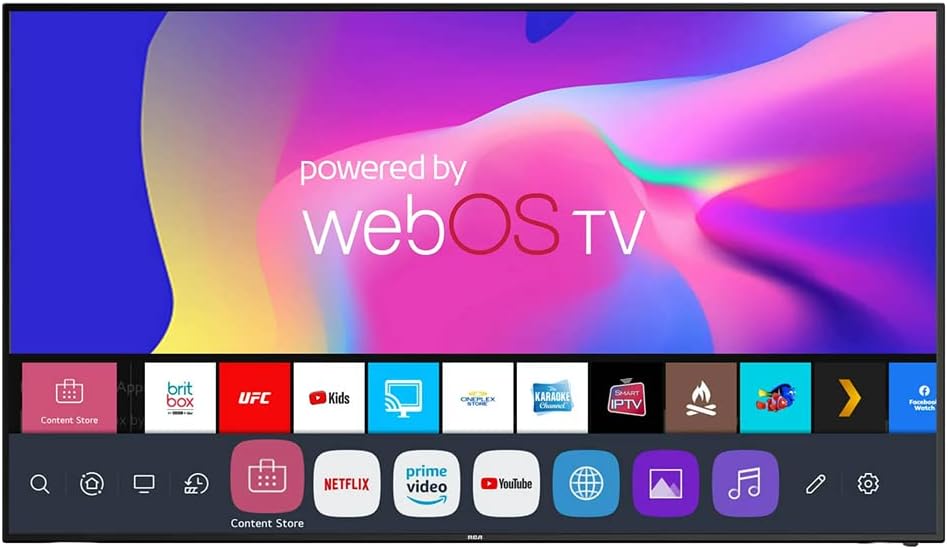
Image: The RCA 55-Inch TV screen showcasing the WebOS smart interface with various streaming application icons.
5.3. Bluetooth Connectivity
Connect Bluetooth-enabled devices such as soundbars, headphones, or game controllers wirelessly to your TV.
- Go to the TV's settings menu.
- Navigate to the Bluetooth settings.
- Enable Bluetooth and search for available devices.
- Select your device from the list to pair.
5.4. HDR (High Dynamic Range)
Your TV supports HDR technology, delivering brighter whites, deeper blacks, and a wider range of colors for a more lifelike viewing experience. Ensure your content source also supports HDR to fully utilize this feature.
6. Maintenance
Proper care will ensure the longevity of your TV.
- Screen Cleaning: Gently wipe the screen with a soft, lint-free cloth. For stubborn marks, slightly dampen the cloth with water or a specialized screen cleaner (do not spray directly on the screen).
- Cabinet Cleaning: Use a soft, dry cloth to wipe the TV cabinet.
- Dusting: Regularly dust the ventilation slots to prevent overheating.
- Power Cord: Periodically check the power cord for any damage.
7. Troubleshooting
If you encounter issues with your TV, refer to the following common problems and solutions.
| Problem | Possible Cause / Solution |
|---|---|
| No Power | Ensure the power cord is securely plugged into the TV and the wall outlet. Check the power outlet with another device. |
| No Picture, But Sound is Present | Check the input source. Ensure the connected device is powered on and functioning correctly. |
| No Sound, But Picture is Present | Check the volume level. Ensure Mute is not activated. Check audio cables if using external speakers. |
| Remote Control Not Working | Replace the batteries. Ensure there are no obstructions between the remote and the TV's IR sensor. |
| Cannot Connect to Wi-Fi | Ensure your Wi-Fi router is on and within range. Re-enter the Wi-Fi password carefully. Try restarting your router and TV. |
| Picture Quality Issues (Blurry, Distorted) | Check the source resolution. For antenna, adjust antenna position. For external devices, check cable connections. |
8. Specifications
| Feature | Specification |
|---|---|
| Brand | RCA |
| Model Number | RWOSU5549 |
| Screen Size | 55 Inches (140 cm diagonal) |
| Display Resolution | 4K UHD (2160p) |
| Refresh Rate | 60Hz |
| Smart TV Platform | WebOS |
| HDR Support | Yes |
| Bluetooth | Bluetooth 5.0 |
| Wi-Fi Connectivity | Yes |
| HDMI Inputs | 3 |
| USB Ports | Available (quantity not specified) |
| Mounting Type | Wall Mount (VESA compatible) |
| Item Weight | 35 pounds |
| Product Dimensions (L x W x H) | 53 x 6.2 x 32 inches |
| UPC | 657768140716 |
9. Warranty and Support
As a renewed product, specific warranty terms may vary. Please refer to the seller's warranty information provided at the time of purchase. For technical support or further assistance, please contact the retailer or the renewed product provider. Keep your purchase receipt and model number (RWOSU5549) handy when seeking support.
Related documentsRWOSU5549


Ask a question about this manual
Ask about setup, troubleshooting, compatibility, parts, safety, or missing instructions. Manuals+ will review the question and use this page’s manual context to help answer it.