
1. Introduction
Welcome to your new Kitchen Goods Electric Vegetable Cutter Set. This versatile 4-in-1 appliance is designed to simplify your food preparation, offering portable, rechargeable, and wireless convenience for chopping, slicing, and shredding various ingredients. Please read this manual carefully before use to ensure safe and optimal operation.
2. Product Overview
2.1 Included Components
- Lid
- Filter
- Container
- Spoon
- Chopping Blade
- Dough Blade (Note: Functionality may vary by model, primarily for chopping/slicing)
- Slicing Disc
- S Blade
- Full Size Feed Tube
- Shredding Disc
- USB Charging Cable
- Manual
2.2 Key Features
- 4-in-1 Design: Functions include chopping, slicing, shredding, and a cleaning brush attachment.
- Portable & Wireless: Designed for convenience and freedom of movement in your kitchen.
- Rechargeable: Equipped with a 1500mAh Lithium Ion battery for cordless operation.
- Efficient Operation: Quickly processes ingredients such as pepper, garlic, onion, celery, and various meats.
- Easy to Clean: Features a dedicated cleaning brush head for simplified maintenance.
2.3 Product Visuals

The Kitchen Goods 4-in-1 Electric Vegetable Cutter Set, showcasing its main unit and various attachments for chopping, slicing, and cleaning.

Demonstration of the slicing function, showing how the device can quickly slice ingredients directly into a bowl.

A collage illustrating the stirring and slicing capabilities of the device, along with its modular components.

User feeding green onions into the shredding attachment, demonstrating its ease of use for continuous processing.

Detailed view of the USB-C charging port and battery indicator lights, showing red for charging and green for full charge.

An organized display of all included accessories: chopping accessories, slicing kit, cleaning kit, USB-C charging cable, small shovel, and infeed filler.
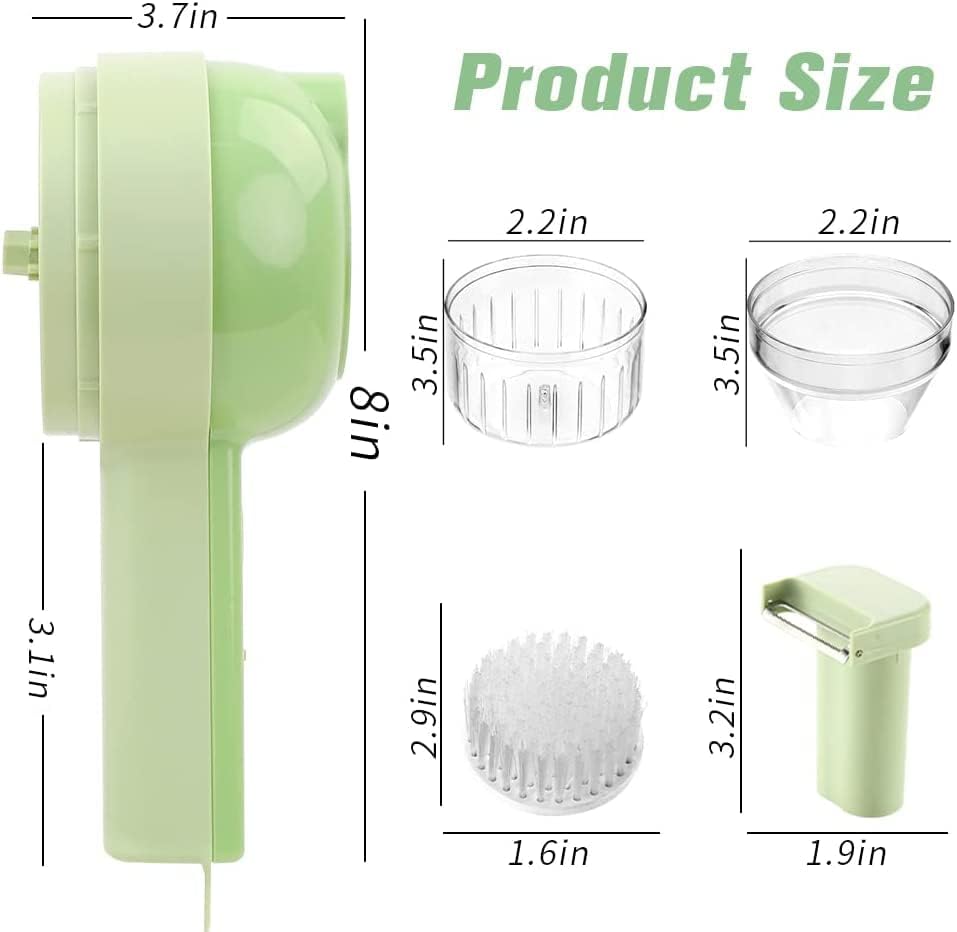
Diagram illustrating the compact dimensions of the main unit and its various attachments, highlighting its space-saving design.
2.4 Product Video
This video demonstrates the various functions of the Electric Vegetable Cutter Set, including slicing, shredding, and cleaning, highlighting its efficiency and ease of use for different food preparation tasks.
3. Setup
3.1 Initial Charging
Before first use, fully charge the device. Connect the provided USB Charging Cable to the unit's USB-C port and plug the other end into a compatible USB power adapter (not included). The indicator light will show red during charging and turn green when fully charged. A full charge typically takes a few hours.
3.2 Assembly
Select the desired attachment (chopping blade, slicing disc, or shredding disc) and securely attach it to the main unit. Ensure all components are properly aligned and locked into place before operation.
4. Operating Instructions
4.1 Chopping/Mincing
For chopping or mincing ingredients like garlic, ginger, or small amounts of meat, attach the chopping blade to the container. Place your ingredients into the container, secure the main unit on top, and press the power button to operate. Pulse for desired consistency.
4.2 Slicing
To slice vegetables such as peppers or celery, attach the slicing disc. Use the full-size feed tube to guide ingredients into the device while it's running. The sliced ingredients will exit directly from the bottom.
4.3 Shredding
For shredding, attach the shredding disc. Insert ingredients like garlic cloves or small pieces of carrot into the feed tube. The shredded output will collect in the container below.
4.4 Safety Precautions
- Always keep fingers and utensils away from moving blades during operation.
- Ensure the device is fully assembled and locked before turning it on.
- Do not overload the container.
- Keep out of reach of children.
5. Maintenance and Cleaning
5.1 Cleaning Instructions
All removable components (blades, containers, discs) should be hand washed only. Do not immerse the main motor unit in water. Use the included cleaning brush to remove food residue from blades and hard-to-reach areas. Rinse thoroughly and allow to air dry completely before reassembly or storage.
5.2 Storage
Store the unit and its accessories in a clean, dry place away from direct sunlight and extreme temperatures.
6. Troubleshooting
- Device not turning on or charging: Ensure the USB cable is securely connected and the power source is active. Allow sufficient time for charging.
- Blades not spinning or chopping effectively: Verify that the chopping blade or slicing/shredding disc is correctly installed and locked into place. Check for any large food pieces obstructing the blades.
- Components not staying together: Ensure all parts are properly aligned and twisted/clicked into their secure positions.
- Reduced battery life: Ensure the unit is fully charged before each use. Battery performance may decrease over time with regular use.
7. Specifications
| Brand | Kitchen Goods |
| Model Number | KGVC1 |
| Special Feature | Portable, Rechargeable, Wireless, 4-in-1 Design |
| Recommended Uses | Kitchen |
| Number of Speeds | 1 |
| Product Care Instructions | Hand Wash |
| Power Source | Battery Powered |
| UPC | 676737779221 |
| Product Dimensions | 4 x 4 x 7 inches |
| Item Weight | 8.8 ounces |
| Batteries | 1 Lithium Ion battery (included) |
| Date First Available | October 21, 2022 |
8. Warranty and Support
For warranty information and customer support, please refer to the product packaging or contact the seller directly through your purchase platform. Keep your proof of purchase for any warranty claims.