
1. Introduction
This manual provides detailed instructions for the safe and effective operation of the VIHELM DT-615 Handheld Industrial Thermohygrometer. This device is designed for accurate measurement of air humidity, ambient temperature, and external K-type thermocouple temperature, suitable for various industrial and environmental monitoring applications.
Key Features
- Large dual digital LCD display with backlight for clear readings.
- Fast response time: 10 seconds (90% at +25°C in still air).
- Sampling Rate: 2.5 samples per second.
- Measures Dew Point Temperature and Wet Bulb Temperature.
- High Accuracy: ±2% for humidity.
- Dual Display for simultaneous Temperature & Humidity readings.
- Supports Type K Thermocouple for external temperature measurements.
2. Safety Information
General Safety Precautions
- Read all instructions thoroughly before operating the device.
- Do not operate the device in explosive atmospheres or near flammable gases.
- Avoid exposing the device to extreme temperatures, high humidity, or direct sunlight for prolonged periods.
- Ensure correct battery installation and polarity to prevent damage.
- Do not attempt to repair, disassemble, or modify the device. Refer all servicing to qualified personnel.
- Keep the device out of reach of children.
- Remove batteries if the device will not be used for an extended period.
3. Package Contents
Please verify that all items listed below are present and undamaged upon opening the package. If any items are missing or damaged, contact your retailer.
- VIHELM DT-615 Thermohygrometer Unit
- Integrated Humidity/Temperature Probe
- External K-Type Thermocouple
- User Manual
- Carrying Case

Image: Complete package contents of the VIHELM DT-615 Thermohygrometer.
4. Device Overview
Front Panel and Controls

Image: Front view of the DT-615 device with its display and buttons.

Image: Detailed view of the control buttons.
- LCD Display: Shows humidity, temperature, dew point, wet bulb, and other indicators.
- Power Button (Green): Turns the device on or off.
- TEMP Button (Gray, with arrows): Cycles through temperature units (°C/°F) and measurement modes (e.g., ambient, K-type).
- MAX Button (Yellow): Displays the maximum recorded value.
- HOLD Button (Yellow): Freezes the current reading on the display.
- Backlight Button (Light bulb icon): Activates or deactivates the display backlight.
- Humidity MAX/HOLD Buttons: Specific functions for humidity readings (if applicable, refer to display indicators).
Top Panel

Image: Top view of the DT-615, highlighting the K-type input.
- Integrated Humidity/Temperature Probe: Permanently attached sensor for ambient readings.
- K-Type Thermocouple Input: Port for connecting an external K-type temperature probe.
Back Panel
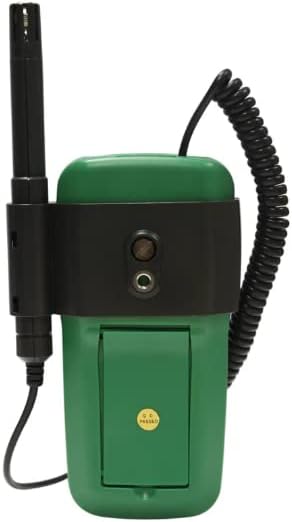
Image: Back view of the DT-615, showing the battery cover and kickstand.
- Battery Compartment: Houses the required batteries for device operation.
- Kickstand: Allows the device to be propped up for easier viewing.
5. Setup
Battery Installation
- Locate the battery compartment cover on the back of the device.
- Open the battery cover by sliding or unlatching it.
- Insert the required batteries (e.g., 9V battery, not specified in data but common for such devices) into the compartment, ensuring correct polarity (+ and - terminals).
- Close the battery cover securely until it clicks into place.
Probe Connection
- The primary humidity and ambient temperature probe is integrated and permanently connected to the device.
- For external temperature measurements, connect the provided K-type thermocouple to the designated input port on the top of the device. Ensure the connection is firm and secure.
6. Operating Instructions
Power On/Off
Press the Power button (green button) to turn the device on. To turn it off, press and hold the Power button for a few seconds. The device may feature an auto-power-off function to conserve battery life.
Taking Measurements
Once powered on, the device will immediately begin displaying ambient humidity and temperature readings from the integrated probe. Position the probe in the environment you wish to measure, ensuring adequate airflow around the sensor.
Temperature Unit Selection (°C/°F)
Press the TEMP button to toggle between Celsius (°C) and Fahrenheit (°F) temperature units on the display.
K-Type Temperature Measurement
With the K-type thermocouple connected to its port, the device will display the external temperature reading. Use the TEMP button to switch between internal (ambient) and external (K-type) temperature displays, or to select the K-type reading mode if the device has distinct modes.
Data Hold Function
Press the HOLD button to freeze the current readings on the display. This is useful for recording stable measurements. Press the HOLD button again to release the function and resume live readings.
Maximum/Minimum Readings
Press the MAX button to view the maximum recorded value since the device was powered on or the function was reset. Press it again to view the minimum recorded value (MIN). Press a third time to exit MAX/MIN mode and return to live readings.
Display Backlight
Press the Backlight button (often indicated by a light bulb icon) to illuminate the display, improving visibility in low-light conditions. Press it again to turn off the backlight.
Dew Point and Wet Bulb Temperature
The DT-615 can calculate and display Dew Point and Wet Bulb temperatures. Refer to the display indicators and specific button combinations (if any, not explicitly shown on buttons but listed in features) to access these readings. Typically, these are cycled through using the TEMP button or a dedicated mode button.
7. Specifications
The following table details the technical specifications for the VIHELM DT-615 Thermohygrometer. Values are typical and subject to change without notice.

Image: Technical specifications table for the DT-615 and related models.
| Function | Range | Resolution | Basic Accuracy |
|---|---|---|---|
| Humidity RH | 0% to 100% RH | 0.1% RH | ±2% RH |
| Temperature | -30°C to 100°C / -30°F to 199°F | 0.1°C / 0.1°F | ±0.5°C / ±0.9°F |
| Type K Temp. | -20°C to 1000°C / -4°F to 1832°F | 0.1° (up to 200°), 1° (over 200°) | ±3% |
| Dew Point Temp. | -30°C to 100°C / -22°F to 199°F | 0.1°C / 0.1°F | ±1.0°C / ±1.8°F |
| Wet Bulb Temp. | 0°C to 80°C / 32°F to 176°F | 0.1°C / 0.1°F | ±1.0°C / ±1.8°F |
General Specifications
- Item Model Number: DT-128M (Note: Product is marketed as DT-615)
- Power Source: Battery Powered
- Item Weight: Approximately 2.2 pounds (1 kg)
- Package Dimensions: Approximately 6 x 3 x 2 inches (15.2 x 7.6 x 5.1 cm)
8. Maintenance
Cleaning
Wipe the device casing with a soft, slightly damp cloth. Do not use abrasive cleaners, solvents, or harsh chemicals, as these can damage the plastic housing or display. Keep the sensor area clean and free of dust or debris.
Storage
When not in use, store the DT-615 in a cool, dry place, away from direct sunlight and extreme temperatures. If storing for an extended period, it is recommended to remove the batteries to prevent leakage and potential damage to the device.
Calibration
For professional applications requiring certified accuracy, periodic calibration by a qualified service center is recommended. Refer to local standards or industry guidelines for appropriate calibration intervals.
9. Troubleshooting
Device Does Not Power On
- Check battery installation: Ensure batteries are inserted correctly with proper polarity.
- Replace batteries: Install fresh batteries, as depleted batteries are a common cause of power issues.
Inaccurate or Erratic Readings
- Clean the probe: Ensure the humidity/temperature probe is clean and free from dust, dirt, or moisture.
- Allow stabilization: Give the device sufficient time (e.g., 10-15 minutes) to stabilize in the measurement environment.
- Verify measurement mode: Confirm that the correct measurement mode (e.g., ambient, K-type) is selected.
- Consider calibration: If inaccuracies persist, professional calibration may be required.
Display Issues (Dim, Blank, or Flickering)
- Check battery level: Low batteries can cause a dim or blank display. Replace them if necessary.
- Activate backlight: Ensure the backlight is activated if operating in a dark environment.
10. Warranty and Support
For warranty information, technical support, or service inquiries regarding your VIHELM DT-615 Thermohygrometer, please contact your original retailer or the manufacturer, VIHELM. Please retain your purchase receipt as proof of purchase for any warranty claims.