
Introduction
This manual provides essential instructions for the safe and effective use of your Cameron Sino 1200mAh Li-ion replacement battery. This battery is designed for compatibility with Motorola Clarigo SMP-508 and SMP-528 two-way radios. Please read this manual thoroughly before installation and use to ensure optimal performance and safety.
Safety Information and Warnings
Your safety is paramount. Please observe the following warnings and precautions:
- Do not attempt to disassemble, open, or service the battery pack. This can lead to electric shock, fire, or explosion.
- Replace only with the battery pack designated for this product. Using an incompatible battery may cause damage or injury.
- Do not crush, puncture, short external contacts, or dispose of in fire or water. This can cause severe damage, fire, or explosion.
- Do not store above 50°C (140°F). High temperatures can degrade battery performance and pose a safety risk.
- New battery packs must be fully charged before use. Refer to the "Operating and Charging" section for initial charging instructions.
- Do not use low-quality third-party adapter chargers. This can shorten the battery's life and may pose safety risks.
- Keep the battery away from children.
- Dispose of used batteries according to local regulations.
Compatibility
This Cameron Sino replacement battery is compatible with the following radio models and part numbers:
- Clarigo SMP-508
- Clarigo SMP-528
- SMP-508
- SMP-528
- Part No.: 60Q137301-C
Always verify the model number of your device and the part number of your original battery to ensure compatibility before purchase and installation.
Specifications
| Specification | Value |
|---|---|
| Electric Voltage | 7.4V |
| Capacity | 1200mAh |
| Energy | 8.88Wh |
| Product Type | Li-ion (Lithium Ion) |
| Weight | 76.2g / 2.69 oz |
| Dimensions | 94.50 x 54.60 x 14.10mm |
| Reusability | Rechargeable |
Setup and Installation
Follow these general steps to install your new battery. Refer to your radio's specific user manual for detailed instructions on opening the battery compartment.
- Power Off Device: Ensure your Motorola Clarigo radio is completely powered off before attempting battery installation or removal.
- Remove Old Battery: Locate the battery compartment on your radio. Open the latch or screw mechanism to remove the old battery.
- Insert New Battery: Align the Cameron Sino replacement battery with the battery compartment. Ensure the metal contacts on the battery align with the contacts in the radio. Gently push the battery into place until it clicks or sits securely.
- Secure Battery: Close the battery compartment latch or tighten the screws to secure the battery.
- Verify Connection: Ensure the connector has been properly connected to your device.
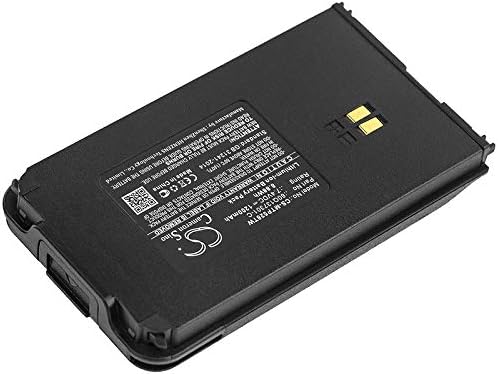
Image: Top view of the Cameron Sino replacement battery, showing the label with model number, part number, rating, and safety warnings. The gold-colored charging contacts are visible.

Image: Angled view of the Cameron Sino replacement battery, highlighting the four gold-colored charging contacts on the top edge.
Operating and Charging
To achieve the best performance and extend the lifespan of your battery, follow these charging guidelines:
- Initial Charge: A new battery will achieve its best performance after 2 to 3 complete cycles of charge and discharge. Fully charge the battery before its first use.
- Charging Process: Use only the original or a certified compatible charger for your Motorola Clarigo radio. Connect the radio with the installed battery to the charger. The charging indicator on your radio or charger will typically show the charging status.
- No Memory Effect: This Li-ion battery technology offers extended run time with no memory effect, meaning you can charge it at any time without needing to fully discharge it first.
- Avoid Overcharging/Over-discharging: While the battery has built-in protection, it is good practice to remove the device from the charger once fully charged for prolonged periods. Avoid completely draining the battery frequently.
Maintenance
Proper maintenance helps ensure the longevity and reliability of your battery:
- Storage: If storing the battery for an extended period, store it in a cool, dry place, ideally at about 50% charge. Avoid extreme temperatures.
- Cleaning: Keep the battery contacts clean. Use a dry, soft cloth to wipe off any dust or debris. Do not use liquids or abrasive cleaners.
- Regular Use: For optimal battery health, use and recharge the battery regularly rather than leaving it unused for very long periods.
Troubleshooting
If you encounter issues with your battery, consider the following:
- Battery Not Charging:
- Ensure the battery is correctly seated in the radio and the contacts are clean.
- Verify the charger is functioning correctly and properly connected to a power source.
- Confirm the charger is compatible with your radio and battery.
- Short Battery Life:
- Ensure the battery has completed 2-3 full charge/discharge cycles to reach optimal performance.
- Check for excessive background applications or high power consumption settings on your radio.
- Extreme temperatures can affect battery performance; operate within recommended temperature ranges.
- If the battery is old, its capacity may naturally degrade over time.
- Device Not Powering On:
- Ensure the battery is fully charged.
- Re-install the battery to ensure a proper connection.
- Test with another known-good battery if available to rule out a radio issue.
If troubleshooting steps do not resolve the issue, please contact customer support.
Warranty and Support
This Cameron Sino battery comes with a 1-year warranty from the date of purchase. This warranty covers manufacturing defects under normal use.
Additionally, we provide a 30-day refund policy and 24-hour response service for any questions or concerns you may have before or after purchase. Please feel free to contact us for assistance.
For warranty claims or technical support, please refer to the contact information provided with your purchase or visit the official Cameron Sino website.
