
1. Introduction and Overview
The Bernette 05 Crafter is a versatile sewing machine designed for creative projects. It offers a high sewing speed and a comprehensive selection of stitches, making it suitable for various crafting needs. This manual provides essential information for the safe and efficient operation, maintenance, and troubleshooting of your sewing machine.
Key features include a maximum sewing speed of 1100 stitches per minute, 30 essential stitches including specialized super-stretch and blanket stitches for various fabric types and applications, adjustable stitch density for buttonholes and stretch stitches, and adjustable presser foot pressure. The machine comes equipped with six presser feet to support diverse sewing tasks.

Figure 1: Front view of the Bernette 05 Crafter Sewing Machine. This image displays the main body of the machine, highlighting its compact design and the sewing area.
2. Safety Instructions
- Always unplug the machine from the electrical outlet when removing covers, lubricating, or when making any other user servicing adjustments mentioned in the instruction manual.
- Keep fingers away from all moving parts. Special care is required around the sewing machine needle.
- Use the correct needle plate. The wrong plate can cause the needle to break.
- Do not use bent needles.
- Do not pull or push fabric while stitching. This may deflect the needle, causing it to break.
- Wear safety glasses when sewing.
- Never operate the machine with any air openings blocked. Keep ventilation openings of the sewing machine and foot controller free from the accumulation of lint, dust, and loose cloth.
- Do not insert any objects into any openings.
- Do not use outdoors.
- Do not operate where aerosol (spray) products are being used or where oxygen is being administered.
3. Unpacking and Setup
3.1 Unpacking
Carefully remove the sewing machine from its packaging. Retain all packaging materials for future storage or transport. Verify that all accessories listed in the packing list are present.
3.2 Power Connection
Place the machine on a stable, flat surface. Connect the foot controller plug to the machine's power socket and then plug the power cord into a suitable electrical outlet. Ensure the power switch is in the "OFF" position before connecting.
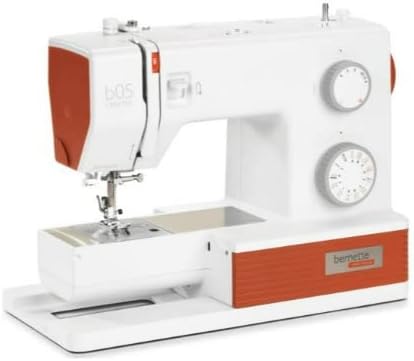
Figure 2: Rear view of the Bernette 05 Crafter, showing the power input and foot pedal connection.
4. Product Features
- High Sewing Speed: Achieves up to 1100 stitches per minute for efficient project completion.
- Extensive Stitch Selection: Features 30 essential stitches, including specialized super-stretch and blanket stitches for various fabric types and applications.
- Adjustable Stitch Density: Allows for precise control over stitch density, particularly useful for buttonholes and stretch fabrics.
- Adjustable Presser Foot Pressure: Customize pressure to suit different fabric thicknesses, ensuring smooth feeding and consistent stitch quality.
- Integrated LED Lighting: Two bright LED lights illuminate the work surface, enhancing visibility during sewing.
- Retractable Feed Dog: Easily lower the feed dog for free-motion sewing or darning by using the lever located at the back of the machine.
- Included Presser Feet: Comes with six presser feet to accommodate a wide range of sewing techniques.

Figure 3: Top view of the Bernette 05 Crafter, illustrating the thread path and control dials for stitch selection and length.
5. Operating Instructions
5.1 Winding the Bobbin
- Place a spool of thread on the spool pin.
- Guide the thread through the upper thread guide and around the bobbin winding tension disc.
- Place the empty bobbin onto the bobbin winder spindle.
- Wind the thread clockwise a few times around the bobbin.
- Push the bobbin winder spindle to the right.
- Press the foot controller to start winding. The machine will stop automatically when the bobbin is full.
- Cut the thread and push the bobbin winder spindle back to the left.
5.2 Threading the Upper Thread
- Raise the presser foot lever.
- Place the thread spool on the spool pin.
- Guide the thread through the upper thread guide.
- Bring the thread down the right channel, up the left channel, and through the take-up lever from right to left.
- Continue guiding the thread down to the needle bar thread guide.
- Thread the needle from front to back.
5.3 Inserting the Bobbin
- Open the bobbin cover plate.
- Insert the bobbin into the bobbin case with the thread unwinding counter-clockwise.
- Guide the thread into the tension spring and then into the thread guide slot.
- Close the bobbin cover plate.
5.4 Selecting Stitches and Adjustments
Use the stitch selector dial to choose one of the 30 available stitches. Adjust stitch length and width using the corresponding dials as needed for your project. Refer to the stitch chart on the machine for visual guidance.

Figure 4: Side view of the Bernette 05 Crafter, showing the stitch selection and adjustment dials.
6. Maintenance
6.1 Cleaning the Machine
- Always unplug the machine before cleaning.
- Remove the needle, presser foot, and needle plate.
- Use the provided brush to remove lint and dust from the feed dogs and bobbin area.
- Wipe the exterior surfaces with a soft, dry cloth. Do not use liquid cleaners.
6.2 Needle Replacement
Replace the needle regularly, especially when starting a new project or if the needle becomes bent or dull. Loosen the needle clamp screw, remove the old needle, insert a new needle with the flat side facing the back, and tighten the screw securely.
7. Troubleshooting
| Problem | Possible Cause | Solution |
|---|---|---|
| Skipped Stitches | Incorrect needle size/type, bent needle, improper threading. | Replace needle, re-thread machine, ensure correct needle for fabric. |
| Thread Breaking | Incorrect tension, poor quality thread, bent needle, improper threading. | Adjust tension, use quality thread, replace needle, re-thread machine. |
| Fabric Not Feeding | Feed dogs lowered, presser foot pressure too low. | Raise feed dogs, increase presser foot pressure. |
| Machine Not Starting | Power cord not connected, foot controller not connected, power switch off. | Check all connections, ensure power switch is on. |
8. Specifications
- Brand: Bernette
- Model: Bernette 05 Crafter
- Color: White
- Material: Aluminum
- Product Dimensions (D x W x H): 8"D x 16"W x 12"H
- Item Weight: 1 Pounds
- Power Source: Corded Electric
- UPC: 763004352895
- Manufacturer: Bernette

Figure 5: Bernette 05 Crafter Sewing Machine with labeled dimensions (16" width, 12" height, 8" depth).
9. Warranty and Support
For detailed warranty information and customer support, please refer to the official Bernette website or contact your authorized Bernette dealer. Keep your purchase receipt as proof of purchase for warranty claims.


