
Introduction
Thank you for choosing the Highttoy Electronic ATM Piggy Bank. This innovative product is designed to help children develop good saving habits in a fun and secure way. Please read this manual carefully to ensure proper setup, operation, and maintenance of your new electronic safe. Keep this manual for future reference.
Product Overview
The Highttoy Electronic ATM Piggy Bank is a secure and interactive money-saving device for children. It features a password-protected safe, an automatic banknote feeder, and a coin slot. Made from high-quality, environmentally friendly ABS plastic, it is designed to be durable and safe for kids.
Key Features:
- High-Quality Materials: Constructed from environmental ABS plastic, ensuring durability and safety.
- Password-Protected Safe: Features a 4-digit password system for secure access. The default password is "0000" and can be changed.
- Automatic Banknote Feeder: Automatically draws in banknotes when inserted into the designated slot.
- High Storage Capacity: Can store up to 600 coins or 100 banknotes, encouraging significant savings.
- Educational Tool: Helps children learn the importance of saving money and managing their pocket money.


Setup
- Battery Installation:
Locate the battery compartment on the bottom of the piggy bank. Using a screwdriver (included), open the compartment. Insert 3 "AA" batteries (not included) according to the polarity markings. Close the compartment securely.
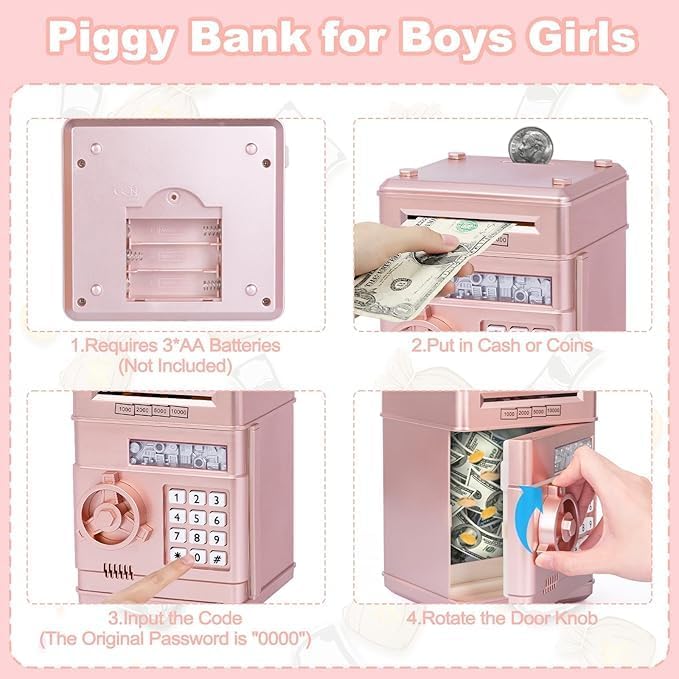
Image: The first panel of an instructional diagram, showing the bottom of the piggy bank with the battery compartment open, indicating the need for 3 "AA" batteries. - Initial Password:
Upon first use or after battery replacement, the default password is "0000". You will need this to open the safe initially.
Operating Instructions
- Depositing Coins:
Insert coins into the coin slot located on the top of the piggy bank.
- Depositing Banknotes:
Place banknotes into the cash entrance slot on the front of the piggy bank. The automatic feeder will draw the money inside.
Image: A hand is shown inserting a banknote into the automatic feeder of the rose gold Highttoy Electronic ATM Piggy Bank. - Opening the Safe:
- Enter your 4-digit password (default is "0000").
- If the password is correct, a green light will illuminate. If incorrect, a red light will appear, and the safe will prompt "please try again".
- While the green light is on (approximately 10 seconds), turn the knob clockwise to open the door. You will hear a creaking sound.
- If the door remains open for more than 10 seconds, the green light will stop flashing, and a beep will sound every 20 seconds. Close the door to stop the beeping.

Image: A hand is shown pressing numbers on the keypad of the piggy bank to enter the password. A green light indicates correct input. 
Image: A hand is shown rotating the circular door knob of the piggy bank clockwise to open the safe door. - Changing the Password:
- With the door open, press and hold the "*" button.
- Enter your new 4-digit password.
- Press the "#" button to confirm.
- Close the door. Your new password is now set.
Maintenance
- Cleaning: Wipe the surface of the piggy bank with a soft, dry cloth. Do not use abrasive cleaners or immerse the unit in water.
- Battery Replacement: Replace batteries when the lights dim or the sounds become faint. Always replace all three batteries at once.
- Storage: Store the piggy bank in a cool, dry place away from direct sunlight and extreme temperatures.
Troubleshooting
| Problem | Possible Cause | Solution |
|---|---|---|
| Cannot open the safe. | Incorrect password entered. | Ensure you are entering the correct 4-digit password. The default is "0000". |
| Forgotten password. | Password has been forgotten or lost. | Remove the batteries, wait at least 10 minutes, then reinsert them. The password will reset to "0000". |
| Banknotes are not automatically fed. | Batteries are low or incorrectly installed. | Check battery polarity and replace with fresh "AA" batteries if needed. Ensure banknotes are inserted straight. |
| No sound or lights. | Batteries are dead or missing. | Install or replace batteries. |
Specifications
- Model: B0BJYTW773
- Material: Environmental ABS Plastic
- Color: Rose Gold
- Dimensions (L x W x H): Approximately 5.31 in x 5.51 in x 7.28 in (13.5 cm x 14 cm x 18.5 cm)
- Power Source: 3 x "AA" Batteries (not included)
- Capacity: Approx. 600 coins or 100 banknotes
- Default Password: 0000
Warranty and Support
Highttoy is committed to providing high-quality products. While specific warranty details are not provided in this manual, please retain your proof of purchase. For any questions, technical support, or issues not covered in this manual, please contact Highttoy customer service through the retailer where the product was purchased. We are dedicated to ensuring your satisfaction.
For more information, visit the official Highttoy brand page or contact their support channels.
