
Altec Lansing IMT7000
Altec Lansing Shockwave Wireless Speaker User Manual
Model: IMT7000 | Brand: Altec Lansing
1. Introduction
The Altec Lansing Shockwave Wireless Speaker is a powerful and versatile audio device designed for robust sound and portability. Featuring 60W peak power, multi-color LED party modes, and Party Sync capabilities, it delivers an immersive audio experience for various environments. Its durable construction and long-lasting battery make it ideal for both indoor and outdoor use.
Key Features:
- Long Lasting Battery: Up to 6 hours of continuous playback via Bluetooth.
- Party Sync: Connects with up to 50 other Party Sync enabled Altec Lansing speakers for synchronized audio.
- Multi Color LEDs: Over 9 LED light modes that react to music.
- Carrying Strap: Integrated strap for easy portability.
- AUX Input: Direct connection for MP3/MP4 players.
- Built-in Smartphone Charger: USB-A output for charging devices.
- IP65 Water Repellent: Designed to withstand splashes and dust.

Figure 1.1: Key Features of the Shockwave Speaker
2. What's in the Box
Upon unboxing your Altec Lansing Shockwave Wireless Speaker, please ensure all the following components are present:
- Altec Lansing Shockwave Wireless Speaker
- AC Adapter
- User Manual (this document)
3. Product Overview
Top Panel Controls:

Figure 3.1: Top Panel Controls
- Power Button: Press and hold to power on/off.
- Volume Up/Next Track: Short press for volume up, long press for next track.
- Volume Down/Previous Track: Short press for volume down, long press for previous track.
- Play/Pause/Bluetooth Pairing: Press to play/pause. Long press to enter Bluetooth pairing mode.
- LED Light Control: Cycle through various LED light modes.
- AUX Mode: Switch to AUX input mode.
- Bass Control: Adjust bass levels.
- True Wireless Pairing: Initiate pairing with another Shockwave speaker.
Rear Ports:
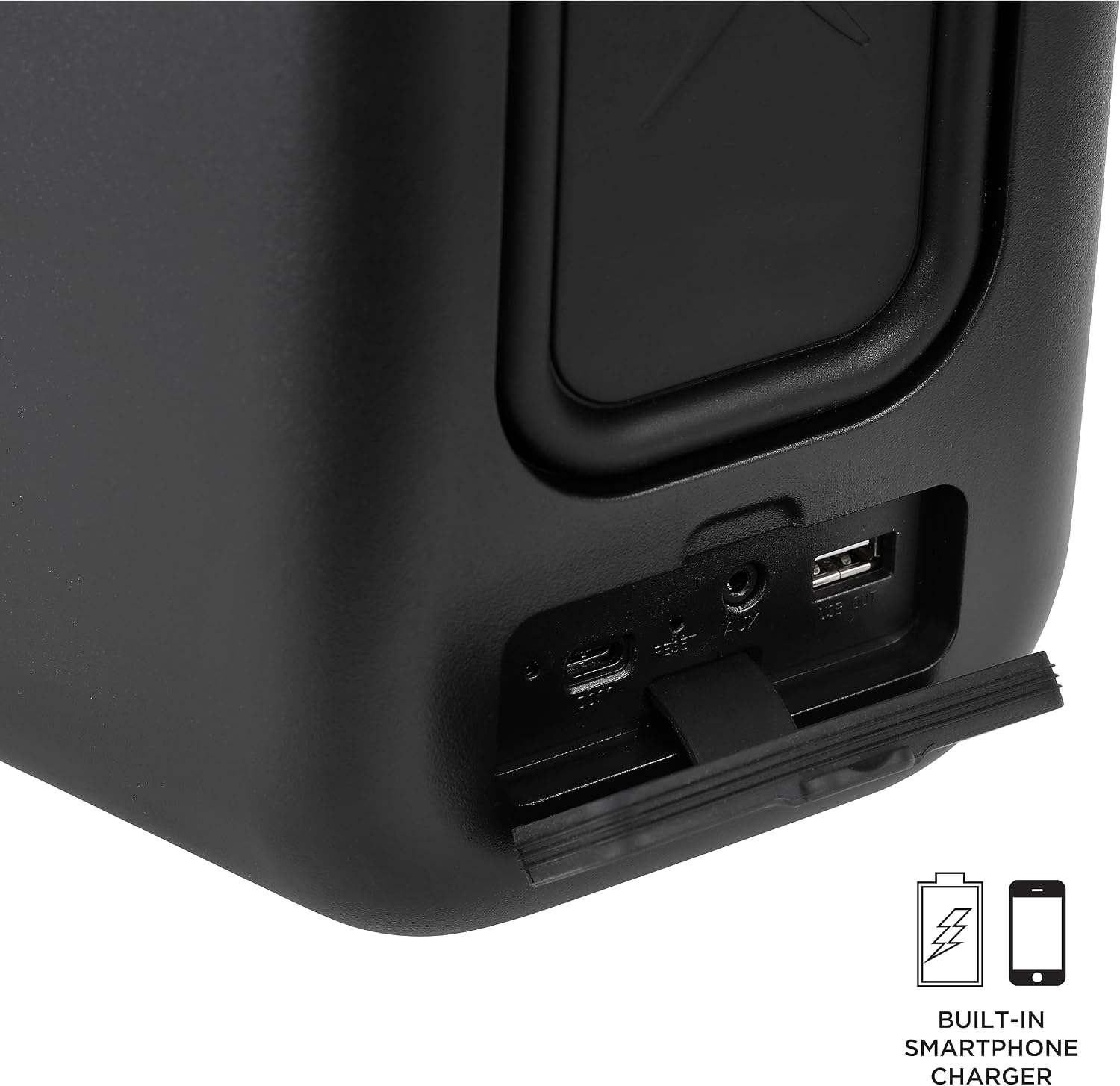
Figure 3.2: Rear Connectivity Ports
- DC IN (USB-C): Power input for charging the speaker.
- RESET: Small pinhole button to reset the device.
- AUX IN: 3.5mm audio input for wired connections.
- USB OUT: USB-A port for charging external devices.
4. Setup
4.1 Charging the Speaker
Before first use, fully charge the Shockwave speaker. Connect the supplied AC adapter to the DC IN port on the rear of the speaker and plug it into a power outlet. The charging indicator light will illuminate. It will turn off or change color once fully charged.
4.2 Powering On/Off
Press and hold the Power Button on the top panel for approximately 3 seconds to turn the speaker on or off.
4.3 Bluetooth Pairing
- Ensure the speaker is powered on and not connected to another device. The Bluetooth indicator light will flash, indicating it's in pairing mode.
- On your mobile device (smartphone, tablet, etc.), enable Bluetooth and search for available devices.
- Select "Altec Shockwave" from the list of devices.
- Once connected, the Bluetooth indicator light on the speaker will become solid, and you will hear an audible confirmation.
4.4 Party Sync (True Wireless Pairing)
To connect two Altec Lansing Shockwave speakers for a stereo experience:

Figure 4.1: Party Sync Feature
- Ensure both Shockwave speakers are powered on and not connected to any Bluetooth devices.
- On one speaker (this will be your primary speaker), press the True Wireless Pairing button. The speaker will enter pairing mode.
- On the second speaker, also press the True Wireless Pairing button.
- The speakers will automatically connect to each other. You will hear a confirmation tone.
- Once paired, connect your mobile device to the primary speaker via Bluetooth as described in Section 4.3. Audio will now play through both speakers in stereo.
5. Operating Instructions
5.1 Audio Playback
- Play/Pause: Press the Play/Pause button.
- Volume Adjustment: Short press the Volume Up or Volume Down buttons.
- Next/Previous Track: Long press the Volume Up (next) or Volume Down (previous) buttons.
- Bass Control: Press the Bass Control button to cycle through different bass modes.
5.2 LED Light Modes
The Shockwave speaker features multiple LED light modes that can enhance your listening experience. Press the LED Light Control button on the top panel to cycle through the available light patterns and colors.

Figure 5.1: Multi Light & Strobe Modes
5.3 AUX Input Usage
To play audio from a device without Bluetooth, use the AUX input:
- Connect one end of a 3.5mm audio cable (not included) to the AUX IN port on the speaker's rear panel.
- Connect the other end of the cable to the headphone jack or audio output of your external device.
- Press the AUX Mode button on the top panel to switch to AUX input.
- Control playback and volume directly from your connected device.
5.4 Using the Built-in Smartphone Charger
The Shockwave speaker can charge your mobile devices via its USB OUT port:
- Connect your device's charging cable to the USB OUT port on the speaker's rear panel.
- Ensure the speaker is powered on.
- Your device will begin charging. Note that charging an external device will reduce the speaker's battery life.
6. Maintenance
6.1 Cleaning
To clean the speaker, use a soft, dry cloth. For stubborn dirt, slightly dampen the cloth with water. Do not use harsh chemicals, cleaning solvents, or strong detergents, as they may damage the speaker's finish or internal components. Ensure all port covers are securely closed before cleaning if using a damp cloth.
6.2 Storage
When not in use for extended periods, store the speaker in a cool, dry place away from direct sunlight and extreme temperatures. It is recommended to charge the battery fully before storing and to recharge it every few months to maintain battery health.
6.3 Battery Care
- Avoid fully discharging the battery frequently.
- Do not expose the speaker to temperatures above 45°C (113°F) or below 0°C (32°F).
- Use only the provided AC adapter for charging.
7. Troubleshooting
| Problem | Possible Cause | Solution |
|---|---|---|
| Speaker does not power on. | Battery is depleted. | Connect the speaker to the AC adapter and charge it fully. |
| No sound from speaker. | Volume is too low; Device not connected; Incorrect input mode. | Increase speaker and device volume; Re-pair Bluetooth or check AUX connection; Ensure correct input mode (Bluetooth/AUX) is selected. |
| Bluetooth pairing fails. | Speaker is already connected; Device is out of range; Interference. | Disconnect from other devices; Move device closer to speaker (within 10 meters); Turn off other Bluetooth devices nearby; Try resetting the speaker using the RESET pinhole. |
| Party Sync not working. | Speakers are too far apart; One speaker is already connected to a device. | Ensure speakers are within close proximity; Disconnect any Bluetooth devices from both speakers before initiating Party Sync. |
| LED lights not working. | Lights are turned off or in a static mode. | Press the LED Light Control button to cycle through modes. |
8. Specifications
| Feature | Detail |
|---|---|
| Model Name | Shockwave (IMT7000) |
| Brand | Altec Lansing |
| Speaker Type | Multi Room, Portable Bluetooth Speaker |
| Connectivity Technology | Bluetooth, USB, AUX |
| Wireless Communication Technology | Bluetooth, FM (Note: FM capability may vary by model version) |
| Speaker Maximum Output Power | 150 Watts (Peak) |
| Battery Life | Up to 6 Hours (Bluetooth playback) |
| Power Source | Battery Powered (1 Lithium Ion battery included) |
| Product Dimensions (D x W x H) | 9.65" x 8.74" x 14.45" |
| Item Weight | 7.73 pounds |
| Water Resistance Level | Water Repellent (IP65 rating) |
| Bluetooth Range | 10 Meters |
| Included Components | AC Adapter |

Figure 8.1: Product Dimensions
9. Warranty and Support
9.1 Manufacturer's Warranty
The Altec Lansing Shockwave Wireless Speaker comes with a 1 Year Manufacturer Warranty from the date of purchase. This warranty covers defects in materials and workmanship under normal use. It does not cover damage caused by misuse, accident, unauthorized modification, or external causes.
For warranty claims or service, please retain your proof of purchase.
9.2 Customer Support
For further assistance, technical support, or inquiries regarding your Altec Lansing Shockwave speaker, please visit the official Altec Lansing website or contact their customer service department.
You can find more information and support resources at the Altec Lansing Store on Amazon.
Related documentsIMT7000


Ask a question about this manual
Ask about setup, troubleshooting, compatibility, parts, safety, or missing instructions. Manuals+ will review the question and use this page’s manual context to help answer it.