
1. Introduction
This manual provides essential information for the installation, configuration, and maintenance of your MSI PRO B760-P WiFi DDR4 ATX Motherboard. Designed for optimal performance and reliability, this motherboard supports 12th and 13th Gen Intel Core, Pentium Gold, and Celeron Processors, offering a robust foundation for your personal computer system. Please read this manual thoroughly before proceeding with installation.

Figure 1: Overview of the MSI PRO B760-P WiFi DDR4 ATX Motherboard.
2. Setup and Installation
2.1. Component Identification
Familiarize yourself with the motherboard's layout and key components before installation.

Figure 2: Top-down view of the motherboard, showing various slots and connectors.
2.2. CPU Installation
This motherboard features an LGA 1700 socket, compatible with 12th and 13th Generation Intel Core Processors, as well as Pentium Gold and Celeron Processors. Ensure proper alignment and gentle placement of the CPU into the socket.
2.3. Memory (RAM) Installation
The motherboard is equipped with 4 DDR4 DIMM slots, supporting a maximum memory capacity of 128GB. It supports various memory speeds, including 5333(OC), 5200(OC), 5066(OC), 5000(OC), 4800(OC), 4600(OC), 4400(OC), 4266(OC), 4200(OC), 4000(OC), 3800(OC), 3733(OC), 3600(OC), 3466(OC), 3400(OC), 3333(OC), 3200(JEDEC), 2933(JEDEC), 2666(JEDEC), 2400(JEDEC), and 2133(JEDEC) MHz. Install DDR4 modules into the appropriate slots, ensuring they are fully seated.
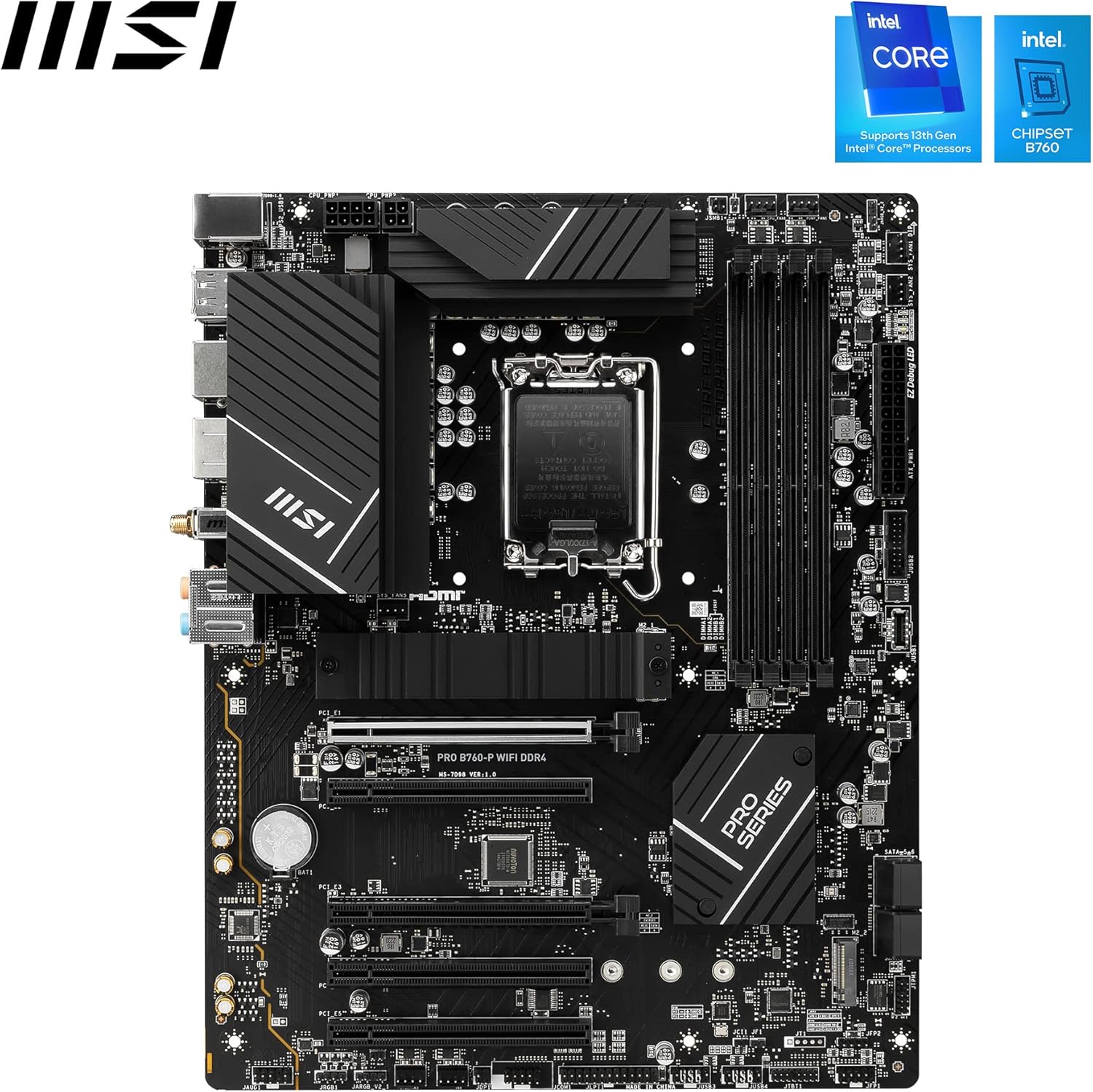
Figure 3: Angled view showing the CPU socket and four DDR4 memory slots.
2.4. Storage Device Installation
The motherboard provides 2 M.2 slots and 4 SATA 6G ports for storage. M.2_1 (from CPU) supports up to PCIe 4.0 x4 for 22110/2280/2260/2242 devices. M.2_2 (from Chipset) supports up to PCIe 4.0 x4 / SATA mode for 2280/2260/2242 devices. Connect your SATA drives to the SATA 6G ports.

Figure 4: Motherboard view highlighting M.2 slots and other key features.
2.5. Expansion Card Installation
There are 5 PCI-E x16 slots available. PCI_E1 supports up to x16 from the CPU (PCIe 4.0), while PCI_E2, PCI_E3, PCI_E4, and PCI_E5 support various configurations from the Chipset (PCIe 3.0 and PCIe 4.0). Install your graphics card and other expansion cards into the appropriate slots.
2.6. Connecting Peripherals
The rear I/O panel includes 4x USB 2.0, 2x USB 3.2 Gen2 Type A, 1x USB 3.2 Gen2 Type C, 1x HDMI, 1x DisplayPort, 2.5G LAN, and Wi-Fi 6E / Bluetooth 5.3 antenna connectors. Internal I/O includes power connectors (ATX_PWR, CPU_PWR), fan headers (CPU Fan, Pump Fan, System Fan), front panel connectors (JFP, JAUD), USB headers (4x USB 2.0, 2x USB 3.2 Gen1 Type A, 1x USB 3.2 Gen1 Type C), and RGB LED connectors (JARGB_V2, JRGB).

Figure 5: Detailed view of the rear I/O panel with various ports.
2.7. Box Contents
The motherboard package typically includes the motherboard itself, Wi-Fi antennas, SATA cables, M.2 screws/standoff set, I/O Shield, and a Quick Installation Guide. Ensure all components are present before starting your build.

Figure 6: Contents of the motherboard packaging, including accessories and documentation.
3. Operating System Installation
This motherboard supports Windows 11 64-bit and Windows 10 64-bit. After assembling your hardware, install your preferred operating system. It is crucial to install the latest drivers for your motherboard components, which can typically be found on the MSI official website. This ensures optimal performance and stability.
4. BIOS Configuration
The BIOS (Basic Input/Output System) allows you to configure various system settings. Access the BIOS during startup (usually by pressing DEL or F2). Here, you can enable XMP profiles for your memory to achieve advertised speeds and adjust other performance-related settings. Refer to the detailed user manual on the MSI website for comprehensive BIOS settings.
5. Maintenance
To ensure the longevity and optimal performance of your motherboard, regular maintenance is recommended:
- Driver Updates: Periodically check the MSI website for the latest drivers and firmware updates for your motherboard.
- Dust Cleaning: Keep your PC case and motherboard free of dust accumulation. Use compressed air to gently clean components, especially heatsinks and fan blades.
- BIOS Updates: Only update the BIOS if necessary, following MSI's official instructions carefully to avoid system instability.
6. Troubleshooting
If you encounter issues with your motherboard, consider the following basic troubleshooting steps:
- No Power/No Boot: Double-check all power connections (24-pin ATX, 8-pin CPU). Ensure the power supply is switched on.
- No Display: Verify that your monitor is connected to the graphics card (or motherboard if using integrated graphics) and that the display input is correctly selected. Reseat the graphics card and RAM modules.
- System Instability/Crashes: Ensure all drivers are up-to-date. Check memory compatibility and run memory diagnostic tools. Monitor CPU and GPU temperatures.
- Peripheral Issues: Test USB devices in different ports. Ensure correct drivers are installed for all peripherals.
For more detailed troubleshooting, consult the full user manual available on the MSI support website.
7. Specifications
| Feature | Specification |
|---|---|
| Brand | MSI |
| Model Name | B760-P |
| CPU Socket | LGA 1700 |
| Compatible Processors | 12th/13th Gen Intel Core, Pentium Gold, Celeron Processors |
| Chipset Type | Intel B760 |
| Memory | 4x DDR4 DIMM, Max 128GB, up to 5333(OC) MHz |
| Expansion Slots | 5x PCI-E x16 slots (PCI_E1 PCIe 4.0 x16, others PCIe 3.0/4.0 x1/x16) |
| Storage | 2x M.2 slots (PCIe 4.0 x4, M.2_2 supports SATA mode), 4x SATA 6G ports |
| USB Ports (Rear) | 4x USB 2.0, 2x USB 3.2 Gen2 Type A, 1x USB 3.2 Gen2 Type C |
| USB Ports (Front) | 4x USB 2.0, 2x USB 3.2 Gen1 Type A, 1x USB 3.2 Gen1 Type C |
| Onboard Graphics | 1x HDMI 2.1 (4K 60Hz), 1x DisplayPort 1.4 (4K 60Hz) |
| LAN | 2.5G LAN |
| Wireless/Bluetooth | Wi-Fi 6E, Bluetooth 5.3 |
| Audio | 8-Channel (7.1) HD Audio |
| Operating System | Windows 11 64-bit, Windows 10 64-bit |
| PCB Dimension | ATX (243.84mm x 304.8mm) |
| Item Weight | 2.6 pounds |
| Product Dimensions | 9.45 x 27.17 x 0.98 inches |
8. Warranty and Support
Your MSI PRO B760-P WiFi DDR4 ATX Motherboard comes with a manufacturer's warranty. For specific warranty terms, conditions, and duration, please refer to the warranty card included in your product packaging or visit the official MSI website. For technical support, driver downloads, and further assistance, please visit the MSI support page or contact their customer service.
MSI Official Website: www.msi.com


