
1. Introduction and Safety Information
Thank you for purchasing the Fenton RP161 Bluetooth Stereo Turntable. This manual provides essential information for the safe and correct operation of your device. Please read it thoroughly before use and retain it for future reference.
Important Safety Instructions:
- Do not expose the unit to rain or moisture to prevent fire or electric shock.
- Ensure proper ventilation; do not block any ventilation openings.
- Place the unit on a stable, flat surface.
- Use only the power adapter supplied with the unit.
- Do not attempt to service the unit yourself. Refer all servicing to qualified personnel.
- Keep the unit away from direct sunlight, heat sources, and strong magnetic fields.
2. Product Overview
The Fenton RP161 is a versatile stereo turntable featuring integrated speakers and Bluetooth connectivity. It supports three playback speeds for various record types.

Figure 2.1: Overall view of the Fenton RP161 Turntable.
Components:
- Dust Cover: Protects the platter and tonearm from dust.
- Platter: The rotating surface where records are placed.
- Spindle: Central pin for placing records.
- 45 RPM Adapter: Used for playing 7-inch records with large center holes.
- Tonearm: Holds the cartridge and stylus.
- Stylus (Needle): Reads the grooves of the record.
- Speed Selector Switch: Allows selection of 33, 45, or 78 RPM.
- Auto Stop Switch: Engages or disengages the automatic stop function.
- Volume/Power Knob: Controls power and audio output level.
- Integrated Speakers: Built-in audio output.
- RCA Line Output: For connecting to external audio systems.
- DC Power Input: For connecting the power adapter.

Figure 2.2: Tonearm, Speed Selector, and Auto Stop Switch.
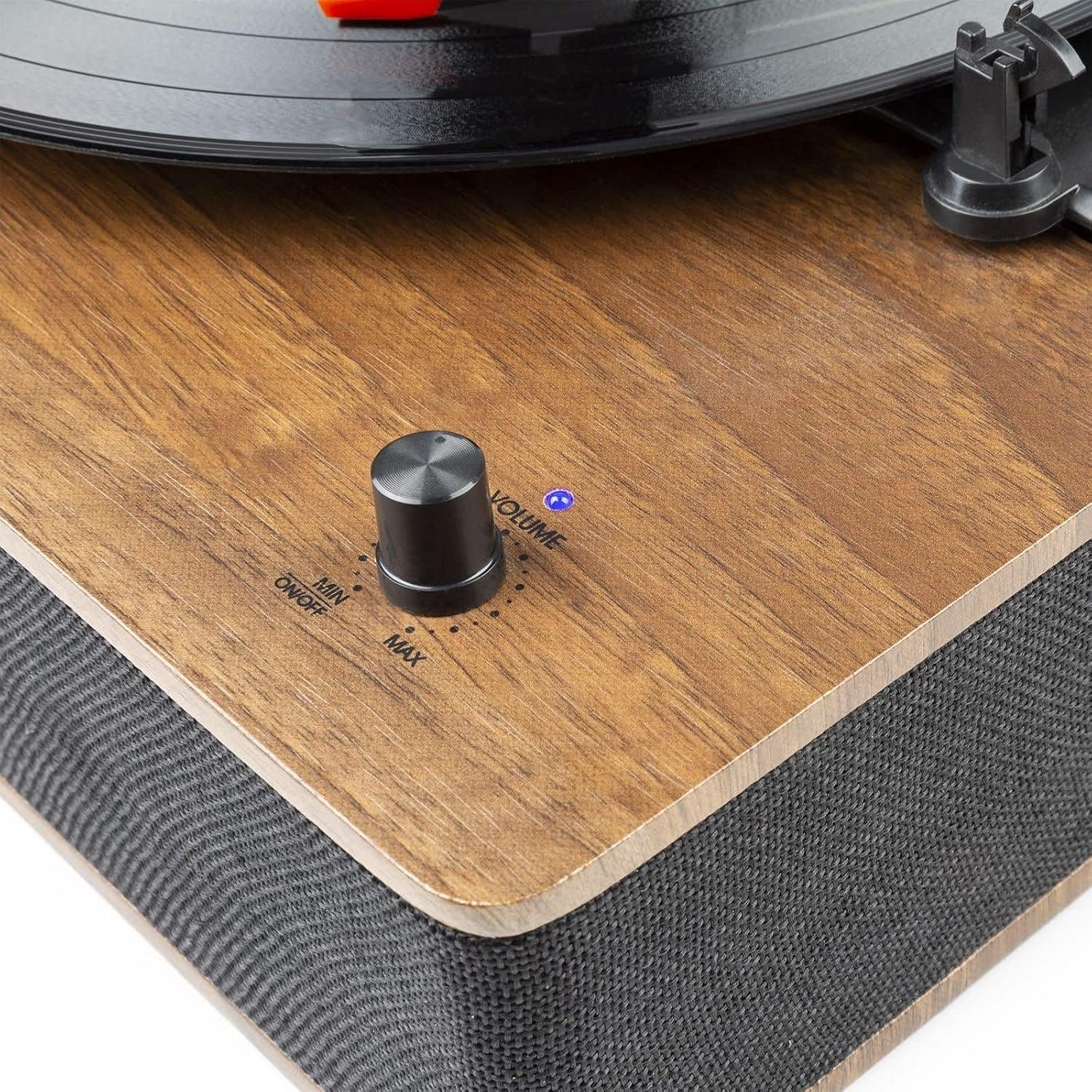
Figure 2.3: Volume and Power Knob.

Figure 2.4: Rear Panel with RCA Output and DC Input.
3. Setup
Unpacking:
- Carefully remove the turntable from its packaging.
- Remove all protective materials, including the stylus protector.
- Ensure all components are present: turntable unit, dust cover, 45 RPM adapter, and power adapter.
Placement:
- Place the turntable on a flat, stable, and level surface to prevent vibrations and ensure proper playback.
- Avoid placing it near speakers or other vibration-producing equipment.
Power Connection:
- Connect the supplied power adapter to the DC 5V 1A input port on the rear of the turntable.
- Plug the adapter into a suitable wall outlet.
External Audio Connection (Optional):
- To connect to an external amplifier or powered speakers, use an RCA cable (not included) to connect the RCA Line Output ports on the rear of the turntable to the corresponding input on your audio system.
4. Operating Instructions
4.1 Playing Records:
- Power On: Rotate the Volume/Power knob clockwise until it clicks and the indicator light illuminates. Adjust to a low volume setting initially.
- Select Speed: Set the speed selector switch to the appropriate speed for your record (33, 45, or 78 RPM). For 7-inch records with a large center hole, place the 45 RPM adapter on the spindle.
- Place Record: Carefully place your record on the turntable platter.
- Auto Stop: Set the AUTO STOP switch to ON if you want the platter to stop rotating automatically when the record finishes. Set to OFF for continuous rotation.
- Position Tonearm: Gently lift the tonearm using the tonearm lift lever. Move the tonearm over the desired starting groove of the record.
- Lower Tonearm: Slowly lower the tonearm onto the record using the tonearm lift lever. The music will begin to play.
- Adjust Volume: Adjust the Volume/Power knob to your desired listening level.
- End of Playback: When the record finishes, if AUTO STOP is ON, the platter will stop. If AUTO STOP is OFF, manually lift the tonearm and return it to its rest.
- Power Off: Rotate the Volume/Power knob counter-clockwise until it clicks to turn off the unit.
4.2 Bluetooth Operation:
The RP161 can receive audio wirelessly from a Bluetooth-enabled device.
- Power On: Turn on the turntable by rotating the Volume/Power knob. The unit will automatically enter Bluetooth pairing mode, indicated by a flashing blue LED light.
- Enable Bluetooth: On your smartphone, tablet, or other Bluetooth device, enable Bluetooth and search for available devices.
- Pair: Select 'Fenton RP161' from the list of devices. Once paired, the blue LED light will stop flashing and remain solid.
- Play Audio: You can now play music from your Bluetooth device through the turntable's speakers. Adjust the volume using the Volume/Power knob on the turntable and/or your connected device.
- Disconnect: To disconnect, turn off Bluetooth on your device or power off the turntable.
5. Maintenance
Cleaning the Unit:
- Always unplug the unit from the power outlet before cleaning.
- Use a soft, dry cloth to wipe the exterior surfaces.
- Do not use abrasive cleaners, waxes, or solvents as they may damage the finish.
Stylus Care:
- The stylus is delicate. Handle it with extreme care.
- Clean the stylus periodically using a soft brush, brushing gently from back to front.
- A worn stylus can damage records and degrade sound quality. Replace the stylus approximately every 200-300 hours of playback.
Dust Cover Care:
- Wipe the dust cover gently with a soft, damp cloth.
- Avoid using harsh chemicals that could scratch or cloud the plastic.
6. Troubleshooting
| Problem | Possible Cause | Solution |
|---|---|---|
| No power | Power adapter not connected or faulty. | Ensure power adapter is securely connected to the unit and a working power outlet. |
| No sound from speakers | Volume too low; stylus protector still on; stylus damaged. | Increase volume. Remove stylus protector. Check stylus for damage and replace if necessary. |
| Record skipping | Record is dirty or scratched; stylus is worn or dirty; turntable not level. | Clean record. Clean or replace stylus. Ensure turntable is on a level surface. |
| Bluetooth not connecting | Turntable not in pairing mode; device Bluetooth off; too far from unit. | Ensure turntable LED is flashing (pairing mode). Turn on Bluetooth on your device. Move device closer to the turntable. |
| Platter not spinning | Power off; belt dislodged; AUTO STOP engaged prematurely. | Ensure power is on. Check if the drive belt is correctly positioned around the motor pulley and platter. Try setting AUTO STOP to OFF. |
7. Specifications
| Power Output | 50W |
| Playback Speeds | 33 1/3, 45, 78 RPM |
| Output Connection | RCA Line Output |
| Drive Type | Belt Drive |
| Power Supply | 230Vac/50Hz (5V DC adapter included) |
| Dimensions (L x W x H) | 33 x 32 x 13 cm |
| Weight | 2.75 kg |
| Features | Integrated Hi-Fi speakers, Bluetooth audio streaming, removable dust cover, ceramic stereo cartridge with needle, shock-absorbing feet. |
8. Warranty and Support
This product is covered by a warranty in accordance with local regulations. Please refer to your purchase documentation for specific terms and conditions.
Spare Parts Availability: Spare parts for the Fenton RP161 are guaranteed to be available for 2 years from the date of purchase.
For technical support or service inquiries, please contact your retailer or the Fenton customer service department.


