Introduction
Welcome to the user manual for your new Smart Tech 32HA20V3 Android LED HD TV. This manual provides essential information for setting up, operating, and maintaining your television. Your Smart Tech TV offers a rich entertainment experience with access to over 500,000 movies and TV shows, Google Assistant voice control, and seamless content casting from your smartphone or tablet.
Please read this manual thoroughly before using your TV to ensure proper operation and to maximize your viewing pleasure.

Figure 1: Smart Tech 32HA20V3 Android TV highlighting its main features and branding.
Safety Information
Always observe the following safety precautions when operating your TV:
- Do not expose the TV to rain or moisture to prevent fire or electric shock.
- Do not block ventilation openings. Ensure adequate space around the TV for proper airflow.
- Protect the power cord from being walked on or pinched.
- Only use attachments/accessories specified by the manufacturer.
- Unplug the TV during lightning storms or when unused for long periods.
- Refer all servicing to qualified service personnel.
Package Contents
Before proceeding with the setup, please ensure all items listed below are present in your package:
- Smart Tech 32HA20V3 TV Unit
- Remote Control (with batteries included)
- Power Cable
- TV Stand (Base and Screws)
- User Manual (this document)
Setup
1. Attaching the Stand
Carefully place the TV face down on a soft, flat surface to prevent screen damage. Align the stand with the mounting holes on the bottom of the TV and secure it with the provided screws.
2. Wall Mounting (Optional)
If you choose to wall mount your TV, ensure you use a VESA-compatible wall mount kit (not included). The VESA mounting pattern for this model is 100mm x 100mm. Refer to the wall mount kit's instructions for proper installation.
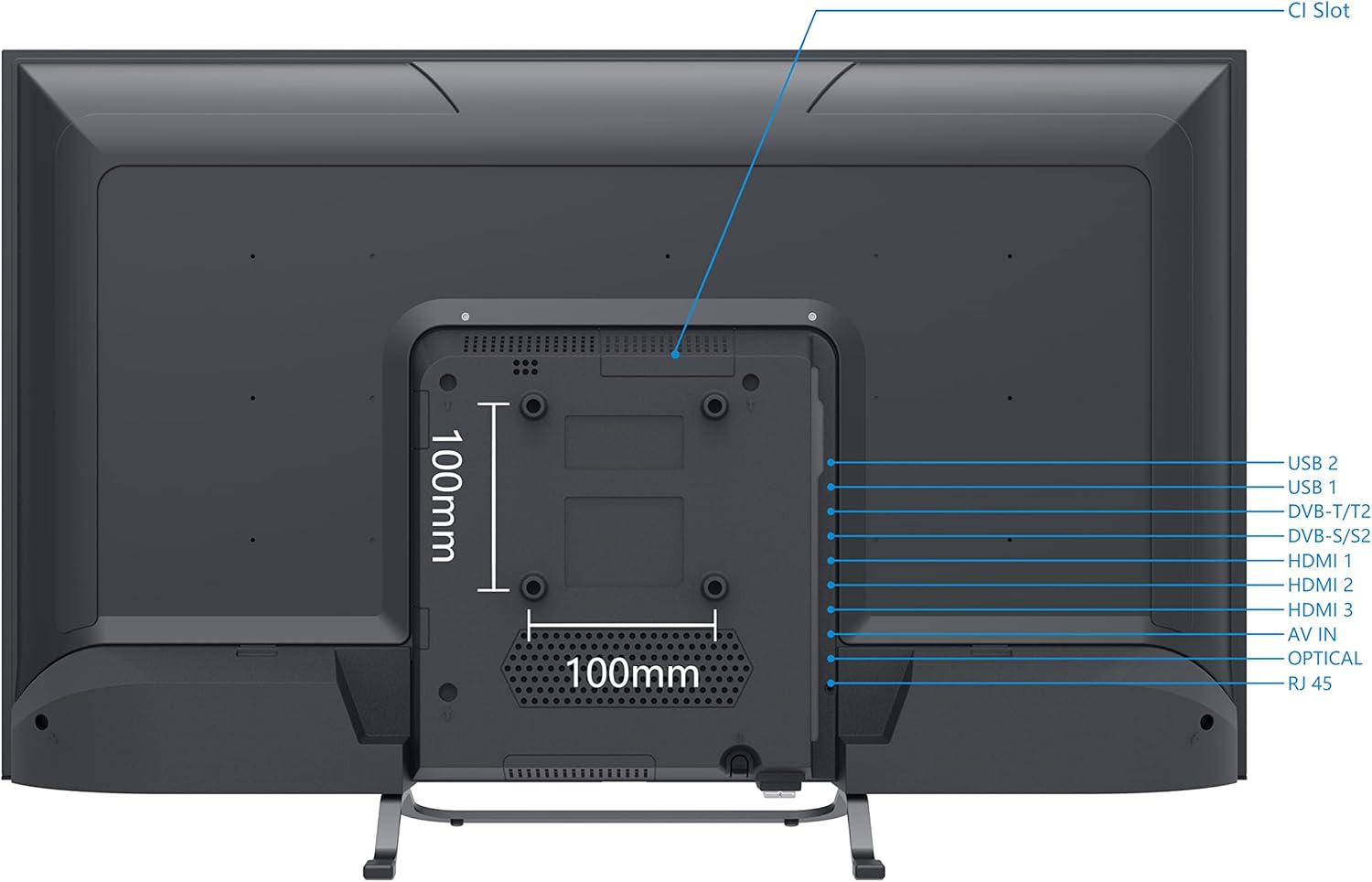
Figure 2: Back panel of the TV illustrating VESA mounting points (100mm x 100mm) and port locations.
3. Connecting Peripherals
Connect your external devices to the TV using the appropriate ports on the back panel.
- HDMI Ports (HDMI 1, HDMI 2, HDMI 3): For connecting Blu-ray players, game consoles, set-top boxes, etc.
- USB Ports (USB 1, USB 2): For connecting USB storage devices to play media or for software updates.
- Antenna/Cable Input (DVB-T/T2, DVB-S/S2): For connecting an antenna for terrestrial digital TV or a satellite dish.
- Optical Audio Output: For connecting to a soundbar or audio receiver.
- AV IN: For connecting older devices using composite video and stereo audio cables.
- RJ45 (Ethernet) Port: For a wired internet connection.
- CI Slot: For inserting a Common Interface module (CAM) and smart card to access encrypted channels.
Refer to Figure 2 for the exact location of these ports.
4. Initial Power On and Setup Wizard
After connecting all necessary cables, plug the power cord into an electrical outlet. The TV will power on and guide you through the initial setup wizard, including language selection, network connection, and channel scanning.
Operating Your TV
1. Remote Control Overview
The included remote control allows you to navigate the TV's features. It includes dedicated buttons for popular streaming services like Netflix and YouTube, as well as Google Assistant for voice commands.

Figure 3: The Smart Tech TV remote control, showing various buttons for navigation and smart features.
- Power Button: Turns the TV on or off.
- Volume +/-: Adjusts the volume level.
- Channel +/-: Changes TV channels.
- Input: Selects the input source (HDMI, AV, TV Tuner).
- Navigation Buttons (Up/Down/Left/Right/OK): For menu navigation.
- Google Assistant Button: Activates voice control.
- Netflix/YouTube/Prime Video Buttons: Direct access to these applications.
2. Smart TV Features (Android TV)
Your Smart Tech TV runs on Android 11.0, providing a user-friendly interface and access to a vast ecosystem of apps.
- Google Play Store: Download and install your favorite apps, games, and streaming services.
- Google Assistant: Use voice commands to search for content, control smart home devices, get answers, and more. Press the Google Assistant button on your remote and speak into the microphone.
- Chromecast Built-in: Cast photos, videos, music, and other content directly from your smartphone, tablet, or computer to your TV.
- Pre-installed Apps: Enjoy immediate access to popular services like Netflix, Amazon Prime Video, YouTube, and more.
3. Network Connection
To access smart features, connect your TV to the internet.
- Wi-Fi: Navigate to Settings > Network & Internet, select your Wi-Fi network, and enter the password. The TV supports Wi-Fi 2T2R.
- Ethernet: Connect an Ethernet cable from your router to the RJ45 port on the TV.
Maintenance
1. Cleaning the TV
To clean the screen, gently wipe it with a soft, lint-free cloth. For stubborn marks, dampen the cloth with a small amount of screen cleaner. Do not spray cleaner directly onto the screen. Clean the TV casing with a soft, dry cloth.
2. Software Updates
Your TV may receive software updates to improve performance and add new features. Ensure your TV is connected to the internet. Updates can typically be checked and installed via the Settings menu.
Troubleshooting
If you encounter issues with your TV, refer to the following common problems and solutions:
| Problem | Possible Solution |
|---|---|
| No power | Check if the power cord is securely plugged into the TV and the wall outlet. Try a different outlet. |
| No picture, but sound is present | Ensure the correct input source is selected. Check cable connections to external devices. |
| No sound, but picture is present | Check volume level and mute settings. Ensure audio cables are correctly connected. |
| Remote control not working | Check or replace batteries. Ensure there are no obstructions between the remote and the TV's IR sensor. |
| Cannot connect to Wi-Fi | Ensure your router is on and working. Re-enter the Wi-Fi password. Try restarting your router and TV. |
| Smart TV apps are slow or unresponsive | Ensure a stable internet connection. Close unused apps. Restart the TV. |
For more complex issues, please contact Smart Tech customer support.
Specifications
Below are the technical specifications for the Smart Tech 32HA20V3 TV:
| Feature | Detail |
|---|---|
| Model Number | 32HA20V3 |
| Screen Size | 32 Inches (80 cm) |
| Display Technology | LED |
| Resolution | 1366 x 768 (HD Ready) |
| Refresh Rate | 60 Hz |
| Operating System | Android 11.0 |
| Connectivity | 3x HDMI, 2x USB, Bluetooth, RF, Ethernet (RJ45) |
| Wireless Connectivity | Wi-Fi 2T2R, Bluetooth |
| Special Features | Google Assistant, Chromecast Built-in, HDR, HbbTV, CI+, Triple Tuner, Dolby Audio, H.265 HEVC |
| VESA Mounting | 100mm x 100mm |
| Dimensions (WxDxH) | 72 cm x 21.7 cm x 45.7 cm (with stand) |
| Energy Efficiency Class | E |

Figure 4: Energy efficiency label for the 32HA20V3 model.
For detailed product information and energy efficiency data, you can visit the official EPREL database: https://eprel.ec.europa.eu/qr/1084093
Warranty and Support
Your Smart Tech 32HA20V3 TV comes with a standard manufacturer's warranty. Please refer to the warranty card included in your package for specific terms and conditions.
For technical support, troubleshooting assistance, or warranty claims, please contact Smart Tech customer service. Contact information can typically be found on the manufacturer's official website or on the warranty documentation.
Information regarding spare parts availability and software updates is generally provided by the manufacturer.


