1. Product Overview
The LASER TREE LT-80W-AA Pro 24V is a high-performance laser engraver module designed for precision engraving and cutting. It features a real 10W (10000mW) optical laser power output with dual compressed spot technology for finer detail. This module is equipped with an air assist device and magnetic removable eye protection for enhanced safety and efficiency.

Figure 1: Complete LASER TREE LT-80W-AA Pro 24V Laser Engraver Module Kit, showing the laser module, driver adapter, eye protection cover, spare protective window glass, 3-pin input cable, L-wrench, and focus fixing plates.

Figure 2: Key features of the 10W optical power laser module, including built-in laser driver, air assist, eye protection, focus-setting free operation, and capabilities for laser engraving and cutting various materials like wood, metal, and acrylic.
2. Setup Guide
Before operating the laser module, ensure proper installation and connection to your engraving machine.
2.1 Unpacking and Inspection
Carefully unpack all components. Verify that all items listed in the kit are present and undamaged. Refer to Figure 1 for a visual guide of included parts.
2.2 Power Supply Selection
The laser module operates on either 12V or 24V DC. It is crucial to select the correct voltage version (12V or 24V) that matches the DC output of your machine's motherboard. An included driver adapter can convert voltage if necessary, but direct compatibility is preferred for simpler setup.
2.3 Module Installation
- Attach the sliding mounting plate to your machine's carriage. The kit includes two parts for the sliding plate; one attaches to the carriage, the other to the laser head.
- Secure the laser module to the mounting plate using the provided screws and hex wrenches.
- Connect the 3-pin input cable from the laser module to your machine's control board. Note that cable sequence may vary between machines; consult your machine's manual or contact support if unsure.
- If using the driver adapter, connect it according to the provided diagram, ensuring correct input and output connections for your machine's voltage.
2.4 Air Assist Connection
The laser module is designed with an air assist port. Connect an air pump hose (suggested outer diameter: 6mm, inner diameter: ≥4mm) to the brass nozzle on the module. Air assist significantly improves cutting penetration and efficiency by clearing debris and smoke from the cutting path.
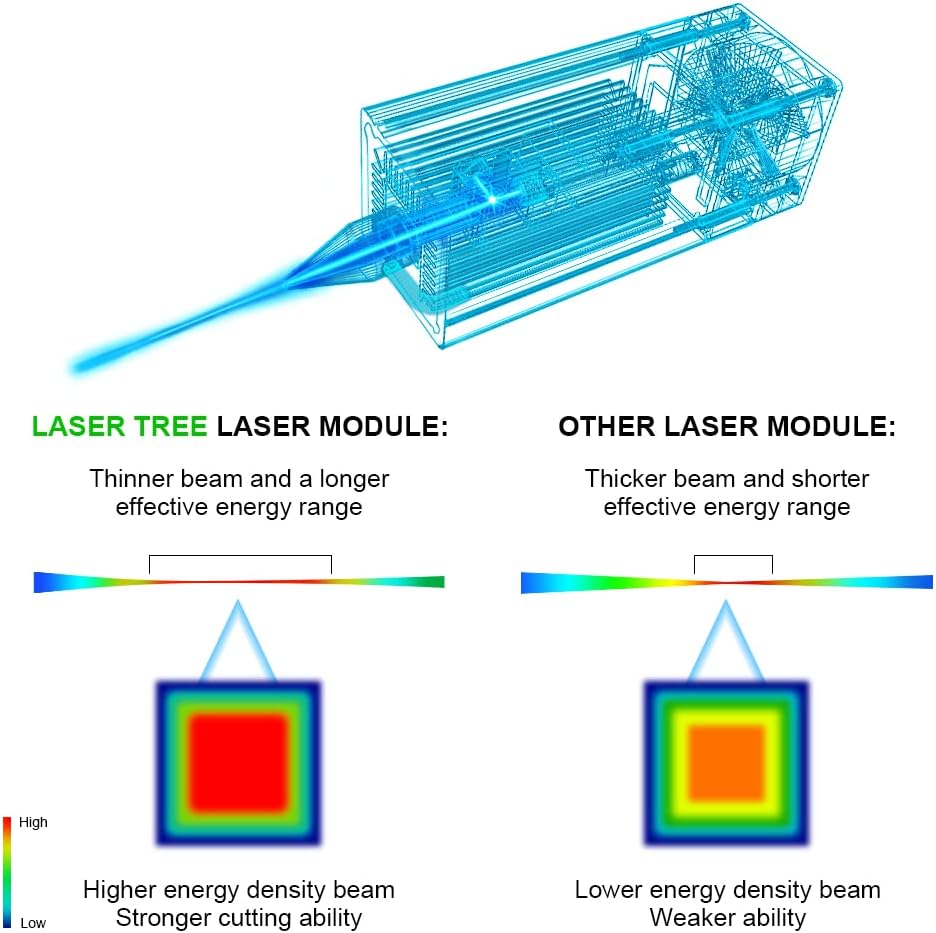
Figure 3: Detailed view of the LT-80W-AA Pro module, highlighting the air tube holder (Φ8mm) and air tube suggestion (Outer diameter: 6mm, Inner diameter: ≥4mm), along with electrical connections (PWM, GND, VCC).
2.5 Eye Protection
The module includes a magnetic removable eye protection cover. This cover protects your eyes during operation and enhances air pressure utilization. While this cover provides protection, always exercise caution and consider additional safety glasses when operating laser equipment.
3. Operating Instructions
This section provides guidance on operating your LASER TREE laser engraver module for optimal performance.
3.1 Focus Adjustment
The LT-80W-AA Pro module is designed for focus-setting free operation, simplifying setup. However, for precise work, use the included focus fixing plates to ensure the optimal distance between the laser and the material surface. Two thumbscrews on the mounting plate allow for easy fine-tuning of focus.
3.2 Material Compatibility
The module is compatible with a wide range of materials for engraving and cutting:
- Engraving: Plywood, Pine board, wood, stone, bamboo, coated glass, brushed/mirror stainless steel, black acrylic, plastic, leather, aluminum oxide, non-reflective electroplating layer, lacquered metal, and blackened utility knife.
- Cutting: 8mm thick plywood, 15mm pinewood, and 5mm thick dark acrylic in one pass. Maximum cutting thickness is 30mm.
Note: This laser module is unable to engrave blue, purple, white, or transparent materials, or aluminum without an oxide layer.

Figure 4: Demonstrates the cutting capabilities of the 10W optical power laser module, showing clean cuts through 5mm acrylic, 8mm plywood, and 15mm pinewood in a single pass.

Figure 5: Visual comparison illustrating the improved cutting quality and reduced charring when using air assist compared to operating without it.
3.3 Power Adjustment and Control
The module supports 5V PWM modulation for power adjustment. This allows for precise control over the laser intensity, which is essential for different materials and desired engraving/cutting effects. Consult your engraving software for specific PWM settings.
3.4 Example Operations (Seller Videos)
Below are official videos from LASER TREE demonstrating the module's capabilities:
Video 1: Demonstration of the LT-80W-AA Pro module cutting 20mm pine wood. This video showcases the module's cutting power and efficiency on thicker materials.
Video 2: This video demonstrates the LT-80W-AA Pro module cutting plywood, acrylic, and pine wood, highlighting its versatility across different material types.
Video 3: A demonstration of the LT-80W-AA Pro module cutting 30mm acrylic and 20mm pinewood, showcasing its deep cutting capabilities.
Video 4: This video compares the effect of using air assist versus not using air assist during laser operation, clearly showing the benefits of air assist for cleaner cuts.
4. Maintenance
Regular maintenance ensures the longevity and optimal performance of your laser module.
4.1 Lens Cleaning and Maintenance
The laser lens can accumulate dust and debris, affecting performance. Regular cleaning is recommended.
- Carefully unscrew the lens protection cap from the bottom of the laser module.
- Use a clean, soft cotton swab or lens cleaning paper with a small amount of lens cleaning solution (not included) to gently wipe the lens surface. Avoid applying excessive pressure.
- Ensure the lens is completely dry before reassembling.
4.2 Replacing the Lens Protection Window
The kit includes a spare protective window glass. If the existing window becomes scratched or damaged, it should be replaced.
- Unscrew the lens protection cap as described above.
- Carefully remove the old protective window.
- Insert the new spare protective window into the cap.
- Screw the lens protection cap back onto the laser module, ensuring it is securely fastened.
Video 5: This video provides a visual guide on how to clean the module lens and replace the lens protection window, applicable to various laser modules.
5. Troubleshooting
This section addresses common issues you might encounter with your laser module.
| Problem | Possible Cause | Solution |
|---|---|---|
| Laser not firing or weak output | Incorrect voltage (12V/24V mismatch), loose cable connection, dirty lens, insufficient power setting. |
|
| Poor engraving/cutting quality (e.g., blurry, incomplete cuts) | Incorrect focus, wrong speed/power settings for material, no air assist or insufficient air flow, dirty lens. |
|
| Module not recognized by machine | Incorrect cable sequence, incompatible control board, driver issues. |
|
If you encounter issues not covered here or require further assistance, please refer to the Support section.
6. Specifications
| Feature | Detail |
|---|---|
| Optical Laser Power Output | 10W (10000mW) |
| Machine Power | 80W |
| Spot Size | 0.08*0.08mm (Dual Compressed Spot) |
| Laser Wavelength | 450nm |
| Input Voltage | DC 24V (1.7-2A) |
| Input Socket | XH2.54-3P |
| Power Modulation | 5V PWM |
| Laser Level | Class 1 |
| Product Dimensions | 1.57 x 1.57 x 5.7 inches |
| Item Weight | 1.61 pounds |
7. Warranty and Support
LASER TREE is committed to providing high-quality products and excellent customer support.
7.1 Technical Support
For any technical questions, installation guidance, or operational issues, please visit the official LASER TREE store on Amazon or their website for professional technical support. The support team is available to assist you with your inquiries.
You can find the LASER TREE store at: LASER TREE Amazon Store
7.2 Product Documents
An official User Manual in PDF format is also available for download:


