
Tuanzi T10
Tuanzi T10 Smart Watch with Earbuds User Manual
Model: T10
Introduction
This manual provides detailed instructions for the setup, operation, and maintenance of your Tuanzi T10 Smart Watch with integrated TWS Earbuds. Please read this manual thoroughly before use to ensure proper functionality and to maximize your product experience.
The Tuanzi T10 combines a 1.28-inch round touch color screen smartwatch with built-in Bluetooth 5.0 TWS HiFi stereo headphones, offering a versatile wearable experience for daily activity tracking, communication, and music enjoyment.
What's in the Box
Upon opening the product packaging, you should find the following items:
- Tuanzi T10 Smart Watch (with pre-attached straps and integrated TWS earphones)
- USB Magnetic Charging Cable
- User Manual


Setup
Follow these steps to set up your Tuanzi T10 Smart Watch and pair it with your smartphone.
- Charge the Smart Watch: Before initial use, ensure the watch is fully charged using the provided USB magnetic charging cable. The watch comes pre-charged, but a full charge is recommended.
- Download the App: Open the included user manual and locate the QR code. Scan this QR code with your smartphone to download and install the 'VeryFit' application from your device's app store (available for Android 4.4 and above, and iOS 8.0 and above).

Locate and scan the QR code in the user manual to download the 'VeryFit' app. - Enable Bluetooth: On your smartphone, navigate to your settings and ensure Bluetooth is enabled.
- Register/Log In: Open the 'VeryFit' app and follow the on-screen prompts to register a new account or log in if you already have one.
- Pair the Device: Within the 'VeryFit' app, select the option to 'Add Device' or 'Pair Device'. The app will search for nearby devices. Select 'T10' from the list of found devices to initiate pairing. Confirm the pairing request on both your phone and the watch if prompted.
- Configure Settings: After successful pairing, the app will guide you through initial settings such as language selection, unit format (e.g., Celsius/Fahrenheit, km/miles), and notification preferences (call alerts, SMS, calendar, emails).
For a visual guide on connecting your Tuanzi T10 Smart Watch, please refer to the video below:
Operating Your Smart Watch
The Tuanzi T10 Smart Watch offers a variety of functions accessible through its touch screen and physical buttons.
Basic Navigation
- Power On/Off: Long press the side button to turn the watch on or off.
- Screen Activation: Raise your wrist or press the side button to wake the screen.
- Swipe Up/Down: Toggle through menus and view long text details.
- Swipe Left/Right: Toggle through different menu screens or features.
- Tap Screen: Enter a menu or select an option.
- Tap and Hold: Switch between various watch faces.
Key Features
- Health Monitoring: The watch tracks heart rate, blood pressure, and SpO2 (blood oxygen) levels. It also includes a sleep monitor to track your sleep quality.
- Fitness Tracking: Monitor daily activities such as steps taken, calories burned, and distance covered. The watch supports various workout modes for tracking specific exercises.
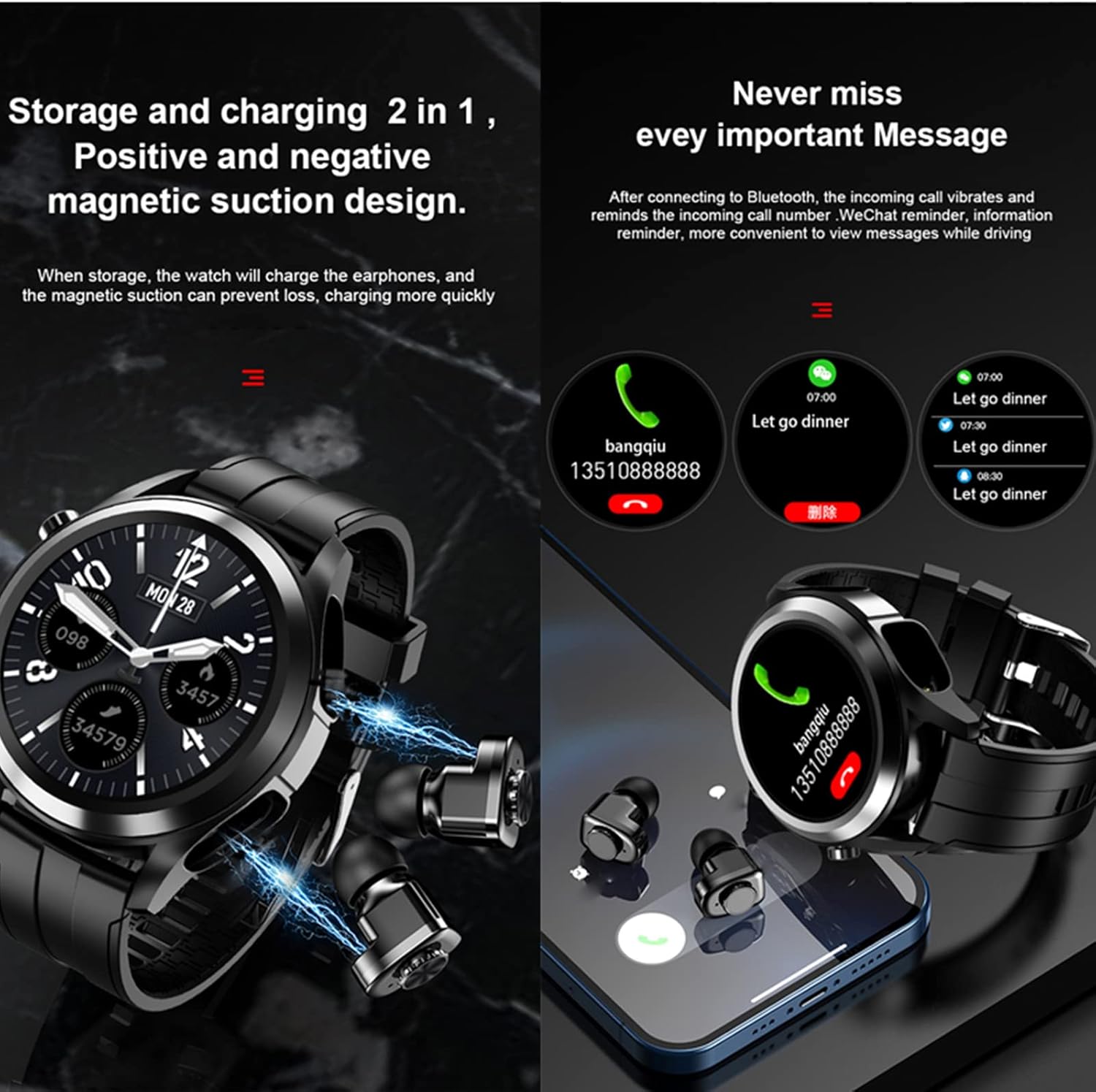
- Notifications: Receive call alerts, SMS messages, calendar reminders, and email notifications directly on your wrist when connected to your smartphone.
- Music Control: Control music playback on your smartphone (play, pause, skip tracks) directly from the watch.
- TWS Earbuds: The integrated earbuds provide HiFi stereo sound for calls and music. They are stored and charged within the watch itself.
- Other Functions: Includes features like weather updates, camera remote control, 'Find Phone' and 'Find Watch' functions, stopwatch, clock, non-disturb mode, and sedentary reminders.


Maintenance
Proper care and maintenance will extend the life of your Tuanzi T10 Smart Watch.
Charging
Use only the provided USB magnetic charging cable. Connect the magnetic end to the charging points on the back of the watch. A full charge typically takes approximately 1 hour and provides 3-10 days of use (without earphones) or about 2.5 hours of continuous earphone playback.
Cleaning
Regularly clean the watch and strap with a soft, dry cloth. Avoid using harsh chemicals or abrasive materials. Ensure the charging contacts are clean and dry before charging.
Water Resistance
The Tuanzi T10 Smart Watch has a waterproof rating. While it can withstand splashes and brief immersion, it is not recommended for swimming or showering, especially with hot water, as this may affect its water resistance over time.
Troubleshooting
If you encounter issues with your Tuanzi T10 Smart Watch, try the following steps:
- Watch not turning on: Ensure the watch is fully charged. Connect it to the charger and wait a few minutes before attempting to power it on again.
- Unable to pair with phone: Check that Bluetooth is enabled on your phone and that the 'VeryFit' app is open. Ensure the watch is close to your phone. Restart both the watch and your phone, then try pairing again.
- Notifications not received: Verify that notification permissions are granted to the 'VeryFit' app in your phone's settings. Also, check the notification settings within the 'VeryFit' app itself.
- Inaccurate health data: Ensure the watch is worn snugly on your wrist, but not too tight. Keep the sensor clean.
- Earbuds not connecting/charging: Ensure the earbuds are properly seated in their charging slots within the watch. Check for any debris obstructing the charging contacts.
If the issue persists, please refer to the comprehensive troubleshooting section in the full user manual or contact customer support.
Specifications
| Feature | Specification |
|---|---|
| Product Dimensions | 2.25 x 1.95 x 0.64 inches |
| Item Weight | 7 ounces |
| Item Model Number | T10 |
| Standing Screen Display Size | 1.28 Inches |
| Memory Storage Capacity | 128 MB |
| Operating System Compatibility | Android 4.4 and iOS 8.0 or above |
| Special Feature | TWS Bluetooth Earphone and Watch 2 in 1 |
| Battery Capacity | 350 mAh |
| Connectivity Technology | Bluetooth (APP name: Brandfit) |
| Wireless Communication Standard | Bluetooth |
| Battery Cell Composition | Polymer |
| GPS | No GPS |
| Shape | Round |
| Water Resistance Level | Waterproof |
| Manufacturer | PADY&Tuanzi |
Warranty and Support
For warranty information, product support, or to purchase protection plans, please refer to the documentation included with your product or visit the official Tuanzi website. You may also contact the seller directly for assistance.
Ask a question about this manual
Ask about setup, troubleshooting, compatibility, parts, safety, or missing instructions. Manuals+ will review the question and use this page’s manual context to help answer it.