
1. Introduction
This manual provides detailed instructions for the installation, operation, and maintenance of your XTRONS Android 13 Car Stereo. Please read this manual thoroughly before using the product to ensure proper functionality and safety.

Image 1.1: Overview of the XTRONS Android 13 Car Stereo unit, showcasing its main technical specifications and features such as Octa-core CPU, 4GB RAM, 64GB ROM, Android 13 operating system, 4G LTE connectivity, Wireless CarAutoPlay, Wireless Android Auto, Built-in DSP, RDS radio, high power amplifier, and IPS screen technology.
2. Applicable Models & Years
This XTRONS car stereo is designed for the following Porsche Cayenne models and years:
- Porsche Cayenne (2003-2010)
- Porsche Cayenne S (2003-2010)
- Porsche Cayenne GTS (2003-2010)
- Porsche Cayenne Turbo (2003-2010)
- Porsche Cayenne Turbo S (2003-2010)
- Porsche Cayenne Diesel (2003-2010)
Important Compatibility Note: If your vehicle is equipped with an original reversing camera, an additional adapter cable may be required for its functionality after upgrading the car stereo. XTRONS model ICE/ACS/FZMRM01 is compatible for this purpose.

Image 2.1: Visual comparison of the Porsche Cayenne dashboard before and after the installation of the XTRONS car stereo, demonstrating the integrated appearance. An adapter cable for original reversing cameras is also depicted.
3. Key Features
- Operating System: Latest Android 13.
- Processor: Octa Core CPU.
- Memory & Storage: 4GB RAM + 64GB ROM for fast and smooth operation.
- Display: 9-inch IPS Touch Screen with 1280*720 high definition and 178° viewing angle. Supports 2K video playback.
- Connectivity:
- Integrated 4G solution (Micro-SIM card required, not included). Supports global bands: 1, 2, 3, 4, 5, 7, 8, 12, 17, 20, 28, 38, 40, 41, 42. (Bands 13, 25, 26 not supported).
- Dual Band Wi-Fi (2.4 GHz and 5 GHz).
- USB Tethering for mobile network sharing.
- Bluetooth 5.0 for hands-free calls, audio streaming, and phone book synchronization.
- Smartphone Integration: Built-in Wireless CarAutoPlay and Wired/Wireless Android Auto. Supports Screen Mirroring.
- Audio: Built-in DSP (Digital Sound Processor) for professional sound quality, including Smart Bass, Sub Output, and 30-band EQ.
- Navigation: Supports Google Maps, Sygic, Waze, and other Android-compatible navigation software.
- User Interface: Changeable UI themes with optimized menus and intuitive icons.
- Multitasking: Supports split-screen functionality.
- CANbus Decoding: Optimized CANbus decoding for seamless integration with Porsche systems.

Image 3.1: Details on the unit's global 4G LTE and dual-band Wi-Fi capabilities, including SIM card slot information and USB tethering functionality.

Image 3.2: Explanation of smartphone integration options including CarAutoPlay, Android Auto, and Screen Mirroring.

Image 3.3: Visual representation of customizable user interface themes, DSP audio controls, 2K video playback with picture-in-picture, and the split-screen feature.
4. Setup and Installation
4.1. Wiring Diagram
Refer to the following diagram for proper wiring connections. Ensure all connections are secure before powering on the unit.

Image 4.1: Comprehensive wiring diagram indicating connection points for all included cables and accessories.
4.2. Included Accessories
The following accessories are included with your XTRONS car stereo:
- 2 × ISO Wiring Harness
- 1 × RCA Cable
- 1 × 4G Antenna
- 1 × CANbus Box
- 1 × Camera Cable
- 2 × USB Cable
- 1 × GPS Antenna
- 1 × CANbus Cable
- 1 × Optical Fiber Decoder
- 1 × Radio Antenna Cable
- 1 × User Manual (this document)
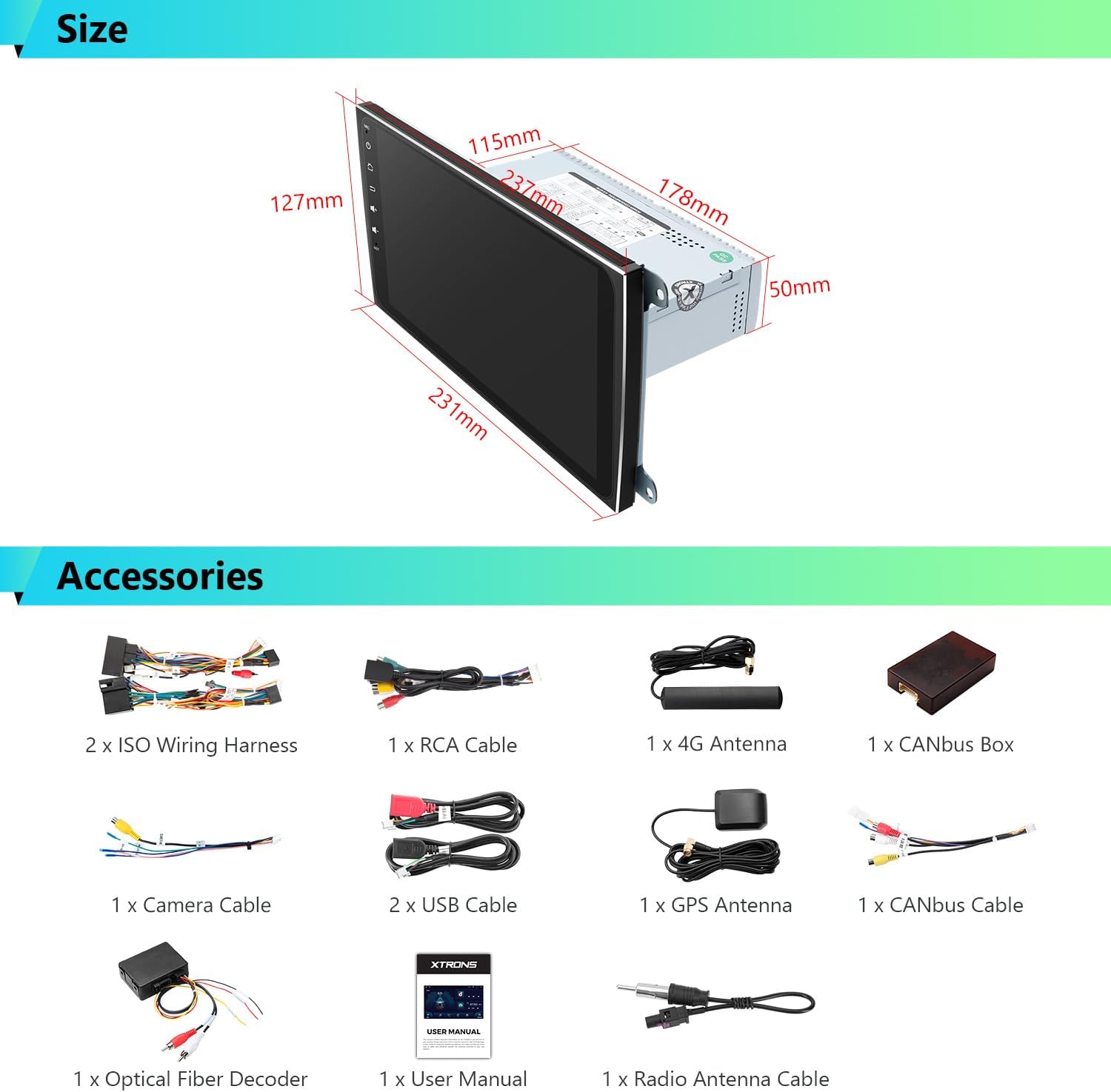
Image 4.2: Physical dimensions of the head unit and a visual display of all accessories provided in the package.
5. Operating Instructions
5.1. Initial Power On and Boot Time
The unit features a fast boot time of less than 1 second for subsequent starts. The first boot time may take up to 50 seconds as the system initializes.
5.2. Smartphone Integration (CarAutoPlay, Android Auto, Screen Mirroring)
- Wireless CarAutoPlay: Connect your iPhone wirelessly via Bluetooth to access compatible apps.
- Wired/Wireless Android Auto: Connect your Android phone via USB or wirelessly via Bluetooth to use Android Auto features.
- Screen Mirroring: Mirror your smartphone's screen to the head unit display via Wi-Fi.
Activate Siri or Google Assistant by saying "Hey Siri" or "OK Google" for voice control.
5.3. 4G and Wi-Fi Connectivity
- 4G Connection: Insert a Micro-SIM network card into the designated slot to enable 4G mobile broadband. Ensure your SIM card supports the listed bands.
- USB Tethering: Connect your smartphone to the unit via a USB cable. Configure your smartphone's settings to share its mobile internet connection. Note that some mobile carriers may limit or charge for tethering.
- Wi-Fi: Connect to available Wi-Fi networks through the unit's settings for internet access.
5.4. GPS Navigation
The unit supports various Android-compatible navigation software such as Google Maps, Sygic, and Waze. Install your preferred navigation application from the Google Play Store and follow its instructions for use.

Image 5.1: Demonstrates the DSP sound controls, Bluetooth 5.0 interface, CANbus integration, and GPS navigation display.
5.5. Digital Sound Processor (DSP)
Access the built-in DSP settings to customize your audio experience. Adjust parameters such as Smart Bass, Sub Output, and the 30-band equalizer to achieve desired sound quality.
5.6. Video Playback and Multitasking
- 2K Video Playback: The unit supports playing 2K format videos.
- Picture-in-Picture: Utilize the picture-in-picture function for simultaneous viewing of navigation and video content.
- Split Screen: The split-screen feature allows two applications to run side-by-side on the display.
6. Maintenance
To ensure the longevity and optimal performance of your XTRONS car stereo, follow these general maintenance guidelines:
- Screen Cleaning: Use a soft, lint-free cloth to gently wipe the touchscreen. Avoid abrasive cleaners or solvents.
- Software Updates: Periodically check for and install system software updates to ensure the latest features and security patches.
- Environmental Conditions: Avoid exposing the unit to extreme temperatures, direct sunlight for prolonged periods, or excessive moisture.
- Cable Connections: Ensure all cables remain securely connected. Loose connections can lead to intermittent issues.
7. Troubleshooting
If you encounter issues with your XTRONS car stereo, consider the following basic troubleshooting steps:
- Unit Not Powering On: Check all power connections and ensure the vehicle's ignition is on. Verify the fuse for the stereo is intact.
- No Sound: Check speaker connections, volume levels, and DSP settings. Ensure the optical fiber decoder is correctly installed and functioning.
- GPS Signal Issues: Ensure the GPS antenna is properly installed and has a clear view of the sky.
- Touchscreen Unresponsive: Perform a system reset (refer to the device's specific reset button, often labeled "RST").
- Connectivity Problems (Bluetooth/Wi-Fi/4G): Verify settings are correctly configured. For 4G, ensure the SIM card is properly inserted and active. For USB tethering, check phone settings.
- CarPlay/Android Auto Not Connecting: Ensure your phone is compatible and the connection method (wired/wireless) is correctly selected and configured on both the phone and the head unit.
For persistent issues, please contact XTRONS technical support.
8. Specifications
| Feature | Specification |
|---|---|
| Item Weight | 5.18 pounds |
| Package Dimensions | 12.8 x 8.27 x 7.87 inches |
| Item Model Number | 92264df3-b1ea-447c-a479-95c070b26d22 |
| Display Size | 9 Inches |
| Operating System | Android 13 |
| Processor | Octa Core |
| RAM | 4GB |
| ROM | 64GB |
| Connectivity Technology | USB, Wi-Fi, 4G LTE |
| Controller Type | Android |
| Special Features | Built-In Bluetooth, Touchscreen, DSP, CarPlay, Android Auto |
| Compatible Devices | Smartphone |
| Connector Type | Optical Fiber, RCA, USB |
| Audio Output Mode | Stereo |
| Surround Sound Channel Configuration | 2.1 |
| Video Encoding | H.264, H.265/HEVC |
| Color | Black or Neutral |
9. Warranty and Support
Warranty: XTRONS provides a 1-year manufacturer's warranty for this unit. This warranty covers defects in materials and workmanship under normal use.
Technical Support: For any technical assistance or warranty claims, please contact XTRONS customer support. You can typically reach them via the Amazon messaging system or through the contact information provided on the official XTRONS website. When contacting support, please provide your product model number (92264df3-b1ea-447c-a479-95c070b26d22) and a detailed description of the issue.


